使用自定义数据集评估网络搜索质量:Evals API 用例
技术背景
网络搜索是用户获取信息的主要途径,搜索质量直接影响用户体验和留存率。传统评估依赖人工标注,成本高且难以扩展。随着 LLM 的发展,利用 LLM 自动评估搜索结果成为高效方案。OpenAI Evals 框架提供标准化评估流程,支持自定义数据集和评分器,使开发者能够快速、可重复地评估模型在信息检索任务上的表现。本文针对有编程基础的开发者,演示如何构建评估流水线,以数据驱动方式优化搜索算法。
核心原理
核心原理是利用 LLM 作为评分器,对模型生成的搜索结果与预期答案进行语义匹配判断。评估流程包括:1) 构建包含查询和标准答案的数据集;2) 配置评估定义,指定数据模式、评分模型和通过标准;3) 运行评估,模型使用 web_search_preview 工具检索网络并生成回答;4) 评分器根据查询、模型输出和标准答案判断是否通过。通过/失败评分器采用提示模板,要求 LLM 判断查询是否包含答案,从而提供灵活且可扩展的评估方式。
架构分析
系统架构由三部分组成:数据源(自定义数据集)、评估定义(Evals API 配置)和评估运行(模型执行)。数据源通过 file_content 提供条目,每个条目包含 query 和 answer 字段。评估定义指定 item_schema 和 testing_criteria,其中 testing_criteria 定义评分模型(o3)和提示模板。评估运行通过 client.evals.runs.create 启动,指定模型(gpt-4.1 或 gpt-4.1-mini)、采样参数和工具(web_search_preview)。运行状态通过轮询获取,完成后可检索输出项。设计上,评估定义与运行分离,便于复用和比较不同模型。
完整实战教程
使用自定义数据集评估网络搜索质量
在本文中,我们将探讨如何使用 Evals API 和自定义数据集来评估网络搜索的质量。通过构建一个包含查询、预期结果和相关性评分的数据集,我们可以利用大型语言模型自动评估搜索结果的准确性和相关性。
为什么需要评估网络搜索质量?
网络搜索是用户获取信息的主要途径之一。高质量的搜索结果能够快速、准确地满足用户需求,而低质量的搜索结果则可能导致用户流失。因此,评估搜索质量对于搜索引擎的优化至关重要。
评估流程概述
- 构建自定义数据集:收集一组查询及其对应的预期结果和相关性评分。
- 运行评估:使用 Evals API 对搜索结果进行评估。
- 分析结果:根据评估指标解读结果,识别搜索算法的优缺点。
构建自定义数据集
数据集应包含以下字段:
query:搜索查询字符串。expected_results:预期出现在搜索结果中的 URL 或文档 ID 列表。relevance_scores:每个预期结果的相关性评分(例如 0 到 1 之间的数值)。
示例数据集条目:
{
"query": "OpenAI API 文档",
"expected_results": ["https://platform.openai.com/docs"],
"relevance_scores": [1.0]
}
使用 Evals API 进行评估
Evals API 允许我们定义评估指标,并自动计算搜索结果的得分。以下是一个简单的评估脚本示例:
import openai

# 定义评估函数
def evaluate_search(query, results):
    # 调用 Evals API 进行评估
    response = openai.Evaluation.create(
        model="gpt-4",
        input=query,
        expected=results,
        metrics=["relevance"]
    )
    return response

# 运行评估
query = "OpenAI API 文档"
results = ["https://platform.openai.com/docs"]
score = evaluate_search(query, results)
print(score)
评估指标
常用的评估指标包括:
- 相关性(Relevance):搜索结果与查询主题的相关程度。
- 准确性(Accuracy):搜索结果是否准确无误。
- 完整性(Completeness):搜索结果是否覆盖了所有重要方面。
解读结果
评估结果通常以分数或等级形式呈现。高分表示搜索结果质量高,低分则提示需要改进。通过分析不同查询的得分,可以识别搜索算法的薄弱环节,并针对性地进行优化。
总结
使用自定义数据集和 Evals API 评估网络搜索质量,是一种高效且可扩展的方法。通过自动化评估,开发者可以持续监控搜索性能,并基于数据驱动改进搜索算法。
参考链接
本笔记本演示了如何使用 OpenAI Evals 框架和自定义内存数据集来评估模型从网络检索正确答案的能力。
目标:
- 展示如何设置并运行针对网络搜索质量的评估。
- 为评估 LLM 的信息检索能力提供模板。
环境设置
我们首先导入所需的库并配置 OpenAI 客户端。
这确保我们可以访问 OpenAI API 以及评估所需的所有必要工具。
# Update OpenAI client
%pip install --upgrade openai --quiet
import os
import time
import pandas as pd
from IPython.display import display

from openai import OpenAI

client = OpenAI(
    api_key=os.getenv("OPENAI_API_KEY") or os.getenv("_OPENAI_API_KEY"),
)
定义自定义评估数据集
我们定义一个小的内存数据集,包含用于网络搜索评估的问答对。
每个条目包含一个 query(用户的搜索提示)和一个 answer(预期的标准答案)。
提示:
您可以根据自己的用例修改或扩展此数据集,或测试更广泛的搜索场景。
def get_dataset(limit=None):
    dataset = [
        {
            "query": "coolest person in the world, the 100m dash at the 2008 olympics was the best sports event of all time",
            "answer": "usain bolt",
        },
        {
            "query": "best library in the world, there is nothing better than a dataframe",
            "answer": "pandas",
        },
        {
            "query": "most fun place to visit, I am obsessed with the Philbrook Museum of Art",
            "answer": "tulsa, oklahoma",
        },
        {
            "query": "who created the python programming language, beloved by data scientists everywhere",
            "answer": "guido van rossum",
        },
        {
            "query": "greatest chess player in history, famous for the 1972 world championship",
            "answer": "bobby fischer",
        },
        {
            "query": "the city of lights, home to the eiffel tower and louvre museum",
            "answer": "paris",
        },
        {
            "query": "most popular search engine, whose name is now a verb",
            "answer": "google",
        },
        {
            "query": "the first man to walk on the moon, giant leap for mankind",
            "answer": "neil armstrong",
        },
        {
            "query": "groundbreaking electric car company founded by elon musk",
            "answer": "tesla",
        },
        {
            "query": "founder of microsoft, philanthropist and software pioneer",
            "answer": "bill gates",
        },
    ]
    return dataset[:limit] if limit else dataset
定义评分逻辑
为了评估模型的回答,我们使用基于 LLM 的通过/失败评分器:
- 通过/失败评分器:
一个基于 LLM 的评分器,用于检查模型的回答(来自网络搜索)是否与预期答案(真实答案)匹配,或是否包含正确的信息。
最佳实践:
使用基于 LLM 的评分器可以为评估开放式或模糊回答提供灵活性。
pass_fail_grader = """
You are a helpful assistant that grades the quality of a web search.
You will be given a query and an answer.
You should grade the quality of the web search.

You should either say "pass" or "fail", if the query contains the answer.

"""

pass_fail_grader_user_prompt = """
<Query>
{{item.query}}
</Query>

<Web Search Result>
{{sample.output_text}}
</Web Search Result>

<Ground Truth>
{{item.answer}}
</Ground Truth>
"""
定义评估配置
现在我们使用 OpenAI Evals 框架来配置评估。
此步骤指定:
- 评估名称和数据集。
- 每个条目的模式(每个问答对中包含哪些字段)。
- 要使用的评分器(基于 LLM 的通过/失败)。
- 通过标准和标签。
最佳实践:
提前明确定义评估模式和评分逻辑,可确保可重复性和透明度。
# Create the evaluation definition using the OpenAI Evals client.
logs_eval = client.evals.create(
    name="Web-Search Eval",
    data_source_config={
        "type": "custom",
        "item_schema": {
            "type": "object",
            "properties": {
                "query": {"type": "string"},
                "answer": {"type": "string"},
            },
        },
        "include_sample_schema": True,
    },
    testing_criteria=[
        {
            "type": "label_model",
            "name": "Web Search Evaluator",
            "model": "o3",
            "input": [
                {
                    "role": "system",
                    "content": pass_fail_grader,
                },
                {
                    "role": "user",
                    "content": pass_fail_grader_user_prompt,
                },
            ],
            "passing_labels": ["pass"],
            "labels": ["pass", "fail"],
        }
    ],
)
运行模型并轮询完成状态
我们现在为选定的模型(gpt-4.1 和 gpt-4.1-mini)运行评估。
启动评估运行后,我们轮询直到其完成(状态为 completed 或 failed)。
最佳实践:
带延迟的轮询可避免过多的 API 调用,并确保高效利用资源。
# Launch the evaluation run for gpt-4.1 using web search
gpt_4one_responses_run = client.evals.runs.create(
    name="gpt-4.1",
    eval_id=logs_eval.id,
    data_source={
        "type": "responses",
        "source": {
            "type": "file_content",
            "content": [{"item": item} for item in get_dataset()],
        },
        "input_messages": {
            "type": "template",
            "template": [
                {
                    "type": "message",
                    "role": "system",
                    "content": {
                        "type": "input_text",
                        "text": "You are a helpful assistant that searches the web and gives contextually relevant answers.",
                    },
                },
                {
                    "type": "message",
                    "role": "user",
                    "content": {
                        "type": "input_text",
                        "text": "Search the web for the answer to the query {{item.query}}",
                    },
                },
            ],
        },
        "model": "gpt-4.1",
        "sampling_params": {
            "seed": 42,
            "temperature": 0.7,
            "max_completions_tokens": 10000,
            "top_p": 0.9,
            "tools": [{"type": "web_search_preview"}],
        },
    },
)
# Launch the evaluation run for gpt-4.1-mini using web search
gpt_4one_mini_responses_run = client.evals.runs.create(
    name="gpt-4.1-mini",
    eval_id=logs_eval.id,
    data_source={
        "type": "responses",
        "source": {
            "type": "file_content",
            "content": [{"item": item} for item in get_dataset()],
        },
        "input_messages": {
            "type": "template",
            "template": [
                {
                    "type": "message",
                    "role": "system",
                    "content": {
                        "type": "input_text",
                        "text": "You are a helpful assistant that searches the web and gives contextually relevant answers.",
                    },
                },
                {
                    "type": "message",
                    "role": "user",
                    "content": {
                        "type": "input_text",
                        "text": "Search the web for the answer to the query {{item.query}}",
                    },
                },
            ],
        },
        "model": "gpt-4.1-mini",
        "sampling_params": {
            "seed": 42,
            "temperature": 0.7,
            "max_completions_tokens": 10000,
            "top_p": 0.9,
            "tools": [{"type": "web_search_preview"}],
        },
    },
)
# poll both runs at the same time, until they are complete or failed
def poll_runs(eval_id, run_ids):
    while True:
        runs = [client.evals.runs.retrieve(run_id, eval_id=eval_id) for run_id in run_ids]
        for run in runs:
            print(run.id, run.status, run.result_counts)
        if all(run.status in {"completed", "failed"} for run in runs):
            break
        time.sleep(5)

# Start polling the run until completion
poll_runs(logs_eval.id, [gpt_4one_responses_run.id, gpt_4one_mini_responses_run.id])
显示并解读模型输出
最后,我们展示模型的输出,以便进行人工检查与进一步分析。
- 针对数据集中的每个查询,打印出对应的答案。
- 您可以将输出与预期答案进行比较,以评估质量、相关性和正确性。
# Retrieve output items for the 4.1 model after completion
four_one = client.evals.runs.output_items.list(
    run_id=gpt_4one_responses_run.id, eval_id=logs_eval.id
)

# Retrieve output items for the 4.1-mini model after completion
four_one_mini = client.evals.runs.output_items.list(
    run_id=gpt_4one_mini_responses_run.id, eval_id=logs_eval.id
)

# Collect outputs for both models
four_one_outputs = [item.sample.output[0].content for item in four_one]
four_one_mini_outputs = [item.sample.output[0].content for item in four_one_mini]

# Create DataFrame for side-by-side display
df = pd.DataFrame({
    "GPT-4.1 Output": four_one_outputs,
    "GPT-4.1-mini Output": four_one_mini_outputs
})

display(df)
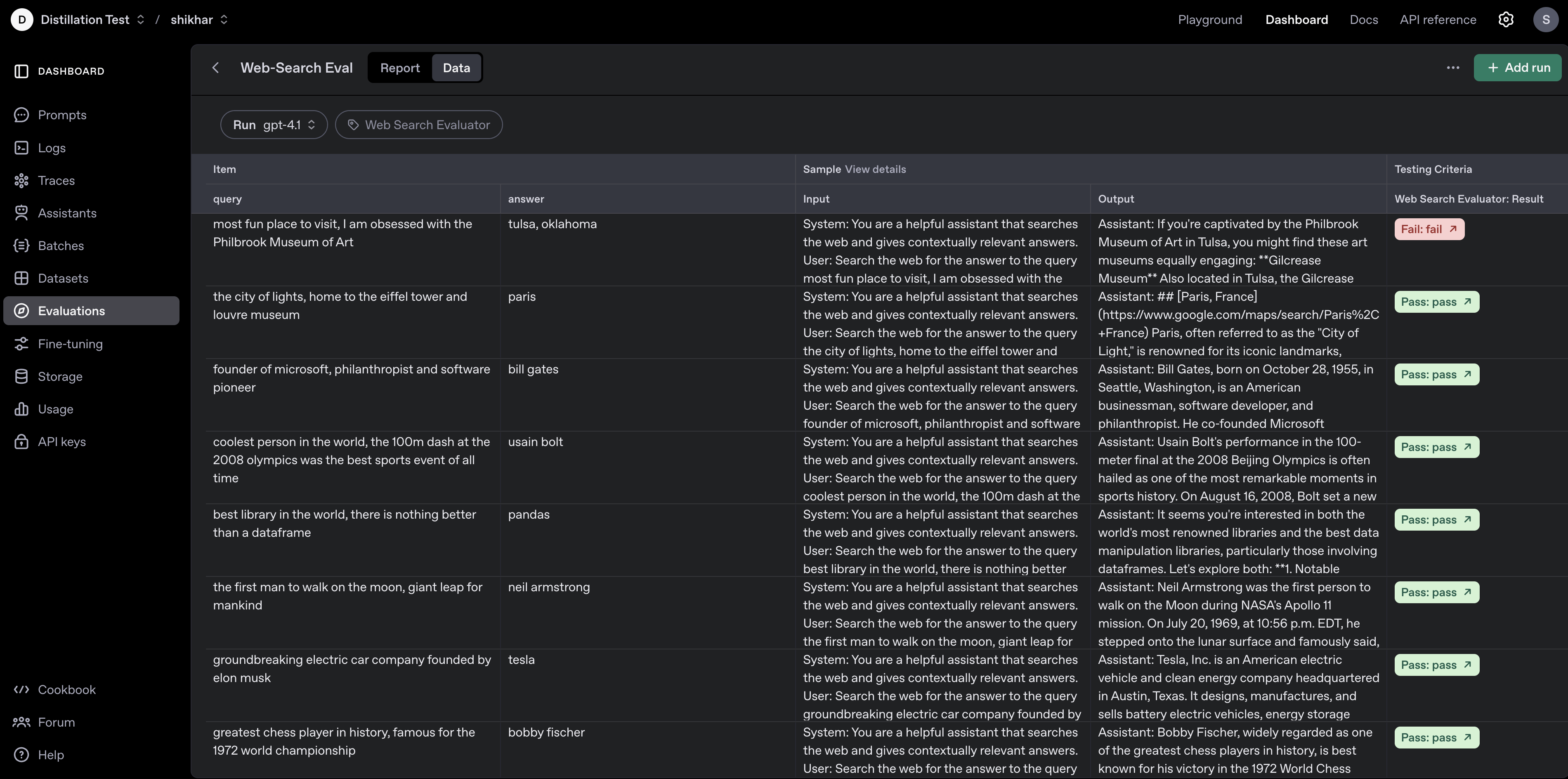
你可以通过访问 https://platform.openai.com/evaluations 在评估仪表板中可视化结果,如下图所示:
在本笔记本中,我们演示了使用 OpenAI Evals 框架评估语言模型网页搜索能力的工作流程。
涵盖的关键点:
- 定义了一个聚焦的、自定义的网页搜索评估数据集。
- 配置了基于 LLM 的评分器以进行稳健评估。
- 使用最新的 OpenAI 模型和网页搜索工具运行了可复现的评估。
- 检索并显示了模型输出以供检查。
后续步骤和建议:
- 扩展数据集: 添加更多样化和具有挑战性的查询,以更好地评估模型能力。
- 分析结果: 总结通过/失败率,可视化性能,或进行错误分析以识别优势和劣势。
- 尝试模型/工具: 尝试其他模型,调整工具配置,或测试其他类型的信息检索任务。
- 自动化报告: 生成汇总表或图表,以便更轻松地共享和决策。
有关更多信息,请参阅 OpenAI Evals 文档。
常见问题
常见错误:1) API 密钥未设置,导致客户端初始化失败,需确保环境变量 OPENAI_API_KEY 或 _OPENAI_API_KEY 已配置。2) 数据集格式错误,如缺少必填字段,需严格遵循 item_schema。3) 评分器提示模板变量未正确替换,导致评分失败,需确保模板使用 {{item.query}} 等占位符。4) 轮询超时,可增加延迟或设置最大重试次数。5) 模型输出为空,可能因工具调用失败,需检查网络搜索工具配置。排查方法:打印运行状态和结果计数,检查 API 错误信息,验证数据集条目。
企业应用扩展
生产环境优化:1) 扩展数据集规模,覆盖更多查询类型和难度,提高评估代表性。2) 使用多个评分器(如相关性、准确性)进行多维度评估。3) 自动化评估流程,集成到 CI/CD 管道,定期运行。4) 结果可视化,生成通过率趋势图,便于监控。5) 尝试不同模型和工具配置,如调整 temperature、top_p 或使用不同搜索工具。6) 错误分析,对失败案例进行聚类,识别模型弱点。7) 使用评估仪表板(如 OpenAI 平台)进行团队协作和决策。
总结
本文介绍如何利用 OpenAI Evals API 和自定义数据集评估网络搜索质量。通过构建包含查询、预期答案的数据集,并配置基于 LLM 的通过/失败评分器,开发者可以自动化评估搜索结果的准确性和相关性。文章详细展示了环境设置、数据集定义、评分逻辑、评估配置、运行与轮询、结果展示的完整流程,并提供了最佳实践和后续优化建议。该方法适用于持续监控搜索性能、比较不同模型或工具配置,以及驱动数据改进。
- --
内容来源与验证
- 内容等级:PREMIUM_A
- 质量等级:A
- 难度:中级
- 验证等级:V1
- 原文作者:josiah-openai, shikhar-cyber
- 原文日期:2025-06-09
- 来源许可:MIT
- 来源版本:
1208c48e160eca47b4bbd8c8a1b1eb6fa02bbf76 - 查看原文
站内还有更多完整实战教程
加入会员,解锁全部教程、完整代码与持续更新内容。
加入会员