Claude API 延迟优化指南:降低响应时间的最佳实践
技术背景
LLM 应用落地时,质量、成本与延迟构成三角权衡。多数工程资料聚焦输出质量与成本,而实时产品(如语音客服、支付授权前的欺诈检查、财报电话会摘要)对响应时间有硬性约束。延迟由三部分构成:首 token 时间(TTFT)、末 token 时间(TTLT)与每秒输出 token 数(OTPS)。不同产品形态关注不同指标——语音线路关注 p90 TTFT,聊天代理关注 p50 TTLT。若缺乏统一度量与质量底线,盲目加速会以准确率下降为代价。因此需要一套可复现的评估框架,在保持准确率门槛的前提下系统性地压缩延迟。
核心原理
核心原理是把任务总耗时拆解为可独立优化的项:TTLT ≈ 调用次数 × TTFT + 输出 token 数 ÷ OTPS + 额外延迟。调用次数决定要支付多少次首 token 等待,可通过预取、更大分页、程序化工具调用、子代理并行来减少;TTFT 取决于模型下限与未缓存前缀的读取时间,可通过精简提示、提示缓存、预热、消息线程降低;输出 token 数(含思考 token)可通过要求简短输出形态、结构化输出、降低 effort、关闭思考来压缩;OTPS 由模型与快速模式决定;额外延迟包括工具等待、网络与压缩,可通过后台压缩与并行工具调用消除。所有杠杆都需在准确率门槛下验证,并用 bootstrap 检验判断显著性。
架构分析
系统采用“评估驱动调优”的架构:底层是 154 个任务的评测集与模拟工具,中层是统一的 Config 数据类封装模型、effort、thinking、speed、loop、commentary 六个维度,上层是 Sweep 扫描器对 33 种配置运行三轮并记录每次调用的秒数与 token 计数。度量层用 timed_stream() 在流式响应中打点记录首个思考文本、首个答案文本与结束时刻,并用 token_counts() 归一化 usage 字段。分析层通过 latency_stats 提供中位数、百分位、bootstrap 显著性与前沿图。最终按产品定义 Bounds(质量门槛 + 关注指标),在满足门槛的配置中选出该指标最快者。设计决策上,先固定“明确收益”类杠杆(缓存、流式、超时、结构化答案)作为新基线,再对“需要测试”类杠杆做多变量交叉,避免组合爆炸。
完整实战教程
Latency Optimization on the Claude API
优化 LLM 工作负载是在质量、成本和延迟之间寻求平衡。我们的大多数 cookbook 都涉及输出质量,而成本优化 cookbook 则涉及开销。本篇则关注如何让你的 Claude 驱动体验尽可能快。
你可能需要更低的延迟来提供实时产品体验,比如呼叫中心语音代理。你可能有时效性依赖,比如必须在支付授权超时前完成的欺诈检查。或者结果可能随时间推移而贬值,比如在市场反应之前为交易员总结财报电话会议。
无论用例是什么,我们都以三种方式衡量延迟。首 token 时间(TTFT)是看到模型*任何*响应所需的时间。末 token 时间(TTLT)是获得完整最终响应所需的时间。每秒输出 token 数(OTPS)是两者之间生成响应的速率。本 cookbook 涵盖如何通过以下杠杆改善这三项指标:
- 输入 token 管理:每次调用发送更少的 token,然后通过提示缓存停止重复处理相同前缀,预热缓存,并避免通过消息线程重新发送对话
- 代理循环效率:在后台进行压缩,使任何轮次都不必等待它,将独立工作交给子代理,并减少往返次数
- 输出 token 管理:提示更短的答案或使用结构化输出
- 模型、努力程度和思考:通过快速模式加速输出,按请求或按轮次调整努力程度,或选择不同的模型以及是否进行思考
- 限制最长任务:通过你的代码或 API 强制执行的限制来约束最慢的任务
- 用户体验设计:流式输出并显示加载状态,以在模型工作时最小化感知等待时间
构建一个快速的代理相对容易,但构建一个保持你期望行为的快速代理则更难。因此,我们首先将介绍如何构建一个评估延迟并建立质量基准的评估,以便在此基础上进行爬山优化。
<a id="prerequisites"></a>
前置条件
注意:从头到尾运行本 cookbook 大约会消耗 <span>$</span>20 的 API 额度。我们建议仅在你想要试验输入参数时实时运行单元格。延迟会随服务状况变化,因此结果可能无法在每次运行之间复现。除 API 层面的调节手段外,影响延迟的其他变量已在§局限性中列出。
要运行本 notebook,你需要:
- Anthropic API 密钥,用于调用 Claude API(获取你的 API 密钥)
- Python 3.11 或更高版本,并安装
anthropic(2.2.0 或更高版本)、matplotlib、numpy和python-dotenv包 - 本 cookbook 的文件夹,来自 cookbooks 仓库:
desk_agent/(任务、模拟工具和评分器)、results/(记录的运行结果)、latency_stats.py(统计、表格和图表)以及assets/(模拟数据)
<a id="setup"></a>
环境配置
请从本 cookbook 的 latency_optimization/ 文件夹启动 notebook,因为它会通过相对路径读取 assets/、results/ 和 desk_agent/。在该目录下创建一个 .env 文件,内容为 ANTHROPIC_API_KEY=your-anthropic-api-key,然后安装并导入依赖项。
%%capture
%pip install --upgrade "anthropic>=2.2.0" matplotlib numpy python-dotenv
import base64
import csv
import io
import json
import random
import statistics
import threading
import time
from concurrent.futures import ThreadPoolExecutor
from dataclasses import dataclass, replace
from pathlib import Path

import anthropic
import desk_agent  # the tasks, simulated tools, and graders, in the folder beside this notebook
import httpx2  # the SDK's HTTP library
import matplotlib.pyplot as plt
from dotenv import load_dotenv
from IPython.display import display
from latency_stats import (
    Sweep,
    curve_chart,
    frontier_chart,
    in_words,
    rank_row,
    show,
    show_task,
    speed_chart,
    table,
)

load_dotenv()
# Retries are off so that timed_stream() can retry outside the timing.
client = anthropic.Anthropic(max_retries=0)
现在定义基础模型和定价模式。下面的定价表定义了撰写本文时(2026 年 10 月 16 日)的缓存费率和快速模式标价。BASE 是我们的基线:Opus 5.5 在默认 medium 努力程度下的配置。我们从 Opus 5.5 开始,因为它能正确完成大多数任务,而加速一个根本无法完成工作的配置毫无意义。接下来我们要研究的其他调节手段,则聚焦于降低它的延迟。
OPUS, SONNET, HAIKU = "claude-opus-5-5", "claude-sonnet-5-5", "claude-haiku-5-5"
MODELS = (OPUS, SONNET, HAIKU)
NAME = {OPUS: "Opus 5.5", SONNET: "Sonnet 5.5", HAIKU: "Haiku 5.5"}

# $ per million tokens on October 16, 2026, from https://platform.claude.com/docs/en/about-claude/pricing
PRICE = {
    OPUS: {"input_tokens": 4.00, "cache_write": 5.00, "cache_read": 0.20, "output_tokens": 20.00},
    SONNET: {"input_tokens": 2.00, "cache_write": 2.50, "cache_read": 0.10, "output_tokens": 10.00},
    HAIKU: {"input_tokens": 0.10, "cache_write": 0.125, "cache_read": 0.01, "output_tokens": 0.50},
}
FAST_PRICE = 2.0  # fast mode multiplies every rate by this
EFFORTS = ("low", "medium", "high")
JOBS = {"letter": "letter", "quote": "quote", "prescreen": "pre-screen"}
PLAIN = {"loop": "plain", "commentary": "free"}
LOOPS = {
    "baseline loop": PLAIN,
    "prefetch": PLAIN | {"loop": "prefetch"},
    "bigger pages": PLAIN | {"loop": "big_pages"},
    "no commentary": PLAIN | {"commentary": "none"},
    "prefetch + bigger pages": PLAIN | {"loop": "prefetch+big_pages"},
}


@dataclass(frozen=True)
class Config:
    """One setting: what the request asks for, and what the agent loop does around it"""

    model: str = OPUS
    effort: str = "medium"
    thinking: str = "adaptive"  # or "disabled" (Haiku 5.5) or "between_tools" (Sonnet 5.5)
    speed: str = "standard"  # or "fast", on Opus 5.5 only
    loop: str = "plain"  # or "prefetch", "big_pages", "prefetch+big_pages"
    commentary: str = "free"  # or "none": the system prompt asks for no text around tool calls

    def kwargs(self):
        """The request parameters this setting fixes"""
        thinking = {"type": self.thinking}
        if self.thinking == "adaptive":
            thinking["display"] = "omitted"
        kw = {"model": self.model, "thinking": thinking, "output_config": {"effort": self.effort}}
        if self.speed == "fast":
            kw |= {"speed": "fast", "betas": ["fast-mode-2026-02-01"]}
        return kw

    def dollars(self, tokens):
        """tokens: the four counts in PRICE, for one call or summed over a task"""
        usd = sum(tokens[kind] * rate for kind, rate in PRICE[self.model].items()) / 1e6
        return usd * (FAST_PRICE if self.speed == "fast" else 1)

    def with_loop(self, name):
        """A copy of this setting with the loop and commentary of LOOPS[name]"""
        return replace(self, **LOOPS[name])

    @property
    def loop_name(self):
        return next(name for name in LOOPS if self == self.with_loop(name))

    @property
    def name(self):
        name = f"{NAME[self.model]} · {self.effort}"
        name += " · thinking off" if self.thinking == "disabled" else ""
        name += " · between tools" if self.thinking == "between_tools" else ""
        name += " · fast mode" if self.speed == "fast" else ""
        return name + (f" + {self.loop_name}" if self.loop_name != "baseline loop" else "")

    @property
    def order(self):
        """The key that tables sort settings by: the largest model and the highest effort first"""
        model, effort = MODELS.index(self.model), -EFFORTS.index(self.effort)
        loop = list(LOOPS).index(self.loop_name)
        return (model, self.thinking != "adaptive", self.speed == "fast", effort, loop)


BASE = Config()  # the baseline: Opus 5.5 at medium, its default effort, on the baseline loop
<a id="measuring-latency"></a>
测量延迟
我们使用以下公式来计算一个任务需要多长时间,以及这些时间花在了哪里:
TTLT ≈ 调用次数 × TTFT + 输出 token 数 ÷ OTPS + 额外的客户端或服务端延迟
换句话说,就是每次模型调用开始响应前的等待时间(乘以调用次数),加上写出每个输出 token 所需的时间,再加上模型之外花费的任何时间,例如工具查找或网络跳转。总和就是 TTLT,即每个任务的秒数,我们通过调整每个变量来降低它:
- 调用次数:每次向模型发起的请求都要付出自己的 TTFT,我们在§Agent 循环效率中减少调用次数。
- TTFT:每次调用都有一个取决于模型的下限,再加上读取提示词中未被缓存部分的时间,我们在§输入 token 管理中通过发送更少的 token 并缓存调用之间重复的内容来缩短它。
- 输出 token 数:这些包括思考 token。我们在§输出 token 管理中减少它们,并通过在§模型、努力程度与思考中降低努力程度来减少。
- OTPS:这取决于模型,快速模式会提高它,如我们在§模型、努力程度与思考中所示。
- 额外延迟:这涵盖等待工具、网络、队列和压缩所花费的时间。§Agent 循环效率处理压缩的等待,而§整合起来中的完整循环会并行运行一轮中的查找操作。
百分位数: 中位数(p50)是一半任务完成所需的时间,p90 是 90% 任务完成所需的时间。我们将同时跟踪两者,以便了解典型和缓慢用户体验下的延迟情况。当某个杠杆对其中一个的影响大于另一个时,重要的是优先考虑用户感受更明显的那个。通话中的人会注意到长时间的沉默,而等待最终结果的人感受到的是典型的等待时间。对于更罕见的卡顿,请对最长任务设置限制。
计时: 我们使用 timed_stream() 记录延迟,如下一个单元格所示。它在发送请求之前启动一个时钟,并在回复流式传输过程中记录三个时刻:第一个思考文本、第一个答案文本(TTFT)和回复结束(TTLT)。OTPS 是单独估算的,通过将上述方程拟合到记录的扫描数据中,见§模型、努力程度与思考。
MAX_TOKENS = 16_000  # per model call: thinking, text, and tool calls
TIME_LIMIT = 60  # seconds for a whole task in run_task(), which stops it there


def timed_stream(deadline=None, **request):
    """One streamed request. Returns (message, marks): the seconds until the first thinking text ("thinking")
    and the first answer text ("text"), each left out if none came, and until the end of the reply ("done").
    deadline: a time.perf_counter() reading. At the deadline the reply is cut off and TimeoutError raised, with no
    retry. A connection that goes completely silent can run past it: it ends once no data has arrived for as long as
    was left when the request was sent"""
    api = client.beta.messages if "betas" in request else client.messages
    for tries_left in (2, 1, 0):
        marks = {}
        start = time.perf_counter()
        if deadline is not None:
            if start >= deadline:
                raise TimeoutError
            request["timeout"] = deadline - start
        try:
            with api.stream(**request) as stream:
                # At the deadline the watchdog closes the connection, which stops the loop below with an error
                watchdog = None
                if deadline is not None:
                    left = max(0.0, deadline - time.perf_counter())
                    watchdog = threading.Timer(left, stream.close)
                    watchdog.start()
                try:
                    for event in stream:
                        if event.type == "content_block_delta":
                            kind = event.delta.type.removesuffix("_delta")
                            if kind == "text" or (kind == "thinking" and event.delta.thinking):
                                marks.setdefault(kind, time.perf_counter() - start)
                    message = stream.get_final_message()
                finally:
                    if watchdog:
                        watchdog.cancel()
            if deadline is not None and time.perf_counter() >= deadline:
                raise TimeoutError  # the watchdog may have cut the reply short
            return message, {**marks, "done": time.perf_counter() - start}
        except Exception as e:
            timed_out = isinstance(e, (anthropic.APITimeoutError, httpx2.TimeoutException))
            if deadline is not None and (timed_out or time.perf_counter() >= deadline):
                raise TimeoutError from None
            retry = (anthropic.APIStatusError, anthropic.APIConnectionError, httpx2.TransportError)
            if not isinstance(e, retry):
                raise
            # Retry everything except a request the API rejects (400 to 428)
            if not tries_left or 400 <= getattr(e, "status_code", 500) < 429:
                raise
            if deadline is not None and time.perf_counter() + 10 >= deadline:
                raise TimeoutError from None  # no time left to wait and try again
            time.sleep(10)


def token_counts(usage):
    """A reply's token counts, under the names the price table and the sweep's log use"""
    details = getattr(usage, "output_tokens_details", None)
    return {
        "input_tokens": usage.input_tokens,
        "cache_write": usage.cache_creation_input_tokens or 0,
        "cache_read": usage.cache_read_input_tokens or 0,
        "output_tokens": usage.output_tokens,
        "thinking_tokens": details.thinking_tokens if details else 0,
    }


def cached(block):
    """A copy of a content block with a cache breakpoint on it"""
    return {**block, "cache_control": {"type": "ephemeral"}}


def single_request(content, cfg=BASE, *, system, cache=False, max_tokens=MAX_TOKENS, **more):
    """A request with one user message. cache=True puts a cache breakpoint at the end of the system prompt"""
    system = [cached({"type": "text", "text": system})] if cache else system
    messages = [{"role": "user", "content": content}]
    return cfg.kwargs() | {"max_tokens": max_tokens, "system": system, "messages": messages} | more


def timed(request):
    """Sends one request. Returns its seconds and token counts, under the headings the demos' tables print"""
    message, marks = timed_stream(**request)
    counts = token_counts(message.usage)
    return {
        # the first thinking or answer text to arrive
        "first thing on screen, s": min(marks.values()),
        "first answer text, s": marks.get("text", marks["done"]),
        "done, s": marks["done"],  # TTLT
        "cache read, tokens": counts["cache_read"],
        "cache write, tokens": counts["cache_write"],
        "output tokens": counts["output_tokens"],
        "of which thinking": counts["thinking_tokens"],
    }


def compare(variants, repeats=3):
    """variants: {label: a function with no arguments that returns a dict of numbers, such as timed()'s}.
    Calls each one `repeats` times. Returns {label: the median of each number}"""
    runs = {label: [] for label in variants}
    for _ in range(repeats):  # alternating, so a change in load hits every variant
        for label, run in variants.items():
            runs[label].append(run())
    return {
        label: {k: statistics.median(r[k] for r in got) for k in got[0]}
        for label, got in runs.items()
    }


def show_medians(found, *columns):
    """Prints what compare() returns, one row for each variant"""
    show({"": label} | {k: medians[k] for k in columns} for label, medians in found.items())
<a id="our-example-use-case"></a>
我们的示例用例
在本手册中,贯穿始终的示例是 Acme Insurance(一家虚构的保险公司)的柜台客服智能体。该智能体受理理赔,通过工具查询所需信息,并记录其答复。Acme 在两个产品中运行该智能体:
- 电话线路是一个供人们拨打的语音智能体。它是对话式的,在智能体响应之前,来电者会一直处于静默等待中,因此它需要接近实时的延迟。在这里,Acme 针对 TTFT 进行优化。
- 聊天智能体在聊天窗口中作答。应用可以在智能体思考时显示其正在工作,并且用户期望获得完整的结果,因此稍长的等待是可以接受的。在这里,Acme 针对 TTLT 进行优化。
两者都在 desk_agent/ 中的 154 个任务集上运行同一个智能体。我们通过可重新运行的实时演示单元,以及一次录制好的扫描(在 Claude Opus 5.5、Claude Sonnet 5.5 和 Claude Haiku 5.5 的 33 种不同配置下运行这些任务),来衡量每个调节手段的效果。下一个单元会加载模拟数据以及各演示共用的组件。
POLICY_MANUAL = Path("desk_agent/_gen/policy_manual.md").read_text()  # the cost cookbook's manual
LEDGER_ROWS = Path("assets/claims_ledger.csv").read_text().splitlines()
with open("assets/claims.csv") as f:
    CLAIMS = {r["id"]: r for r in csv.DictReader(f)}
with open("assets/prior_claims.csv") as f:
    PRIORS = list(csv.DictReader(f))
MANUAL = "=== UNDERWRITING MANUAL ===\n" + POLICY_MANUAL + "\n=== END MANUAL ==="
MEMO_SYSTEM = (
    "You are a licensed auto-insurance claims adjuster. The file has already been reviewed. "
    f"Write from the facts given and the manual below.\n\n{MANUAL}"
)
QUESTION = "Which section covers rental reimbursement?"
TWO_LINES = "DECISION: <APPROVE|DENY|SUPERVISOR|SIU>\nWHY: <one sentence>"


def ledger_system(tag, ledger_rows=None):
    """A tag, MEMO_SYSTEM, then the first ledger_rows lines of the paid-claims ledger (all of it by default).
    A tag nobody has sent before makes a prefix the cache has never seen"""
    paid = "\n".join(LEDGER_ROWS[:ledger_rows])
    return f"({tag})\n\n{MEMO_SYSTEM}\n\n=== PAID CLAIMS ===\n{paid}"


def claim_record(cid):
    """What is on file for one claim: the record, the shop's estimate, and the policyholder's prior claims"""
    claim, estimate = CLAIMS[cid], Path(f"assets/estimates/{cid}.txt").read_text()
    priors = [json.dumps(p) for p in PRIORS if p["policyholder_id"] == claim["policyholder_id"]]
    return (
        f"CLAIM RECORD\n{json.dumps(claim, indent=1)}\n\nESTIMATE\n{estimate}\n"
        "PRIOR CLAIMS\n" + ("\n".join(priors) or "none")
    )


print(
    f"{len(CLAIMS)} claims · manual {len(POLICY_MANUAL):,} characters · ledger {len(LEDGER_ROWS) - 1:,} rows"
)
智能体在系统提示中附带一份核保手册和一行请求,每个任务都为它提供相同的八个模拟工具。五个用于查询,三个用于记录答案,后者即我们评分的输出。
每个任务属于三类工作之一。信函根据档案中的决定填写正确的客户信函模板:一两次查询,然后输出可见结果。报价通过手册的结算工作表处理索赔,并记录裁定和金额,这需要翻阅估价单、为零件定价,并对规则进行推理。预筛找出符合欺诈评分标准的既往索赔并对索赔评分,逐页搜索分类账。
在每类工作中,任务按所需工作量从易到难分为不同难度等级。§综合运用使用这些任务来展示每类工作最难任务上的准确率。
TASKS = desk_agent.load_items("final")
print(f"{len(TASKS)} tasks")
print("tools: " + ", ".join(t["name"] for t in desk_agent.tool_specs()))
<a id="before-you-start-optimizing"></a>
开始之前
在我们深入延迟优化方法之前,需要确保有一个稳健的评估,能够展示每个杠杆如何改变整体性能,因为下面几个杠杆会用能力或成本来换取速度。我们的评估基于准确率、TTFT、TTLT 和每任务成本,对上述 154 个任务进行评分。
获胜的配置必须既准确又快速,因此我们需要知道“足够好”是什么样子。Acme 可以容忍每二十个答案中有一个错误,这意味着至少 95% 的任务必须正确。然而,每个产品有不同的延迟要求:电话线路完全不能容忍长时间静默(p90 TTFT),而聊天代理可以接受困难场景下更长的会话(p50 TTLT)。这些目标是 Acme 的,因此你的目标配置将取决于你自己的产品、用户和错误容忍度。
我们将从一个没有延迟杠杆的简单代理循环开始。下一个单元格定义了 baseline_task(),它将对话发送给模型,依次执行模型请求的查找,并将结果发送回去,直到模型记录一个答案。当任务记录的每个字段都与答案键匹配时,该任务就是正确的。
def baseline_task(task, cfg):
    """Runs one task until it records an answer or gives up, with no latency lever applied. cfg sets the
    model, effort, and thinking. Returns its id, type, grade, and a row per model call"""
    prompt = desk_agent.system_prompt()
    tools = desk_agent.tool_specs()
    first = desk_agent.first_turn(task)
    history = [{"role": "user", "content": [{"type": "text", "text": first}]}]
    calls, recorder, nudged = [], None, False
    while True:  # no cap on calls yet
        start = time.perf_counter()
        m = client.messages.create(
            **cfg.kwargs(), max_tokens=MAX_TOKENS, system=prompt, tools=tools, messages=history
        )
        marks = {"done": time.perf_counter() - start}
        history.append({"role": "assistant", "content": m.content})  # thinking blocks included
        uses = [b for b in m.content if b.type == "tool_use"]
        calls.append(
            {"secs": marks["done"], "tools": [b.name for b in uses], **token_counts(m.usage)}
        )
        if m.stop_reason in ("max_tokens", "refusal"):  # counts as wrong
            break
        recorder = next((b for b in uses if desk_agent.is_terminal(b.name)), None)
        if recorder or (nudged and not uses):
            break
        if not uses:  # one reminder, then the task ends with nothing recorded
            nudged = True
            reminder = {"type": "text", "text": desk_agent.NUDGE_MESSAGE}
            history.append({"role": "user", "content": [reminder]})
            continue
        results = [desk_agent.call_tool(task, b.name, b.input) for b in uses]  # one after another
        blocks = [
            {"type": "tool_result", "tool_use_id": b.id, "content": r}
            | ({"is_error": True} if r.startswith("ERROR: ") else {})
            for b, r in zip(uses, results, strict=True)
        ]
        history.append({"role": "user", "content": blocks})  # one message, in call order
    recorded = {"name": recorder.name, "args": recorder.input} if recorder else None
    correct = bool(desk_agent.grade(task, recorded)["correct"])
    return {"task": task["id"], "type": task["type"], "correct": correct, "calls": calls}
我们将使用 Opus 5.5 在 medium(其默认 effort)下对所有 154 个任务运行基线,并重复三次以尽量减少非确定性方差。工具是模拟的,每次调用都获得相同的固定网络时间,因此我们的计时隔离了模型本身。你的后端服务和网络会带来自身的延迟,这不在本文范围内,已在§局限性中说明。一个任务的秒数等于其所有调用的 TTLT 之和。对于第一个可见 token,我们取该任务首次调用返回其第一个 token 的时间(其中思考 token 也计入),再加上该次调用用于思考的时间,后者估算为思考 token 数除以其输出速度。
下一个单元格展示了在我们评估集中的一个示例任务中,时间和 token 是如何累积的。
# One task from the baseline's run, a quote.
# To run one live: show_task(baseline_task(TASKS[0], BASE), BASE)
examples = [json.loads(line) for line in open("results/examples.jsonl")]
show_task(next(row for row in examples if row["type"] == "quote"), BASE)
现在我们将通过加载 results/baseline.jsonl 中的结果,对整个评估套件执行此操作。输出显示了三次试验的平均延迟、成本和准确率。
BASELINE = Sweep("results/baseline.jsonl", Config)
display(BASELINE.results_table([BASE]))
for metric in ("p50", "p90"):
    each = ", ".join(f"{seconds:.1f}s" for seconds in BASELINE.stat(BASE, metric)[:, 0])
    print(f"{metric} is the average of the three rounds: {each}")
而这些就是 Acme 的产品必须超越的最终 p50 和 p90 等待时间。
from latency_stats import to_beat

MEASURES = {"Phone line": "first token p90", "Chat agent": "p50"}
display(to_beat(BASELINE, BASE, MEASURES))
因此,我们此后所做的每一项延迟优化都必须在保持准确率在 95% 或更高的同时,超越电话线路的 p90 TTFT 和聊天代理的 p50 TTLT。延迟数据存在噪声(仅基线的 p90 TTLT 在不同轮次之间就波动了 1.6 秒),因此只有当 bootstrap 检验给出 *p* < 0.05 时,我们才会认为某项变更是显著的。目标已明确,让我们开始爬山优化。
<a id="input-token-management"></a>
输入 token 管理
延迟方程取决于模型需要处理多少 token,因此一个简单的杠杆就是发送更少的 token。当所有输入 token 都是必需的时候,次优的选择是通过提示缓存或消息线程将它们存储在服务端,这样它们就不会在每次调用时被重新处理或重新发送。
<a id="sending-fewer-tokens"></a>
发送更少的 token
为了观察更长的提示会增加多少时间,下面的单元格要求每个模型对约 17,000 个 token(我们任务提示的大小)、100,000 个 token 和 200,000 个 token 的提示给出一个 token 的回复。每个提示都是新的,没有任何缓存。我们将对每个提示运行三次,并绘制最快的一次,这样可以排除服务繁忙的时刻。
def read_prompt(model, ledger_rows):
    """A one-token reply to a prompt nobody has sent before, with no caching, so its seconds go to reading the
    prompt, plus a fixed overhead. Returns the prompt's tokens and the seconds"""
    paid = "\n".join((LEDGER_ROWS * 2)[:ledger_rows])
    system = f"(length {time.time_ns()})\n\n{MEMO_SYSTEM}\n\n=== PAID CLAIMS ===\n{paid}"
    request = single_request(QUESTION, Config(model, "low"), system=system, max_tokens=1)
    message, marks = timed_stream(**request)
    return message.usage.input_tokens, marks["done"]


# Ledger rows for about 17,000 prompt tokens (our tasks' size), 100,000, and 200,000
LENGTHS = (220, 3318, 7057)
runs = {(model, rows): [] for model in MODELS for rows in LENGTHS}
for repeat in range(3):
    order = list(runs)
    random.Random(repeat).shuffle(order)
    for model, rows in order:
        runs[model, rows].append(read_prompt(model, rows))

# Each point is its fastest run
CURVE = [
    {"model": NAME[model], "prompt tokens": got[0][0], "s": min(s for _, s in got)}
    for (model, rows), got in runs.items()
]
show(CURVE, places=2)
curve_chart(CURVE)
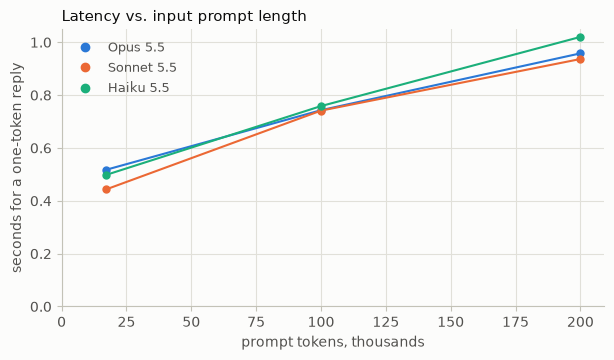
从桌面智能体的 17,000 token 输入提示词增加到 200,000 token,在每个模型上都会增加约半秒,这意味着每 100,000 token 大约增加四分之一秒。这在电话线路 0.70 秒的 p90 TTFT 中占了很大一部分,但在聊天智能体 6.1 秒的 p50 中只占一小部分,因为大部分时间都花在生成输出上。因此,对于接近实时的产品来说,精简提示词可以成为一项重要的延迟优化手段。
减少发送 token 的方式有三种:
- 精简它。 移除提示词中任务用不到的部分。对于图像,调整尺寸到任务所需的分辨率,因为更大的图像会消耗更多 token,处理时间也更长。在长对话中,上下文编辑会清除模型不再需要的旧工具结果或思考块,并且在 5.5 模型上它会让先前的思考保持有效。如果你使用了提示词缓存,每次清除都会在该点重新开始缓存,因此下一次调用会冷读取其后的所有内容。
- 推迟它。 在模型需要之前,将上下文排除在提示词之外,这也称为渐进式披露。借助工具搜索,标记为
defer_loading的工具会留在提示词之外,直到模型的搜索加载它所需的工具,一旦工具定义超过约 10,000 token,这通常就能带来收益。技能对指令也做同样的事,系统提示词的部分内容被移到技能之后,只在任务需要时才加载。 - 让访问更高效。 为模型提供一种更窄的方式来访问大型上下文。一个返回任务所需页面或字段的工具,可以将长文档的其余部分排除在上下文之外。对于表格数据,将 CSV 挂载到代码执行工具中,让模型可以在沙箱中查询它,这样只有代码及其输出会进入上下文。
这些方法中的每一种都可能增加额外的调用或下游的更多 token,因此让你的评估来决定你的输入形态应该是什么。
<a id="prompt-caching"></a>
提示缓存
我们的智能体在每次调用时都会重新发送相同的工具、系统提示和对话历史,模型必须先重新处理所有这些内容才能开始输出 token。提示缓存会存储模型已经见过的内容,这样后续调用就无需重新处理,因此缓存是降低 TTFT 的绝佳手段。前缀是提示开头在每次调用之间重复的部分,包括工具、系统提示和之前的消息,它终止于缓存断点,即标记要缓存多少提示的位置。最简单的入门方式是使用自动缓存:在请求中添加一个顶层 cache_control,它会为你放置断点。
为了给基线添加缓存,我们改用显式缓存断点。这让你可以自行放置最多四个断点,每个断点标记一个可缓存前缀的结束位置。使用多个断点可以让你匹配提示中变化速率不同的部分,这样如果后面的部分发生变化,调用仍然可以从缓存中读取前面的部分。我们在这里将使用其中三个,分别在系统提示、第一个用户轮次和最新的用户轮次上放置 cache_control 标记。实现这一点的代码如下:
system = [{"type": "text", "text": prompt, "cache_control": {"type": "ephemeral"}}]
...
    messages = list(history)
    for k in {0, len(messages) - 1}:
        *before, last = messages[k]["content"]
        messages[k] = {"role": "user", "content": [*before, {**last, "cache_control": {"type": "ephemeral"}}]}
随后每个请求发送 system 和 messages,而不是 prompt 和 history。下一个单元格会在全部 154 个任务上分别运行带缓存和不带缓存的评估。
@dataclass(frozen=True)
class CachingConfig(Config):
    """A Config that also says whether the requests were cached, to tell the two baselines apart"""

    caching: str = "on"  # or "off"

    @property
    def name(self):
        return super().name + (" · caching" if self.caching == "on" else " · no caching")


BOTH = Sweep(["results/baseline.jsonl", "results/sweep.jsonl"], CachingConfig)
no_caching = CachingConfig(caching="off")
display(BOTH.results_table([CachingConfig()], base=no_caching, waits=tuple(MEASURES.values())))

# The baseline caches from here on. Every setting in the sweep ran with caching on
SWEEP = Sweep("results/sweep.jsonl", Config)
缓存将每个任务的成本降低了 85%,并且没有显著改变两个产品的等待时间或准确率。电话线路的 p90 TTFT 从 0.70 秒降至 0.69 秒,聊天代理的 p50 TTLT 从 6.1 秒变为 6.2 秒,两者均在运行间噪声范围内。即使 p50 的这一小幅上升是真实的,我们也愿意接受它,以将每个任务的成本从 <span>$</span>0.25 降至 <span>$</span>0.04,因此缓存从此保留,作为新的基准线。我们的任务较短,平均在约 17,000 个 token 的提示上进行 3.5 次调用,因此可供缓存读取跳过的前缀很少。
TTFT 节省随前缀大小和复用该前缀的调用次数而增长,因此在具有更多轮次的更长视野任务上,它们会累积起来。下面的单元格在一个约 146,000 个 token 的新系统提示上对两轮对话计时,先不使用缓存,然后添加顶层 cache_control。第二轮会重新发送整个提示和第一轮,这正是缓存提供更大延迟收益的地方。在该轮上,usage.cache_read_input_tokens 显示缓存是否被读取。我们在 Haiku 5.5 上以 low 努力程度运行它,这使得如此长的提示重新运行成本低廉,并报告五次运行的中位数。
TURNS = (QUESTION, "What are its standard daily and aggregate limits?")


def long_system():
    """A system prompt of about 146,000 tokens that the cache has never seen"""
    return ledger_system(f"caching demo {time.time_ns()}")


def run_turns(system, cfg, cache):
    """Asks TURNS in one conversation. cache: turn on automatic caching. Returns the seconds until each
    answer began, and the tokens written to the cache and read from it"""
    history, calls = [], []
    for turn in TURNS:
        history.append({"role": "user", "content": turn})
        request = cfg.kwargs() | {"max_tokens": MAX_TOKENS, "system": system, "messages": history}
        if cache:
            request["cache_control"] = {"type": "ephemeral"}  # the one line that turns caching on
        m, marks = timed_stream(**request)
        history.append({"role": "assistant", "content": m.content})  # thinking blocks included
        calls.append(marks | token_counts(m.usage))
    waits = {f"turn {n}, s": c.get("text", c["done"]) for n, c in enumerate(calls, 1)}
    return waits | {
        "cache write, tokens": sum(c["cache_write"] for c in calls),
        "cache read, tokens": sum(c["cache_read"] for c in calls),
    }


cfg = Config(HAIKU, "low")
found = compare(
    {
        "BEFORE: no caching": lambda: run_turns(long_system(), cfg, cache=False),
        "AFTER: caching": lambda: run_turns(long_system(), cfg, cache=True),
    },
    repeats=5,
)
before, after = found.values()
show_medians(found, *before)
saved = before["turn 2, s"] - after["turn 2, s"]
print(f"\n→ {saved:.1f}s faster with {after['cache read, tokens']:,} tokens read from cache")
请注意,这些节省仅在前缀保持完全一致时才能持续。系统提示顶部的动态字段(例如时间戳或请求 ID)会在每次请求时改变前缀,从而不再与已写入缓存的内容匹配。请将静态内容放在最前面,用显式断点标记其结束位置,并将所有变化的内容放在其后的最新用户轮次中。当请求仅共享该静态部分时,仅靠自动缓存是不够的,因为它会将断点放在最后一个块上。
对话也是如此。编辑较早的轮次会从该点重新开始缓存,而在支持保留思考的近期模型上,这还可能导致请求被拒绝。更改工具、思考、effort 或模型也会使部分或全部缓存失效(具体哪些部分)。因此,只应追加到 messages 的末尾,如有需要,可作为对话中途的系统消息添加,并保持模型及其设置固定不变。如果缓存读取量降至零且你无法看出原因,缓存诊断会显示发生了什么变化。
<a id="pre-warming"></a>
预热
缓存条目默认存活五分钟,并且每次被读取时都会刷新,因此停机超过五分钟后的第一个请求需要为冷前缀付出代价。预热将这一代价从用户路径上移开。在启动时,或在缓存生命周期内的定时器中,你发送共享前缀,并在其最后一个块上设置显式断点,同时设置 max_tokens: 0,这样模型不会输出任何内容。使用与后续流量相同的模型、思考配置和 effort。
在上面的缓存示例中,第一轮仍然很慢,因为它需要冷读取提示词的全部 146,000 个 token。下面的单元格在开启缓存的情况下重新运行该对话,一次按原样运行,一次在预热之后运行。
def prewarm(system, cfg):
    """Writes system into the cache ahead of real traffic, and returns it. cfg: that traffic's setting.
    max_tokens=0 generates nothing and can't stream"""
    request = single_request("warmup", cfg, system=system, cache=True, max_tokens=0)
    client.with_options(max_retries=2).messages.create(**request)
    return system


found = compare(
    {
        "BEFORE: no pre-warm": lambda: run_turns(long_system(), cfg, cache=True),
        "AFTER: pre-warmed": lambda: run_turns(prewarm(long_system(), cfg), cfg, cache=True),
    },
    repeats=5,
)
before, after = found.values()
show_medians(found, *before)
saved = before["turn 1, s"] - after["turn 1, s"]
more = after["cache read, tokens"] - before["cache read, tokens"]
print(f"\n→ {saved:.1f}s faster with {more:,} more tokens read from cache")
预热将首个回答的等待时间从 1.0 秒缩短到 0.8 秒(针对这个 146,000 token 的提示词)。节省的时间随提示词长度增长,因为冷读取需要处理的 token 越多,耗时就越长,正如我们在§发送更少的 token 中测量的那样。当前缀很长且流量呈突发式到来、静默期长于缓存存活时间时,我们会进行预热。对于这些静默期,一小时缓存 是定时器的替代方案;而在稳定流量已经让缓存保持热度的场景下,预热只会增加一次计费请求。
<a id="message-threads"></a>
消息线程
提示缓存让模型无需重新处理前缀,但每次调用仍然会上传整个对话,供 API 重新验证和分词。消息线程将对话保留在服务器上,因此你无需重新发送。第一次调用照常发送所有内容并创建线程。之后的每次调用只需发送新消息以及上一条响应的 ID,并省略系统提示、工具和之前的轮次。以下是实现方式:
first = {"system": system, "messages": history, "thread": {"type": "create"}}
...
later = {"messages": [new_message], "thread": {"type": "continue", "previous_message_id": previous.id}}
线程可以让你免于重新发送对话内容,当对话中充满图像、文档或数百条工具结果时,这一点尤为重要。下面的单元格会打开一个包含 Acme 理赔台账扫描页面的对话,并就这些内容提出几个问题,分别在有线程和无线程的情况下进行。在线程上的第一次调用会上传完整对话,因此我们将报告后续调用的 TTFT 中位数。并且我们会在每个请求上保留 cache_control,因为线程不会为我们缓存提示词。
THREADS = "message-threads-2026-08-12"
LOST = ("thread_not_found", "thread_already_continued", "thread_continue_in_flight")
PAGES = (4, 8, 16)
cfg = Config(HAIKU, "low", thinking="disabled")


def scan(rows):
    """An image block of one page of the paid claims ledger, as a 300 dpi scan of about 1 MB"""
    page = plt.figure(figsize=(8.5, 11))
    page.text(0.05, 0.96, "\n".join(rows), family="monospace", size=7, va="top", parse_math=False)
    jpeg = io.BytesIO()
    page.savefig(jpeg, format="jpg", dpi=300, pil_kwargs={"quality": 90})
    plt.close(page)
    data = base64.b64encode(jpeg.getvalue()).decode()
    return {"type": "image", "source": {"type": "base64", "media_type": "image/jpeg", "data": data}}


SCANS = [scan(LEDGER_ROWS[80 * n : 80 * (n + 1)]) for n in range(max(PAGES))]
PAID_CLAIMS = [row.split(",")[0] for row in LEDGER_ROWS[10:290:40]]
TOKENS = {
    pages: client.messages.count_tokens(
        model=cfg.model, system=MEMO_SYSTEM, messages=[{"role": "user", "content": SCANS[:pages]}]
    ).input_tokens
    for pages in PAGES
}


def run_claims(pages, thread):
    """Opens a conversation with that many scanned pages, then asks about each of PAID_CLAIMS, with caching on. thread: create a
    thread on the first call and send each later call only its new message. Returns, over the calls after the first,
    the median seconds until the answer began and the median size of the request's JSON"""
    system = f"(threads {time.time_ns()})\n\n{MEMO_SYSTEM}"
    fixed = cfg.kwargs() | {"max_tokens": MAX_TOKENS, "cache_control": {"type": "ephemeral"}}
    history = [
        {"role": "user", "content": SCANS[:pages]},
        {"role": "assistant", "content": "I have the pages."},
    ]
    previous, calls = None, []
    for claim in PAID_CLAIMS:
        history.append({"role": "user", "content": f"What was paid on {claim}?"})
        whole = fixed | {"system": system, "messages": history}
        if thread:
            whole["thread"] = {"type": "create"}
        request = whole
        if thread and previous:  # the thread holds the system prompt and the earlier messages
            request = fixed | {"messages": history[-1:]}
            request["thread"] = {"type": "continue", "previous_message_id": previous}
        start, lost = time.perf_counter(), 0.0
        try:
            m, marks = timed_stream(betas=[THREADS], **request)
        except (anthropic.NotFoundError, anthropic.BadRequestError) as e:
            details = e.body.get("error", {}).get("details") if isinstance(e.body, dict) else None
            if (details or {}).get("error_code") not in LOST:
                raise
            # The thread can't be continued, so resend the conversation on a new one. The failed call's time counts
            request, lost = whole, time.perf_counter() - start
            m, marks = timed_stream(betas=[THREADS], **request)
        calls.append(
            {
                "TTFT, s": lost + marks.get("text", marks["done"]),
                "bytes": len(json.dumps(request, default=lambda block: block.to_dict())),
            }
        )
        history.append({"role": "assistant", "content": m.content})
        previous = m.id
    ttft, size = (statistics.median(c[k] for c in calls[1:]) for k in ("TTFT, s", "bytes"))
    return {
        "TTFT, s": ttft,
        "request": f"{size / 1e6:.1f} MB" if size >= 1e6 else f"{size / 1e3:.1f} KB",
    }


runs = {(pages, thread): [] for pages in PAGES for thread in (False, True)}
for repeat in range(3):
    order = list(runs)
    random.Random(repeat).shuffle(order)
    for pages, thread in order:
        runs[pages, thread].append(run_claims(pages, thread))

show(
    [
        {"": "AFTER: caching + thread" if thread else "BEFORE: caching", "pages": pages}
        | {"prompt tokens": TOKENS[pages]}
        | min(repeats, key=lambda run: run["TTFT, s"])
        for (pages, thread), repeats in runs.items()
    ],
    places=2,
)
在 16 页的情况下,线程将每个请求从 22 MB 削减到 0.3 KB,使 TTFT 减半,而且这些节省随着页数的增加而增长。请注意,线程节省的是上传时间,而不是 token。Claude 在每次调用时仍然会读取完整对话,因此无论是否使用线程,我们的成本都相同。对于任何冗长或繁重的多轮对话,我们都会使用线程,但我们的桌面代理的典型任务只是几次纯文本调用,因此线程能节省的负载很少。
<a id="agent-loop-efficiency"></a>
Agent 循环效率
延迟还取决于 Agent 调用模型的次数。这就是我们公式中的调用次数 × TTFT 项:一个需要五次调用才能回答的 Agent 要付出五次 TTFT,再加上中间的工具等待时间。本节中的手段旨在减少调用次数,并将必须保留的调用并行化。
<a id="background-compaction"></a>
后台压缩
在长时间的多轮任务中,对话最终可能会超出模型的上下文窗口。为了继续推进,必须将较早的轮次压缩成一段摘要来替代它们。API 的压缩功能会为你撰写这段摘要。撰写摘要需要时间,而触发它的方式不同,决定了用户是否需要等待。在 token 阈值处,跨越阈值的那次请求会先撰写摘要,从而给该轮次增加等待时间。按需触发时,由一个单独的请求返回摘要,如果你在后台发送该请求,则没有任何轮次需要等待它。
我们桌面智能体的任务永远不会长到触及阈值,因此我们将使用一个单独的聊天示例,包含十条索赔,每条粘贴约 8K token。我们将以三种方式运行它:不压缩、在 50K token 阈值处压缩(API 接受的最低值),以及在提示超过 50K token 后进行后台压缩。
# Helpers shared by this demo and the per-turn effort demo in Model, effort, and thinking
SESSION_SYSTEM = (
    "You are a Senior Adjuster in Acme Insurance's auto claims unit, working a queue of claims "
    "in one session. Apply the underwriting manual below. For each claim reply in exactly two "
    f"lines and nothing else:\n{TWO_LINES}\n\n{MANUAL}"
)


def new_session():
    """A system prompt that no earlier session has cached, and an empty history"""
    return f"(session {time.time_ns()})\n\n" + SESSION_SYSTEM, []


def claim_file(i):
    cid = list(CLAIMS)[i]
    comparables = "\n".join([LEDGER_ROWS[0], *LEDGER_ROWS[1 + i * 270 : 1 + (i + 1) * 270]])
    return f"{claim_record(cid)}\n\nCOMPARABLE PAID CLAIMS\n{comparables}\n\nDecide claim {cid}."


def session_request(system, messages, **more):
    """What every request on a conversation shares. Two cache breakpoints: one at the end of the system prompt,
    and one the API places at the end of the history, asked for by the top-level cache_control"""
    return BASE.kwargs() | {
        "max_tokens": MAX_TOKENS,
        "system": [cached({"type": "text", "text": system})],
        "messages": messages,
        "cache_control": {"type": "ephemeral"},
        **more,
    }


def send_turn(label, system, history, **more):
    """Sends the conversation's next request and appends the reply to history as returned, thinking included.
    Returns its row of the session's table"""
    m, marks = timed_stream(**session_request(system, history, **more))
    history.append({"role": "assistant", "content": m.content})
    # A request that compacts before it answers makes two passes, and usage.iterations lists each
    parts = [token_counts(u) for u in getattr(m.usage, "iterations", None) or [m.usage]]
    sizes = [t["input_tokens"] + t["cache_read"] + t["cache_write"] for t in parts]
    return {
        "": label,
        "wait s": marks["done"],
        "prompt tokens": max(sizes),
        "cache read, tokens": parts[-1]["cache_read"],
        "cache write, tokens": parts[-1]["cache_write"],
        "output tokens": m.usage.output_tokens,
    }


# The compaction demo: one conversation of ten claims, run three ways
COMPACT_BETA = "compact-2026-09-04"  # compaction on demand
THRESHOLD_BETA = "compact-2026-01-12"  # compaction at a token threshold
COMPACT_AT = 50_000  # prompt tokens. Also the lowest threshold the API accepts
PAUSE = 4.0  # seconds between turns, standing in for the person reading. Not counted as waiting


def summarize(system, messages):
    """Compaction on demand. Model, system, thinking, effort, and cache_control match the conversation's,
    so the request reads the conversation's cached prefix"""
    extra = {"betas": [COMPACT_BETA], "compaction": {"type": "summarize"}}
    request = session_request(system, messages, **extra)
    return client.with_options(max_retries=2).beta.messages.create(**request)


def run_session(mode):
    """Ten claims in one conversation. mode: "none", "threshold" (compact inside the request that crosses it),
    or "background" (ask for a summary between turns, swap it in when ready). Returns one row for each turn"""
    system, history = new_session()
    extra = {}
    if mode == "threshold":
        trigger = {"type": "input_tokens", "value": COMPACT_AT}
        edits = [{"type": "compact_20260112", "trigger": trigger}]
        extra = {"betas": [THRESHOLD_BETA], "context_management": {"edits": edits}}
    if mode == "background":
        extra = {"betas": [COMPACT_BETA]}  # needed once the history holds a summary
    rows = []
    pending, held = None, 0  # the summary on its way, and how many messages it covers
    with ThreadPoolExecutor(max_workers=1) as pool:
        for i in range(len(CLAIMS)):
            if pending and pending.done():
                summary, pending = pending.result(), None
                if summary.stop_reason == "compaction":
                    # Replace exactly the messages the summary covers. Later turns stay after it
                    history[:held] = [{"role": "assistant", "content": summary.content}]
            history.append({"role": "user", "content": claim_file(i)})
            row = send_turn(f"turn {i + 1}", system, history, **extra)
            rows.append(row)
            last = i + 1 == len(CLAIMS)
            if mode == "background" and not (pending or last) and row["prompt tokens"] > COMPACT_AT:
                pending, held = pool.submit(summarize, system, list(history)), len(history)
            time.sleep(0 if last else PAUSE)
    return rows


SESSIONS = {
    "no compaction": run_session("none"),
    "BEFORE: at a threshold": run_session("threshold"),
    "AFTER: in the background": run_session("background"),
}
summary = [
    {
        "": label,
        "median wait s": statistics.median(r["wait s"] for r in rows),
        "longest wait s": max(r["wait s"] for r in rows),
        "largest prompt, tokens": max(r["prompt tokens"] for r in rows),
    }
    for label, rows in SESSIONS.items()
]
show(summary)
_, before, after = (row["longest wait s"] for row in summary)
print(f"\n→ longest wait: {before:.1f}s compacting at a threshold, {after:.1f}s in the background")
在阈值处进行压缩会让一个回合等待 21.4 秒,同时摘要正在生成。在后台压缩时,最长等待时间为 4.9 秒,与无压缩时的 5.4 秒相当。代价是提示词更大,峰值时约为 70,000 个 token,而在阈值处为 56,000 个 token,因为在摘要生成期间发送的回合仍然携带完整历史。如果你的对话足够长以至于需要压缩,并且每个回合都有人在等待,我们会在后台进行压缩,并尽早请求摘要,以便这些回合仍能放入上下文窗口。
<a id="subagents"></a>
子代理
当一个任务可以拆分成相互独立的部分时,每个部分都可以交给一个子代理处理。在 Messages API 中,子代理不过是另一个带有自己 messages 数组的请求。它能看到你提供给它的上下文,并将答案返回给主代理。这些部分一起发送时会并行运行,任务会等待最慢的那个完成。如果你是基于 Agent SDK 或 Claude Managed Agents 构建的,两者都有各自的子代理支持。
在下面的单元格中,Opus 5.5 是决定理赔的主代理,它需要先从理赔记录中获取三个事实。在第一次运行中,它自己查找这些事实,在自己的对话中一轮一轮地进行。在第二次运行中,它把这些事实交给三个更快、更便宜的 Haiku 5.5 子代理,并根据它们的回答做出决定。只有 Opus 会拿到核保手册,因为子代理只负责查找事实。每个请求都以 low 努力程度运行,我们将检查它们的回答以确保准确性不会下降。
# Three facts the manual's fraud score (§5.1) turns on. Each is a lookup in the claim record
QUESTIONS = [
    "How many days passed between the loss and the report, and is a reason for the delay on file?",
    "How many prior claims fell in the 36 months before the loss date?",
    "Was a police report filed?",
]
CLAIM = claim_record("CLM-008")
ONE_LINE = "Answer in one terse line."
DECIDE = f"Decide the claim from these findings. Reply in exactly two lines:\n{TWO_LINES}"
ANSWER = "SUPERVISOR"  # the manual's fraud score comes to 4, and 3 to 5 means supervisor review
ORCHESTRATOR, SUBAGENT = Config(OPUS, "low"), Config(HAIKU, "low")
BEFORE, AFTER = "BEFORE: Opus 5.5 answers in turn", "AFTER: Haiku 5.5 subagents side by side"
GRADES = {BEFORE: [], AFTER: []}  # whether each decision matched ANSWER


def reply(cfg, system, messages):
    """Sends one conversation and adds the reply to it. Returns the seconds"""
    message, marks = timed_stream(**cfg.kwargs(), max_tokens=8192, system=system, messages=messages)
    messages.append({"role": "assistant", "content": message.content})
    return marks["done"]


def text(messages):
    """The text of the conversation's last reply"""
    return "".join(b.text for b in messages[-1]["content"] if b.type == "text")


def decide(messages, label):
    """The orchestrator, which has the manual, decides from the conversation so far. Returns the seconds"""
    messages.append({"role": "user", "content": DECIDE})
    secs = reply(ORCHESTRATOR, MEMO_SYSTEM, messages)
    GRADES[label].append(f"DECISION: {ANSWER}" in text(messages))
    return secs


def one_agent():
    """The orchestrator answers each question in turn in its own conversation, then decides. Returns the
    seconds"""
    messages, secs = [], 0.0
    for i, question in enumerate(QUESTIONS):
        ask = f"{question} {ONE_LINE}"
        messages.append({"role": "user", "content": f"{CLAIM}\n\n{ask}" if i == 0 else ask})
        secs += reply(ORCHESTRATOR, MEMO_SYSTEM, messages)
    decision = decide(messages, BEFORE)
    return {"answers, s": secs, "decision, s": decision, "total, s": secs + decision}


def subagent(question):
    """One subagent: a request with its own messages array and no manual. Returns its seconds and answer"""
    messages = [{"role": "user", "content": f"{CLAIM}\n\n{question} {ONE_LINE}"}]
    return reply(SUBAGENT, "You are a claims assistant.", messages), text(messages)


def with_subagents():
    """Subagents answer the questions side by side, then the orchestrator decides from their answers. Returns
    the seconds"""
    with ThreadPoolExecutor(max_workers=len(QUESTIONS)) as pool:
        found = list(pool.map(subagent, QUESTIONS))
    findings = "\n".join(f"{q}\n{answer}" for q, (_, answer) in zip(QUESTIONS, found, strict=True))
    messages = [{"role": "user", "content": f"{CLAIM}\n\nSubagents' findings:\n{findings}"}]
    secs = max(s for s, _ in found)
    decision = decide(messages, AFTER)
    return {"answers, s": secs, "decision, s": decision, "total, s": secs + decision}


found = compare({BEFORE: one_agent, AFTER: with_subagents}, repeats=5)
for label, medians in found.items():
    medians["decisions right"] = f"{sum(GRADES[label])}/{len(GRADES[label])}"
show_medians(found, "answers, s", "decision, s", "total, s", "decisions right")
before, after = (medians["total, s"] for medians in found.values())
print(f"\n→ with subagents the task waits ×{after / before:.2f} as long")
使用子代理后,任务耗时从 9.5 秒降至 5.7 秒,且五个决策全部正确。三个答案的返回时间从 6.8 秒缩短至 1.5 秒,因为它们在一个更快的模型上并行运行。因此,当任务可以拆分为独立的查找或检查时,将它们交给小型子代理,并只给每个子代理提供其所需的上下文。我们选择了 Haiku 5.5 以追求速度,这适合此类简单的查找任务。需要更强判断力的子任务可能需要更大的模型,但由于子代理并行带来的收益,我们预计效果在方向上仍然相同。
如果你的子代理以相同的长上下文启动,例如共享文档,那么同时启动子代理意味着每个子代理都会在未缓存的情况下读取文档,因为缓存条目要到第一个响应开始后才会就绪。要解决这个问题,请预热共享上下文,或者先发送一个子代理,待其回复开始流式传输后再发送其他子代理。
<a id="prefetch-and-bigger-pages"></a>
预取与更大的分页
有时你的代码知道模型会首先发起哪个工具调用。当代码知道时,它可以在 agent 循环之外自行发起该调用,并将结果放入第一个用户轮次。每个 desk agent 任务都以针对请求所指定理赔的 get_claim 开始,而报价还需要针对该理赔估算第 1 页的 get_estimate。预取会预先执行这些查询,从而为模型节省一次往返。更大的分页会将每次查询返回的估算行数或账本行数翻倍,因此需要翻页浏览结果的任务所需的查询次数更少。两者都与§发送更少的 token做出相反的权衡:增加输入 token,以减少调用次数并减少 TTFT 的支付次数。
这些代码行替换了基线的工具设置和第一个轮次:
prefetch, big_pages = "prefetch" in cfg.loop, "big_pages" in cfg.loop
...
tools = desk_agent.tool_specs(big_pages=big_pages)
first = desk_agent.first_turn(task, prefetch=prefetch, big_pages=big_pages)
而下表展示了预取和更大页面分别应用于我们的基线评估后的结果。
LEVERS = ("prefetch", "bigger pages")
SWEEP.results_table([BASE.with_loop(name) for name in LEVERS])
预取为每个任务节省了大约一次调用,并将 p50 降低了 13%。更大的分页减少了调用次数,并将 p50 降低了 10%。这两个手段都没有显著改变 p90 或准确率。鉴于它们在 p50 延迟上的收益,我们建议预取任务总是首先执行的查找,例如拉取退款请求所引用的订单,并在任务需要翻页浏览长结果时返回更大的分页。
<a id="programmatic-tool-calling"></a>
程序化工具调用
在常规的工具循环中,每一轮工具调用之后都会重新对模型进行采样。模型请求一次调用,你的代码执行它,结果返回对话中,然后模型才能请求下一次调用。一个需要逐页获取 20 条结果的作业,要为此付出 20 次往返的代价,每次都有各自的 TTFT。而且模型还要完整读取每一个结果,即使它需要的只是这些结果的总和。
使用程序化工具调用时,模型会编写一个脚本,在代码执行容器中发起所有工具调用。模型在这些调用之间不会被采样,只读取脚本打印出来的内容(参见 cookbook)。代价是启动容器和编写脚本的固定开销,而且脚本发起的每一次调用仍然要发往你的代码再返回。程序化工具调用在调用次数多或结果量大的作业上收益明显。如果模型需要在选择下一次调用之前读取每一个结果,或者作业只进行少量调用且结果很小,则应跳过这种方式。
在下面的演示中,模型要对一个逐页返回保险赔付数据的工具,汇总一整年的赔付总额。使用直接调用时,模型必须依次请求每一页。使用脚本时,由代码获取各页数据,模型只读取总额。
PAGE = 20
PAID = [row | {"paid_usd": float(row["paid_usd"])} for row in csv.DictReader(LEDGER_ROWS)]
LIST_CLAIMS = {
    "name": "list_paid_claims",
    "description": (
        f"One page of the claims paid in a state on one year's losses, {PAGE} to a page, the most the "
        "API returns. For the next page, pass the last page's next_cursor. Returns JSON: "
        '{"rows": [{"claim_id": str, "loss_date": "YYYY-MM-DD", "type": str, "paid_usd": float}], '
        '"next_cursor": str or null}. next_cursor is null on the last page.'
    ),
    "input_schema": {
        "type": "object",
        "properties": {
            "state": {"type": "string", "description": "Two letters"},
            "year": {"type": "integer"},
            "cursor": {"type": "string"},
        },
        "required": ["state", "year"],
    },
}


def list_paid_claims(state, year, cursor=None):
    """The simulated API. A cursor is the last claim of the page before, so no page can be asked for ahead of time"""
    rows = [r for r in PAID if (r["state"], r["loss_date"][:4]) == (state, str(year))]
    claim_ids = [r["claim_id"] for r in rows]
    if cursor and cursor not in claim_ids:
        return "ERROR: unknown cursor"
    start = claim_ids.index(cursor) + 1 if cursor else 0
    page = [{k: v for k, v in r.items() if k != "state"} for r in rows[start : start + PAGE]]
    more = start + PAGE < len(rows)
    return json.dumps({"rows": page, "next_cursor": page[-1]["claim_id"] if more else None})


REPORT = (
    "A regulator wants our Texas payouts on 2022 losses: the total paid, and the claim type we paid "
    "the most on."
)
REPORT_SYSTEM = (
    "You are an analyst in Acme Insurance's auto claims unit. Answer from the paid-claims API, using "
    "every matching claim. End with exactly two lines:\n"
    "TOTAL: <dollars and cents>\nTOP TYPE: <claim type>"
)
REPORT_KEY = "TOTAL: 2110804.91\nTOP TYPE: collision"  # worked out from the ledger
SCRIPTS = "code_execution_20260120"


def run_report(cfg, scripted):
    """Answers REPORT with the one tool, which the model calls directly or (scripted) from a script it writes"""
    tools, extra = [LIST_CLAIMS], {"cache_control": {"type": "ephemeral"}}
    if scripted:  # the pages go to the script, so the prompt doesn't grow: nothing to cache
        sandbox = {"type": SCRIPTS, "name": "code_execution"}
        tools, extra = [sandbox, LIST_CLAIMS | {"allowed_callers": [SCRIPTS]}], {}
    request = cfg.kwargs() | {"max_tokens": MAX_TOKENS, "system": REPORT_SYSTEM, "tools": tools}
    history, secs, tokens = [{"role": "user", "content": REPORT}], [], 0
    while len(secs) < 40:
        m, marks = timed_stream(**request, messages=history, **extra)
        secs.append(marks["done"])
        tokens += m.usage.output_tokens
        history.append({"role": "assistant", "content": m.content})
        if m.container:
            extra["container"] = m.container.id  # a paused script resumes only in its own container
        # A script's calls come back as tool_use too, and their results must be the whole message
        results = [
            {"type": "tool_result", "tool_use_id": b.id, "content": list_paid_claims(**b.input)}
            for b in m.content
            if b.type == "tool_use"
        ]
        if results:
            history.append({"role": "user", "content": results})
        elif m.stop_reason != "pause_turn":
            break
    answer = next((b.text for b in reversed(m.content) if b.type == "text"), "")
    reply = answer.replace("$", "").replace(",", "")
    return {
        "fetching pages, s": sum(secs[:-1]),
        "answering, s": secs[-1],
        "total, s": sum(secs),
        "output tokens": tokens,
        "correct": reply.rstrip().endswith(REPORT_KEY),
    }


before, after = run_report(BASE, scripted=False), run_report(BASE, scripted=True)
show([{"": "BEFORE: direct calls"} | before, {"": "AFTER: from a script"} | after])
saved, fewer = (before[k] - after[k] for k in ("total, s", "output tokens"))
print(f"\n→ {saved:.1f}s faster from a script, with {fewer:,} fewer output tokens")
从脚本获取页面多花了 9.5 秒,但回答时间少了 20.4 秒,因此整个任务提前了约 11 秒完成。获取变慢是因为这些请求包含了编写脚本的时间。回答变快是因为脚本在代码中累加了所有付款并打印出总额,模型只需报告该结果。而直接调用时,模型必须自行累加每一页的每一笔付款,这多消耗了约 4,400 个输出 token。
当任务最终需要求和、过滤或计数时,程序化工具调用最有帮助,因为这些操作由代码完成比由模型完成更好。我们的前台代理任务只需少量调用且结果很小,因此我们在最终测试中未采用程序化工具调用。
<a id="output-token-management"></a>
输出 token 管理
在输入 token 和轮次确定之后,延迟公式中剩下的变量都与输出有关。模型一次只写一个输出 token,因此它每少写一个 token,都会缩短 TTLT,思考过程也不例外。如果你的应用只需要一个决策和一行理由,那么围绕这个决策的每一段解释,都是用户本不该等待的时间。
<a id="prompting-for-shorter-answers"></a>
提示模型给出更简短的回答
虽然听起来可能微不足道,但你可以直接要求 Claude 输出更少的 token。概述你想要的输出形式,最好配上一个示例,可以防止模型在给出答案之前过度叙述。下面的单元格要求模型对同一个主张做出两次判断。第一次它可以随意回答。第二次它必须严格用两行回复:一个决定和一句理由。
question = claim_record("CLM-008") + "\n\nWrite up your decision on this claim."
shaped = f"{MEMO_SYSTEM}\n\nRespond in exactly two lines and nothing else:\n{TWO_LINES}"
found = compare(
    {
        "BEFORE: free-form": lambda: timed(single_request(question, system=MEMO_SYSTEM)),
        "AFTER: two lines asked for": lambda: timed(single_request(question, system=shaped)),
    }
)
show_medians(found, "done, s", "output tokens", "of which thinking")
before, after = found.values()
saved = before["done, s"] - after["done, s"]
fewer = before["of which thinking"] - after["of which thinking"]
print(f"\n→ asking for two lines: {saved:.1f}s sooner, with {fewer:,.0f} fewer thinking tokens")
要求两行输出将决策时间从 46.4 秒缩短到 4.9 秒。模型的思考量也减少了,大约 300 个 token 而非 2,100 个,因此更短的答案意味着更短的推理。如果你的任务需要深度推理但只需简短输出,请使用结构化输出来生成答案,并通过effort设置模型的思考量。我们建议,凡是模型写出的内容超过任何人会去阅读的场合,都应要求一个输出形态。
<a id="no-commentary"></a>
不添加评论
我们也可以提示智能体在工具调用之间不要进行叙述。下表对比了基线版本与在系统提示中加入此指令的版本:
在工具调用之外不要写任何文本:不要写计划、笔记、摘要或解释。没有人会读这些文本,而且客户会在你撰写这些内容时等待。请按照手册的要求,准确填写记录器调用的参数。
SWEEP.results_table([BASE.with_loop("no commentary")])
在我们的用例中,无评论指令对 p50 和 p90 均无显著影响。它几乎没有什么可削减的,因为无论是否使用该指令,Opus 5.5 在得出答案的过程中所写的文字量都相同。准确率显著提升了 1.2 个百分点,这可能源于该指令最后一句关于填写记录器参数的要求,而非削减评论本身。当没有人阅读你的智能体在工具调用之间所写的文本时,这种配置仍然值得测试,但请针对你打算搭配使用的每个模型检查准确率,因为在长周期任务中,评论有助于让模型保持正轨。
<a id="structured-outputs"></a>
结构化输出
结构化输出通过将响应约束为在 output_config.format 中发送的 JSON schema 来强制规定形状,而不是请求某种形状。这样回复就只是 JSON,因此没有需要生成的前言,也不会因为输出解析失败而重试。使用新 schema 的首次请求耗时更长,因为 API 必须将 schema 转换为限制模型可写内容的规则。这些规则在最后一次使用后会缓存 24 小时。我们的桌面代理已经通过使用自定义工具来回答,该工具像结构化输出一样约束模型输出,因此 schema 对它没有节省任何东西。如果自由文本答案会带有前言或需要解析,请改为发送 schema,并保持其稳定,因为更改过或很少使用的 schema 会再次付出首次请求的等待代价。
<a id="model-effort-and-thinking"></a>
模型、努力程度与思考
一次调用写入多少 token,还取决于模型思考多少;而 token 到达的速度则取决于模型及其速度。这里的调节项会改变模型推理的多少,或由哪个模型来进行推理。这决定了你应用的智能上限,也就是它仍能处理的最难问题。较低的努力程度或更小的模型可能通过你评测中的每一项任务,却仍会在之后出现的更难请求上失败。这就是为什么这些调节项排在那些不改变模型的调节项之后。例外是快速模式,它提供的是同一个 Opus 5.5,只是更快。
<a id="fast-mode"></a>
快速模式
快速模式以更快的推理配置运行 Opus 5.5,在标价翻倍的情况下,OTPS 最高可提升至 2.5 倍。下表对比了快速模式与标准 Opus 5.5 在不同 effort 级别下的表现。
for effort in reversed(EFFORTS):
    standard = Config(effort=effort)
    display(SWEEP.results_table([replace(standard, speed="fast")], base=standard, rounds=True))
在每一次尝试中,快速模式都将 p50 和 p90 降低了 53% 到 59%。准确率没有显著变化,但每个任务的成本大约翻了一倍(<span>$</span>0.0766,而 medium 下为 <span>$</span>0.0377)。如果时间价值是标准价格的两倍,并且任务需要 Opus-5.5 级别的智能,那么快速模式是合适的。如果你的任务由许多短调用组成,快速模式可能不值得,因为它的收益主要体现在 OTPS 上,而不是 TTFT。
<a id="effort"></a>
Effort
Effort 决定模型的推理彻底程度。就 token 而言,这意味着它在思考、文本和工具调用上花费多少。在自适应思考模式下,模型自行决定思考多少,而 effort 则对其进行引导。较低的 effort 会以部分能力换取更少的 token 和调用次数,从而缩短单次调用的 TTLT,并使 OTPS 基本保持不变。请注意,可用的 effort 级别和默认值因模型和代际而异;对于下表中的 Opus 5.5,默认值为 medium。
ON_BASELINE_LOOP = SWEEP.pick(**LOOPS["baseline loop"])
table([SWEEP.result_row(Config(effort=effort), BASE, "medium") for effort in reversed(EFFORTS)])
在 low 档位下,Opus 5.5 的 p50 显著下降了 13%,而 p90 和准确率没有显著变化。在 high 档位下,p50 上升了 7%,p90 上升了 12%,两者均显著,且准确率没有显著变化。这些结果表明,相对于我们评估任务的复杂度,medium 档位的 Opus 5.5 可能投入过度,我们可以通过降低档位来挽回延迟。一般来说,从模型的默认档位开始,逐步下调,直到你的评估显示准确率开始下滑,并且只有在收益足以证明额外等待合理时,才提高档位。我们将在§综合运用中通过实验来完成这一点。
<a id="per-turn-effort"></a>
每轮工作量
你也可以在对话过程中更改工作量,例如在遇到难题时从 low 切换到 high。在 5.5 模型上,请使用逐消息形式,它通过追加一条内容为空、带有新工作量级别的系统消息来保留提示缓存。而更改顶层的 output_config.effort 会使缓存的消息失效,因此请务必使用以下语法:
{"role": "system", "content": [], "output_config": {"effort": "high"}}
逐消息形式适用于所有 5.5 模型并支持自适应思考,但不适用于关闭思考的 Haiku 5.5 或 Sonnet 5.5 的 between_tools(参见§关闭思考)。在下面的单元格中,Opus 5.5 在 high 努力级别下于一次对话中判定四条主张。只有第四条主张较难,因此如果我们让努力级别与难度匹配,前三条可以以 low 运行,并通过一条消息将第四条的努力级别提升至 high。
EFFORT_BETA = "mid-conversation-output-config-2026-07-01"
# Three routine claims, then one we want more care on
SESSION = ("CLM-001", "CLM-004", "CLM-005", "CLM-008")
KEY = {"CLM-001": "APPROVE", "CLM-004": "SIU", "CLM-005": "DENY", "CLM-008": "SUPERVISOR"}
BEFORE, AFTER = "BEFORE: high on every claim", "AFTER: low, then high for the last claim"
GRADES = {BEFORE: [], AFTER: []}  # whether each decision matched KEY


def work_session(label):
    """Decides the SESSION claims in one conversation on Opus 5.5. Returns the seconds"""
    system, history = new_session()
    effort = "high" if label == BEFORE else "low"
    secs = []
    for n, cid in enumerate(SESSION, 1):
        if label == AFTER and n == len(SESSION):
            # Raise effort in a message, which keeps the cache
            history.append({"role": "system", "content": [], "output_config": {"effort": "high"}})
        history.append({"role": "user", "content": claim_file(list(CLAIMS).index(cid))})
        extra = {"betas": [EFFORT_BETA], "output_config": {"effort": effort}}
        secs.append(send_turn(cid, system, history, **extra)["wait s"])
        answer = "".join(b.text for b in history[-1]["content"] if b.type == "text")
        GRADES[label].append(f"DECISION: {KEY[cid]}" in answer)
    return {
        "first three claims, s": sum(secs[:-1]),
        "last claim, s": secs[-1],
        "total, s": sum(secs),
    }


found = compare(
    {BEFORE: lambda: work_session(BEFORE), AFTER: lambda: work_session(AFTER)}, repeats=5
)
for label, medians in found.items():
    medians["decisions right"] = f"{sum(GRADES[label])}/{len(GRADES[label])}"
show_medians(found, "first three claims, s", "last claim, s", "total, s", "decisions right")
before, after = (medians["total, s"] for medians in found.values())
print(f"\n→ {before - after:.1f}s sooner with low effort on the routine claims")
在 low 级别运行三个常规声明节省了 3.3 秒,对话提前 4.3 秒完成,同时保持了 100% 的准确率。因此,常规轮次应在 low 级别运行,仅在需要更高投入的轮次中通过消息提高 effort。在生产环境中,需要有机制来判断哪些轮次属于这一类,例如任务类型或分类器。节省的幅度取决于你的轮次构成,因此请在你自己的对话中进行测量。
<a id="model"></a>
模型
较小的模型(如 Sonnet 或 Haiku)通常能更快地写出输出 token,从而缩短那些大部分时间都花在写输出上的任务。我们的桌面代理就是如此——输出 token 对任务秒数的贡献超过了每次调用的固定成本。下一个单元格通过比较每次调用的秒数与其输出 token 数,来衡量每个模型写输出的速度。每多一个 token 调用耗时增加多少,就得到 OTPS;剩下的部分则是每次调用的固定时间,大致是 TTFT 加上网络时间。
# The three models at medium effort and standard speed
MEDIUM = [
    cfg
    for cfg in ON_BASELINE_LOOP
    if cfg.effort == "medium" and cfg.thinking == "adaptive" and cfg.speed == "standard"
]
rows = []
for setting in MEDIUM:
    a, b = SWEEP.fit(setting)  # a call's seconds = a + b per 100 output tokens
    calls = SWEEP.value(setting, "calls")
    out = SWEEP.value(setting, "output_tokens")
    rows.append(
        {
            "setting": setting.name,
            "output tokens per second": round(100 / b),
            "calls / task": calls,
            "output tokens / task": round(out),
            # what calls and tokens each add to the average task's seconds
            "from calls, s": calls * a,
            "from tokens, s": out * b / 100,
        }
    )
display(table(rows))
speed_chart(SWEEP, MEDIUM)
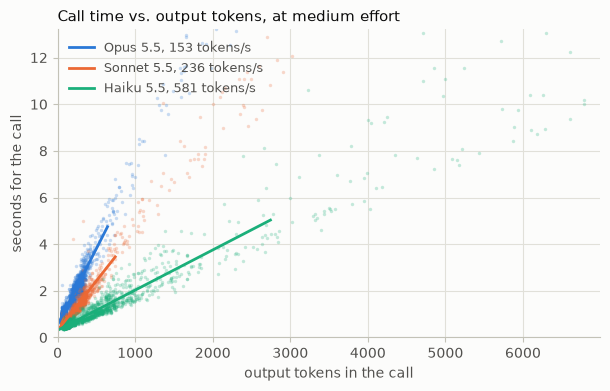
Haiku 5.5 是当前产品线中最快的模型,每秒可写入 581 个 token,而 Sonnet 5.5 为 236 个,Opus 5.5 为 153 个。但更快的 token 速度并不总是意味着更快的任务完成。请注意,Haiku 5.5 的调用在横轴上向右延伸得更远,因为它在完成同一任务时需要写入更多 token。更小的模型速度更快,但这并不意味着它们更高效。
下表将 Sonnet 5.5 和 Haiku 5.5 在 high、medium 和 low 三档下与 Opus 5.5 基线进行对比。请同时关注准确率、输出 token 数以及耗时(秒)。
SMALLER = [cfg for cfg in ON_BASELINE_LOOP if cfg.model != OPUS and cfg.thinking == "adaptive"]
SWEEP.results_table(SMALLER, rounds=True)
在 medium 档位下,与 Opus 5.5 基线付出相同努力时,Sonnet 将任务中位耗时缩短了 2.7 秒,Haiku 缩短了 2.2 秒。Sonnet 更快是因为它输出的 token 数量远少于 Haiku,尽管 Haiku 输出额外 token 的速度更快。这一点在 p90 上更加明显:high 档位的 Haiku 比 Opus 多花了 3.9 秒。然而,Sonnet 和 Haiku 在 medium 档位的准确率分别低了 3.9 和 2.4 个百分点,因此它们节省的时间是以质量为代价换来的。此外,虽然每任务成本随模型规模稳步下降——Sonnet 约降低 2 倍,Haiku 约降低 16 倍——但准确率和延迟并不会随之改善。high 档位的 Haiku 比 low 档位的 Sonnet 得分高 2.2 个百分点,但在 p90 上多花了 7.8 秒。
这里的教训是:应在你的评测集上比较不同配置,而不是仅凭模型规模和标价来判断,正如我们在§综合考量中所做的那样。就速度而言,我们建议只将那些几乎不需要推理的任务迁移到更小的模型上。
<a id="thinking-off"></a>
关闭思考
思考是模型在回答之间以及工具调用之间写下的推理过程。它是模型能力的重要组成部分,因此关闭思考适用于速度比准确性更重要的情况。Haiku 5.5 是三个模型中唯一接受 thinking: {"type": "disabled"} 的模型,而 Sonnet 5.5 的最低思考设置是 thinking: {"type": "between_tools"},它会关闭前置思考。两者都仅在 high 或更低 effort 下有效。
我们在全部三个 effort 级别下运行了关闭思考的 Haiku 5.5,下面的单元格将每个结果与开启思考、high effort 下的 Haiku 5.5 进行对比。
# Against Haiku 5.5 at high with thinking on, not the Opus 5.5 baseline
THINKING_ON = Config(HAIKU, "high")
THINKING_OFF = [cfg for cfg in ON_BASELINE_LOOP if cfg.thinking == "disabled"]
SWEEP.results_table(THINKING_OFF, base=THINKING_ON, rounds=True)
在 high 档位下,关闭思考使 Haiku 5.5 的 p50 缩短了 1.2 秒,p90 缩短了 6.8 秒,但准确率下降了 24 个百分点。降低 effort 能再节省一点时间,但准确率依然会下降。这些速度提升的代价大约是每四个回答中就有一个出错,因此对于你自己的 agent,我们建议只有在评估显示准确率保持稳定时才关闭思考。
Sonnet 5.5 的 between_tools 与关闭思考的工作方式不同。它会跳过回复首次输出之前的思考,并在工具调用之间保留较轻量的思考。只有当回复原本会以一段长时间的思考开头时,这才能节省时间。我们的前台 agent 的回复总是以一次查询开头,因此没有可跳过的内容。但当我们提示生成较长的书面回复时,它的作用就更明显了。下面的单元格要求 high 档位的 Sonnet 5.5 就一项理赔写出其决定,一次使用自适应思考,一次使用 between_tools,并检查每个决定是否正确。
MEMO_DECISION = (
    claim_record("CLM-008") + "\n\nWrite an adjudication memo covering coverage analysis, damages, "
    "fraud review, authority, and a final recommendation. End the memo with exactly these two "
    f"lines:\n{TWO_LINES}"
)
MEMO_GRADES = {"adaptive": [], "between_tools": []}


def sonnet_memo(thinking):
    """Streams the memo on Sonnet 5.5 at high effort. Returns its seconds and token counts"""
    cfg = Config(SONNET, "high", thinking=thinking)
    message, marks = timed_stream(**single_request(MEMO_DECISION, cfg, system=MEMO_SYSTEM))
    text = "".join(b.text for b in message.content if b.type == "text")
    decision = text.rpartition("DECISION:")[2].partition("WHY")[0]
    MEMO_GRADES[thinking].append("SUPERVISOR" in decision)
    counts = token_counts(message.usage)
    return {
        "first thing on screen, s": min(marks.values()),
        "done, s": marks["done"],
        "output tokens": counts["output_tokens"],
        "of which thinking": counts["thinking_tokens"],
    }


found = compare(
    {
        "BEFORE: adaptive thinking": lambda: sonnet_memo("adaptive"),
        "AFTER: between_tools": lambda: sonnet_memo("between_tools"),
    },
    repeats=5,
)
for medians, grades in zip(found.values(), MEMO_GRADES.values(), strict=True):
    medians["decisions right"] = f"{sum(grades)}/{len(grades)}"
show_medians(found, *next(iter(found.values())))
before, after = found.values()
print(
    f"\n→ text on screen {before['first thing on screen, s'] - after['first thing on screen, s']:.1f}s sooner "
    f"with between_tools, and done {before['done, s'] - after['done, s']:.1f}s sooner"
)
在自适应思考模式下,Sonnet 5.5 在写作前思考了约 1,900 个 token,用户在此期间不得不等待 15.8 秒。between_tools 在 0.5 秒内将文本显示在屏幕上,并提前 10.7 秒完成最后一个 token 的输出。然而,速度再次以准确性为代价,五次决策中仅有三次正确。因此,你可以在用户需要等待的推理密集型任务中使用带 between_tools 的 Sonnet 5.5 来限制 TTFT 和 TTLT,但务必在你的评估中检查准确性。
<a id="limiting-the-longest-task"></a>
限制最长任务
到目前为止,这些手段缩短了 p50 和 p90 延迟,但没有一个能约束 p99。我们的应用需要能够缓解最极端等待时间的手段,而这些等待时间往往由错误的轨迹引起,例如调用停滞、回复过长或循环不断查找。限制分为两种:停止由模型外部强制执行,由你的代码或 API 实施;而信号是模型可以看到并据此调整节奏的计数。你可以统计 token、调用次数或秒数,以了解任务是否运行过久,使用以下机制:
| 限制 | 类型 | 统计内容 |
|---|---|---|
| max_tokens | 停止,由 API 实施 | Token |
| 任务预算 | 信号 | Token |
| 轮次上限 | 停止,由你的代码实施 | 调用次数 |
| 最后一轮消息 | 信号 | 调用次数 |
| 超时 | 停止,由你的代码实施 | 秒数 |
| 向模型展示的时钟 | 信号 | 秒数 |
停止和信号配合使用效果最佳。单独使用停止会在没有答案的情况下切断任务,而单独使用信号在调用停滞时也无济于事。两者结合使用时,模型能看到限制即将到来,并在停止必须生效之前给出答案。选择与问题匹配的限制:用户等待时用秒数,存在循环风险时用调用次数,回复过长时用 token。
Tokens:max_tokens 与任务预算
max_tokens 是模型在单轮对话中可输出 token 数量的硬性上限。模型本身看不到这个上限,因此设置较低的上限并不一定能让它写得更少。只要开启了思考,该上限就会同时覆盖思考、工具调用以及文本输出,所以过低的上限可能导致请求在任何答案写出之前就结束。请将其设置得足够高,使真实答案不会触及该上限,并像捕获错误一样捕获 stop_reason: "max_tokens"。
API 对整个智能体循环 token 用量的限制,即任务预算,并非确定性强制执行。它是循环中每个请求共享的一份 token 配额,计入思考、工具调用、工具结果和文本。模型会根据剩余预算调整工作节奏,预算过紧可能导致模型提前停止或跳过步骤。预算只能间接限制秒数,因此当你的限制以秒为单位时,下面的时钟更为合适。
调用:轮次上限与最后一次调用提示
对模型调用设置上限,是对一个始终不记录答案的循环的粗暴停止手段。下面几行代码会在 TURN_CAP(即 16 次调用)处停止循环,并在模型第 15 次调用之后告知它下一次就是最后一次:
while len(calls) < desk_agent.TURN_CAP:
    ...
    if len(calls) == desk_agent.TURN_CAP - 1:
        results = [f"{r}\n\n{desk_agent.TURN_CAP_MESSAGE}" for r in results]
如果没有这条消息,上限会在查找过程中终止任务而不给出答案,但有了它,模型会利用最后一次调用记录其最佳答案。
秒:超时与时钟
模型自身没有时钟,因此它无法天生区分一秒和十分钟。如果你的任务需要在某个时间量内完成,请在每次请求前,将相对于该限制的已用时间追加到最新用户消息的末尾。模型会调整工作节奏以在该限制内完成,并且通常会提前不少完成。下面的代码片段为我们的基线添加了一个时钟,以 60 秒的 TIME_LIMIT 为衡量标准:
def add_clock(message, seconds):
    """Adds the elapsed time, against the limit, to the end of a user message"""
    clock, last = f"elapsed {seconds:.0f}s / {TIME_LIMIT}s", message["content"][-1]
    if last["type"] == "tool_result":
        last["content"] += f"\n\n{clock}"
    else:
        message["content"].append({"type": "text", "text": clock})


task_start = time.perf_counter()
while True:
    add_clock(history[-1], time.perf_counter() - task_start)  # the newest message only
    ...
每个更早的时钟都停留在原位,因此缓存的前缀在下一个请求中仍然匹配。在模型不遵守时钟的情况下,你应该在代码中定义超时。将每个停止点设置得高于健康任务所需的时间,这样它只会捕获失控的任务,并决定当某个停止点触发时用户会看到什么,例如部分答案、重试或转交。在设置这些停止点之前,先统计每个停止点在已记录任务上会触发的频率,因为那些任务中的每一个都会以无答案结束。下一个单元格为扫描执行这一统计。
rows = []
for model, name in NAME.items():
    runs = [line for (cfg, _), got in SWEEP.rows.items() if cfg.model == model for line in got]
    outputs = [tokens for line in runs for tokens in line["call_output_tokens"]]
    rows.append(
        {
            "model": name,
            "task runs": len(runs),
            f"over {TIME_LIMIT}s": sum(line["secs"] > TIME_LIMIT for line in runs),
            "most calls in a task": max(len(line["call_secs"]) for line in runs),
            f"calls at {MAX_TOKENS:,} output tokens": sum(t >= MAX_TOKENS for t in outputs),
        }
    )
show(rows)
在扫描中,60 秒的超时不会终止 15,172 次任务运行中的任何一次,没有任务用掉其 16 次调用中的超过 8 次,并且只有 1 次调用达到了 MAX_TOKENS。这些停止条件几乎不产生任何代价,同时限制了任何用户的等待时长,因此 §整合所有内容 中的 run_task() 保留了全部三个条件,外加最后一次调用的消息。我们没有采用任务预算或时钟,因为我们的任务很短且调用次数很少,这几乎没有给模型留下需要调节节奏的空间。
<a id="user-experience-design"></a>
用户体验设计
无论模型或测试框架有多好,总会有一定的等待时间。而在面向用户的应用中,等待时间<i>感觉</i>有多长,与它实际有多长同样重要。本节中的手段能让内容更早地出现在屏幕上,从而在总时间不变的情况下缩短感知到的等待时间。
<a id="streaming"></a>
流式传输
流式传输会在回复生成的同时将其发送出去,因此用户从第一个 token 开始就能阅读,而无需等待整条回复完成。API 以一系列事件的形式传递回复,每个事件携带下一段文本或工具输入,你的应用程序在每段内容到达时即时展示。启用它只需一处改动:对每个请求进行流式处理,而不是调用 create()。在 Python SDK 中,它看起来是这样的:
with client.messages.stream(**request) as stream:
    for text in stream.text_stream:
        print(text, end="", flush=True)  # show each piece as it arrives
    message = stream.get_final_message()
流式传输在智能体循环中也能节省时间。回复中的工具调用会一个接一个地到达,且每个调用在回复完成之前就已结束流式传输,因此你的循环可以在每个调用到达时立即启动对应工具,而不必等待整个回复完成。细粒度工具流式传输更进一步,会在每个工具的输入被写入时即时流式传输,不过该输入在完成之前可能并非有效的 JSON。当用户观看回复到达时,你的应用应当进行流式传输;当回复携带多个工具调用时,应尽早启动工具。
<a id="ui-during-thinking-state"></a>
思考状态下的 UI
流式输出只有在输出 token 开始生成后才有帮助。开启思考后,模型会先思考再写出答案,而默认情况下 API 不会把这段思考发送给客户端。display 字段默认为 "omitted",这也是我们基线配置中的设置。在这种设置下,模型完成思考之前屏幕上不会出现任何内容。但如果你把 display 设为 "summarized",API 就会在思考过程中流式传输一份可读的思考摘要,这样用户就能看到模型在工作,而不是面对一块空白屏幕。
在 agent 循环中,Opus 5.5 和 Sonnet 5.5 在工具调用之间写下的简短进度更新会以思考的形式到达,因此保持默认设置的界面在 agent 工作期间同样会陷入静默。"updates"(beta 阶段,需配合 thinking-display-updates-2026-08-18 请求头)会隐藏推理过程,并以可读形式返回这些备注。即使没有 API 设置,你的界面也可以显示当前正在运行哪个工具,例如“正在搜索账本……”,从而避免屏幕陷入静默。Sonnet 5.5 的 between_tools 则以另一种方式消除空白屏幕:跳过思考而不是展示思考,如§关闭思考中所述。
下面的单元格在 agent 循环之外流式输出一份备忘录,分别采用省略思考和摘要化思考两种设置。请留意 first thing on screen(屏幕上首先出现的内容)这一列。
MEMO = (
    claim_record("CLM-008") + "\n\nWrite an adjudication memo covering coverage analysis, damages, "
    "fraud review, authority, and a final recommendation."
)


def memo(display):
    thinking = {"type": "adaptive", "display": display}
    return timed(single_request(MEMO, system=MEMO_SYSTEM, thinking=thinking))


found = compare(
    {
        "BEFORE: thinking omitted": lambda: memo("omitted"),
        "AFTER: thinking summarized": lambda: memo("summarized"),
    },
    repeats=5,
)
show_medians(found, "first thing on screen, s", "first answer text, s", "done, s", "output tokens")
before, after = found.values()
print(
    f"\n→ the screen stays empty for {before['done, s']:.1f}s without streaming, "
    f"{before['first thing on screen, s']:.1f}s streaming with the thinking omitted, "
    f"and {after['first thing on screen, s']:.1f}s with it summarized"
)
摘要将文本显示在屏幕上的时间提前了 22.1 秒。展示思考过程不应改变模型作答所需的时间,而答案和完成时间上的微小差异属于运行间波动。对于用户在屏幕上跟随的智能体,我们建议在它思考时展示一些内容,无论是思考摘要、"updates" 显示,还是标明当前工具的状态行。
<a id="putting-it-all-together"></a>
综合运用
现在我们已经介绍了各种调节手段,接下来要决定哪些手段对 Acme 的电话线路(p90 TTFT)和聊天代理(p50 TTLT)最能降低延迟。测试所有组合会超出合理预算,所以我们先缩小范围。根据前面各节的结论,我们将这些手段分为三类:对成本或准确率没有负面影响的、不适合我们用例的,以及需要进一步测试的。然后我们对剩下的手段进行筛选,并运行所有组合,让每个产品选择能通过其质量门槛的最快设置。
明确的收益(这些手段有助于降低延迟和成本,且没有任何权衡):
| 手段 | 保留原因 |
|---|---|
| 提示缓存 | 成本降低 85%,对延迟或准确率无影响 |
| 流式传输、思考期间的 UI | 更快地在屏幕上显示内容,不改变任务时间 |
| 轮次上限、最后调用消息、超时 | 以几乎零成本限制最坏情况 |
| 结构化答案 | 响应通过具有固定字段的答案工具返回 |
已排除(这些手段不适合我们产品的形态、会降低延迟,或导致准确率低于质量门槛):
| 手段 | 排除原因 |
|---|---|
| 发送更少的输入 token | 我们的大部分提示是任务所需的策略手册 |
| 预热 | 我们的提示太短,这无关紧要 |
| 消息线程 | 我们的任务调用次数太少,每次调用的节省无法累积 |
| 后台压缩 | 每个任务都是一次简短的对话,达不到压缩阈值 |
| 子代理 | 我们的任务是连续几次查找,而不是独立的部分 |
| 程序化工具调用 | 我们的任务调用次数少,结果也小 |
| 无评论 | 我们的代理在工具调用之间几乎不写任何内容 |
| 每轮努力 | 每个任务都是一个难度下的一个工作 |
| between_tools | 我们的回复以查找开头,所以没有可跳过的前期思考 |
| 关闭思考 | 在每个努力级别上都未通过准确率门槛 |
需要测试(这些手段单独能加速,但尚不清楚它们之间如何相互作用):
| 手段 | 需要测试的原因 |
|---|---|
| 预取 | 在基线上缩短了任务时间,但减慢了首个 token |
| 更大的页面 | 在基线上缩短了任务时间,仅在该处测量过 |
| 模型 | 更小的模型写得更快,但有时写得更多 |
| 努力 | 更低的努力更快,但准确率成本因模型而异 |
| 快速模式 | 在 Opus 5.5 上快得多,但价格翻倍 |
我们将把明确的收益作为新的基线,并对需要测试的杠杆进行多变量测试。也就是预取和更大的页面,各自开启或关闭,与八种模型设置交叉组合:Haiku 5.5 在 medium 和 high 下、Sonnet 5.5 在所有 effort 下,以及 Opus 5.5 在快速模式下所有 effort 下。Opus 5.5 标准速度被排除,因为它对两个产品来说都太慢;Haiku 5.5 在 low 下也被排除,因为其 90.4% 的准确率远低于 95% 的门槛,仅靠循环改动无法弥补差距。这样共有 32 种设置,每种设置都在全部 154 个任务上使用下面的循环运行三轮。
def run_task(task, cfg):
    """Runs one task until it records an answer, gives up, or runs out of time. Returns its id, type, grade, and a row
    per model call that finished"""
    prefetch, big_pages = "prefetch" in cfg.loop, "big_pages" in cfg.loop
    prompt = desk_agent.system_prompt(no_commentary=cfg.commentary == "none")
    system = [cached({"type": "text", "text": prompt})]
    tools = desk_agent.tool_specs(big_pages=big_pages)
    first = desk_agent.first_turn(task, prefetch=prefetch, big_pages=big_pages)
    history = [{"role": "user", "content": [{"type": "text", "text": first}]}]
    calls, recorder, nudged = [], None, False
    deadline = time.perf_counter() + TIME_LIMIT
    while len(calls) < desk_agent.TURN_CAP:
        # Cache breakpoints on the first user turn and the newest one. They go on a copy, so the
        # history we keep never carries an old breakpoint
        messages = list(history)
        for k in {0, len(messages) - 1}:
            *before, last = messages[k]["content"]
            messages[k] = {"role": "user", "content": [*before, cached(last)]}
        try:
            m, marks = timed_stream(
                **cfg.kwargs(),
                max_tokens=MAX_TOKENS,
                system=system,
                tools=tools,
                messages=messages,
                deadline=deadline,
            )
        except TimeoutError:  # past TIME_LIMIT: nothing recorded, so it counts as wrong
            break
        history.append({"role": "assistant", "content": m.content})  # thinking blocks included
        uses = [b for b in m.content if b.type == "tool_use"]
        calls.append(
            {"secs": marks["done"], "tools": [b.name for b in uses], **token_counts(m.usage)}
        )
        if m.stop_reason in ("max_tokens", "refusal"):  # counts as wrong
            break
        recorder = next((b for b in uses if desk_agent.is_terminal(b.name)), None)
        if recorder or (nudged and not uses):
            break
        if not uses:  # one reminder, then the task ends with nothing recorded
            nudged = True
            reminder = {"type": "text", "text": desk_agent.NUDGE_MESSAGE}
            history.append({"role": "user", "content": [reminder]})
            continue
        with ThreadPoolExecutor(max_workers=8) as pool:  # one turn's lookups run side by side
            results = list(
                pool.map(
                    lambda b: desk_agent.call_tool(task, b.name, b.input, big_pages=big_pages), uses
                )
            )
        if len(calls) == desk_agent.TURN_CAP - 1:
            results = [f"{r}\n\n{desk_agent.TURN_CAP_MESSAGE}" for r in results]
        blocks = [
            {"type": "tool_result", "tool_use_id": b.id, "content": r}
            | ({"is_error": True} if r.startswith("ERROR: ") else {})
            for b, r in zip(uses, results, strict=True)
        ]
        history.append({"role": "user", "content": blocks})  # one message, in call order
    recorded = {"name": recorder.name, "args": recorder.input} if recorder else None
    correct = bool(desk_agent.grade(task, recorded)["correct"])
    return {"task": task["id"], "type": task["type"], "correct": correct, "calls": calls}
# Haiku 5.5 at low fell short of the bar on the baseline loop, so it's left out
RACE = Sweep(
    "results/race.jsonl",
    Config,
    keep=lambda line: (line["model"], line["effort"]) != (HAIKU, "low"),
    stop=TIME_LIMIT,
)
rows = [
    {
        "setting": cfg.name,
        "correct": f"{RACE.value(cfg, 'correct'):.1%}",
        "first token p90": f"{RACE.value(cfg, 'first token p90'):.2f}s",
        "p50": f"{RACE.value(cfg, 'p50'):.1f}s",
        "p90": f"{RACE.value(cfg, 'p90'):.1f}s",
        "$ / task": f"${RACE.value(cfg, 'usd'):.4f}",
    }
    for cfg in RACE.settings
]
display(table(rows))
32 个设置中有 25 个达到了 95% 的门槛,但没有任何一个设置在所有指标上都最快。现在让我们分别考察每个产品的指标——聊天代理的 p50 TTLT 和电话线路的 p90 TTFT——来看看哪个设置适合各自场景。满足质量门槛的最快设置胜出。
@dataclass(frozen=True)
class Bounds:
    """What a product fixes before it looks at any result"""

    bar: float  # the share of tasks it needs right
    metric: str  # the wait its users feel: "p50", "p90", "first token p50", or "first token p90"

    def outside(self, cfg):
        """Why the setting is out, in words. Empty if it meets the bar"""
        return "under the bar" if RACE.value(cfg, "correct") < self.bar else ""


PRODUCTS = {name: Bounds(bar=0.95, metric=metric) for name, metric in MEASURES.items()}
SETTINGS = list(RACE.settings)


def report(name, shown=8):
    """One product: the settings that meet its bar, fastest first at its metric, and the chart"""
    bounds = PRODUCTS[name]
    print(f"{name}: quality bar {bounds.bar:.0%}, ranked by {in_words(bounds.metric)}")
    inside = [cfg for cfg in SETTINGS if not bounds.outside(cfg)]
    inside.sort(key=lambda cfg: RACE.value(cfg, bounds.metric))
    pick = inside[0]
    rows = []
    for cfg in inside[:shown]:
        tied = cfg != pick and RACE.versus(cfg, pick, bounds.metric).verdict == "not significant"
        rows.append(rank_row(RACE, cfg, bounds, "" if cfg == pick else "yes" if tied else "no"))
    display(table(rows))
    title = f"{name}: every setting, by {in_words(bounds.metric)}"
    frontier_chart(RACE, SETTINGS, bounds, pick, title)
report("Chat agent")
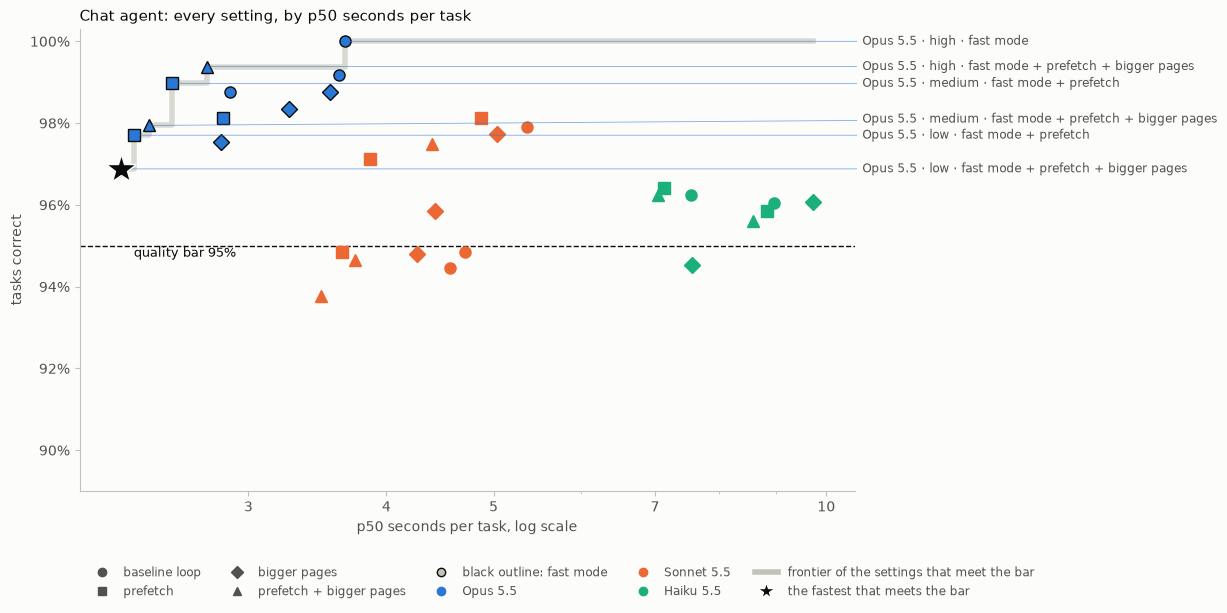
聊天智能体
- 我们的选择:Opus 5.5 在
low模式下启用快速模式、预取和更大的页面,p50 TTLT 为 2.3 秒,准确率 96.9%,每任务成本 <span>$</span>0.056。 - 如果成本是限制因素:Sonnet 5.5 在
medium模式下启用预取的成本约为前者的三分之一,但 p50 慢了约 1.6 秒,准确率为 97.1%。 - 跨模型来看,p50 速度提升的大部分来自预取。在 Opus 5.5 的
low模式配合快速模式下,预取通过省去智能体的首次查找,将 p50 缩短了约半秒。对于只有几次调用的任务而言,这占了等待时间的很大一部分。
report("Phone line")
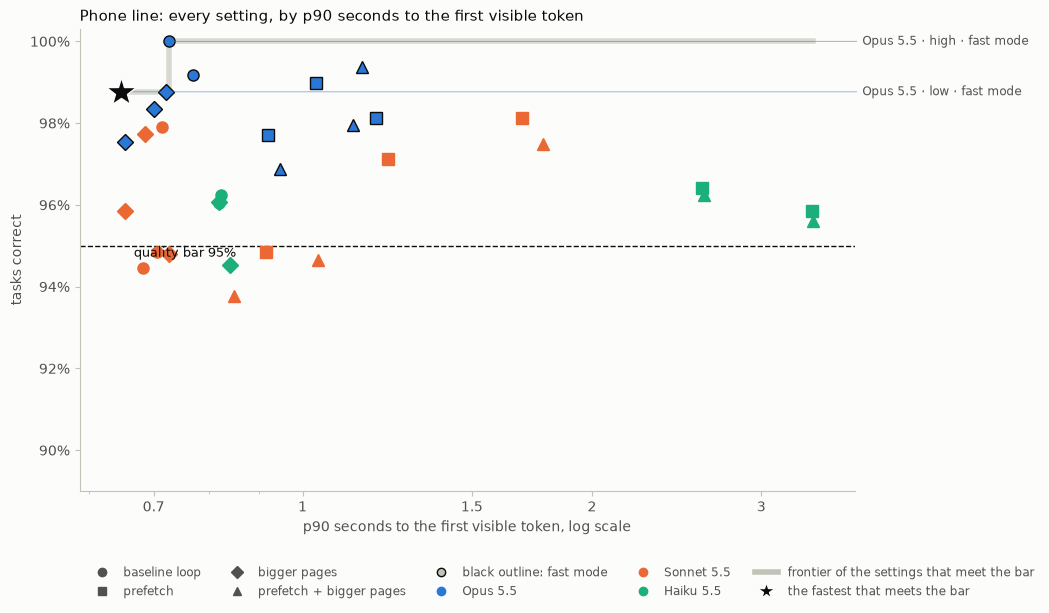
电话线路
- 我们的选择:使用
low档位并开启快速模式的 Opus 5.5,p90 TTFT 为 0.65 秒,准确率 98.8%,每任务成本 <span>$</span>0.069。 - 如果成本是限制因素:使用
medium档位、更大页面的 Sonnet 5.5 速度相当,价格约为四分之一,准确率 95.9%。不过其 p90 TTLT 要长 5.1 秒,因此来电者需要等待更久才能获得完整回答。 - 对于电话线路,首个 token 的延迟取决于首次调用是否进行思考。任何使其思考的因素,例如预取声明或选择 Haiku 5.5,都会推迟 TTFT。模型规模和努力程度几乎无关紧要,而更大的页面似乎对 TTFT 影响不大。
<a id="takeaways-and-next-steps"></a>
要点与后续步骤
我们的两个产品最终落在了相同的模型、effort 和速度上——Opus 5.5 在 low 档位并开启 fast mode——但采用了不同的循环,因为一个以首 token 为评判标准,另一个则以整个任务为评判标准。以下是可以应用到你自己延迟实验中的关键经验:
- 从 eval 和质量底线开始。 一些最快的设置会在准确率上失败,因此要针对你自己的任务构建 eval,事先确定你能接受的最低质量,并在每次变更时重新运行它。
- 为<i>感知</i>延迟而设计。 根据你的产品形态,针对用户实际感受到的等待进行优化。有些用户注意到的是任何内容出现需要多久,另一些用户注意到的则是完整答案需要多久,而加快其中一个可能会拖慢另一个。
- 先修循环,再动模型。 减少往返次数可以在不触碰模型推理的情况下节省时间,而且通常还能降低成本。更小的模型或更低的 effort 则以部分准确率换取速度。
- 输出通常才是时间的大头。 要求更少的输出,因为更短的答案往往也意味着更短的思考;当任务需要深度推理但只需要简短答案时,使用结构化输出并单独设置 effort。fast mode 或更小的模型写输出更快,但如果要写的内容更多,写得更快的模型仍可能更晚完成。
下表从你想要的结果出发,列出了能推动它的杠杆。在决定首先拉动哪些杠杆以降低应用延迟时,可以把它当作快速备忘单。
| 如果你想要…… | 可以尝试 |
|---|---|
| 更快的首 token | 发送更少的输入 token,用 prompt caching 缓存静态前缀,为突发流量预热它,并在长对话或图片密集的对话中使用消息线程;通过更低的 effort、Sonnet 5.5 上的 between_tools,或 Haiku 5.5 上的关闭思考,让首次调用不进行思考 |
| 更少的调用等待 | 预取每个任务开始时都会用到的查询,并为长结果返回更大的分页;当一连串调用最终归结为求和、过滤或计数时,使用程序化工具调用,并在更小的模型上使用子代理处理独立的查询 |
| 更少的输出等待 | 要求简短的输出形态或使用结构化输出,并整体降低 effort 或在常规轮次中降低;如果你的代理在工具调用之间写文本,要求不输出评论 |
| 输出开始后更快 | 为 Opus 5.5 开启 fast mode,或将几乎不需要推理的任务迁移到更小的模型,只要这不会导致模型写更多内容 |
| 更短的 worst case | 用超时和轮次上限限制循环,用 max_tokens 限制每次调用,并按§限制最长任务给模型一个任务预算或已用时间 |
| 感觉更短的等待 | 流式返回回复,并在模型工作期间展示思考摘要、进度更新或正在运行的工具;在后台压缩,这样长对话不会因摘要而停滞 |
<a id="limitations"></a>
局限性
在将我们的结果套用到你自己的 agent 之前,有几点需要注意:
- 最佳杠杆取决于你的具体用例。 我们的工作负载是合成的,其工具会即时返回结果,因此真实的查询会引入等待时间——这些时间我们的数据并未计入——同时也会暴露出另一组不同的延迟优化机会。
- 延迟是非确定性的。 大多数演示报告的是多次运行的中位数,而且不同模型之间的结果会逐轮变化。某个杠杆是有帮助还是有损害,比它具体带来多少变化更可靠。运行更多试验有助于降低噪声,但成本可能变得过高。
- 我们将测试重点放在 5.5 系列模型和 Messages API 上。 输出速度、思考以及快速模式等设置可能会在不同模型代际之间发生变化,而本 cookbook 中的 API 杠杆也可能随着平台演进而改变。Agent SDK、Claude Code 和其他框架也有各自的杠杆,我们在此并未涵盖。
- 还有其他因素可能影响你的延迟。 延迟还取决于此处任何杠杆都无法改变的因素,例如流量负载、一天中的时段、速率限制,以及你的网络和客户端。它还取决于你是直接调用 Claude API 还是通过云平台调用,以及所在区域。
<a id="conclusion"></a>
结论
不存在最快的通用配置。Acme 的电话线路和聊天代理从同一个代理和相同的调节手段出发,最终仍然采用了不同的配置,因为它们的用户对等待的感受不同。你的数据很可能与我们的不同,但方法和最佳实践是通用的。设定一个质量标准,并构建一个能让你达到该标准的评估。找出延迟方程中哪些项对你的用户最重要。然后测试可能有帮助的调节手段组合,并发布满足标准的最快设置。
延迟优化也永远没有终点。你的流量和任务会变化,新的模型和 API 功能会带来本手册未涵盖的调节手段。频繁重新运行你的评估,并检查今天的选择是否仍然是最快的。
常见问题
常见错误包括:在系统提示顶部放时间戳或请求 ID 导致缓存前缀失配,应把静态内容前置并用显式断点标记;编辑历史中间轮次导致缓存从该点失效甚至请求被拒,应只追加到 messages 末尾;更改模型、工具或 thinking 配置使缓存整体失效;max_tokens 设得过低导致思考耗尽预算而未写出答案,应捕获 stop_reason 为 max_tokens;子代理共享长上下文时并发启动导致全部冷读,应先预热或串行启动首个;程序化工具调用在需要逐条读取结果再决策的场景反而更慢;关闭思考或降低 effort 导致准确率跌破门槛。排查手段包括使用缓存诊断查看 cache_read 归零原因、统计各停止条件在历史任务上的触发频率、对每个变体交替重复运行以抵消负载波动。生产优化建议:为每个产品定义质量门槛与关注指标,用 bootstrap 检验判断显著性,将超时与轮次上限设为仅捕获失控任务的高水位,并为停止触发定义用户可见的降级行为。
企业应用扩展
后续可扩展方向包括:将评估集替换为真实业务任务并引入真实工具延迟;针对 Agent SDK、Claude Code 与 Managed Agents 各自的杠杆做对照;跟踪新模型代际对 OTPS、思考与快速模式的影响并定期重跑评估;把 effort 的逐轮切换与分类器结合,自动识别需要高投入的轮次;将程序化工具调用用于求和、过滤、计数类聚合任务;在长对话场景引入一小时缓存与后台压缩的组合策略;以及把延迟指标接入生产监控,形成持续回归的延迟看板。
总结
本文面向有编程基础的 AI 工程开发者,系统讲解 Claude API 延迟优化的工程方法。内容以延迟方程 TTLT ≈ 调用次数 × TTFT + 输出 token ÷ OTPS + 额外延迟 为主线,覆盖输入 token 管理、提示缓存与预热、消息线程、Agent 循环效率、后台压缩、子代理、预取与分页、程序化工具调用、输出 token 管理、结构化输出、模型与 effort 选择、快速模式、思考开关、最长任务限制以及流式与思考态 UI 等杠杆。强调先建立带质量门槛的评估,再通过多变量扫描选择满足准确率要求的最快配置。
- --
内容来源与验证
- 内容等级:PREMIUM_A
- 质量等级:S_CANDIDATE
- 难度:高级
- 验证等级:V1
- 原文作者:benlehrburger-ant, owenz-ant
- 原文日期:2026-11-02
- 来源许可:MIT
- 来源版本:
cdf4bdb51f6d29a192146b9f2305159dc89e7a4d - 查看原文
站内还有更多完整实战教程
加入会员,解锁全部教程、完整代码与持续更新内容。
加入会员