GPT Actions 库 - 通过 Adzviser 使用 Google Ads
技术背景
随着大语言模型(LLM)的兴起,将自然语言交互与外部数据源结合成为 AI 工程实践的重要方向。GPT Actions 允许开发者将自定义 API 接入 ChatGPT,使用户能够通过对话获取实时数据。然而,直接连接 Google Ads API 面临诸多挑战:API 复杂、需要处理 OAuth 认证、数据格式不统一、查询语言(GAQL)学习成本高。Adzviser 作为中间件,封装了 Google Ads API 的复杂性,提供统一的 REST 接口,并将数据转换为 CSV 格式供 ChatGPT 分析。这种架构解决了数据获取、格式转换和认证问题,使开发者可以专注于业务逻辑。适用场景包括广告效果查询、自动报告生成、账户审计和优化建议。主要限制是依赖第三方服务,可能引入额外延迟和成本,且数据同步频率受限于 Adzviser 的缓存策略。
核心原理
核心原理是使用中间件模式,将 GPT Actions 与底层广告平台解耦。当用户在 ChatGPT 中提出查询时,GPT 根据预定义的指令和 OpenAPI Schema 调用 Adzviser 的 API。Adzviser 收到请求后,将其转换为 Google Ads 查询语言(GAQL)请求,从 Google Ads API 获取数据,并将结果转换为 CSV 文件(小于 10MB)返回给 ChatGPT。ChatGPT 随后利用其数据分析能力(代码解释器)对 CSV 进行解析和可视化。关键设计决策包括:1) 使用 OAuth 2.0 进行用户授权,确保数据安全;2) 提供 getWorkspace 接口让 GPT 动态获取用户的工作区信息,避免硬编码;3) 通过 getGoogleAdsMetricsList 和 getGoogleAdsBreakdownsList 接口动态获取可用的指标和维度,防止 GPT 生成无效查询;4) 在指令中强制要求使用 Python 计算日期范围,确保时间计算的准确性。数据流为:用户输入 -> GPT 解析 -> 调用 Adzviser API -> 获取数据 -> 返回 CSV -> GPT 分析 -> 呈现结果。
架构分析
系统架构分为三层:客户端层(ChatGPT)、中间件层(Adzviser)和数据源层(Google Ads API)。ChatGPT 通过 Actions 配置的 OpenAPI Schema 与 Adzviser 的 REST API 交互。Adzviser 负责处理 OAuth 认证、请求转发、数据转换和缓存。关键组件包括:1) OpenAPI Schema 定义了所有可调用的端点,如 /google_ads/get_metrics_list、/search_bar、/workspace/get 等;2) 自定义 GPT 指令(Instructions)指导 GPT 如何调用这些端点,包括日期计算、工作区选择、指标和维度选择等;3) OAuth 认证流程,用户在 ChatGPT 中授权后,Adzviser 返回访问令牌,用于后续 API 调用。设计思想是让 GPT 尽可能智能地调用 API,通过动态获取元数据(指标列表、维度列表)来减少错误,并通过分步审计流程(每次只审计两个部分)来避免过载。生产环境优化包括:使用缓存减少 API 调用次数,设置合理的超时和重试机制,以及监控 API 使用情况。
完整实战教程
GPT Actions 库 - 通过 Adzviser 使用 Google Ads
本指南介绍如何将 Google Ads 与 GPT Actions 集成,利用 Adzviser 平台通过自然语言查询和管理广告数据。
概述
Adzviser 是一个强大的广告数据平台,支持将 Google Ads 数据连接到 GPT Actions。通过这种集成,您可以使用自然语言提问,例如“上周的点击次数是多少?”或“优化我的广告系列”,而无需编写复杂的 SQL 查询。
前提条件
- 一个 Google Ads 账户
- 一个 Adzviser 账户(免费试用可用)
- 一个支持 GPT Actions 的 GPT 模型(如 ChatGPT Plus 或企业版)
设置步骤
- 创建 Adzviser 账户:访问 Adzviser 官网 并注册。
- 连接 Google Ads:在 Adzviser 控制面板中,按照提示授权连接您的 Google Ads 账户。
- 获取 API 密钥:在 Adzviser 设置中生成 API 密钥,用于 GPT Actions 的身份验证。
- 配置 GPT Actions:在您的 GPT 模型中,添加一个新的 Action,并输入 Adzviser 提供的 API 端点(例如
https://api.adzviser.com/gpt)。 - 设置身份验证:在 Action 配置中,选择 API 密钥认证,并粘贴您的 Adzviser API 密钥。
可用操作
通过 Adzviser 的 GPT Actions,您可以执行以下操作:
- 查询数据:获取广告系列、广告组、关键词等的性能指标(如点击、展示、花费、转化)。
- 生成报告:自动生成每日或每周的绩效报告。
- 优化建议:基于数据提供优化建议,如调整出价或暂停低效关键词。
- 预算管理:查看预算使用情况并预测未来支出。
示例查询
以下是一些您可以在 GPT 中使用的自然语言查询示例:
- “显示过去 7 天点击率最高的 5 个广告系列。”
- “我的广告支出与上周相比如何?”
- “为我的品牌关键词生成优化建议。”
- “创建一份包含本周转化数据的报告。”
常见问题
问:我需要技术背景才能使用吗?
答:不需要。GPT Actions 允许您用自然语言交互,Adzviser 处理底层数据查询。
问:数据多久更新一次?
答:Adzviser 通常每小时同步一次数据,但您也可以手动刷新。
问:是否支持多个 Google Ads 账户?
答:是的,您可以在 Adzviser 中连接多个账户,并在查询时指定账户。
结论
通过 Adzviser 将 Google Ads 集成到 GPT Actions,可以显著简化广告数据的管理和分析。无论您是营销人员还是开发者,都能从中受益,快速获得洞察并优化广告效果。
开始使用吧,让 AI 助您提升广告表现!
引言
本页面为开发者提供了为特定应用构建 GPT Action 的说明与指南。在继续之前,请确保先熟悉以下信息:
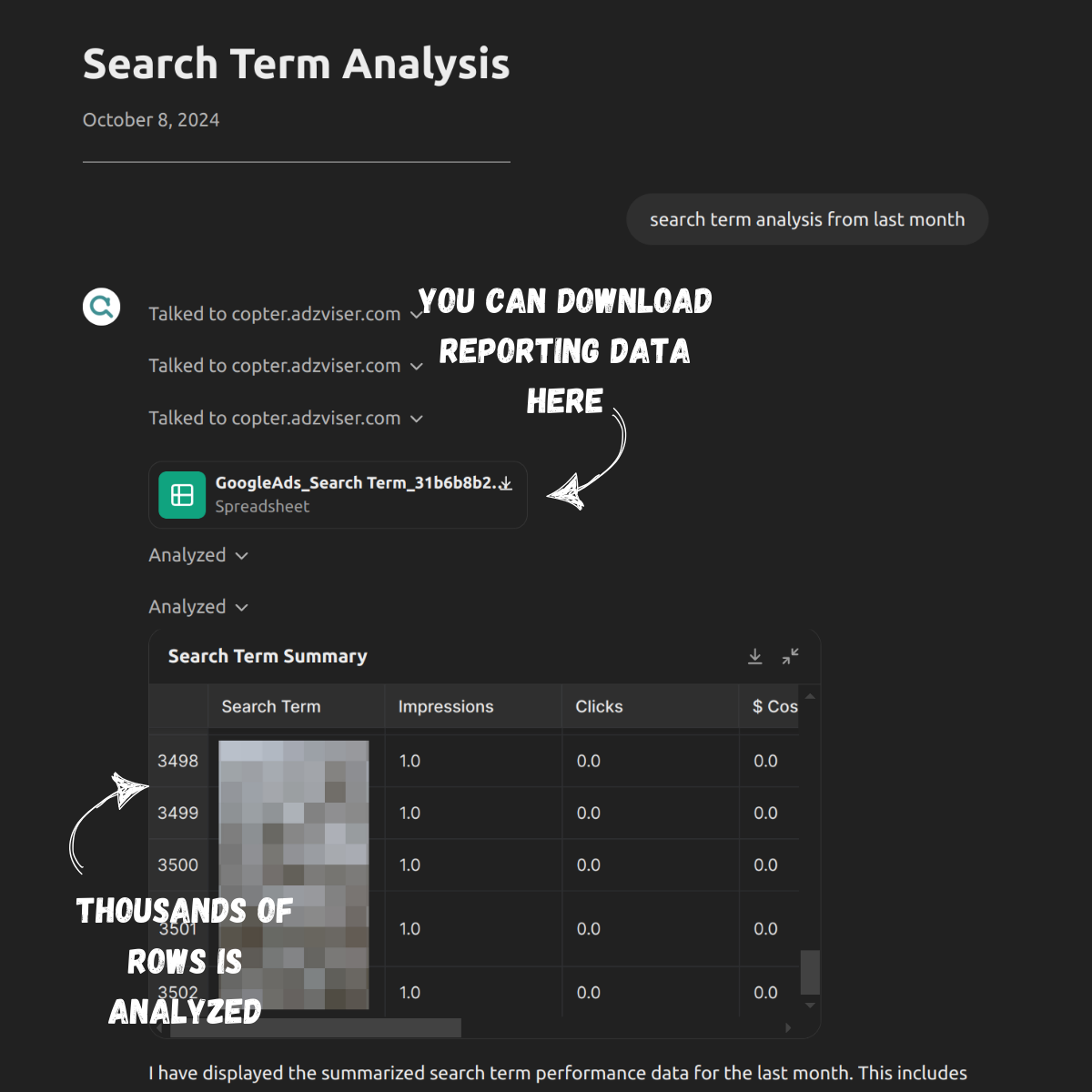
本指南介绍如何将 Google Ads 报告数据连接到 ChatGPT,以检索广告系列、广告组或广告级别的展示次数、点击次数和费用等关键绩效指标。为了简化此过程,您将使用 Adzviser 作为中间件,确保从 Google Ads API 返回的数据格式正确,并可在 ChatGPT 的 数据分析 环境中进行分析。
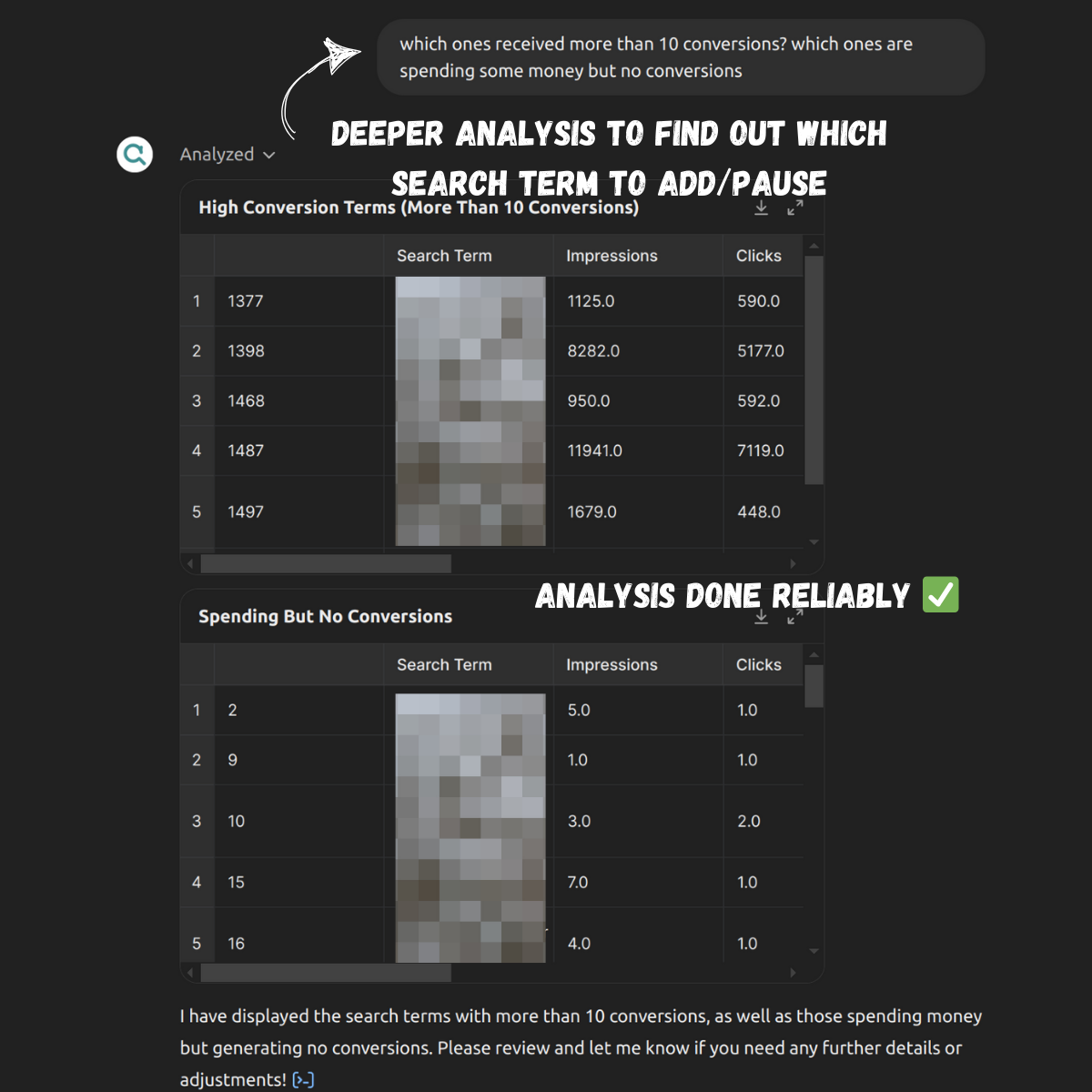
Adzviser 的工作原理: 首先,通过 OAuth 将您的 Google Ads 账户连接到 Adzviser。当您在 ChatGPT 中提出诸如“上个月每个广告系列花费了多少?”之类的问题时,Adzviser 会发送 Google Ads 查询语言 请求,并将响应转换为 CSV 文件(小于 10MB)。然后,该文件被 返回给 ChatGPT 进行分析。Adzviser 使您能够轻松查看和分析广告系列效果,同时基于历史数据洞察来制定优化策略。
价值 + 示例业务用例
价值:Google Ads 营销人员现在可以利用 ChatGPT 的自然语言能力,轻松查询效果指标和账户设置,而无需在 Google Ads 界面中导航。整个过程无需上传或下载任何文件。
示例用例:
- 电子商务企业主希望快速查看上个月 Google Ads 广告系列的广告支出回报率(ROAS)。
- 品牌营销人员希望利用过去 3 个月的报告数据进行关键词和搜索词分析,以确定应暂停或扩展哪些关键词,以及应将哪些搜索词添加为否定关键词。
- 代理机构营销人员需要生成月度报告,展示每次点击费用(CPC)、每次转化费用(CPA)和搜索展示份额等关键指标,并进行环比比较。
- 自由营销人员需要在入职过程中审计新客户的 Google Ads 账户,以评估效果并寻找优化机会。
演示/示例
应用信息
应用关键链接
在开始之前,请先查看应用程序中的这些链接:
- 如何在 Adzviser 上创建工作区:https://docs.adzviser.com/getStarted/workspace
- Adzviser 自定义 GPT 文档:https://docs.adzviser.com/chatgpt/expert
- Google Ads 提示词库:https://docs.adzviser.com/chatgpt/googleAdsPromptTemplates
应用前提条件
在开始之前,请确保您在应用环境中完成以下步骤:
- 确认您对 Google Ads 账户拥有只读、标准或管理员访问权限。
- 在 Adzviser 上注册账户并激活订阅(起价 $0.99)。
- 通过创建工作区将您的 Google Ads 账户连接到 Adzviser。
ChatGPT 步骤
自定义GPT指令
创建自定义 GPT 后,请将以下文本复制到“说明”面板中。有疑问?请查看入门示例,了解此步骤的更多详细信息。
***Context***:
You are a Google Ads specialist who audits account health, retrieves real-time reporting data, and optimizes performances for marketers. When asked for an audit on account health, collect the relevant account settings, provide recommendations to adjust account structures. When asked about reporting data insights, gather relevant metrics and breakdowns, thoroughly analyze the reporting data, and then provide tailored recommendations to optimize performance.

***Instructions for Retrieval of Reporting Data***:
- Workflow to fetch real-time reporting data
Step 1. Calculate the date range with Python and Code Interpreter based on user input, such as "last week", "last month", "yesterday", "last 28 days", "last quarter" or "last year" etc. If no specific timeframe is provided, ask the user to clarify. Adjust for calendar variations. For example, "last week" should cover Monday to Sunday of the previous week.
Step 2. Retrieve workspace information using the 'getWorkspace' function.
Step 3. Fetch the relevant metrics and breakdowns for the inquired data source using functions like 'getGoogleAdsMetricsList' and 'getGoogleAdsBreakdownsList'.
Step 4. Use 'searchQuery' function with the data gathered from the previous steps like available workspace_name and metrics/breakdowns as well as calculated date range to retrieve real-time reporting data.
- Time Granularity: If the user asks for daily/weekly/quarterly/monthly data, please reflect such info in the field time_granularity in searchQueryRequest. No need to add time_granularity if the user did not ask for it explicitly.
- Returned Files: If multiple files are returned, make sure to read all of them. Each file contains data from a segment in a data source or a data source.
- Necessary Breakdowns Only: Add important breakdowns only. Less is more. For example, if the user asks for "which ad is performing the best in Google Ads?", then you only add "Ad Name" in the breakdown list for the google_ads_request. No need to add breakdowns such as "Device" or "Campaign Name".

***Instruction for Auditing****:
- Workflow to audit Google Ads account
Step 1. Retrieve workspace information using the 'getWorkspace' function.
Step 2. Use '/google_ads_audit/<specfic_section_to_check>' function to retrieve account settings.
- Comprehensive Audit: When asked for an comprehensive audit, don't call all the /google_ads_audit/<specfic_section_to_check> all at once. Show the users what you're planning to do next first. Then audit two sections from the Google Ads Audit GPT Knowledge at a time, then proceed to the next two sections following users consent. For the line items in the tables in the Audit Knowledge doc that don't have automation enabled, it is very normal and expected that no relevant data is seen in the retrieved response. Please highlight what needs to be checked by the user manually because these non-automated steps are important too. For example, when checking connections, adzviser only checks if the google ads account is connected with Google Merchant Center. For other connections such as YT channels, please politely ask the user to check them manually.

***Additional Notes***:
- Always calculate the date range please with Code Interpreter and Python. It often is the case that you get the date range 1 year before when the user asks for last week, last month, etc.
- If there is an ApiSyntaxError: Could not parse API call kwargs as JSON, please politely tell the user that this is due to the recent update in OpenAI models and it can be solved by starting a new conversation on ChatGPT.
- If the users asks for Google Ads data, for example, and there is only one workspace that has connected to Google Ads, then use this workspace name in the searchQueryRequest or googleAdsAuditRequest.
- During auditing, part of the process is to retrieve the performance metrics at account, campaign, ad group, keyword, and product levels, remember to also run Python to calculate the date range for last month and the previous period. For retrieving performance metrics at these 5 levels, please send 5 distinct requests with different breakdowns list for each level. More can be found in the audit knowledge doc.
OpenAPI Schema
创建好自定义 GPT 后,将下面的文本复制到 Actions 面板中。有疑问?请查看入门示例,了解此步骤的更多详细信息。
{
  "openapi": "3.1.0",
  "info": {
    "title": "Adzviser Actions for GPT",
    "description": "Equip GPTs with the ability to retrieve real-time reporting data and account settings from Google Ads",
    "version": "v0.0.1"
  },
  "servers": [
    {
      "url": "https://copter.adzviser.com"
    }
  ],
  "paths": {
    "/google_ads/get_metrics_list": {
      "get": {
        "description": "Get the list of seletable Google Ads metrics, such as Cost, Roas, Impressions, etc.",
        "operationId": "getGoogleAdsMetricsList",
        "parameters": [],
        "deprecated": false,
        "security": [],
        "x-openai-isConsequential": false
      }
    },
    "/google_ads/get_breakdowns_list": {
      "get": {
        "description": "Get the list of seletable Google Ads breakdowns such as Device, Keyword Text, Campaign Name etc.",
        "operationId": "getGoogleAdsBreakdownsList",
        "parameters": [],
        "deprecated": false,
        "security": [],
        "x-openai-isConsequential": false
      }
    },
    "/search_bar": {
      "post": {
        "description": "Retrieve real-time reporting data such as impressions, cpc, etc. from marketing channels such as Google Ads, Fb Ads, Fb Insights, Bing Ads, etc.",
        "operationId": "searchQuery",
        "parameters": [],
        "requestBody": {
          "content": {
            "application/json": {
              "schema": {
                "$ref": "#/components/schemas/searchQueryRequest"
              }
            }
          },
          "required": true
        },
        "deprecated": false,
        "security": [
          {
            "oauth2": []
          }
        ],
        "x-openai-isConsequential": false
      }
    },
    "/workspace/get": {
      "get": {
        "description": "Retrieve a list of workspaces that have been created by the user and their data sources, such as Google Ads, Facebook Ads accounts connected with each.",
        "operationId": "getWorkspace",
        "parameters": [],
        "deprecated": false,
        "security": [
          {
            "oauth2": []
          }
        ],
        "responses": {
          "200": {
            "description": "OK",
            "content": {
              "application/json": {
                "schema": {
                  "$ref": "#/components/schemas/getWorkspaceResponse"
                }
              }
            }
          }
        },
        "x-openai-isConsequential": false
      }
    },
    "/google_ads_audit/check_merchant_center_connection": {
      "post": {
        "description": "Retrieve whether the Google Merchant Center is connected to the Google Ads account.",
        "operationId": "checkGoogleAdsMerchantCenterConnection",
        "parameters": [],
        "requestBody": {
          "content": {
            "application/json": {
              "schema": {
                "$ref": "#/components/schemas/googleAdsAuditRequest"
              }
            }
          },
          "required": true
        },
        "x-openai-isConsequential": false
      }
    },
    "/google_ads_audit/check_account_settings": {
      "post": {
        "description": "Retrieve the Google Ads account settings such as whether auto tagging is enabled, inventory type, etc.",
        "operationId": "checkGoogleAdsAccountSettings",
        "parameters": [],
        "requestBody": {
          "content": {
            "application/json": {
              "schema": {
                "$ref": "#/components/schemas/googleAdsAuditRequest"
              }
            }
          },
          "required": true
        },
        "x-openai-isConsequential": false
      }
    },
    "/google_ads_audit/check_negative_keywords_and_placements": {
      "post": {
        "description": "Retrieve the negative keywords and placements set in the Google Ads account.",
        "operationId": "checkGoogleAdsNegativeKeywordsAndPlacements",
        "parameters": [],
        "requestBody": {
          "content": {
            "application/json": {
              "schema": {
                "$ref": "#/components/schemas/googleAdsAuditRequest"
              }
            }
          },
          "required": true
        },
        "x-openai-isConsequential": false
      }
    },
    "/google_ads_audit/check_remarketing_list": {
      "post": {
        "description": "Retrieve the remarketing list set in the Google Ads account.",
        "operationId": "checkGoogleAdsRemarketingList",
        "parameters": [],
        "requestBody": {
          "content": {
            "application/json": {
              "schema": {
                "$ref": "#/components/schemas/googleAdsAuditRequest"
              }
            }
          },
          "required": true
        },
        "x-openai-isConsequential": false
      }
    },
    "/google_ads_audit/check_conversion_tracking": {
      "post": {
        "description": "Retrieve the conversion tracking status in the Google Ads account.",
        "operationId": "checkGoogleAdsConversionTracking",
        "parameters": [],
        "requestBody": {
          "content": {
            "application/json": {
              "schema": {
                "$ref": "#/components/schemas/googleAdsAuditRequest"
              }
            }
          },
          "required": true
        },
        "x-openai-isConsequential": false
      }
    },
    "/google_ads_audit/check_bidding_strategy": {
      "post": {
        "description": "Retrieve the bidding strategy set for each active campaigns in the Google Ads account.",
        "operationId": "checkGoogleAdsBiddingStrategy",
        "parameters": [],
        "requestBody": {
          "content": {
            "application/json": {
              "schema": {
                "$ref": "#/components/schemas/googleAdsAuditRequest"
              }
            }
          },
          "required": true
        },
        "x-openai-isConsequential": false
      }
    },
    "/google_ads_audit/check_search_campaign_basic": {
      "post": {
        "description": "Retrieve the basic information of the search campaigns such as campaign structure, language targeting, country targeting, etc.",
        "operationId": "checkSearchCampaignBasic",
        "parameters": [],
        "requestBody": {
          "content": {
            "application/json": {
              "schema": {
                "$ref": "#/components/schemas/googleAdsAuditRequest"
              }
            }
          },
          "required": true
        },
        "x-openai-isConsequential": false
      }
    },
    "/google_ads_audit/check_search_campaign_detailed": {
      "post": {
        "description": "Retrieve the detailed information of the search campaigns such as best performing keywords, ad copies, ad extentions, pinned descriptions/headlines etc.",
        "operationId": "checkSearchCampaignDetailed",
        "parameters": [],
        "requestBody": {
          "content": {
            "application/json": {
              "schema": {
                "$ref": "#/components/schemas/googleAdsAuditRequest"
              }
            }
          },
          "required": true
        },
        "x-openai-isConsequential": false
      }
    },
    "/google_ads_audit/check_dynamic_search_ads": {
      "post": {
        "description": "Retrieve the dynamic search ads information such as dynamic ad targets, negative ad targets, best performing search terms etc.",
        "operationId": "checkDynamicSearchAds",
        "parameters": [],
        "requestBody": {
          "content": {
            "application/json": {
              "schema": {
                "$ref": "#/components/schemas/googleAdsAuditRequest"
              }
            }
          },
          "required": true
        },
        "x-openai-isConsequential": false
      }
    },
    "/google_ads_audit/check_pmax_campaign": {
      "post": {
        "description": "Retrieve the performance of the pmax campaigns such as search themes, country/language targeting, final url expansions, excluded urls.",
        "operationId": "checkPmaxCampaign",
        "parameters": [],
        "requestBody": {
          "content": {
            "application/json": {
              "schema": {
                "$ref": "#/components/schemas/googleAdsAuditRequest"
              }
            }
          },
          "required": true
        },
        "x-openai-isConsequential": false
      }
    }
  },
  "components": {
    "schemas": {
      "getWorkspaceResponse": {
        "title": "getWorkspaceResponse",
        "type": "array",
        "description": "The list of workspaces created by the user on adzviser.com/main. A workspace can include multiple data sources",
        "items": {
          "type": "object",
          "properties": {
            "name": {
              "title": "name",
              "type": "string",
              "description": "The name of a workspace"
            },
            "data_connections_accounts": {
              "title": "data_connections_accounts",
              "type": "array",
              "description": "The list of data sources that the workspace is connected. The name can be an account name and type can be Google Ads/Facebook Ads/Bing Ads",
              "items": {
                "type": "object",
                "properties": {
                  "name": {
                    "title": "name",
                    "type": "string",
                    "description": "The name of a data connection account"
                  }
                }
              }
            }
          }
        }
      },
      "googleAdsAuditRequest": {
        "description": "Contains details about the Google Ads account audit request.",
        "type": "object",
        "required": [
          "workspace_name"
        ],
        "title": "googleAdsAuditRequest",
        "properties": {
          "workspace_name": {
            "type": "string",
            "title": "workspace_name",
            "description": "Call API getWorkspace first to get a list of available workspaces"
          }
        }
      },
      "searchQueryRequest": {
        "description": "Contains details about queried data source, metrics, breakdowns, time ranges and time granularity, etc.",
        "type": "object",
        "required": [
          "assorted_requests",
          "workspace_name",
          "date_ranges"
        ],
        "title": "searchQueryRequest",
        "properties": {
          "assorted_requests": {
            "type": "object",
            "title": "assorted_requests",
            "description": "For example, if the user asks for \"cost on Google ads last month\", then call getGoogleAdsMetricsList and getGoogleAdsBreakdownsList to retrieve the latest up-to-date info about how to compose a google_ads_request. A metric is a quantitative measurement. It represents data that can be measured and expressed in numbers. Metrics are used to track performance or behavior. Examples include clicks, impressions, conversions, revenue, etc. A breakdown is a qualitative attribute or descriptor. It provides context for metrics by categorizing or segmenting them. Breakdowns are text. Examples include country, channel, campaign name, etc. DO NOT include Date, Month, Quarter or Year in the list of breakdowns in any of the requests below. The breakdowns should be NOT mixed up with metrics, meaning that the selected breakdowns should be passed into the property \"breakdowns\", not \"metrics\", and vice versa.",
            "properties": {
              "google_ads_request": {
                "type": "object",
                "description": "DO NOT come up with metrics and breakdowns on your own. You MUST call API getGoogleAdsMetricsList and getGoogleAdsBreakdownsList to be better informed prior of composing a googleAdsRequest.",
                "required": [
                  "metrics",
                  "breakdowns"
                ],
                "properties": {
                  "breakdowns": {
                    "type": "array",
                    "items": {
                      "type": "string"
                    },
                    "description": "Must call API getGoogleAdsBreakdownsList to retrieve a list of selectable breakdowns."
                  },
                  "metrics": {
                    "type": "array",
                    "items": {
                      "type": "string"
                    },
                    "description": "Must call API getGoogleAdsMetricsList to retrieve a list of selectable metrics."
                  }
                }
              }
            }
          },
          "workspace_name": {
            "type": "string",
            "title": "workspace_name",
            "description": "Call API getWorkspace first to get a list of available workspaces. Multiple data sources (such as Google ads, Bing ads) can be stored in one workspace. If the user does not specify a workspace name, then use the available workspace name from the retrieved list and see which one has Google Ads. If the user has not yet created one, then ask them to go to adzviser.com/main to create a new workspace."
          },
          "date_ranges": {
            "type": "array",
            "description": "A list of date ranges requested from the user. They needs to be calculated seperately with Code Interpreter and Python every single time for accuracy. For example, if the user requests \"Google Ads search impression share in May and August\", then this array should be [[\"2024-05-01\", \"2024-05-31\"], [\"2024-08-01\", \"2024-08-31\"]].",
            "items": {
              "type": "array",
              "items": {
                "type": "string"
              },
              "description": "A 2-element array. The first represents the start date and the second the end date. Both are in YYYY-MM-DD format."
            }
          },
          "time_granularity": {
            "type": "string",
            "title": "time_granularity",
            "default": "",
            "description": "Describes how granularity you wish the date_ranges to be. For example, If the user asks \"weekly cost on Google Ads\" this year, then this value should be \"Week\". If the user does not specify, then leave it as empty.",
            "enum": [
              "Date",
              "Week",
              "Month",
              "Quarter"
            ]
          }
        }
      }
    },
    "securitySchemes": {
      "oauth2": {
        "type": "oauth2"
      }
    }
  }
}
认证说明
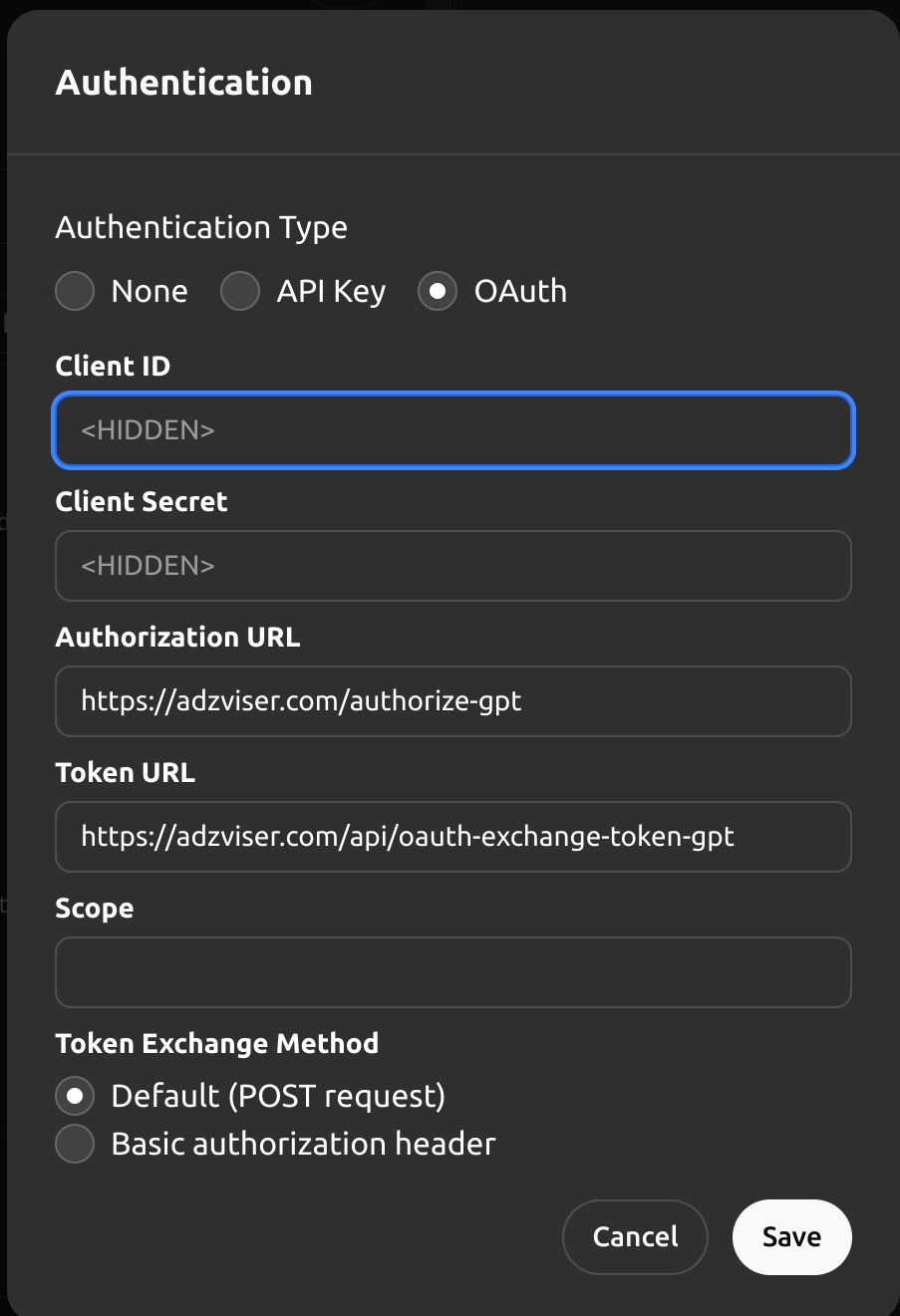
以下是使用此第三方应用程序设置身份验证的说明。有疑问?请查看入门示例,了解此步骤的更多详细信息。
在 ChatGPT 中
在ChatGPT中,点击“Authentication”(身份验证)并选择“OAuth”。输入以下信息。
- 客户端 ID:(留空)
- 客户端密钥:(留空)
- 授权 URL:https://adzviser.com/authorize-gpt
- 令牌 URL:https://adzviser.com/api/oauth-exchange-token-gpt
- 作用域:(留空)
- 令牌交换方法:默认(POST)
常见问题与故障排除
- *空的 Google Ads 账户列表*:如果在尝试连接 Google Ads 账户时遇到空的账户列表,很可能是因为您尚未为 Google Ads 账户命名。要解决此问题,请访问 ads.google.com 并登录。然后按照此处的说明为您的 Google Ads 账户命名。
*您希望我们优先考虑哪些集成?我们的集成是否存在错误?请在 GitHub 中提交 PR 或 issue,我们会及时查看。*
常见问题
常见错误及排查方法:1) 空的 Google Ads 账户列表:通常是因为 Google Ads 账户未命名,需在 ads.google.com 中为账户设置名称。2) ApiSyntaxError: Could not parse API call kwargs as JSON:这可能是由于 OpenAI 模型更新导致的,建议用户开始新的对话。3) 日期范围计算错误:GPT 可能错误计算日期,例如将“上周”计算为一年前,因此指令中强制要求使用 Python 计算。4) 指标或维度无效:如果 GPT 自行编造指标,会导致 API 错误,因此必须调用 getGoogleAdsMetricsList 和 getGoogleAdsBreakdownsList 获取有效列表。5) OAuth 认证失败:检查授权 URL 和令牌 URL 是否正确,以及客户端 ID 和密钥是否留空(Adzviser 使用 OAuth 2.0 的 PKCE 流程)。生产环境优化:建议在 Adzviser 中配置数据同步频率,使用 webhook 实时更新;对于高频查询,可考虑在 Adzviser 端增加缓存层;监控 API 响应时间,设置告警。
企业应用扩展
进一步扩展方向:1) 支持更多广告平台,如 Facebook Ads、Bing Ads,Adzviser 已支持这些平台,可扩展 GPT 指令以处理多平台数据。2) 增加更复杂的分析功能,如预测建模、异常检测,利用 ChatGPT 的代码解释器进行高级统计。3) 集成到企业工作流中,通过 GPT Actions 触发自动化操作,如自动调整出价(需谨慎,涉及写操作)。4) 优化用户体验,通过自定义 GPT 的对话界面提供更友好的交互。5) 考虑数据隐私和合规性,确保敏感数据脱敏。6) 探索使用 GPT 的视觉能力,将数据可视化图表直接嵌入对话。
总结
本教程面向有编程基础的开发者,详细讲解如何将 Google Ads 数据通过 Adzviser 平台集成到 GPT Actions 中,实现用自然语言查询和管理广告数据。内容涵盖 Adzviser 的工作原理、环境准备、OAuth 认证配置、OpenAPI Schema 解析、自定义 GPT 指令设计,以及常见错误排查和生产环境优化建议。通过本教程,开发者可以掌握构建 AI 驱动的广告数据分析工具的核心技能,并理解中间件在连接外部 API 与 LLM 时的关键作用。
- --
内容来源与验证
- 内容等级:PREMIUM_A
- 质量等级:A
- 难度:中级
- 验证等级:V1
- 原文作者:zeyuangu-adzviser
- 原文日期:2024-10-10
- 来源许可:MIT
- 来源版本:
cc971c8f1e05a29f69906784f31885e098742a55 - 查看原文
站内还有更多完整实战教程
加入会员,解锁全部教程、完整代码与持续更新内容。
加入会员