GPT Actions 库:Outlook 集成指南
技术背景
随着大型语言模型(LLM)能力的增强,将自然语言处理与外部服务集成成为 AI 工程实践的重要方向。GPT Actions 允许开发者通过 OpenAPI Schema 定义工具,使模型能够调用外部 API。Outlook 集成解决了用户需要高效管理邮件、日历和联系人的需求,通过自然语言指令即可完成复杂操作,减少手动切换应用的时间。适用场景包括个人助理、企业办公自动化、会议安排等。主要限制包括:依赖 Microsoft Graph API 的权限模型,需要 Azure 应用注册;OAuth 2.0 认证流程复杂;API 调用受速率限制;数据隐私和安全需谨慎处理。
核心原理
核心原理是利用 GPT 的自然语言理解能力,将用户指令解析为结构化 API 调用。数据流为:用户输入 → GPT 模型理解意图 → 根据 OpenAPI Schema 生成 API 请求 → 通过 OAuth 2.0 认证 → 调用 Microsoft Graph API → 返回结果 → GPT 生成自然语言响应。组件关系:GPT 作为前端交互层,OpenAPI Schema 定义可用操作和参数,OAuth 2.0 提供安全认证,Microsoft Graph API 作为后端服务。关键设计决策包括:使用委托权限而非应用程序权限,以用户身份操作;采用 OAuth 2.0 授权码流程,确保用户授权;Schema 中定义清晰的 operationId 和参数,便于模型调用。
架构分析
系统架构采用三层设计:客户端层(ChatGPT 界面)、集成层(GPT Actions 配置)和服务层(Microsoft Graph API)。集成层包含自定义指令(定义 GPT 行为)和 OpenAPI Schema(定义 API 端点)。认证流程使用 OAuth 2.0 授权码模式,涉及 Azure AD 作为身份提供者。设计思想强调模块化:将认证、API 定义和业务逻辑分离,便于维护和扩展。可扩展点包括添加更多 Graph API 端点(如联系人管理)、支持多用户、实现缓存和错误处理。
完整实战教程
GPT Actions 库:Outlook
GPT Actions 库中的 Outlook 集成允许您将 GPT 与 Microsoft Outlook 连接,实现邮件、日历和联系人的自动化操作。通过简单的配置,您可以让 GPT 帮助您管理收件箱、安排会议、查找联系人等。
功能概述
- 邮件操作:发送、回复、转发和搜索邮件。
- 日历操作:创建、更新和查询事件。
- 联系人操作:查找和添加联系人。
配置步骤
- 启用 Outlook 动作:在 GPT Actions 库中找到 Outlook 动作,并点击启用。
- 授权访问:按照提示登录您的 Microsoft 账户,并授予必要的权限。
- 测试连接:完成授权后,您可以测试连接以确保一切正常。
使用示例
以下是一些常见的用法示例:
- 发送邮件:告诉 GPT“给张三发送一封邮件,主题为‘项目进度’,内容为‘请更新项目进度报告’。”
- 安排会议:告诉 GPT“在明天下午 3 点安排一个与李四的会议,时长 1 小时。”
- 查找联系人:询问 GPT“帮我找到王五的邮箱地址。”
权限与安全
- 权限范围:您可以选择授予 GPT 访问邮件、日历或联系人的权限,建议仅授予必要的权限。
- 数据安全:所有操作均通过 Microsoft 官方 API 进行,确保数据安全。
常见问题
- 无法连接:请检查您的网络连接和 Microsoft 账户状态。
- 权限不足:确保您已授予足够的权限,例如发送邮件需要“Mail.Send”权限。
- 操作失败:查看错误信息,并根据提示调整请求。
更多资源
通过以上指南,您可以快速上手 Outlook 集成,让 GPT 成为您的智能助手。
引言
本页面为开发者构建特定应用的 GPT Action 提供说明与指南。在继续之前,请确保先熟悉以下信息:
这个特定的 GPT 操作概述了如何连接到 Outlook,即微软用于电子邮件和日历事件的网络服务。此操作假定用户的上下文,并允许他们从 Outlook 发送和检索电子邮件及日历事件。
价值 + 示例业务用例
价值:用户现在可以利用ChatGPT的自然语言能力直接连接Outlook
示例用例:
- 用户可以查看当天所有会议,并让ChatGPT总结一天的情况
- 用户可以直接将ChatGPT的输出通过电子邮件发送给某人
应用信息
应用关键链接
在开始之前,请查看应用程序中的以下链接:
- 应用程序网站:https://portal.azure.com/
- 应用程序 API 文档:https://learn.microsoft.com/en-us/graph/api/overview?view=graph-rest-1.0
应用前提条件
在开始之前,请确保在您的应用程序环境中完成以下步骤:
- 确保您拥有访问权限和权限,以便在 Azure 中设置应用注册。
ChatGPT 步骤
自定义GPT指令
创建自定义 GPT 后,将以下文本复制到“说明”面板中。有疑问?请查看入门示例,了解此步骤的更多详细信息。
**Context**: you are specialized GPT designed to manage emails and calendar events through API connections to Microsoft Outlook. This GPT can create, read, send, and alter emails and calendar events based on user instructions. It ensures efficient handling of communication and scheduling needs by leveraging Microsoft Graph API for seamless integration with Outlook services.

**Instructions**:
- When asked to perform a task, use the available actions via the microsoft.graph.com API.
- You should behave professionally and provide clear, concise responses.
- Offer assistance with tasks such as drafting emails, scheduling meetings, organising calendar events, and retrieving email or event details.
- Ask for clarification when needed to ensure accuracy and completeness in fulfilling user requests.
- Always conclude an email by signing off with logged in user's name which can be retrieved via the User.Read endpoint
OpenAPI Schema
创建自定义 GPT 后,将以下文本复制到 Actions 面板中。有问题?查看入门示例以了解此步骤的更多详细信息。
openapi: 3.1.0
info:
  title: Microsoft Graph API Integration
  version: 1.0.0
servers:
  - url: https://graph.microsoft.com/v1.0
components:
  securitySchemes:
    OAuth2:
      type: oauth2
      flows:
        clientCredentials:
          tokenUrl: https://login.microsoftonline.com/{tenant_id}/oauth2/v2.0/token
          scopes:
            https://graph.microsoft.com/User.Read: Access current user profile
            https://graph.microsoft.com/Mail.Read: Read user mail
            https://graph.microsoft.com/Mail.Send: Send mail
            https://graph.microsoft.com/Calendars.ReadWrite: Read and write user calendars
  schemas:
    UserProfile:
      type: object
      properties:
        id:
          type: string
        displayName:
          type: string
        mail:
          type: string
    UserMessage:
      type: object
      properties:
        id:
          type: string
        subject:
          type: string
        bodyPreview:
          type: string
    CalendarEvent:
      type: object
      properties:
        id:
          type: string
        subject:
          type: string
        start:
          type: object
          properties:
            dateTime:
              type: string
            timeZone:
              type: string
        end:
          type: object
          properties:
            dateTime:
              type: string
            timeZone:
              type: string
    NewEvent:
      type: object
      properties:
        subject:
          type: string
        start:
          type: object
          properties:
            dateTime:
              type: string
            timeZone:
              type: string
        end:
          type: object
          properties:
            dateTime:
              type: string
            timeZone:
              type: string
        attendees:
          type: array
          items:
            type: object
            properties:
              emailAddress:
                type: object
                properties:
                  address:
                    type: string
                  name:
                    type: string
    SendMailRequest:
      type: object
      properties:
        message:
          type: object
          properties:
            subject:
              type: string
            body:
              type: object
              properties:
                contentType:
                  type: string
                content:
                  type: string
            toRecipients:
              type: array
              items:
                type: object
                properties:
                  emailAddress:
                    type: object
                    properties:
                      address:
                        type: string
security:
  - OAuth2: []
paths:
  /me:
    get:
      operationId: getUserProfile
      summary: Get the authenticated user's profile
      security:
        - OAuth2: []
      responses:
        '200':
          description: A user profile
          content:
            application/json:
              schema:
                $ref: '#/components/schemas/UserProfile'
  /me/messages:
    get:
      operationId: getUserMessages
      summary: Get the authenticated user's messages
      security:
        - OAuth2: []
      parameters:
        - name: $top
          in: query
          required: false
          schema:
            type: integer
            default: 10
            description: Number of messages to return
        - name: $filter
          in: query
          required: false
          schema:
            type: string
            description: OData filter query to narrow results
        - name: $orderby
          in: query
          required: false
          schema:
            type: string
            description: OData order by query to sort results
      responses:
        '200':
          description: A list of user messages
          content:
            application/json:
              schema:
                type: array
                items:
                  $ref: '#/components/schemas/UserMessage'
  /me/sendMail:
    post:
      operationId: sendUserMail
      summary: Send an email as the authenticated user
      security:
        - OAuth2: []
      requestBody:
        required: true
        content:
          application/json:
            schema:
              $ref: '#/components/schemas/SendMailRequest'
      responses:
        '202':
          description: Accepted
  /me/events:
    get:
      operationId: getUserCalendarEvents
      summary: Get the authenticated user's calendar events
      security:
        - OAuth2: []
      responses:
        '200':
          description: A list of calendar events
          content:
            application/json:
              schema:
                type: array
                items:
                  $ref: '#/components/schemas/CalendarEvent'
    post:
      operationId: createUserCalendarEvent
      summary: Create a new calendar event for the authenticated user
      security:
        - OAuth2: []
      requestBody:
        required: true
        content:
          application/json:
            schema:
              $ref: '#/components/schemas/NewEvent'
      responses:
        '201':
          description: Created
          content:
            application/json:
              schema:
                $ref: '#/components/schemas/CalendarEvent'
认证说明
以下是使用 Outlook 设置身份验证的说明。有问题吗?请查看入门示例,了解此步骤的更多详细信息。
Azure 步骤
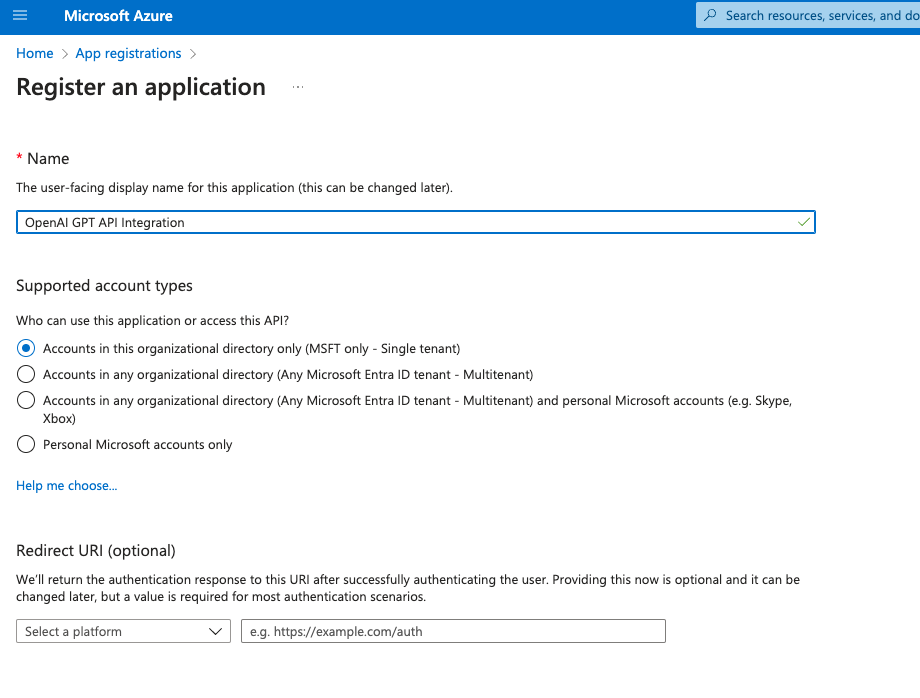
- <b>应用注册</b>:第一步是在 Azure 门户 中注册一个新的应用注册,用于在我们的应用程序与 Azure Active Directory/Entra ID 之间集成 OAuth。只需为应用程序提供一个相关的名称,暂时将重定向 URI 留空,因为我们稍后会返回此处,然后保存。
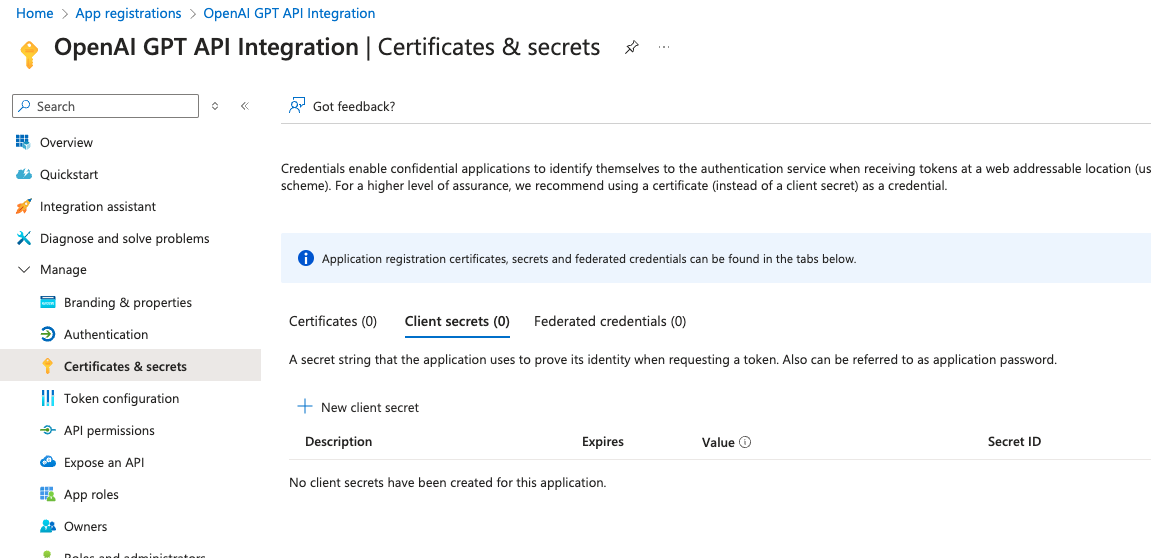
- <b>证书与机密</b>:接下来,我们需要生成一个客户端机密,以确保 GPT 与 Azure 之间的安全通信。在应用注册中,导航到侧边栏中的 <b>证书与机密</b>。
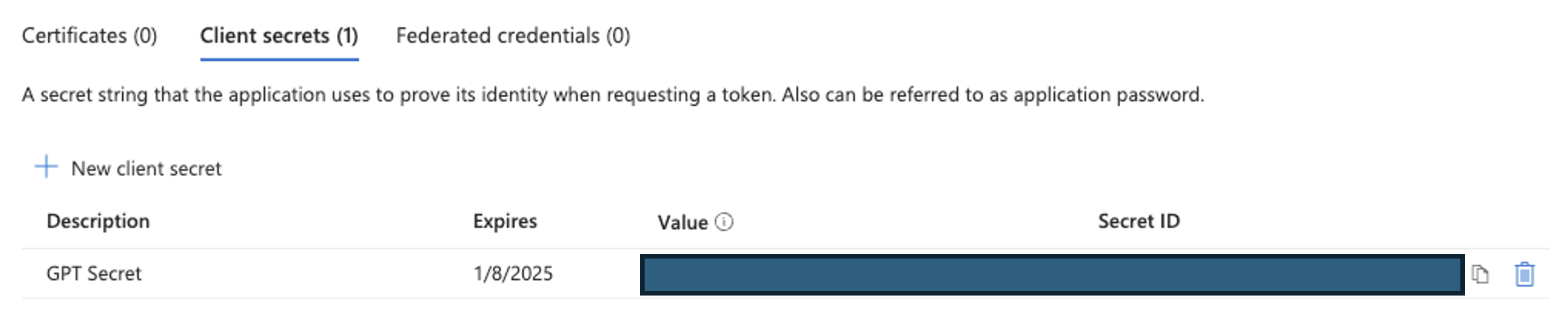
点击“新建客户端密码”,创建一个具有所需名称和过期日期的新客户端密码。点击保存后,我们将获得一个用于创建 GPT 的密码。请务必保存 值 字段,因为它仅在创建时可见,我们稍后会用到它!
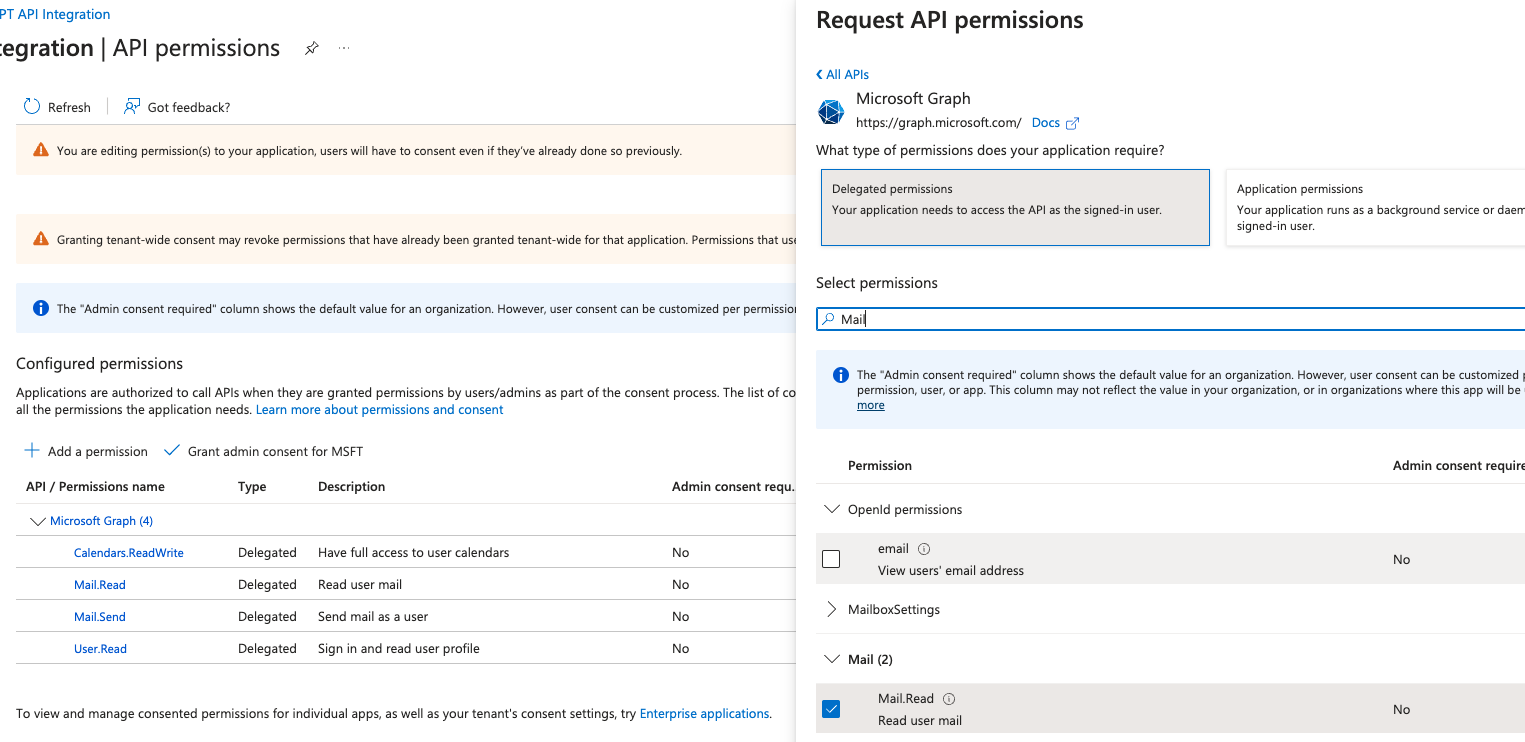
- <b>API 权限</b>:下一步是为集成提供其执行我们特定所需操作所需的作用域。
在应用注册中,导航到侧边栏中的 <b>管理 > API 权限</b>。
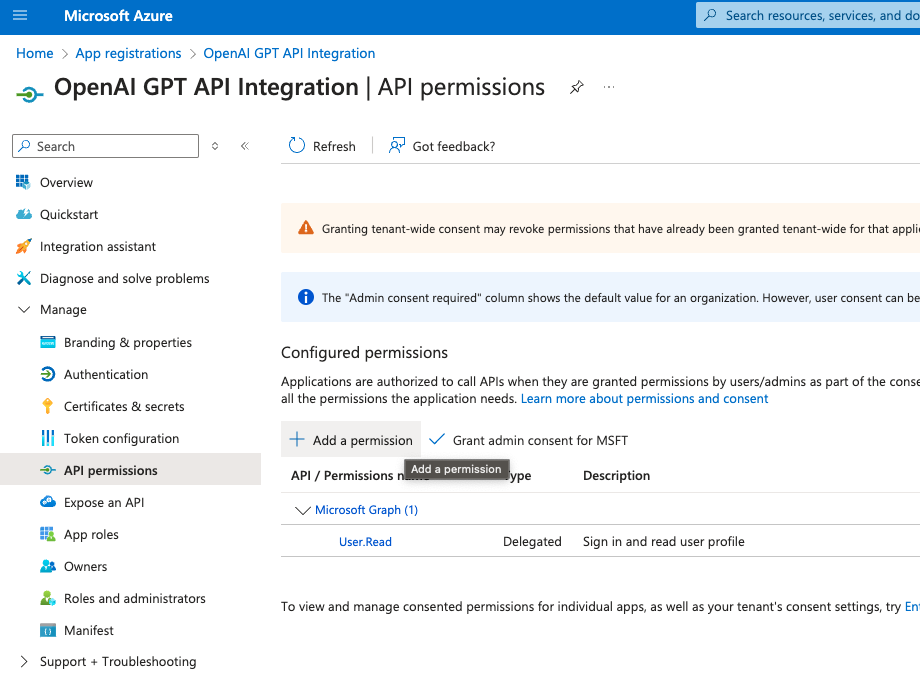
点击<b>添加权限</b>,并在打开的侧边菜单中选择<b>Microsoft Graph > 委托的权限</b>。使用搜索栏添加以下权限:
- Calendars.ReadWrite
- Mail.Read
- Mail.Send
- User.Read
在 ChatGPT 中
在ChatGPT中,点击“Authentication”(身份验证)并选择“OAuth”。输入以下信息。
- 客户端 ID:Azure 注册应用“概述”页面中“应用程序(客户端)ID”下列出的值
- 客户端密钥:在 Azure 步骤 第 2 步中保存的密钥 值
对于以下两个输入,请将 <Tenant_ID> 替换为已注册应用“概述”页面中“目录(租户) ID”下列出的值。
- 授权 URL:https://login.microsoftonline.com/<租户ID>/oauth2/v2.0/authorize
- 令牌 URL:https://login.microsoftonline.com/<租户ID>/oauth2/v2.0/token
- 作用域:https://graph.microsoft.com/User.Read https://graph.microsoft.com/Mail.Send https://graph.microsoft.com/Mail.Read https://graph.microsoft.com/Calendars.ReadWrite
- 令牌交换方法:默认(POST 请求)
操作后步骤
在ChatGPT中设置好身份验证后,请按照以下步骤在应用程序中完成操作。
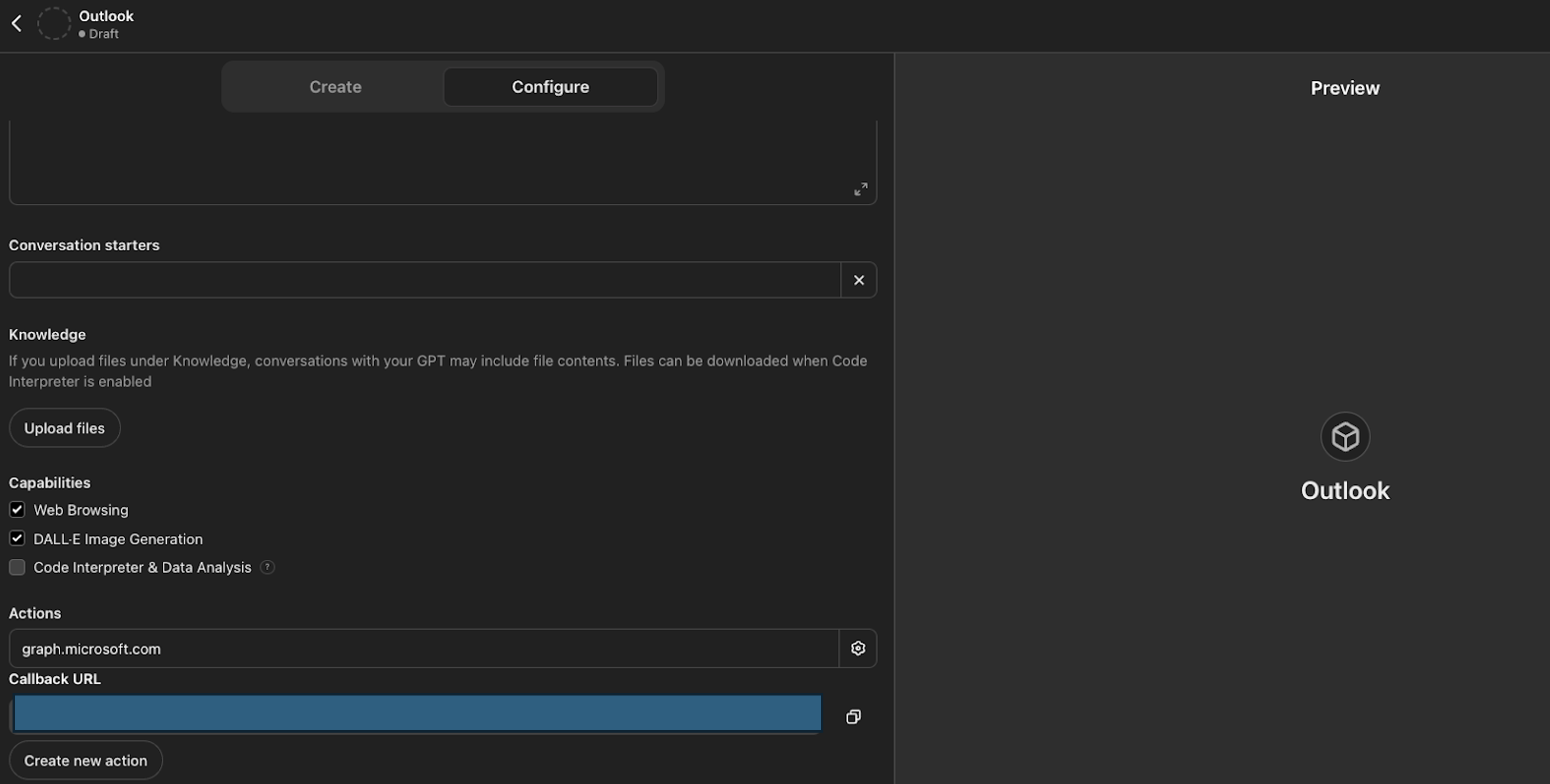
- 从 GPT Action 复制回调 URL
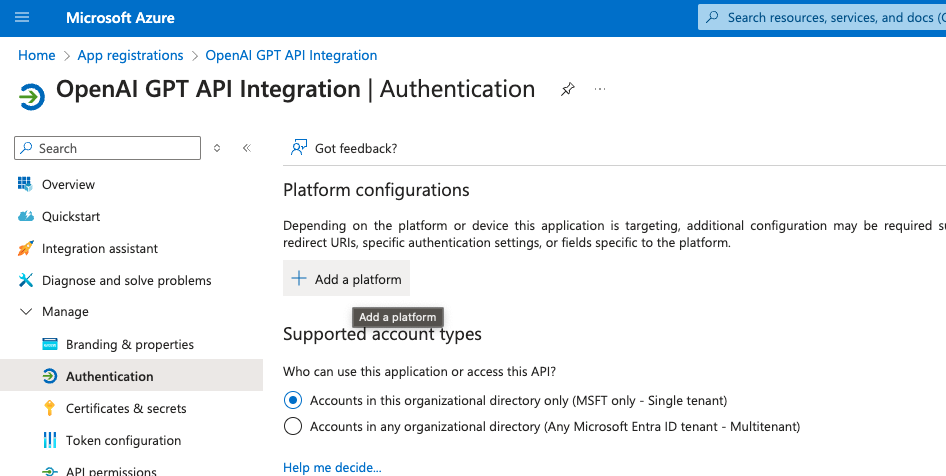
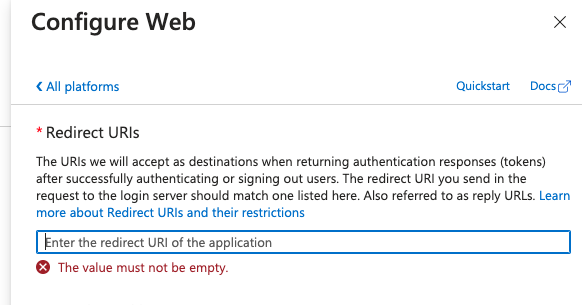
- 在 Azure 应用中,导航到 管理 > 身份验证 选项卡,点击 添加平台,选择 Web,然后在 重定向 URI 下添加你的回调 URL。
常见问题与故障排除
- 回调 URL 错误:如果在 ChatGPT 中遇到回调 URL 错误,请仔细检查回调 URL 的值,因为该值可能会因身份验证的任何更改而偶尔发生变化。
*您希望我们优先考虑哪些集成?我们的集成是否存在错误?请在 GitHub 中提交 PR 或 issue,我们会及时查看。*
常见问题
常见错误:1. 回调 URL 不匹配:确保 Azure 应用的重定向 URI 与 ChatGPT 中生成的回调 URL 完全一致,注意 URL 可能因认证配置变化而更新。2. 权限不足:检查 Azure 应用是否已添加所需 API 权限(Mail.Send, Mail.Read, Calendars.ReadWrite, User.Read),并确保已授予管理员同意(如需要)。3. 令牌获取失败:验证客户端 ID、客户端密钥、租户 ID 是否正确,授权 URL 和令牌 URL 是否拼写无误。4. API 调用返回 401/403:检查令牌是否过期,作用域是否包含所需权限。5. 操作失败:查看错误响应中的错误码和消息,根据提示调整请求参数。排查方法:使用 Graph Explorer 测试 API 调用,检查 Azure 门户中的日志,启用 ChatGPT 的调试模式。生产环境优化:使用密钥保管库存储客户端密钥,实现令牌缓存以减少认证请求,添加重试机制和速率限制处理,监控 API 调用日志。
企业应用扩展
进一步扩展:1. 添加联系人管理端点(/me/contacts),实现查找和添加联系人。2. 支持邮件搜索和筛选,利用 $filter 和 $search 参数。3. 集成 Teams 或 SharePoint 等其他 Microsoft 服务。4. 实现多用户支持,通过动态获取用户上下文。5. 添加自然语言处理增强,如意图识别和实体提取。6. 部署到生产环境时,考虑使用 Azure Functions 或容器化服务托管 GPT Actions。7. 实现错误处理和用户反馈机制,提升用户体验。
总结
本教程面向有编程基础的开发者,深入讲解如何将 GPT 与 Microsoft Outlook 集成,实现邮件、日历和联系人的自动化管理。通过配置 Azure 应用注册、设置 OAuth 2.0 认证、编写 OpenAPI Schema,并利用 Microsoft Graph API,开发者可以构建一个能够发送邮件、创建事件、查询联系人的自定义 GPT。教程涵盖核心原理、架构设计、实践步骤、常见错误排查及生产环境优化建议,帮助开发者快速掌握 AI 工程实践中的 API 集成与自动化工作流构建。
- --
内容来源与验证
- 内容等级:PREMIUM_A
- 质量等级:A
- 难度:中级
- 验证等级:V1
- 原文作者:rupert-openai
- 原文日期:2024-07-15
- 来源许可:MIT
- 来源版本:
099677b1ef8bfffe4812a1fcda2c7ac9d8b969a7 - 查看原文
站内还有更多完整实战教程
加入会员,解锁全部教程、完整代码与持续更新内容。
加入会员