OpenAI Responses API教程:多工具编排与RAG实战
技术背景
在构建复杂AI应用时,单一模型往往无法满足所有需求,需要集成外部工具(如搜索、计算、数据库查询)和知识库。传统的Chat Completions API在工具调用和响应格式上存在局限,而Responses API提供了更灵活的多步骤推理和工具调用机制。RAG(检索增强生成)通过结合外部知识库,提升模型回答的准确性和时效性。本文旨在帮助开发者理解并实践Responses API的多工具编排与RAG方法,解决实际工程中的复杂查询问题。
核心原理
Responses API的核心是允许模型在生成响应时动态调用预定义的工具。工具通过JSON Schema定义,包括名称、描述和参数结构。当用户输入触发工具调用时,API返回包含工具调用指令的响应,开发者执行工具并将结果回传,模型再基于工具结果生成最终答案。RAG通过将文档向量化存储于向量数据库(如Pinecone),查询时计算嵌入向量并检索最相关文档,作为上下文辅助生成。多工具编排则通过系统指令和工具定义,让模型智能选择合适工具,甚至并行调用多个工具,实现复杂任务分解。
架构分析
系统架构分为三层:用户交互层、编排层和工具层。用户交互层接收查询并展示最终答案;编排层由Responses API驱动,负责解析用户输入、决定工具调用顺序、管理对话状态;工具层包含内置网页搜索和自定义函数(如Pinecone检索)。数据流:用户查询→API分析→触发工具调用→执行工具(如Pinecone查询)→返回结果→API生成最终响应。关键设计决策包括:使用JSON Schema定义工具参数,确保类型安全;通过parallel_tool_calls支持并行调用;将工具结果附加到对话历史,保持上下文连贯。
完整实战教程
使用OpenAI Responses API实现多工具编排与RAG方法
在构建复杂的AI应用时,通常需要将多个工具(如搜索、计算、数据库查询)与检索增强生成(RAG)方法相结合。OpenAI的Responses API为这种多工具编排提供了强大的支持。本文将详细介绍如何使用Responses API实现多工具编排与RAG方法。
1. 理解Responses API
Responses API是OpenAI提供的一种新型API,它允许开发者构建具有多步骤推理和工具调用能力的AI应用。与传统的Chat Completions API相比,Responses API提供了更灵活的工具调用机制和更丰富的响应格式。
2. 多工具编排架构
多工具编排的核心思想是将复杂的任务分解为多个子任务,每个子任务由一个专门的工具处理。Responses API通过tools参数支持定义多个工具,并在对话过程中自动调用这些工具。
##### 2.1 定义工具
在Responses API中,工具通过JSON Schema定义。每个工具包含名称、描述和参数结构。例如,我们可以定义一个搜索工具和一个计算工具:
{
"tools": [
{
"type": "function",
"function": {
"name": "search_web",
"description": "搜索互联网获取最新信息",
"parameters": {
"type": "object",
"properties": {
"query": {
"type": "string",
"description": "搜索查询"
}
},
"required": ["query"]
}
}
},
{
"type": "function",
"function": {
"name": "calculate",
"description": "执行数学计算",
"parameters": {
"type": "object",
"properties": {
"expression": {
"type": "string",
"description": "数学表达式"
}
},
"required": ["expression"]
}
}
}
]
}
##### 2.2 调用流程
当用户发送请求时,Responses API会分析请求并决定是否需要调用工具。如果需要,API会返回一个包含工具调用指令的响应。开发者需要执行这些工具调用,并将结果返回给API,以便继续生成最终响应。
3. 集成RAG方法
RAG(检索增强生成)是一种将外部知识库与生成模型相结合的方法。在Responses API中,我们可以通过工具调用实现RAG。例如,我们可以定义一个检索工具,从向量数据库中检索相关文档。
##### 3.1 实现检索工具
首先,我们需要将文档向量化并存储到向量数据库中。然后,定义一个检索工具,该工具接收查询向量,返回最相关的文档片段。
{
"type": "function",
"function": {
"name": "retrieve_documents",
"description": "从知识库中检索相关文档",
"parameters": {
"type": "object",
"properties": {
"query": {
"type": "string",
"description": "查询文本"
}
},
"required": ["query"]
}
}
}
##### 3.2 结合工具与RAG
在对话中,模型可能会先调用检索工具获取相关信息,然后结合这些信息生成回答。例如,用户问:“OpenAI的最新模型是什么?”模型可能会调用检索工具搜索相关文档,然后基于检索结果生成回答。
4. 完整示例
下面是一个使用Responses API实现多工具编排与RAG的Python示例:
import openai

client = openai.OpenAI()

# 定义工具
tools = [
    {
        "type": "function",
        "function": {
            "name": "search_web",
            "description": "搜索互联网获取最新信息",
            "parameters": {
                "type": "object",
                "properties": {
                    "query": {"type": "string"}
                },
                "required": ["query"]
            }
        }
    },
    {
        "type": "function",
        "function": {
            "name": "retrieve_documents",
            "description": "从知识库中检索相关文档",
            "parameters": {
                "type": "object",
                "properties": {
                    "query": {"type": "string"}
                },
                "required": ["query"]
            }
        }
    }
]

# 创建响应
response = client.responses.create(
    model="gpt-4o",
    input="OpenAI的最新模型是什么?",
    tools=tools
)

# 处理工具调用
while response.output:
    for item in response.output:
        if item.type == "function_call":
            # 执行工具调用
            if item.name == "search_web":
                result = search_web(item.arguments["query"])
            elif item.name == "retrieve_documents":
                result = retrieve_documents(item.arguments["query"])
            # 将结果返回给API
            response = client.responses.create(
                model="gpt-4o",
                input=response.output,
                tools=tools,
                tool_outputs=[{"call_id": item.call_id, "output": result}]
            )
        else:
            # 最终输出
            print(item.text)
5. 最佳实践
- 错误处理:在工具调用过程中,可能会发生错误。确保你的代码能够捕获异常并返回适当的错误信息。
- 性能优化:对于频繁调用的工具,可以考虑缓存结果以减少延迟。
- 安全性:确保工具调用不会泄露敏感信息,并对用户输入进行适当的验证。
6. 结论
通过OpenAI的Responses API,我们可以轻松实现多工具编排与RAG方法,构建功能强大的AI应用。本文介绍了基本概念、实现步骤和最佳实践,希望能帮助你快速上手。
本指南将引导您使用OpenAI的Responses API构建动态、多工具工作流。它演示了如何实现检索增强生成(RAG)方法,智能地将用户查询路由到适当的内置或外部工具。无论您的查询是需要通用知识,还是需要从向量数据库(如Pinecone)访问特定的内部上下文,本指南都将向您展示如何集成函数调用、内置的网页搜索工具,并利用文档检索来生成准确、上下文感知的响应。
有关使用Responses API的文件搜索功能对PDF执行RAG的实用示例,请参阅此笔记本。
此示例展示了Responses API的灵活性,说明除了连接到内部向量存储的内部file_search工具之外,它还能够轻松连接到外部向量数据库。这允许结合托管工具实现RAG方法,为各种检索和生成任务提供通用解决方案。
#%pip install datasets tqdm pandas pinecone openai --quiet

import os
import time
from tqdm.auto import tqdm
from pandas import DataFrame
from datasets import load_dataset
import random
import string


# Import OpenAI client and initialize with your API key.
from openai import OpenAI

client = OpenAI(api_key=os.getenv("OPENAI_API_KEY"))

# Import Pinecone client and related specifications.
from pinecone import Pinecone
from pinecone import ServerlessSpec
在这个例子中,我们使用了来自 Hugging Face 的示例医学推理数据集。我们将数据集转换为 Pandas DataFrame,并将“Question”和“Response”列合并为一个字符串。这个合并后的文本用于嵌入,并随后作为元数据存储。
# Load the dataset (ensure you're logged in with huggingface-cli if needed)
ds = load_dataset("FreedomIntelligence/medical-o1-reasoning-SFT", "en", split='train[:100]', trust_remote_code=True)
ds_dataframe = DataFrame(ds)

# Merge the Question and Response columns into a single string.
ds_dataframe['merged'] = ds_dataframe.apply(
    lambda row: f"Question: {row['Question']} Answer: {row['Response']}", axis=1
)
print("Example merged text:", ds_dataframe['merged'].iloc[0])
ds_dataframe
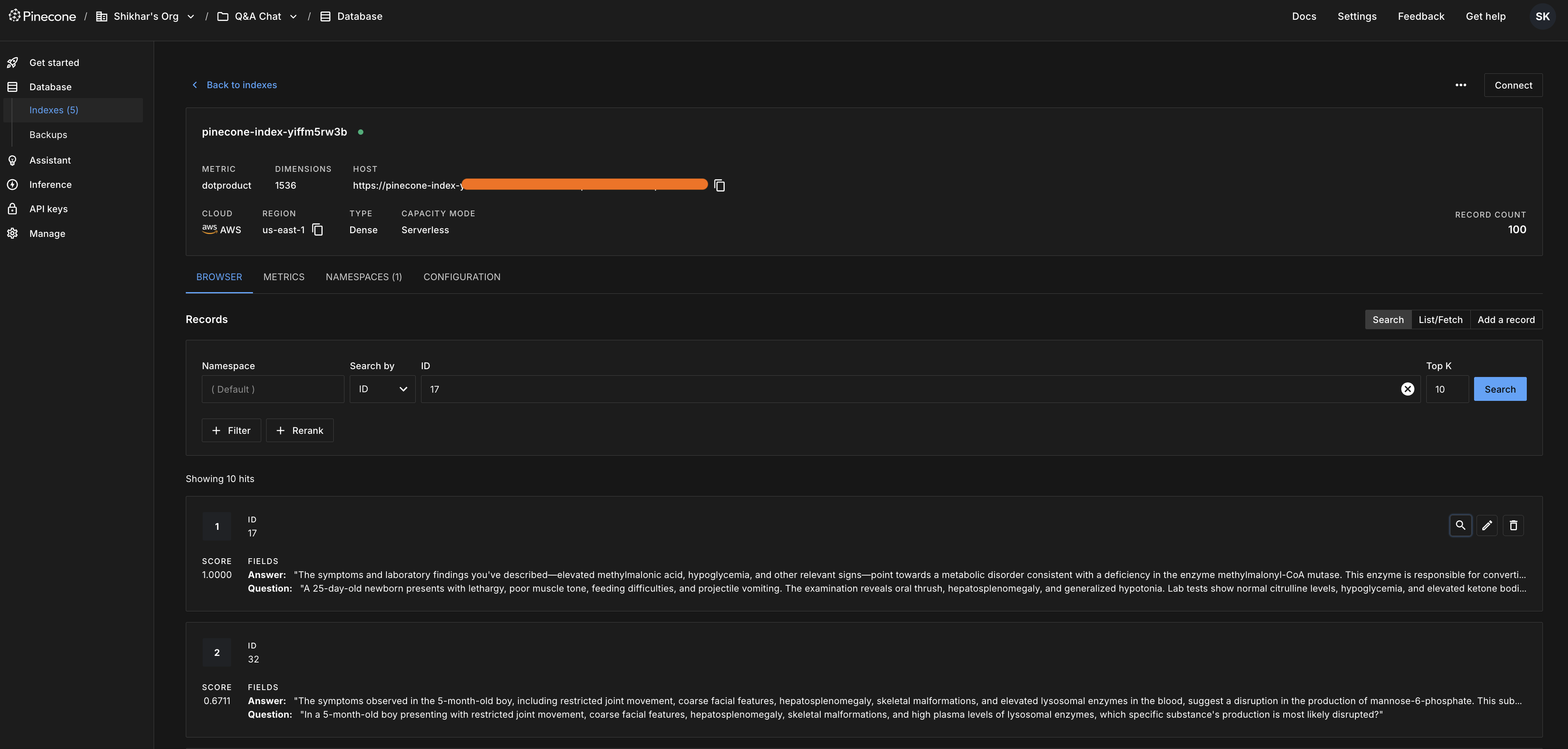
根据数据集创建 Pinecone 索引
使用数据集本身来确定嵌入维度。例如,从合并后的列计算一个嵌入,然后据此创建索引。
MODEL = "text-embedding-3-small"  # Replace with your production embedding model if needed
# Compute an embedding for the first document to obtain the embedding dimension.
sample_embedding_resp = client.embeddings.create(
    input=[ds_dataframe['merged'].iloc[0]],
    model=MODEL
)
embed_dim = len(sample_embedding_resp.data[0].embedding)
print(f"Embedding dimension: {embed_dim}")
# Initialize Pinecone using your API key.
pc = Pinecone(api_key=os.getenv("PINECONE_API_KEY"))

# Define the Pinecone serverless specification.
AWS_REGION = "us-east-1"
spec = ServerlessSpec(cloud="aws", region=AWS_REGION)

# Create a random index name with lower case alphanumeric characters and '-'
index_name = 'pinecone-index-' + ''.join(random.choices(string.ascii_lowercase + string.digits, k=10))

# Create the index if it doesn't already exist.
if index_name not in pc.list_indexes().names():
    pc.create_index(
        index_name,
        dimension=embed_dim,
        metric='dotproduct',
        spec=spec
    )

# Connect to the index.
index = pc.Index(index_name)
time.sleep(1)
print("Index stats:", index.describe_index_stats())
将数据集 Upsert 到 Pinecone 索引中
分批处理数据集,为每个合并后的文本生成嵌入向量,准备元数据(包括单独的 Question 和 Answer 字段),并将每个批次 upsert 到索引中。如有需要,你也可以更新特定条目的元数据。
batch_size = 32
for i in tqdm(range(0, len(ds_dataframe['merged']), batch_size), desc="Upserting to Pinecone"):
    i_end = min(i + batch_size, len(ds_dataframe['merged']))
    lines_batch = ds_dataframe['merged'][i: i_end]
    ids_batch = [str(n) for n in range(i, i_end)]

    # Create embeddings for the current batch.
    res = client.embeddings.create(input=[line for line in lines_batch], model=MODEL)
    embeds = [record.embedding for record in res.data]

    # Prepare metadata by extracting original Question and Answer.
    meta = []
    for record in ds_dataframe.iloc[i:i_end].to_dict('records'):
        q_text = record['Question']
        a_text = record['Response']
        # Optionally update metadata for specific entries.
        meta.append({"Question": q_text, "Answer": a_text})

    # Upsert the batch into Pinecone.
    vectors = list(zip(ids_batch, embeds, meta))
    index.upsert(vectors=vectors)
查询 Pinecone 索引
创建一个自然语言查询,计算其嵌入向量,并在 Pinecone 索引上执行相似性搜索。返回的结果包含元数据,为生成答案提供上下文。
def query_pinecone_index(client, index, model, query_text):
    # Generate an embedding for the query.
    query_embedding = client.embeddings.create(input=query_text, model=model).data[0].embedding

    # Query the index and return top 5 matches.
    res = index.query(vector=[query_embedding], top_k=5, include_metadata=True)
    print("Query Results:")
    for match in res['matches']:
        print(f"{match['score']:.2f}: {match['metadata'].get('Question', 'N/A')} - {match['metadata'].get('Answer', 'N/A')}")
    return res
# Example usage with a different query from the train/test set
query = (
    "A 45-year-old man with a history of alcohol use presents with symptoms including confusion, ataxia, and ophthalmoplegia. "
    "What is the most likely diagnosis and the recommended treatment?"
)
query_pinecone_index(client, index, MODEL, query)
使用检索到的上下文生成响应
从查询结果中选择最匹配的结果,并使用 OpenAI Responses API,将检索到的上下文与原始问题相结合,生成最终答案。
# Retrieve and concatenate top 3 match contexts.
matches = index.query(
    vector=[client.embeddings.create(input=query, model=MODEL).data[0].embedding],
    top_k=3,
    include_metadata=True
)['matches']

context = "\n\n".join(
    f"Question: {m['metadata'].get('Question', '')}\nAnswer: {m['metadata'].get('Answer', '')}"
    for m in matches
)
# Use the context to generate a final answer.
response = client.responses.create(
    model="gpt-4o",
    input=f"Provide the answer based on the context: {context} and the question: {query} as per the internal knowledge base",
)
print("\nFinal Answer:")
print(response.output_text)
编排多工具调用
现在,我们将定义通过 Responses API 可用的内置函数,包括调用外部向量存储(以 Pinecone 为例)的能力。
*Web 搜索预览工具*:使模型能够执行实时网络搜索并预览结果。这对于从互联网检索实时或最新信息非常理想。
*Pinecone 搜索工具*:允许模型使用语义搜索查询向量数据库。这对于检索已以向量化格式存储的相关文档(如医学文献或其他领域特定内容)特别有用。
# Tools definition: The list of tools includes:
# - A web search preview tool.
# - A Pinecone search tool for retrieving medical documents.

# Define available tools.
tools = [
    {"type": "web_search_preview",
      "user_location": {
        "type": "approximate",
        "country": "US",
        "region": "California",
        "city": "SF"
      },
      "search_context_size": "medium"},
    {
        "type": "function",
        "name": "PineconeSearchDocuments",
        "description": "Search for relevant documents based on the medical question asked by the user that is stored within the vector database using a semantic query.",
        "parameters": {
            "type": "object",
            "properties": {
                "query": {
                    "type": "string",
                    "description": "The natural language query to search the vector database."
                },
                "top_k": {
                    "type": "integer",
                    "description": "Number of top results to return.",
                    "default": 3
                }
            },
            "required": ["query"],
            "additionalProperties": False
        }
    }
]
# Example queries that the model should route appropriately.
queries = [
    {"query": "Who won the cricket world cup in 1983?"},
    {"query": "What is the most common cause of death in the United States according to the internet?"},
    {"query": ("A 7-year-old boy with sickle cell disease is experiencing knee and hip pain, "
               "has been admitted for pain crises in the past, and now walks with a limp. "
               "His exam shows a normal, cool hip with decreased range of motion and pain with ambulation. "
               "What is the most appropriate next step in management according to the internal knowledge base?")}
]
# Process each query dynamically.
for item in queries:
    input_messages = [{"role": "user", "content": item["query"]}]
    print("\n🌟--- Processing Query ---🌟")
    print(f"🔍 **User Query:** {item['query']}")

    # Call the Responses API with tools enabled and allow parallel tool calls.
    response = client.responses.create(
        model="gpt-4o",
        input=[
            {"role": "system", "content": "When prompted with a question, select the right tool to use based on the question."
            },
            {"role": "user", "content": item["query"]}
        ],
        tools=tools,
        parallel_tool_calls=True
    )

    print("\n✨ **Initial Response Output:**")
    print(response.output)

    # Determine if a tool call is needed and process accordingly.
    if response.output:
        tool_call = response.output[0]
        if tool_call.type in ["web_search_preview", "function_call"]:
            tool_name = tool_call.name if tool_call.type == "function_call" else "web_search_preview"
            print(f"\n🔧 **Model triggered a tool call:** {tool_name}")

            if tool_name == "PineconeSearchDocuments":
                print("🔍 **Invoking PineconeSearchDocuments tool...**")
                res = query_pinecone_index(client, index, MODEL, item["query"])
                if res["matches"]:
                    best_match = res["matches"][0]["metadata"]
                    result = f"**Question:** {best_match.get('Question', 'N/A')}\n**Answer:** {best_match.get('Answer', 'N/A')}"
                else:
                    result = "**No matching documents found in the index.**"
                print("✅ **PineconeSearchDocuments tool invoked successfully.**")
            else:
                print("🔍 **Invoking simulated web search tool...**")
                result = "**Simulated web search result.**"
                print("✅ **Simulated web search tool invoked successfully.**")

            # Append the tool call and its output back into the conversation.
            input_messages.append(tool_call)
            input_messages.append({
                "type": "function_call_output",
                "call_id": tool_call.call_id,
                "output": str(result)
            })

            # Get the final answer incorporating the tool's result.
            final_response = client.responses.create(
                model="gpt-4o",
                input=input_messages,
                tools=tools,
                parallel_tool_calls=True
            )
            print("\n💡 **Final Answer:**")
            print(final_response.output_text)
        else:
            # If no tool call is triggered, print the response directly.
            print("💡 **Final Answer:**")
            print(response.output_text)
如上所示,根据查询的不同,会调用相应的工具以确定最佳响应。
例如,在第三个示例中,当模型调用 PineconeSearchDocuments 时,代码会将当前查询传递给 query_pinecone_index,并将最佳匹配作为上下文返回。对于一般性问题或非健康类问题,或者当用户明确要求进行互联网搜索时,代码会调用 web_search_call。对于其他问题,模型可能无需工具即可回答。
最后,工具调用及其输出会被附加到对话中,并由 Responses API 生成最终答案。
多工具编排流程
现在,让我们尝试修改输入查询和响应 API 的系统指令,以遵循工具调用序列并生成输出。
# Process one query as an example to understand the tool calls and function calls as part of the response output
item = "What is the most common cause of death in the United States"
# Initialize input messages with the user's query.
input_messages = [{"role": "user", "content": item}]
print("\n🌟--- Processing Query ---🌟")
print(f"🔍 **User Query:** {item}")
# Call the Responses API with tools enabled and allow parallel tool calls.
print("\n🔧 **Calling Responses API with Tools Enabled**")
print("\n🕵️♂️ **Step 1: Web Search Call**")
print(" - Initiating web search to gather initial information.")
print("\n📚 **Step 2: Pinecone Search Call**")
print(" - Querying Pinecone to find relevant examples from the internal knowledge base.")
response = client.responses.create(
model="gpt-4o",
input=[
{"role": "system", "content": "Every time it's prompted with a question, first call the web search tool for results, then call `PineconeSearchDocuments` to find real examples in the internal knowledge base."},
{"role": "user", "content": item}
],
tools=tools,
parallel_tool_calls=True
)
# Print the initial response output.
print("input_messages", input_messages)
print("\n✨ **Initial Response Output:**")
print(response.output)
# Understand the tool calls and function calls as part of the response output

import pandas as pd

# Create a list to store the tool call and function call details
tool_calls = []

# Iterate through the response output and collect the details
for i in response.output:
    tool_calls.append({
        "Type": i.type,
        "Call ID": i.call_id if hasattr(i, 'call_id') else i.id if hasattr(i, 'id') else "N/A",
        "Output": str(i.output) if hasattr(i, 'output') else "N/A",
        "Name": i.name if hasattr(i, 'name') else "N/A"
    })

# Convert the list to a DataFrame for tabular display
df_tool_calls = pd.DataFrame(tool_calls)

# Display the DataFrame
df_tool_calls
tool_call_1 = response.output[0]
print(tool_call_1)
print(tool_call_1.id)

tool_call_2 = response.output[2]
print(tool_call_2)
print(tool_call_2.call_id)
# append the tool call and its output back into the conversation.
input_messages.append(response.output[2])
input_messages.append({
    "type": "function_call_output",
    "call_id": tool_call_2.call_id,
    "output": str(result)
})
print(input_messages)
# Get the final answer incorporating the tool's result.
print("\n🔧 **Calling Responses API for Final Answer**")

response_2 = client.responses.create(
    model="gpt-4o",
    input=input_messages,
)
print(response_2)
# print the final answer
print(response_2.output_text)
在这里,我们使用了OpenAI的Responses API,通过多种工具实现了检索增强生成(RAG)。模型根据查询选择工具:内置的网页搜索可以处理一般性问题,而函数调用则可以从向量数据库(如Pinecone)中检索内部医疗上下文。我们还按顺序组合了多个工具调用,根据提供给Responses API的指令生成最终响应。
当你继续试验并基于这些概念进行构建时,可以考虑探索额外的资源和示例,以进一步加深理解并扩展应用。
祝编码愉快!
常见问题
常见错误:1. 工具调用失败:检查工具名称和参数是否匹配,确保API密钥和索引存在。2. 嵌入维度不匹配:创建索引时需使用与嵌入模型一致的维度。3. 上下文过长:限制检索结果数量(如top_k=3)并合并精简。4. 工具循环:设置最大迭代次数或超时。排查方法:打印响应输出,检查工具调用类型和参数;使用Pinecone的describe_index_stats验证索引状态;监控API调用日志。生产优化:缓存频繁查询结果,使用异步调用,对工具结果进行后处理过滤,以及设置合理的超时和重试机制。
企业应用扩展
可扩展方向:1. 集成更多外部工具,如数据库查询、API调用。2. 使用更先进的嵌入模型(如text-embedding-3-large)提升检索精度。3. 实现多轮对话中的工具状态管理。4. 结合LangChain等框架简化编排。5. 添加用户反馈机制,动态调整工具选择策略。6. 部署为微服务,通过消息队列处理高并发请求。
总结
本文深入讲解如何利用OpenAI Responses API构建多工具编排与检索增强生成(RAG)系统。通过定义函数工具和内置网页搜索,实现动态路由查询,结合Pinecone向量数据库进行语义检索,并生成上下文感知的答案。文章涵盖工具定义、调用流程、RAG集成、完整代码示例、最佳实践及常见问题排查,帮助开发者掌握构建复杂AI应用的核心技术。
- --
内容来源与验证
- 内容等级:PREMIUM_A
- 质量等级:A
- 难度:中级
- 验证等级:V1
- 原文作者:shikhar-cyber
- 原文日期:2025-03-28
- 来源许可:MIT
- 来源版本:
583e5d7bd75369f048b72a842304f302f440c27b - 查看原文
站内还有更多完整实战教程
加入会员,解锁全部教程、完整代码与持续更新内容。
加入会员