AI Agent上下文工程:记忆、压缩与工具清理
技术背景
构建长时程智能体时,工具结果、模型推理和用户消息会持续累积,最终触及 token 上限或为无用上下文付费。Chroma 的上下文腐化研究表明,随着上下文窗口 token 增加,模型准确召回信息的能力下降,边际收益递减。Anthropic 的上下文工程博客将上下文视为有限资源,核心原则是找到最小高信号 token 集合。压缩、工具结果清理和记忆是三种互补策略,分别处理整份记录、子记录和跨会话持久化问题,且均有 API 一方支持,无需自建编排基础设施。
核心原理
压缩是整份记录操作:将接近窗口上限的对话摘要为高保真摘要并重新开始,保留架构决策、未解决问题和关键事实,丢弃冗余,但有损且丢失逐字细节。工具结果清理是子记录操作:遍历消息列表,将旧的 tool_result 块替换为占位符,保留 tool_use 记录,使模型知道自己调用过工具但丢弃庞大载荷,可重新获取且无推理成本。记忆是结构化笔记:智能体将笔记写入持久外部存储,跨任务和会话跟踪进度,按需拉回,存储后端由客户端实现,模型决定保存内容。
架构分析
研究型智能体由工具模式、工具执行和智能体循环组成。BASE_TOOLS 包含 search_files、read_file、record_finding;MEMORY_TOOL_SPEC 仅在传入 memory_handler 时加入。run_research_session 循环调用 API,捕获上下文溢出,追踪 token 轨迹和 context_management.applied_edits 事件。压缩通过 context_management.edits 配置 compact_20260112,触发阈值最低 50K,返回 compaction 块需序列化回消息列表。清理配置 clear_tool_uses_20250919,含 trigger、keep、clear_at_least、exclude_tools。记忆工具 memory_20250818 为客户端工具,MemoryToolHandler 实现 view、create、str_replace、insert、delete、rename 六个命令,并用 _resolve 防止路径遍历。
完整实战教程
AI 智能体的上下文工程:记忆 vs. 压缩 vs. 工具清理
引言
构建长时程智能体时,一个常见的挑战是管理上下文。工具结果、模型自身的推理以及用户消息都会不断累积,最终要么触及 token 上限,要么开始为不再有用的上下文付费。针对“大海捞针”式基准测试的研究揭示了上下文腐化的概念:随着上下文窗口中 token 数量的增加,模型从该上下文中准确召回信息的能力会下降。因此,即使在触及硬性上下文限制之前,智能体从每个 token 中获得的收益也可能在减少。
我们关于AI 智能体高效上下文工程的工程博客将此视为一个资源问题:上下文是有限的,且边际收益递减,核心原则是找到最小的高信号 token 集合,以最大化实现期望结果的可能性。为此有若干手段:将工作隔离在自身上下文中的子智能体、将大型结果完全排除在窗口之外的编程式工具调用,等等。
本指南聚焦于三种:压缩、工具结果清理和记忆。三者都是有效的上下文工程策略,但由于它们以不同方式提升上下文窗口的效率,因此很难区分。理解这些区别,才能将每种工具映射到它真正能帮助的工作负载部分。与利用子智能体等其他核心上下文管理策略一样,这三种策略对于构建长运行智能体的团队来说至关重要。它们也都有一方 API 支持,因此无需构建编排基础设施即可采用。
- 压缩将上下文窗口的内容提炼为高保真摘要,让智能体在对话变长时以最小的性能下降继续运行。
- 工具结果清理解决工具使用本身带来的膨胀问题。当智能体引入工具并调用它们时,结果会不断堆积,决定保留多少工具输出成为管理上下文中日益重要的一部分。清理会丢弃旧的、可重新获取的结果,同时保留调用发生过的记录。
- 记忆是结构化的笔记:智能体写入持久的外部存储,从而跨任务和会话跟踪进度,而无需将所有内容都保留在活动上下文中。
Claude Code在生产环境中采用了其中多种策略:用于长对话的压缩,以及两个互补的记忆系统用于跨会话持久化。我们的 API 提供全部三种的一方实现:服务端压缩、上下文编辑(包含工具结果清理)以及记忆工具。本指南将探讨如何围绕它们进行设计:每种策略的适用场景、如何配置、单独使用与组合使用时有何变化,以及不同组合适用的示例用例。
这些示例围绕一个长时间运行的研究型智能体展开:它读取一批文档语料,做笔记,并在多个会话中基于已有发现继续构建。这是一个很有用的测试用例,因为它天然会触发全部三个问题:庞大的文档读取(清理)、长时间的分析性对话(压缩),以及需要在会话之间保留的知识(记忆)。
你将学到什么
- 当智能体的上下文被大量可重新获取的工具结果(如文件读取和 API 响应)主导时,如何使用
clear_tool_uses限制会话内的 token 增长 - 如何通过服务端压缩让长对话持续进行,包括如何将
compaction块序列化回去,并探查摘要之后哪些内容得以保留 - 如何通过实现一个由模型自行驱动的、基于文件的记忆处理器来跨会话持久化智能体知识,使会话 2 能从会话 1 中断的地方继续
- 如何最有效地实现每个原语:替换默认压缩提示以保留智能体所需的内容,引导智能体写入
/memories的内容,并针对你自己工作负载的工具使用模式测试清理配置 - 如何诊断你的工作负载究竟存在上下文问题的哪一部分,并选择针对该问题的原语,同时提供一个将工作负载特征映射到合适工具的框架
前置条件
要运行此 notebook,你需要:
- Anthropic API key,设置为环境变量或
.env文件中的ANTHROPIC_API_KEY(在此获取) - Python 3.11+,并安装
anthropic、python-dotenv和matplotlib包 research_corpus.py与本 notebook 位于同一目录(包含在仓库中)。它定义了CORPUS,这是一个包含八篇关于衰老研究模式生物的合成综述文档的字典(每篇约 40K tokens,总计约 320K tokens),以及稍后用于测试压缩后哪些内容得以保留的探查问题。你可以通过替换该字典来换入自己的文档。
从 cookbooks 仓库运行? 在运行 notebook 之前,请确保你的工作目录是 tool_use/context_engineering。
步骤 0:环境设置
在此目录中创建一个 .env 文件,并填入你的 Anthropic API 密钥:
ANTHROPIC_API_KEY=your-key-here
%%capture
%pip install anthropic python-dotenv matplotlib
import json
import os
import tempfile
from collections import namedtuple
from pathlib import Path

import anthropic
import matplotlib.pyplot as plt
from dotenv import load_dotenv

load_dotenv()

if not os.environ.get("ANTHROPIC_API_KEY"):
    raise ValueError("ANTHROPIC_API_KEY not set. Add it to a .env file or export it.")

CORPUS_PATH = Path("research_corpus.py")
assert CORPUS_PATH.exists(), (
    f"research_corpus.py not found in {Path.cwd()}. It should be alongside this notebook."
)

client = anthropic.Anthropic()
MODEL = "claude-sonnet-4-6"
print(f"anthropic SDK {anthropic.__version__}, model {MODEL}")
# Force-reload the corpus module in case this kernel has a stale cached version
import importlib

import research_corpus

importlib.reload(research_corpus)
from research_corpus import COMPACTION_PROBES, CORPUS

# Count tokens via the API (cached in-memory so repeat kernel runs are fast).
_token_cache: dict[str, int] = {}


def count_tokens(text: str) -> int:
    if text not in _token_cache:
        _token_cache[text] = client.messages.count_tokens(
            model=MODEL, messages=[{"role": "user", "content": text}]
        ).input_tokens
    return _token_cache[text]


print(f"CORPUS is a dict of {len(CORPUS)} synthetic documents held in Python memory.")
print("When the agent calls read_file, the content is served from this dict and")
print("lands directly in the agent's context window — no disk I/O involved.\n")
_total_tokens = 0
for path, content in CORPUS.items():
    n_tok = count_tokens(content)
    _total_tokens += n_tok
    # Strip the virtual directory prefix for display clarity
    display_name = path.removeprefix("/research/")
    print(f"  {display_name:<26} ~{n_tok:>6,} tokens")
print(f"\n  Total corpus: ~{_total_tokens:,} tokens")

# Sanity check: the corpus should be large enough to push context well past
# 200K in a single read-pass. If this fires, research_corpus.py may be stale.
assert _total_tokens > 250_000, (
    f"Corpus is only {_total_tokens:,} tokens; expected >250K. "
    "Restart the kernel and re-run, or verify research_corpus.py is current."
)
问题:一个长时间运行的研究智能体
本手册中的智能体扮演一位生物学研究者的角色,正在撰写一篇关于衰老与长寿研究模式生物的比较综述。这个任务足够真实,值得认真对待:它涉及阅读一批综述文档(每个生物体一份),提取可比较的事实(寿命、遗传可操作性、转化相关性),做结构化笔记,并综合所读到的所有内容。
这类工作正是上下文管理开始带来麻烦的地方。每份文档大约 40K token(叙述部分加上大量干预数据的附录表格),任务要求智能体分两批阅读它们:先读四个高通量生物体(秀丽隐杆线虫、果蝇、酵母、鳉鱼),再读四个低通量生物体(小鼠、斑马鱼、裸鼹鼠、恒河猴)。两批结构是本手册的一个实验设计选择:它产生的上下文轨迹会在第一批时越过压缩触发点,在第二批时越过 200K 参考线,因此每个原语对轨迹的影响都能在同一次运行中显现出来。如果没有上下文管理,智能体的上下文会在任务中途增长到数十万 token。而且由于工作跨越多个会话,即使一次运行完成,下一个会话开始时也不会记得学到了什么。
研究任务
智能体的具体任务:在三个维度上比较 /research/ 中的模式生物(寿命与实验通量、遗传可操作性、与人类衰老的转化相关性),分两批阅读八份综述文档并随时做笔记,然后撰写一篇比较综述。
三个 API 如何对应问题
每个 API 针对的是不同类型的上下文增长。理解你面对的是哪一种,是选择正确工具的第一步。
概念上
压缩(Compaction) 是指将一段接近上下文窗口上限的对话取出,对其内容进行摘要,并用该摘要重新开始。它的目标是以高保真方式提炼上下文窗口,使智能体能够在性能下降最小的情况下继续运行。压缩的艺术在于决定保留什么、丢弃什么:过于激进的压缩可能会丢失那些微妙但关键的上下文,而这些上下文的重要性往往在之后才会显现。摘要会保留架构决策、未解决的问题和关键事实,同时丢弃冗余内容;它在设计上是有损的,但能处理所有类型的上下文增长,而不仅仅是工具结果。压缩是一种*整份记录*操作:用户消息、助手消息、工具调用、工具结果,甚至先前的压缩块,都会被扁平化进摘要中。
相比之下,工具结果清除(Tool-result clearing) 是一种*子记录*操作。它会遍历消息列表,以外科手术式的方式替换 tool_result 内容块,其他一切——用户消息、助手推理、tool_use 记录——都保持不动。当智能体调用工具时,结果会成为对话历史的一部分,并在之后的每一轮中计入上下文预算。其中很多内容是可以重新获取的:智能体可以重新读取的文件内容、可以重新请求的 API 响应。清除会用简短的占位符替换旧的 tool_result 块,保留 tool_use 记录,使模型仍然知道自己发起过该调用,但丢弃庞大的载荷。一旦某个工具在消息历史深处被调用过,智能体很少需要再次查看原始结果;清除是回收这部分空间最安全、侵入性最小的方式之一。如果智能体确实需要这些数据,只需再次调用该工具即可。
记忆(Memory),或称结构化笔记,是一种技术:智能体定期将笔记写入上下文窗口之外持久保存,然后在之后将其拉回。这以极小的开销提供了持久记忆:智能体在复杂任务中跟踪进度,维护那些否则会在数十次工具调用或上下文重置中丢失的关键上下文。在重置之后(新会话,或压缩之后),智能体会读取自己的笔记并继续。存储后端由你实现,因此你可以控制存储什么以及存储多久。
除了启用这些原语之外,理解如何最有效地实现它们也很重要:默认行为能让你起步,但压缩摘要的质量以及进入记忆的内容是否有用,都取决于你提供的指导。下面每个原语的部分都包含一个关于有效实现的子节。
战术上
| API | 标识符 | Beta 标头 | 触发方式 | 可配置项 |
|---|---|---|---|---|
| 压缩 | compact_20260112 | compact-2026-01-12 | Token 阈值(服务端,最小 50K) | trigger(默认 150K)、instructions、pause_after_compaction |
| 工具清理 | clear_tool_uses_20250919 | context-management-2025-06-27 | Token 阈值(服务端) | trigger(默认 100K)、keep(默认保留 3 次工具使用)、clear_at_least、exclude_tools、clear_tool_inputs |
| 记忆工具 | memory_20250818 | 无(独立使用) | 模型(作为工具调用) | 客户端实现:view、create、str_replace、insert、delete、rename |
映射到研究智能体
具体到研究智能体,这三个问题恰好一一对应:
- 智能体的实时评论(“秀丽隐杆线虫寿命 18 天,可进行全基因组 RNAi;小鼠寿命 30 个月,但每个队列花费 10 万美元……”)以及用户的后续问题会累积成一段很长的对话。这是一个压缩问题。
- 阅读八份约 40K token 的综述文档会产生大约 320K token 的工具结果量,明显进入了模型性能因上下文腐化而衰减的区间。其中大部分内容智能体可以按需重新读取。这是一个清理问题。
- 工作跨越多个会话。如果会话 1 确定了鳉鱼是最短命的脊椎动物(4-6 个月),我们希望会话 2 保留这一发现并在此基础上继续,而不是从头重新发现。这是一个记忆问题。
一个粗略的优先级心智模型:压缩在窗口变得过大时压缩整个窗口,清理丢弃窗口内陈旧的、可重新获取的数据,而记忆将信息移出窗口,使其跨会话存活。每一层都会增加需要调优的配置和需要理解的交互,因此值得从与你实际观察到的瓶颈相匹配的那一层开始。
研究智能体
在探索每个原语之前,我们先搭建智能体本身:工具模式、工具执行,以及一个可以在有或没有任何上下文管理配置的情况下运行的智能体循环。所有内容都是内联的,以便你能看到完整的循环。
# ── Tool schemas ─────────────────────────────────────────────────────────
RESEARCH_TASK = """Compare the model organisms in /research/ on three dimensions:
1. Lifespan and experimental throughput (how fast can you get a lifespan result?)
2. Genetic tractability (what tools exist for manipulation and screening?)
3. Translational relevance (how well do findings transfer to human aging?)

Work through the organisms in two batches, recording a note after each
batch before moving on:

BATCH 1 (high-throughput models): Read celegans_review.md,
drosophila_review.md, yeast_review.md, and killifish_review.md. Record a
single detailed note covering all four organisms on all three dimensions.
Do not begin Batch 2 until this note is recorded.

BATCH 2 (low-throughput models): Read mouse_review.md,
zebrafish_review.md, nmr_review.md, and rhesus_review.md. Record a
single detailed note covering all four organisms on all three
dimensions.

After both batches, write a comprehensive comparative synthesis
contrasting the high-throughput and low-throughput models."""

BASE_TOOLS: list[dict] = [
    {
        "name": "search_files",
        "description": "Search document filenames and contents for a keyword. Returns matching paths with a short excerpt.",
        "input_schema": {
            "type": "object",
            "properties": {"query": {"type": "string", "description": "Search term"}},
            "required": ["query"],
        },
    },
    {
        "name": "read_file",
        "description": "Read the full content of a document by path.",
        "input_schema": {
            "type": "object",
            "properties": {
                "path": {"type": "string", "description": "e.g. /research/celegans_review.md"}
            },
            "required": ["path"],
        },
    },
    {
        "name": "record_finding",
        "description": "Record a research finding (freeform text). Findings are held for the duration of this session only; they are not persisted across sessions.",
        "input_schema": {
            "type": "object",
            "properties": {"finding": {"type": "string"}},
            "required": ["finding"],
        },
    },
]

# The memory tool spec is defined here but only added to the agent's tool
# list when a memory_handler is passed to run_research_session. Baseline
# and clearing/compaction runs do NOT get the memory tool.
MEMORY_TOOL_SPEC = {"type": "memory_20250818", "name": "memory"}

SYSTEM_PROMPT = """You are a biology research analyst writing a comparative review of model organisms for aging research.

Work systematically: search and read review documents, take notes on key facts (lifespans, genetic tools, translational strengths and caveats), and build a comparative picture.

Be concise in your reasoning text; the goal is notes, not essays."""
# ── Tool execution ───────────────────────────────────────────────────────
def execute_research_tool(name: str, tool_input: dict, notes: list[str]) -> str:
    if name == "search_files":
        query = tool_input.get("query", "").lower()
        if not query:
            return "Error: query is required."
        hits: list[str] = []
        for path, content in CORPUS.items():
            if query in path.lower() or query in content.lower():
                for line in content.split("\n"):
                    if query in line.lower():
                        hits.append(f"  {path}\n    → {line.strip()[:120]}")
                        break
                else:
                    hits.append(f"  {path}")
        return (
            f"Found {len(hits)} match(es):\n" + "\n".join(hits)
            if hits
            else f"No matches for '{query}'."
        )

    if name == "read_file":
        path = tool_input.get("path", "")
        content = CORPUS.get(path)
        if content is None:
            return f"Error: '{path}' not found. Available: {', '.join(CORPUS.keys())}"
        return content

    if name == "record_finding":
        finding = tool_input.get("finding", "")
        notes.append(finding)
        return f"Finding #{len(notes)} recorded (session-local)."

    return f"Error: unknown tool '{name}'"
# ── Session result container ─────────────────────────────────────────────
SessionResult = namedtuple(
    "SessionResult",
    [
        "messages",  # final message list
        "notes",  # notes taken this session
        "token_trajectory",  # list of (turn, total_context_tokens)
        "events",  # list of dicts describing compaction / clearing events
        "tool_counts",  # dict of tool_name -> call count
        "file_reads",  # list of (turn, path) for each read_file call
        "hit_limit",  # True if the session stopped because it hit the context window
        "final_text",  # final assistant text (convenience)
    ],
)


def _format_tool_arg(name: str, tool_input: dict) -> str:
    """Human-readable one-line summary of a tool call's arguments for verbose output."""
    if name == "search_files":
        return repr(tool_input.get("query", ""))
    if name == "read_file":
        return tool_input.get("path", "?")
    if name == "record_finding":
        finding = tool_input.get("finding", "")
        preview = finding[:50].replace("\n", " ")
        return f'"{preview}{"..." if len(finding) > 50 else ""}"'
    if name == "memory":
        cmd = tool_input.get("command", "?")
        path = tool_input.get("path", tool_input.get("old_path", ""))
        return f"{cmd} {path}"
    return str(tool_input)[:60]


# ── Agent loop ───────────────────────────────────────────────────────────
def run_research_session(
    initial_prompt: str,
    *,
    context_management: dict | None = None,
    betas: list[str] | None = None,
    memory_handler=None,
    max_turns: int = 12,
    label: str = "session",
    verbose: bool = True,
) -> SessionResult:
    """Run the research agent. Catches context-window overflow gracefully."""
    tools = list(BASE_TOOLS)
    if memory_handler is not None:
        tools.append(MEMORY_TOOL_SPEC)

    messages: list[dict] = [{"role": "user", "content": initial_prompt}]
    notes: list[str] = []
    token_trajectory: list[tuple[int, int]] = []
    events: list[dict] = []
    tool_counts: dict[str, int] = {}
    file_reads: list[tuple[int, str]] = []  # (turn, path) for each read_file
    hit_limit = False
    final_text = ""

    if verbose:
        print(f"┌─ [{label}]")

    for turn in range(1, max_turns + 1):
        kwargs: dict = dict(
            model=MODEL,
            max_tokens=4096,
            system=SYSTEM_PROMPT,
            tools=tools,
            messages=messages,
        )
        if context_management:
            kwargs["context_management"] = context_management
        if betas:
            kwargs["betas"] = betas

        # Call the API; catch context-window overflow
        try:
            if betas:
                response = client.beta.messages.create(**kwargs)
            else:
                response = client.messages.create(**kwargs)
        except anthropic.BadRequestError as e:
            # Context window exceeded (or similar input-too-large error)
            hit_limit = True
            if verbose:
                print(f"│  ⚠ CONTEXT WINDOW LIMIT REACHED at turn {turn} (API rejected)")
                print(f"│    {str(e)[:200]}")
            break

        # Track TOTAL context size: uncached + cache-read + cache-created.
        # usage.input_tokens alone excludes cached tokens, which makes the
        # plot show dips that are just cache hits, not context management.
        u = response.usage
        total_in = (
            u.input_tokens
            + (getattr(u, "cache_read_input_tokens", None) or 0)
            + (getattr(u, "cache_creation_input_tokens", None) or 0)
        )
        token_trajectory.append((turn, total_in))

        # Surface context-management events on their own prominent lines
        cm = getattr(response, "context_management", None)
        if cm is not None and getattr(cm, "applied_edits", None):
            for edit in cm.applied_edits:
                cleared_uses = getattr(edit, "cleared_tool_uses", None)
                cleared_toks = getattr(edit, "cleared_input_tokens", None)
                events.append(
                    {
                        "turn": turn,
                        "kind": "clearing",
                        "cleared_tool_uses": cleared_uses,
                        "cleared_input_tokens": cleared_toks,
                    }
                )
                if verbose:
                    print(
                        f"│  ✂ CLEARING (turn {turn}): {cleared_uses or '?'} tool results cleared, "
                        f"~{cleared_toks:,} tokens freed"
                        if cleared_toks
                        else f"│  ✂ CLEARING (turn {turn}): applied"
                    )

        # Serialize assistant content, track tool calls and compaction
        serialized: list[dict] = []
        tool_calls: list[dict] = []
        turn_tool_calls: list[tuple[str, dict]] = []  # (name, input) for verbose display
        compaction_this_turn = False
        for block in response.content:
            if block.type == "text":
                serialized.append({"type": "text", "text": block.text})
                if block.text.strip():
                    final_text = block.text
            elif block.type == "tool_use":
                serialized.append(
                    {
                        "type": "tool_use",
                        "id": block.id,
                        "name": block.name,
                        "input": block.input,
                    }
                )
                tool_calls.append({"id": block.id, "name": block.name, "input": block.input})
                turn_tool_calls.append((block.name, block.input))
                tool_counts[block.name] = tool_counts.get(block.name, 0) + 1
                # Track file reads specifically so we can show what clearing drops
                if block.name == "read_file":
                    file_reads.append((turn, block.input.get("path", "?")))
            elif block.type == "thinking":
                serialized.append(
                    {"type": "thinking", "thinking": block.thinking, "signature": block.signature}
                )
            elif block.type == "compaction":
                serialized.append({"type": "compaction", "content": block.content})
                events.append({"turn": turn, "kind": "compaction", "summary": block.content})
                compaction_this_turn = True
                if verbose:
                    print(
                        f"│  ⊟ COMPACTION (turn {turn}): "
                        f"~{count_tokens(block.content):,}-token summary replaces prior turns"
                    )
        messages.append({"role": "assistant", "content": serialized})

        if not tool_calls:
            if verbose and not compaction_this_turn:
                print(f"│  turn {turn:2d}  ctx={total_in:>7,}  (final answer)")
            break

        # Execute tools, collecting result sizes so the verbose print
        # can show how much each call added to context
        tool_results: list[dict] = []
        result_sizes: list[int] = []
        for call in tool_calls:
            if call["name"] == "memory" and memory_handler is not None:
                result = memory_handler.handle(call["input"])
            else:
                result = execute_research_tool(call["name"], call["input"], notes)
            tool_results.append(
                {
                    "type": "tool_result",
                    "tool_use_id": call["id"],
                    "content": result,
                }
            )
            result_sizes.append(len(result) if isinstance(result, str) else 0)
        messages.append({"role": "user", "content": tool_results})

        if verbose and not compaction_this_turn:
            # Header with context size, then one line per tool call with
            # its argument and approximate result size (so you can see
            # which calls are responsible for the next turn's ctx jump)
            print(f"│  turn {turn:2d}  ctx={total_in:>7,}")
            for (name, tinput), rsize in zip(turn_tool_calls, result_sizes, strict=False):
                size_note = f"  → ~{rsize // 4:,} tok" if rsize > 200 else ""
                print(f"│            {name:<16} {_format_tool_arg(name, tinput)}{size_note}")

    if verbose:
        if token_trajectory:
            peak = max(t for _, t in token_trajectory)
            status = "⚠ HIT CONTEXT LIMIT" if hit_limit else "completed"
            print(
                f"└─ {status}: {len(token_trajectory)} turns, peak ctx {peak:,}, "
                f"final ctx {token_trajectory[-1][1]:,}, {len(events)} context event(s)\n"
            )
        else:
            print("└─ HIT CONTEXT LIMIT on first turn: 0 turns completed\n")

    return SessionResult(
        messages, notes, token_trajectory, events, tool_counts, file_reads, hit_limit, final_text
    )


def show_cleared_reads(result: SessionResult, keep: int):
    """Show which file reads are no longer in context after clearing.

    Clearing replaces tool results older than the last `keep` tool uses
    with placeholders. We reconstruct the tool-use order and mark any
    read that falls outside the surviving `keep`-window as cleared.

    Note: if clearing fires multiple times, only the last event's
    boundary is considered and earlier cleared-then-re-read files may
    be misclassified.
    """
    if not result.file_reads:
        print("No file reads in this session.")
        return
    clearing_events = [e for e in result.events if e["kind"] == "clearing"]
    if not clearing_events:
        print("Clearing never fired; all file reads remain in context.")
        return

    # Walk messages in order to reconstruct the sequence of tool_use blocks
    # and which turn each one came from. The last `keep` of these survive
    # the most recent clearing; earlier ones are cleared.
    tool_use_seq: list[tuple[int, str, str]] = []  # (turn, name, path-if-read)
    turn = 0
    for msg in result.messages:
        if msg["role"] == "assistant" and isinstance(msg["content"], list):
            turn += 1
            for block in msg["content"]:
                if block.get("type") == "tool_use":
                    name = block.get("name", "?")
                    path = block.get("input", {}).get("path", "") if name == "read_file" else ""
                    tool_use_seq.append((turn, name, path))

    last_clear_turn = clearing_events[-1]["turn"]
    seq_before = [t for t in tool_use_seq if t[0] < last_clear_turn]
    cleared_reads = [(t, p) for (t, n, p) in seq_before[:-keep] if n == "read_file"]
    surviving_reads = [
        (t, p) for tu in seq_before[-keep:] for (t, n, p) in [tu] if n == "read_file"
    ]
    # Reads at or after the last clearing turn are untouched by it.
    surviving_reads += [
        (t, p) for (t, n, p) in tool_use_seq if t >= last_clear_turn and n == "read_file"
    ]

    total = len(result.file_reads)
    print(f"Total file reads across session: {total}")
    print(f"Last clearing event fired at turn {last_clear_turn} (keep={keep})")
    print(f"\nReads cleared from context: {len(cleared_reads)}")
    for turn, path in cleared_reads[:12]:
        print(f"  ✗ turn {turn:2d}: {path}")
    if len(cleared_reads) > 12:
        print(f"  ... and {len(cleared_reads) - 12} more")
    print(
        f"\nReads still in context (within the keep={keep} window or after "
        f"the last clearing): {len(surviving_reads)}"
    )
    for turn, path in surviving_reads[:6]:
        print(f"  ✓ turn {turn:2d}: {path}")
    if len(surviving_reads) > 6:
        print(f"  ... and {len(surviving_reads) - 6} more")


# ── Plot helpers ─────────────────────────────────────────────────────────


def plot_trajectories(
    results: dict[str, SessionResult],
    title: str = "Context size per turn",
    triggers: dict[str, int] | None = None,
    project_growth_for: str | None = None,
):
    """Line plot of context tokens per turn.

    Vertical dashed lines mark turns where clearing fired; dash-dot lines
    mark compaction. Horizontal dotted lines mark configured trigger
    thresholds (pass triggers={"clearing": 20000, "compaction": 50000} etc).

    project_growth_for: label of a run to extrapolate. Fits a line to the
    last 5 points and draws a dotted segment forward ~8 turns to show where
    unmanaged growth is heading.
    """
    fig, ax = plt.subplots(figsize=(10, 4.5))
    colors = plt.rcParams["axes.prop_cycle"].by_key()["color"]

    for i, (label, res) in enumerate(results.items()):
        turns = [t for t, _ in res.token_trajectory]
        tokens = [tok for _, tok in res.token_trajectory]
        color = colors[i % len(colors)]
        ax.plot(turns, tokens, marker="o", label=label, markersize=4, color=color)
        # Mark events on the x-axis
        for ev in res.events:
            style = "--" if ev["kind"] == "clearing" else "-."
            ax.axvline(x=ev["turn"], color=color, linestyle=style, alpha=0.25, linewidth=1)
        # Dotted growth projection for the named run, capped at 1M
        if label == project_growth_for and len(turns) >= 3:
            HARD_LIMIT = 1_000_000
            fit_n = min(5, len(turns))
            xs, ys = turns[-fit_n:], tokens[-fit_n:]
            n = len(xs)
            sx, sy = sum(xs), sum(ys)
            slope = (n * sum(x * y for x, y in zip(xs, ys, strict=False)) - sx * sy) / (
                n * sum(x * x for x in xs) - sx * sx
            )
            intercept = (sy - slope * sx) / n
            proj_x, proj_y = [], []
            for x in range(turns[-1], turns[-1] + 9):
                y = slope * x + intercept
                if y > HARD_LIMIT:
                    # Clip the last segment to the 1M ceiling and stop
                    if proj_y and slope > 0:
                        proj_x.append(proj_x[-1] + (HARD_LIMIT - proj_y[-1]) / slope)
                        proj_y.append(HARD_LIMIT)
                    break
                proj_x.append(x)
                proj_y.append(y)
            if proj_y:
                ax.plot(proj_x, proj_y, linestyle=":", color=color, alpha=0.6, linewidth=1.5)

    # Horizontal reference lines for trigger thresholds
    if triggers:
        for name, value in triggers.items():
            ax.axhline(y=value, color="gray", linestyle=":", alpha=0.6, linewidth=1)
            ax.annotate(
                f"{name} trigger: {value:,}",
                xy=(ax.get_xlim()[1], value),
                xytext=(-5, 3),
                textcoords="offset points",
                ha="right",
                va="bottom",
                fontsize=8,
                color="gray",
            )

    # 200K reference: earlier models cap here and would hard-stop
    if ax.get_ylim()[1] > 30_000:
        ax.axhline(y=200_000, color="gray", linestyle="--", alpha=0.5, linewidth=1)
        ax.annotate(
            "200K: earlier models stop here",
            xy=(ax.get_xlim()[0], 200_000),
            xytext=(5, -12),
            textcoords="offset points",
            ha="left",
            va="top",
            fontsize=8,
            color="gray",
            alpha=0.8,
        )

    ax.set_xlabel("Turn")
    ax.set_ylabel("Context tokens (incl. cached)")
    ax.set_title(title)
    ax.legend(loc="best")
    ax.grid(alpha=0.3)
    plt.tight_layout()
    plt.show()


def plot_summary_bars(results: dict[str, SessionResult], title: str = "Session outcomes"):
    """Side-by-side bars: final context, file reads."""
    labels = list(results.keys())
    final_ctx = [r.token_trajectory[-1][1] for r in results.values()]
    reads = [r.tool_counts.get("read_file", 0) for r in results.values()]

    fig, axes = plt.subplots(1, 2, figsize=(9, 3.5))
    fig.suptitle(title, y=1.02)

    for ax, values, ylabel in zip(
        axes,
        [final_ctx, reads],
        ["Final context (tokens)", "File reads"],
        strict=False,
    ):
        bars = ax.bar(range(len(labels)), values, color=plt.cm.Set2(range(len(labels))))
        ax.set_ylabel(ylabel)
        ax.set_xticks(range(len(labels)))
        ax.set_xticklabels(labels, rotation=30, ha="right", fontsize=8)
        ax.grid(axis="y", alpha=0.3)
        for bar, val in zip(bars, values, strict=False):
            ax.text(
                bar.get_x() + bar.get_width() / 2,
                bar.get_height(),
                f"{val:,}" if val > 1000 else str(val),
                ha="center",
                va="bottom",
                fontsize=7,
            )

    plt.tight_layout()
    plt.show()
基线:无上下文管理
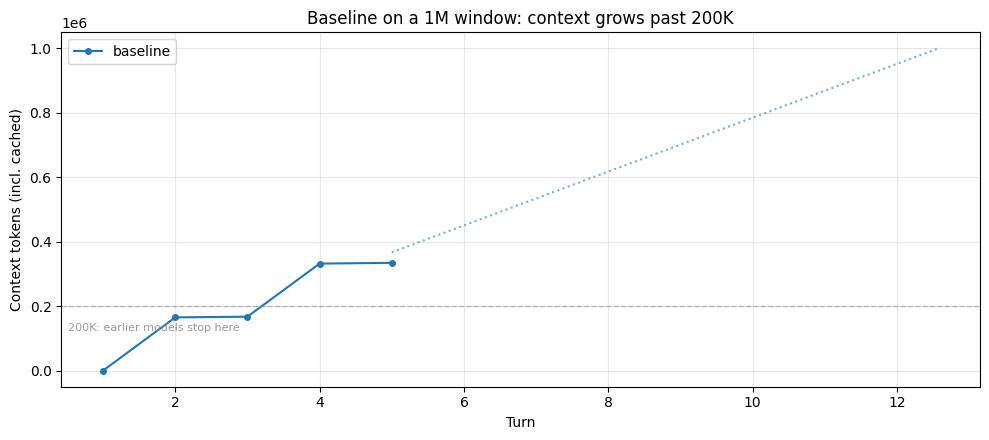
首先,我们在没有上下文管理配置的情况下运行智能体。由于语料库很大(每个文档约 40K token,包含附录表格),上下文会迅速累积。我们将从两个视角观察同一次运行:在 1M token 窗口下会发生什么,以及在 200K 窗口下会发生什么。
第 1 部分:在 1M token 窗口下
Claude Sonnet 4.6 和 Claude Opus 4.6 都提供 1M token 上下文窗口。对于此任务,基线的总输入保持在该限制之下:智能体读取完整语料库并进行综合,而不会触及硬性上限。下面的轨迹显示运行攀升至数十万 token,虚线预测以相同速率继续增长。
baseline = run_research_session(RESEARCH_TASK, label="baseline", max_turns=12)

plot_trajectories(
    {"baseline": baseline},
    "Baseline on a 1M window: context grows past 200K",
    project_growth_for="baseline",
)

peak = max(t for _, t in baseline.token_trajectory)
n_turns = len(baseline.token_trajectory)
print(f"Peak context: {peak:,} tokens across {n_turns} turns")
print(f"File reads: {baseline.tool_counts.get('read_file', 0)}, Notes: {len(baseline.notes)}")
if baseline.hit_limit:
    print("\n⚠ This run hit the 1M hard limit.")
else:
    print(
        "\nThe run stayed within the 1M window. The dotted line projects "
        "where continued growth at the same rate would land, capped at 1M."
    )
# ── What's actually sitting in the context window at the end of the run ──
# Walk the message list and bucket everything by type. This is what the
# model has to attend to on every turn: no hard wall stopped it, but the
# pile keeps growing and every fact from early turns is buried deeper.


def _bucket_context(messages: list[dict]) -> dict[str, tuple[int, int]]:
    """Categorize message content into (count, approx_tokens) per bucket."""
    buckets: dict[str, list[int]] = {
        "File-read results": [],
        "Other tool results": [],
        "Agent reasoning text": [],
        "Tool-call records": [],
        "User/task prompts": [],
    }
    for msg in messages:
        content = msg.get("content")
        if isinstance(content, str):
            buckets["User/task prompts"].append(len(content))
        elif isinstance(content, list):
            for block in content:
                bt = block.get("type")
                if bt == "tool_result":
                    body = block.get("content", "")
                    body = body if isinstance(body, str) else json.dumps(body)
                    # Heuristic: large tool results are file reads
                    key = "File-read results" if len(body) > 5000 else "Other tool results"
                    buckets[key].append(len(body))
                elif bt == "text":
                    buckets["Agent reasoning text"].append(len(block.get("text", "")))
                elif bt == "tool_use":
                    buckets["Tool-call records"].append(len(json.dumps(block.get("input", {}))))
    # chars // 4 as a rough token estimate; the exact number isn't the point
    return {k: (len(v), sum(v) // 4) for k, v in buckets.items() if v}


print("=" * 72)
print("WHAT THE MODEL IS ATTENDING TO at the end of the baseline run")
print("=" * 72)
breakdown = _bucket_context(baseline.messages)
total_est = sum(tok for _, tok in breakdown.values())
# Scale the char-based estimates so the total matches the API's reported
# context size. This keeps the proportions meaningful and the absolute
# numbers consistent with the usage figures shown elsewhere.
api_total = baseline.token_trajectory[-1][1]
scale = api_total / total_est if total_est else 1.0
print(f"\nContext breakdown ({api_total:,} tokens total per API usage):\n")
for label, (count, tokens) in sorted(breakdown.items(), key=lambda kv: -kv[1][1]):
    scaled = int(tokens * scale)
    pct = 100 * tokens / total_est if total_est else 0
    print(f"  {label:<26} ~{scaled:>8,} tokens  ({count:>3} blocks, {pct:4.1f}%)")

if baseline.file_reads:
    first_turn, first_path = baseline.file_reads[0]
    doc_name = first_path.split("/")[-1]
    print(f"\nFirst document read: {doc_name} at turn {first_turn}.")
上面的分解让规模变得具体。模型每一轮都携带数十万个 token 的文件内容,其中大部分是 agent 已经处理并做过笔记的文档。第一个被读取的文档仍然在窗口里,但到运行结束时,它已经位于数十万个其他工具结果以及 agent 所有推理和笔记之后。它并没有被移除;它正在与所有其他内容争夺注意力。这就是上下文腐化出现的地方:随着窗口被填满,从那个深度回忆细节的能力会下降,尽管内容在技术上仍然存在。而预填充延迟会随上下文长度扩展,所以每一轮都要为处理这一整堆内容付出代价。
第 2 部分:在 200K token 窗口上
早期模型的上限是 200K token。在这些模型上,同样的基线运行会撞上一堵硬墙:一旦上下文超过限制,API 就会拒绝下一个请求,任务会在运行中途停止。
下面的单元格会找出基线首次超过 200K 的那一轮,并展示从 200K 模型视角看这次运行是什么样子:到那个点为止轨迹相同,然后硬停止。
# No new agent run here. We reuse the Part-1 baseline's token_trajectory
# and clip it at the turn where context first exceeded 200K, to show what
# the same run would look like from a 200K model's perspective.
cross_turn = next((t for t, tok in baseline.token_trajectory if tok > 200_000), None)

if cross_turn is None:
    print(
        "Baseline never exceeded 200K tokens this run; a 200K model "
        "would have seen the same result."
    )
else:
    # Plot the turns that fit under 200K, plus a dotted segment to the
    # rejected turn and a red cutoff marker between them.
    clipped_traj = [(t, tok) for t, tok in baseline.token_trajectory if t < cross_turn]
    turns_c = [t for t, _ in clipped_traj]
    toks_c = [tok for _, tok in clipped_traj]
    rejected_ctx = dict(baseline.token_trajectory).get(cross_turn, 200_000)

    fig, ax = plt.subplots(figsize=(10, 4.5))
    ax.plot(turns_c, toks_c, marker="o", markersize=4, label="baseline")
    # Dotted segment from last successful turn to the rejected turn
    ax.plot(
        [turns_c[-1], cross_turn],
        [toks_c[-1], min(rejected_ctx, 200_000)],
        linestyle=":",
        color="#1f77b4",
        alpha=0.6,
        linewidth=1.5,
    )
    # Hard red vertical line marking the cutoff between the last
    # successful turn and the rejected one
    cutoff_x = (turns_c[-1] + cross_turn) / 2
    ax.axvline(x=cutoff_x, color="#d62728", linewidth=2)
    ax.set_xlim(0.5, cross_turn + 0.5)
    ax.set_ylim(0, 205_000)
    ax.text(
        0.02,
        0.96,
        "context window: 200,000",
        transform=ax.transAxes,
        ha="left",
        va="top",
        fontsize=9,
        color="#d62728",
    )
    ax.set_xlabel("Turn")
    ax.set_ylabel("Context tokens (incl. cached)")
    ax.set_title("Baseline on a 200K window: agent stopped mid-task")
    ax.legend(loc="lower right")
    ax.grid(alpha=0.3)
    plt.tight_layout()
    plt.show()

    last_turn = clipped_traj[-1][0]
    last_ctx = clipped_traj[-1][1]
    reads_done = sum(1 for t, _ in baseline.file_reads if t < cross_turn)
    notes_at_stop = sum(
        1
        for m in baseline.messages[: 2 * cross_turn]
        if isinstance(m.get("content"), list)
        for b in m["content"]
        if b.get("type") == "tool_use" and b.get("name") == "record_finding"
    )
    print("⚠ Baseline HIT THE CONTEXT WINDOW LIMIT.")
    print(f"  Completed {last_turn} turns before the API rejected the next request.")
    print(f"  Last successful context: {last_ctx:,} tokens")
    print(f"  File reads attempted: {reads_done}")
    print(f"  Notes taken: {notes_at_stop}")
    print()
    print(
        "  The agent stopped mid-task. Without context management, it "
        "cannot continue past this point."
    )
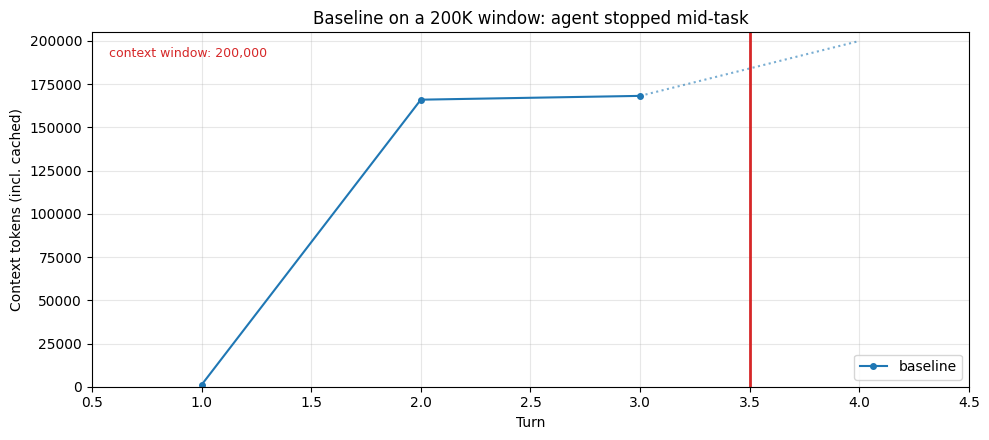
两种失败模式都源于同一个底层问题:上下文窗口被数十万 token 的文件内容填满,其中大部分内容已经被处理并记录过。不同之处在于失败如何显现。在 200K 窗口上,这是硬性停止:API 拒绝下一个请求,任务在阶段中途结束。在 1M 窗口上,智能体继续运行,但随着窗口被填满,上下文腐化开始出现:早期读取的文档在技术上仍然存在,但到运行结束时,它已被此后读取的所有内容掩埋,模型回忆其细节的能力随之下降。智能体完成了任务,但综合质量取决于与那堆内容相抗衡的回忆能力。预填充延迟也随之增长:每一轮都要为处理完整上下文付出代价,无论其中还有多少内容仍然有用。
下面的原语各自通过将工作集保持在足够小、使两种失败模式都不会发作来解决这个问题:窗口不会被填满,因此较小的模型不会停止,较大的模型也不会退化。图表中包含虚线 200K 参考线,以便你可以看到早期模型会在哪里被截断。
压缩
压缩 是一种在长时间运行的对话中管理上下文的有效策略:它接收一段接近上下文窗口限制的对话,对其内容进行摘要,并用该摘要重新开始。这解决了智能体自身的推理文本、用户来回交互以及会话过程中做出的决策等问题。早期轮次中具体的操作序列和确切措辞不会被保留,但智能体所设定的目标、做出的决策以及重大发现会被摘要——摘要保留哪些内容取决于你的压缩提示词,我们将在下文介绍。
从本质上讲,压缩以高保真方式提炼上下文窗口的内容,使智能体能够在性能损失最小的情况下继续运行。其权衡在于选择摘要必须保留什么、可以安全丢弃什么:过于激进的压缩可能会丢失那些微妙但关键的上下文,而这些上下文的重要性往往在之后才会显现。摘要会保留关键决策和事实,但可能会丢弃具体数字或确切措辞。它需要消耗推理成本(摘要模型会运行),但能处理所有上下文增长,而不仅仅是工具结果。
底层工作原理
以下是一个压缩的最小示例实现。我们的一手 API 提供了健壮且经过测试的版本(在 token 阈值处自动触发、可原生嵌入对话的类型化内容块、正确的工具使用配对),但下面约 25 行的版本让机制变得具体:将对话渲染为文本,要求模型对其进行摘要,然后用该摘要替换旧消息。
def demo_compact(client, messages: list[dict], model: str) -> list[dict]:
    """Summarize the conversation and return a fresh message list containing only the summary."""
    # Render to a plain-text transcript
    lines: list[str] = []
    for msg in messages:
        role = msg["role"]
        content = msg.get("content", "")
        if isinstance(content, str):
            lines.append(f"[{role}] {content}")
        elif isinstance(content, list):
            for block in content:
                bt = block.get("type", "?")
                if bt == "text":
                    lines.append(f"[{role}] {block['text']}")
                elif bt == "tool_use":
                    lines.append(f"[{role}→tool] {block['name']}({block.get('input', {})})")
                elif bt == "tool_result":
                    body = block.get("content", "")
                    body = body if isinstance(body, str) else json.dumps(body)
                    lines.append(f"[tool_result] {body[:200]}{'…' if len(body) > 200 else ''}")
    transcript = "\n".join(lines)

    resp = client.messages.create(
        model=model,
        max_tokens=1024,
        messages=[
            {
                "role": "user",
                "content": (
                    "Summarize the following agent transcript, preserving key "
                    "decisions, facts learned, and open threads. Be concise.\n\n"
                    f"<transcript>\n{transcript}\n</transcript>"
                ),
            }
        ],
    )
    summary = resp.content[0].text
    return [{"role": "user", "content": f"[conversation summary]\n{summary}"}]
# Demonstrate on a longer synthetic conversation so the summary is meaningfully shorter
demo_convo = []
organisms = [
    (
        "C. elegans",
        "18-day median lifespan at 20°C. Survival curve takes 4-6 weeks. Automated platforms handle thousands of animals. Genome-wide RNAi by feeding, fast CRISPR knock-ins. ~40% human orthology, no adaptive immunity, post-mitotic soma.",
    ),
    (
        "Drosophila",
        "60-80 day median lifespan at 25°C. Survival curves take 3-4 months. GAL4/UAS tissue-specific expression, FLP/FRT mosaic analysis, mature CRISPR. ~60% human disease gene orthology. Good for cardiac aging and neurodegeneration models.",
    ),
    (
        "Mouse",
        "~24-30 month median lifespan. Full study is 3-year commitment, $1-2/day/animal, $100K+ per 100-mouse cohort. Cre-lox conditionals, inbred strain panels, humanized models. ~85% orthology, best translational predictor.",
    ),
    (
        "Killifish",
        "4-6 month median lifespan (GRZ strain), shortest-lived vertebrate in the lab. Survival curves under a year. CRISPR works, toolkit still thin. ~70% orthology. Rapid vertebrate aging phenotypes on a compressed timeline.",
    ),
    (
        "Yeast",
        "Replicative lifespan ~25 divisions, ~1-2 weeks to result. Genome-wide deletion collection, trivial CRISPR, pooled competitive assays. ~30% orthology. Great for mechanism, not for translation.",
    ),
    (
        "Naked mole-rat",
        "Max lifespan >37 years, negligible senescence. No controlled genetics (eusocial breeding). Cell-line studies only. Near-zero cancer incidence. Comparative biology resource, not a screening organism.",
    ),
]
for name, facts in organisms:
    demo_convo.append({"role": "user", "content": f"Tell me about {name} for aging research."})
    demo_convo.append({"role": "assistant", "content": f"{name}: {facts}"})
demo_convo.append({"role": "user", "content": "What are the key tradeoffs across all of these?"})
demo_convo.append(
    {
        "role": "assistant",
        "content": "The core tradeoff is throughput vs. translational relevance. Short-lived invertebrates (worm, fly, yeast) let you screen fast but translate weakly. Mouse is the translational gatekeeper but slow and expensive. Killifish tries to split the difference. The mole-rat is a comparative outlier you study to understand exceptional longevity, not to screen interventions.",
    }
)

before_tokens = count_tokens(json.dumps(demo_convo))
compacted = demo_compact(client, demo_convo, MODEL)
after_tokens = count_tokens(json.dumps(compacted))
print(
    f"Conversation size: ~{before_tokens:,} → ~{after_tokens:,} tokens "
    f"({(before_tokens - after_tokens) / before_tokens:.0%} reduction)"
    if after_tokens < before_tokens
    else f"Conversation size: ~{before_tokens:,} → ~{after_tokens:,} tokens"
)
print(f"\nSummary produced:\n{compacted[0]['content'][:800]}")
if len(compacted[0]["content"]) > 800:
    print("...")
上面的示例展示了这一机制:模型生成对话的精简版本,智能体可以从中继续。
使用 API
我们的 API 原生提供了这一能力,即 compact_20260112 上下文编辑。它会在达到 token 阈值(最低 50K)时自动触发,返回一个类型化的 compaction 内容块,该内容块可以原生地嵌入对话中,并处理跨越摘要边界的工具调用配对。当压缩触发时,你将压缩块序列化回去({"type": "compaction", "content": block.content}),API 会在下一次请求时丢弃它之前的所有内容。
API 文档: Compaction — platform.claude.com
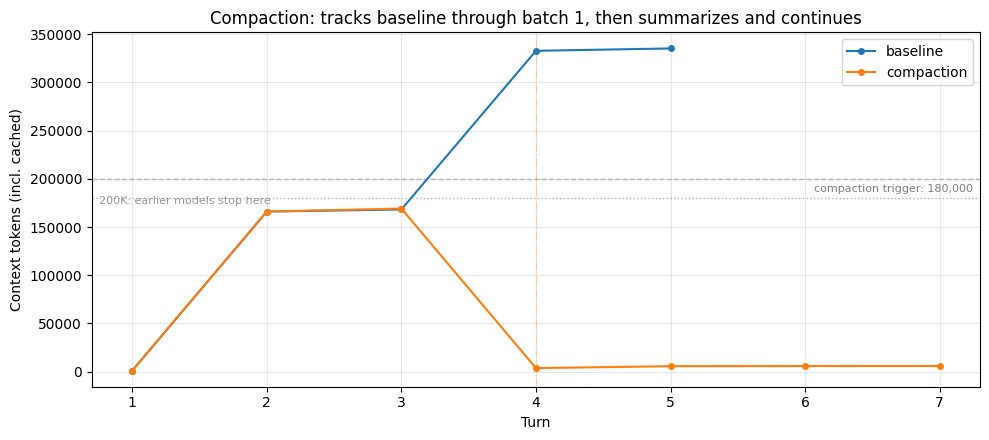
下面是配置了压缩的研究智能体的运行情况。我们将触发阈值设为 180K,以便第一批读取(约 165K)保持在其之下:压缩轨迹在该批次期间与基线保持一致,当第二批将上下文推过触发阈值时则发生偏离。注意输出中的 ⊟ COMPACTION 行,以及图表上摘要替换先前对话时的下降。
COMPACTION_TRIGGER = 180_000  # above batch-1's ~165K so the rise is visible before compaction fires

compaction_run = run_research_session(
    RESEARCH_TASK,
    betas=["compact-2026-01-12"],
    context_management={
        "edits": [
            {
                "type": "compact_20260112",
                "trigger": {"type": "input_tokens", "value": COMPACTION_TRIGGER},
            }
        ]
    },
    max_turns=12,
    label="compaction",
)

plot_trajectories(
    {"baseline": baseline, "compaction": compaction_run},
    "Compaction: tracks baseline through batch 1, then summarizes and continues",
    triggers={"compaction": COMPACTION_TRIGGER},
)

compaction_events = [e for e in compaction_run.events if e["kind"] == "compaction"]

# Outcome comparison
print(
    f"Baseline:    {'HIT LIMIT at' if baseline.hit_limit else 'completed'} "
    f"turn {len(baseline.token_trajectory)}, "
    f"peak {max(t for _, t in baseline.token_trajectory):,} tokens"
)
print(
    f"Compaction:  {'HIT LIMIT at' if compaction_run.hit_limit else 'completed'} "
    f"turn {len(compaction_run.token_trajectory)}, "
    f"peak {max(t for _, t in compaction_run.token_trajectory):,} tokens, "
    f"{len(compaction_events)} compaction event(s)"
)

if compaction_events:
    for i, ev in enumerate(compaction_events, 1):
        print(
            f"  Compaction #{i} at turn {ev['turn']}: ~{count_tokens(ev['summary']):,}-token summary"
        )

baseline_peak = max(t for _, t in baseline.token_trajectory)
compaction_peak = max(t for _, t in compaction_run.token_trajectory)
print(
    f"\n→ Baseline climbed to {baseline_peak:,} tokens; compaction kept "
    f"the peak at {compaction_peak:,}. On a smaller context window the "
    f"baseline would have been cut off mid-task; here it completed, but "
    f"every turn paid to process the full pile."
)
# What compaction costs: check the summary text directly for a MIX of
# details. We inspect what the summary PRESERVED, not what the agent
# happens to have in context at end-of-run (which could include reads
# that happened after compaction fired).
compaction_events = [e for e in compaction_run.events if e["kind"] == "compaction"]

print("=" * 70)
print("WHAT COMPACTION COSTS: what the summary preserved vs. dropped")
print("=" * 70)

if not compaction_events:
    print("(Compaction did not fire this run; probe skipped)")
else:
    # Use the last compaction summary — it covers the most history.
    last_ev = compaction_events[-1]
    summary_text = last_ev["summary"]
    n_tok = count_tokens(summary_text)
    print(
        f"Last compaction at turn {last_ev['turn']} produced a "
        f"~{n_tok:,}-token summary. The file content read before "
        f"that point was distilled into this.\n"
    )
    print(
        "Checking the summary text directly for six details: three "
        "HIGH-LEVEL facts (central to the task, likely summarized) and "
        "three OBSCURE specifics (appendix table cells, unlikely to make "
        "the cut).\n"
    )

    results = []
    for question, answer_key, expected_survive in COMPACTION_PROBES:
        survived = answer_key.lower() in summary_text.lower()
        results.append((question, answer_key, expected_survive, survived))

    for label, expect in [
        ("HIGH-LEVEL FACTS (expected to survive)", True),
        ("OBSCURE SPECIFICS (expected to be lost)", False),
    ]:
        print(f"── {label} ──")
        for q, key, exp, surv in results:
            if exp != expect:
                continue
            status = "✓ in summary" if surv else "✗ not in summary"
            print(f"  {status:<18} looking for '{key}' — {q}")
        print()

    hl_survived = sum(1 for _, _, e, s in results if e and s)
    hl_total = sum(1 for _, _, e, _ in results if e)
    ob_survived = sum(1 for _, _, e, s in results if not e and s)
    ob_total = sum(1 for _, _, e, _ in results if not e)

    print("=" * 70)
    print(
        f"RESULT: high-level {hl_survived}/{hl_total} preserved, "
        f"obscure {ob_survived}/{ob_total} preserved"
    )
    print("=" * 70)

    # Show a representative excerpt of the summary so the reader can see
    # the compression directly.
    excerpt = summary_text.strip()
    if len(excerpt) > 600:
        excerpt = excerpt[:600] + "…"
    print("\nExcerpt from the summary (first ~600 chars):\n")
    for line in excerpt.splitlines():
        print(f"  {line}")
分析
基线会持续攀升,直到它要么触及上下文窗口限制(在较小窗口上会硬性停止),要么累积了足够多的 token,以至于上下文腐化显著降低召回率。压缩同时解决这两个问题:当上下文越过触发阈值时,较早的对话会被模型生成的摘要替换,上下文随之急剧下降。智能体继续在一个精简的窗口上运行,而不是一个不断增长的窗口。
上面的探针直接检查摘要文本中是否包含*混合*的细节。通常出现的模式是:对任务至关重要的高层事实(智能体记录下的寿命数据、生物体身份、主要比较)通常会在摘要中保留下来。冷僻的具体细节(附录表格中的单个单元格、异质性统计量)通常不会。这与工具结果清除有本质区别:清除会*整体*丢弃工具结果,因此内容在重新获取之前就消失了;而压缩以压缩形式保留了*实质内容*,但丢失了逐字细节。
压缩带给你的是保持窗口精简的通用方法:它同时处理对话和工具结果,重要内容以摘要形式保留下来,智能体在原本会被截断或淹没的条件下继续工作。它不能带给你的是具体细节的逐字保真度,或跨会话的持久性。如果你的上下文膨胀主要是可重新获取的工具输出,清除更便宜且无损(智能体只需再次调用工具即可)。如果是无法重新获取的对话和推理,压缩才是正确的选择。
有效实现压缩
instructions 参数允许你完全替换默认的摘要提示词。压缩文档逐字给出了默认提示词:
你已为上述初始任务撰写了部分转录内容。请为该转录内容撰写一份摘要。此摘要的目的是提供连续性,以便你在未来的上下文中继续推进任务解决,届时上述原始历史记录可能无法访问,并将被本摘要替换。请写下任何有帮助的内容,包括状态、后续步骤、经验教训等。你必须将摘要包裹在 <summary></summary> 块中。
这有助于为你提供一个起点。然而,自定义 instructions 并不会补充此提示词——它们会完全替换它。因此,如果你提供自己的指令,你需要负责完整的框架构建。文档中针对编码场景的示例是 "Focus on preserving code snippets, variable names, and technical decisions."
对于本 cookbook 的研究代理,你可以编写一些内容,明确指出上述探针所显示的有丢失风险的具体细节:
context_management={
    "edits": [{
        "type": "compact_20260112",
        "trigger": {"type": "input_tokens", "value": 150_000},
        "instructions": (
            "Summarize this research agent transcript. Preserve every "
            "quantitative lifespan figure and effect size with its "
            "source organism, and note which documents have been read "
            "and which remain. Wrap the summary in <summary></summary>."
        ),
    }]
}
工具结果清理
当智能体调用工具时,每个结果都会以 tool_result 块的形式追加到对话中(上下文编辑文档)。这些块在之后的每一轮都会计入输入 token 预算,即使智能体已经处理完内容并继续前进也是如此。对于可重复调用的工具(文件读取、API 查询、搜索),将逐字结果一直向前携带通常是不必要的;智能体如果需要,只需再次调用该工具即可。
清理会用一段简短的占位字符串替换旧的 tool_result 块。其前面的 tool_use 块会保留,因此模型仍保留着它进行过该调用的记录(以及使用了什么输入),但庞大的响应正文已被移除。这是三种原语中最廉价的一种:没有推理成本,只是对消息列表进行机械式编辑。
底层工作原理
为了让该机制更具体,这里给出一个工具结果清理的最小示例实现。我们的一手 API 提供了该功能的健壮、经过测试的版本(自动触发、正确的块配对不变量、工具排除等),但看到这个约 15 行的版本能让核心操作变得直观:遍历消息列表,找到 tool_result 块,将除最近几个之外的所有块的内容替换为占位符。
def demo_clear_tool_results(messages: list[dict], keep: int = 3) -> int:
    """Replace the content of all but the last `keep` tool_result blocks.
    Returns the number of blocks cleared."""
    positions: list[tuple[int, int]] = []
    for mi, msg in enumerate(messages):
        if msg.get("role") != "user" or not isinstance(msg.get("content"), list):
            continue
        for bi, block in enumerate(msg["content"]):
            if isinstance(block, dict) and block.get("type") == "tool_result":
                positions.append((mi, bi))

    to_clear = positions[:-keep] if keep > 0 else positions
    for mi, bi in to_clear:
        messages[mi]["content"][bi]["content"] = "[cleared to save context]"
    return len(to_clear)
# Demonstrate on a small message list using the actual research corpus
sample_paths = list(CORPUS.keys())[:3]  # first three docs

demo = [{"role": "user", "content": "Read three files and summarize."}]
for i, path in enumerate(sample_paths):
    demo.append(
        {
            "role": "assistant",
            "content": [
                {"type": "tool_use", "id": f"t{i}", "name": "read_file", "input": {"path": path}},
            ],
        }
    )
    demo.append(
        {
            "role": "user",
            "content": [
                {"type": "tool_result", "tool_use_id": f"t{i}", "content": CORPUS[path]},
            ],
        }
    )

before_tokens = count_tokens(json.dumps(demo))
cleared = demo_clear_tool_results(demo, keep=1)
after_tokens = count_tokens(json.dumps(demo))

print(f"Cleared {cleared} of 3 tool results (keep=1 leaves the most recent)")
print(
    f"Message-list size: ~{before_tokens:,} → ~{after_tokens:,} tokens "
    f"({(before_tokens - after_tokens) / before_tokens:.0%} reduction)"
)
print()
print("What each tool_result looks like now:")
for _i, msg in enumerate(demo):
    if not isinstance(msg.get("content"), list):
        continue
    for block in msg["content"]:
        if block.get("type") == "tool_use":
            print(f"\n  [tool_use]  read_file({block['input']['path']})")
        elif block.get("type") == "tool_result":
            body = block["content"]
            if body == "[cleared to save context]":
                print(f"  [tool_result] {body!r}  (← cleared)")
            else:
                preview = body[:80].replace("\n", " ")
                print(f"  [tool_result] {preview!r}... (~{count_tokens(body):,} tokens retained)")
上面的示例展示了该机制。它缺少的是:token 计数与自动触发、正确的 tool_use/tool_result 配对不变量、针对特定工具的排除规则,以及模型侧对已发生清理的感知。
使用 API
我们的 API 原生提供了这一能力,即 clear_tool_uses_20250919 上下文编辑。它在服务端处理 token 计数与触发,保持块配对,并允许你将特定工具排除在清理之外(当记忆工具同时处于活动状态时很有用,我们稍后会看到)。当清理触发时,响应会包含 context_management.applied_edits,其中详细说明了清理了多少次工具使用以及释放了多少 token。
还有用于扩展思考块的clear_thinking_20251015。配置结构相同,只是type不同。如果你同时使用两者,它必须是edits数组中的第一个条目。
API 文档: 上下文编辑 — platform.claude.com
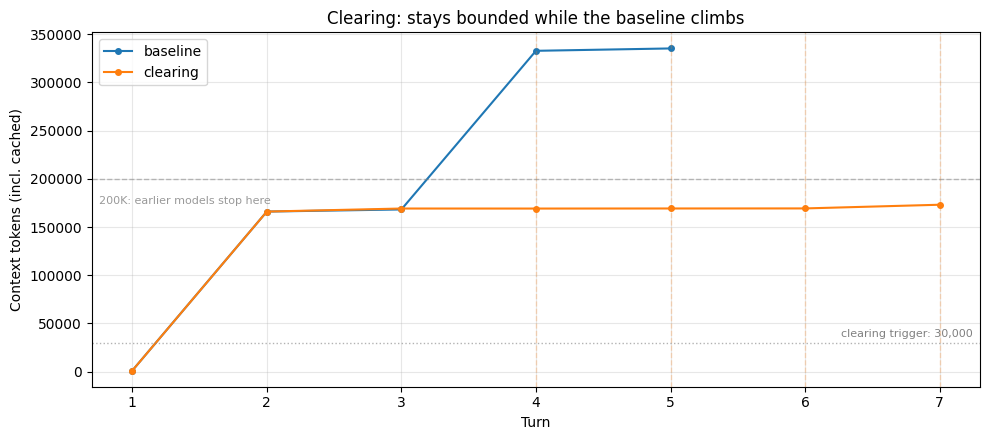
下面是启用清理后运行的研究代理。基线的上下文随着每次文件读取而攀升;清理通过每当上下文超过触发阈值时丢弃旧的工具结果,使本次运行保持有界。注意输出中的 ✂ CLEARING 行;图上的虚线竖线标记了每次触发。
CLEARING_KEEP = 4  # How many most-recent tool results survive each clearing

clearing_run = run_research_session(
    RESEARCH_TASK,
    betas=["context-management-2025-06-27"],
    context_management={
        "edits": [
            {
                "type": "clear_tool_uses_20250919",
                "trigger": {"type": "input_tokens", "value": 30_000},
                "keep": {"type": "tool_uses", "value": CLEARING_KEEP},
                "clear_at_least": {"type": "input_tokens", "value": 10_000},
            }
        ]
    },
    label="clearing",
    max_turns=12,
)

plot_trajectories(
    {"baseline": baseline, "clearing": clearing_run},
    "Clearing: stays bounded while the baseline climbs",
    triggers={"clearing": 30_000},
)

# Show outcome comparison
baseline_turns = len(baseline.token_trajectory)
clearing_turns = len(clearing_run.token_trajectory)
print(
    f"Baseline:  {'HIT LIMIT at' if baseline.hit_limit else 'completed'} "
    f"turn {baseline_turns}, peak {max(t for _, t in baseline.token_trajectory):,} tokens"
)
print(
    f"Clearing:  {'HIT LIMIT at' if clearing_run.hit_limit else 'completed'} "
    f"turn {clearing_turns}, peak {max(t for _, t in clearing_run.token_trajectory):,} tokens"
)

baseline_peak = max(t for _, t in baseline.token_trajectory)
clearing_peak = max(t for _, t in clearing_run.token_trajectory)
print(
    f"\n→ Baseline climbed to {baseline_peak:,} tokens; clearing kept "
    f"the peak at {clearing_peak:,}. On a smaller context window the "
    f"baseline would have been cut off; here both completed, but the "
    f"baseline was attending to far more on every turn."
)

print(f"\nClearing events: {len([e for e in clearing_run.events if e['kind'] == 'clearing'])}")
print(
    f"File reads: baseline={baseline.tool_counts.get('read_file', 0)}, "
    f"clearing={clearing_run.tool_counts.get('read_file', 0)}"
)
# What's lost: which file reads are no longer in the clearing run's context?
print("=" * 60)
print("WHAT CLEARING COSTS: reads no longer in context")
print("=" * 60)
show_cleared_reads(clearing_run, keep=CLEARING_KEEP)
print(
    "\nThe cleared reads above are gone from the conversation. If the "
    "agent needs that content again, it must call read_file again; the "
    "information is re-fetchable, but the original read is no longer "
    "visible in context."
)
分析
基线持续攀升;清理运行则保持有界。一旦上下文超过触发阈值(此处为 30K),且记录中的工具使用次数超过 keep,清理就会在服务端触发:早于最近 keep 次的工具结果会被替换为占位符,上下文随之回落。图中的虚线标记了每次触发。这个有界窗口意味着,在较小的模型上运行不会触及硬性上限,也不会累积到上下文腐化导致召回率下降的范围。
上面的第二个单元格展示了这一做法的代价。除了最近几次之外,每一次文件读取都已从上下文中消失。当智能体进入综合阶段时,它有两个选择。它可以依靠自己的笔记,加上在最后一次清理中幸存下来的近期读取内容:如果笔记足够详尽,这没问题;如果笔记稀疏,综合阶段就会遗漏智能体看到过但未记录的细节。或者,它可以通过再次调用 read_file 来重新获取已被清理的内容:对于相同的文档,清理运行可能会比基线显示更多的文件读取,因为有些读取在智能体用完之前就被清理了。第二条路径的代价取决于你的工具:重新读取本地文件几乎免费,但重新调用有速率限制或缓慢的 API 则不然。调整 keep 和 trigger 会改变智能体在这两者之间的落点。
清理为你带来的是零推理成本的有界窗口,既避免了硬性上限截断,也避免了大量累积上下文带来的召回率下降。它无法为你提供的是:对非工具结果内容(智能体自身的推理、用户消息)的任何帮助,或任何跨会话的持久性。
有效实施清除
与压缩和记忆不同,清除没有需要调优的提示词,所有调节参数要么是数值型(trigger、keep、clear_at_least),要么是基于列表的(exclude_tools)。有一个需要理解的权衡:清除会使缓存的提示前缀失效。为了应对这一点,需要清除足够多的 token,使缓存失效变得值得;clear_at_least 参数确保每次至少清除最小数量的 token。每次清除触发时都会产生缓存写入成本,但后续请求可以复用新缓存的提示前缀。
trigger 和 keep 的合适取值取决于你的智能体如何使用工具结果:它们有多大、智能体重新访问它们的频率如何、重新获取是否廉价。上面的清除运行使用了 trigger=30K 和 keep=4;后面的三者全开运行使用了更高的 trigger 和 keep=6,以便清除和压缩分担工作。针对你自己的智能体工作负载测试几种配置:每个响应中的 context_management.applied_edits 字段会显示清除了多少工具使用和 token,这使得每种配置的效果可以直接观察。
记忆工具
记忆工具使 Claude 能够通过记忆文件目录在对话之间存储和检索信息。Claude 可以创建、读取、更新和删除在会话之间持久存在的文件,使其能够随时间积累知识,而无需将所有内容都保留在上下文窗口中。
这是即时上下文检索的关键原语:代理不是预先加载所有相关信息,而是将它们学到的内容存储在记忆中,并按需取回。这使活动上下文专注于当前相关的内容,这对于长时间运行的工作流至关重要——在这些工作流中,一次性加载所有内容会使窗口不堪重负。清除和压缩都作用于当前上下文;当新会话开始且窗口为空时,两者都无济于事。记忆解决了这个问题。
记忆工具在客户端运行:Claude 发起工具调用来执行记忆操作,你的应用程序在本地执行这些操作。这让你可以完全控制数据的存储位置和方式。API 提供工具协议,并自动注入一个建立记忆检查行为的系统提示;你来实现存储后端。
底层工作原理
这里有一个最小的示例实现:一个键值存储,你在会话结束后写入,在下一个会话开始前读取。我们的一手 API 提供了健壮的版本(模型在其推理过程中决定保存什么以及何时保存、完整的文件操作、自动注入的协议提示),但这个约 10 行的版本让核心模式变得具体。
class SimpleMemoryStore:
    def __init__(self):
        self._store: dict[str, str] = {}

    def save(self, key: str, value: str) -> None:
        self._store[key] = value

    def load(self, key: str) -> str | None:
        return self._store.get(key)

    def keys(self) -> list[str]:
        return list(self._store)


# Demonstrate the pattern manually
store = SimpleMemoryStore()
store.save(
    "lifespans",
    "C. elegans: ~18 days. Mouse: ~24-30 months. Killifish: 4-6 months (shortest vertebrate).",
)
store.save(
    "tractability",
    "Worm has genome-wide RNAi by feeding. Mouse has Cre-lox conditionals. Killifish toolkit still thin.",
)

# In "session 2", you'd inject these into the first prompt:
preamble = "\n".join(f"- {k}: {store.load(k)}" for k in store.keys())
print(f"Session-2 opening prompt would include:\n\nPrior research notes:\n{preamble}")
上面的示例展示了这种模式,但它让你来决定保存什么以及何时加载。而这恰恰是模型更适合做的工作:它在推理过程中知道哪些事实重要,以及何时需要回忆它们。
使用 API
我们的 API 原生提供了这一能力,即 memory_20250818 工具。模型在其工具使用循环中决定保存什么以及何时保存,自动注入的系统提示建立了协议(“在做任何其他事情之前,始终先查看你的记忆目录”),并且该工具提供完整的文件操作,而非键值对。这是一个客户端工具:API 提供协议,你来实现文件后端。
API 文档: Memory tool — platform.claude.com
下面是一个实现了全部六个命令的完整处理器。
class MemoryToolHandler:
    """Client-side backend for the memory_20250818 tool.
    Implements view, create, str_replace, insert, delete, rename.
    File-backed (tempdir) so writes persist across notebook cells.
    """

    def __init__(self, base_dir: str | None = None):
        self.base = Path(base_dir or tempfile.mkdtemp(prefix="memory_"))
        self.base.mkdir(parents=True, exist_ok=True)

    def _resolve(self, path: str) -> Path:
        rel = path.removeprefix("/memories").removeprefix("/") or "."
        resolved = (self.base / rel).resolve()
        if not str(resolved).startswith(str(self.base.resolve())):
            raise ValueError(f"path escapes memory directory: {path}")
        return resolved

    def handle(self, tool_input: dict) -> str:
        cmd = tool_input.get("command")
        try:
            if cmd == "view":
                return self._view(tool_input.get("path", "/memories"))
            if cmd == "create":
                return self._create(tool_input["path"], tool_input["file_text"])
            if cmd == "str_replace":
                return self._str_replace(
                    tool_input["path"], tool_input["old_str"], tool_input["new_str"]
                )
            if cmd == "insert":
                return self._insert(
                    tool_input["path"], tool_input["insert_line"], tool_input["insert_text"]
                )
            if cmd == "delete":
                return self._delete(tool_input["path"])
            if cmd == "rename":
                return self._rename(tool_input["old_path"], tool_input["new_path"])
            return f"Error: unknown command '{cmd}'"
        except Exception as e:
            return f"Error: {e}"

    def _view(self, path: str) -> str:
        p = self._resolve(path)
        if not p.exists():
            return (
                "Directory /memories is empty."
                if path in ("/memories", "/memories/")
                else f"Error: '{path}' does not exist."
            )
        if p.is_dir():
            entries = sorted(p.iterdir())
            if not entries:
                return "(empty directory)"
            return "\n".join((f"{e.name}/" if e.is_dir() else e.name) for e in entries)
        content = p.read_text()
        lines = content.split("\n")
        return "\n".join(f"{i + 1:4d}\t{line}" for i, line in enumerate(lines))

    def _create(self, path: str, file_text: str) -> str:
        p = self._resolve(path)
        p.parent.mkdir(parents=True, exist_ok=True)
        p.write_text(file_text)
        return f"Created {path}"

    def _str_replace(self, path: str, old_str: str, new_str: str) -> str:
        p = self._resolve(path)
        content = p.read_text()
        if old_str not in content:
            return f"Error: old_str not found in {path}"
        if content.count(old_str) > 1:
            return f"Error: old_str appears {content.count(old_str)} times; be more specific."
        p.write_text(content.replace(old_str, new_str, 1))
        return f"Replaced in {path}"

    def _insert(self, path: str, insert_line: int, insert_text: str) -> str:
        p = self._resolve(path)
        lines = p.read_text().split("\n")
        lines.insert(insert_line, insert_text)
        p.write_text("\n".join(lines))
        return f"Inserted at line {insert_line} in {path}"

    def _delete(self, path: str) -> str:
        p = self._resolve(path)
        if p.is_dir():
            import shutil

            shutil.rmtree(p)
        else:
            p.unlink()
        return f"Deleted {path}"

    def _rename(self, old_path: str, new_path: str) -> str:
        old_p, new_p = self._resolve(old_path), self._resolve(new_path)
        new_p.parent.mkdir(parents=True, exist_ok=True)
        old_p.rename(new_p)
        return f"Renamed {old_path} → {new_path}"
安全提示:_resolve方法会防止路径遍历(../../etc/passwd)。在生产环境中,你还需要限制文件大小和目录总大小。更深入的内存模式请参阅 Memory Cookbook。
演示其优势
为了直观地看到效果,我们让智能体运行三个会话:
- 会话 1 执行初始研究,并将其发现写入
/memories。 - 会话 2(无记忆) 在空的内存目录下运行后续任务。它必须从头重新发现所有内容。
- 会话 2(有记忆) 运行相同的后续任务,但可以访问会话 1 保存的文件。它会先读取这些文件,并在此基础上继续,而不是重新研究。
两次会话 2 运行之间的对比,正是记忆优势变得可见的地方。
# Session 1: initial research pass, memory tool enabled
memory = MemoryToolHandler()
# Focused task for S1: read a handful of docs, save the comparative findings
S1_TASK = """Compare four model organisms for aging research: C. elegans, mouse,
killifish, and yeast. For each one, summarize lifespan, genetic tractability,
and translational relevance. Read the review documents and save your
comparative findings to /memories so a follow-up session can build on them."""

memory_s1 = run_research_session(
    S1_TASK,
    memory_handler=memory,
    max_turns=15,
    label="memory/s1",
)

print("=" * 60)
print("What Session 1 wrote to /memories:")
print("=" * 60)
for f in sorted(memory.base.iterdir()):
    content = f.read_text()
    print(f"\n▸ {f.name} (~{count_tokens(content):,} tokens)")
    for line in content.split("\n")[:10]:
        print(f"  {line}")
    if len(content.split("\n")) > 10:
        print("  ...")
# Session 2 WITHOUT memory: follow-up task with empty /memories
# This shows what happens when the agent has no prior knowledge to draw on.
S2_TASK = (
    "Write a final synthesis comparing all eight model organisms for "
    "aging research (C. elegans, Drosophila, yeast, killifish, mouse, "
    "zebrafish, naked mole-rat, rhesus), focusing on which organisms "
    "are strongest for which kinds of questions. Use information from "
    "/memories for organisms already covered there; read source "
    "documents for any organism not yet captured."
)

empty_memory = MemoryToolHandler()  # fresh, empty /memories
memory_s2_without = run_research_session(
    S2_TASK,
    memory_handler=empty_memory,
    max_turns=12,
    label="memory/s2-without",
)
# Session 2 WITH memory: same follow-up task, but with access to Session 1's files
# The agent should read /memories first and build on it instead of re-researching.
memory_s2 = run_research_session(
    S2_TASK,
    memory_handler=memory,  # SAME handler as Session 1
    max_turns=12,
    label="memory/s2-with",
)

# Show what Session 2 read from /memories in its opening turns
print("=" * 60)
print("What Session 2 (with memory) read from /memories:")
print("=" * 60)
for msg_i, msg in enumerate(memory_s2.messages[:8]):
    # Look for memory tool calls in assistant turns
    if msg["role"] == "assistant" and isinstance(msg["content"], list):
        for block in msg["content"]:
            if block.get("type") == "tool_use" and block.get("name") == "memory":
                inp = block.get("input", {})
                print(f"\n[memory {inp.get('command', '?')}] {inp.get('path', '')}")
    # Look for the corresponding tool results (what was read)
    if msg["role"] == "user" and isinstance(msg["content"], list) and msg_i <= 6:
        for block in msg["content"]:
            if block.get("type") == "tool_result":
                result = block.get("content", "")
                if isinstance(result, str) and len(result) > 20:
                    # Show a preview of what was read
                    preview = result[:350].replace("\n", "\n  ")
                    print(f"  └ {preview}{'...' if len(result) > 350 else ''}")
# Compare: the bar chart shows final context and file reads side by side.
plot_summary_bars(
    {
        "S2 without memory": memory_s2_without,
        "S2 with memory": memory_s2,
    },
    "Memory benefit: Session 2 with vs. without Session 1's saved findings",
)

s2_with_reads = memory_s2.tool_counts.get("read_file", 0)
s2_without_reads = memory_s2_without.tool_counts.get("read_file", 0)
s2_with_mem = memory_s2.tool_counts.get("memory", 0)
s2_without_mem = memory_s2_without.tool_counts.get("memory", 0)

print("Session 2 comparison:")
print(
    f"  Without memory: {s2_without_reads} file reads, {s2_without_mem} memory ops, "
    f"peak ctx {max(t for _, t in memory_s2_without.token_trajectory):,}"
)
print(
    f"  With memory:    {s2_with_reads} file reads, {s2_with_mem} memory ops, "
    f"peak ctx {max(t for _, t in memory_s2.token_trajectory):,}"
)

if s2_with_reads < s2_without_reads:
    saved = s2_without_reads - s2_with_reads
    print(
        f"\n→ Memory saved {saved} file read(s): the agent pulled Session 1's "
        "findings from /memories instead of re-reading the source documents."
    )
elif s2_with_reads == 0 and s2_with_mem > 0:
    print(
        "\n→ Session 2 with memory completed using only /memories; "
        "no source-document re-reads needed."
    )
else:
    print(
        "\n→ Read counts are similar this run. The benefit depends on how "
        "comprehensive Session 1's notes were and how the agent chose to use them."
    )

print(
    "\nThis comparison shows memory working well because Session 1's notes "
    "were comprehensive. If Session 1 had saved sparse or poorly organized "
    "notes, Session 2 would fall back to re-reading source documents. "
    "Memory's value depends on the agent's judgment about what to write."
)
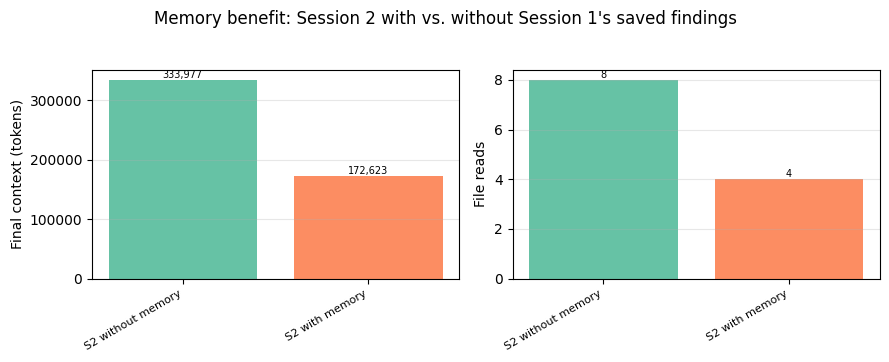
分析
这一对比让收益变得具体。没有记忆的会话 2 没有任何可依托的内容;/memories 是空的,因此它不得不回到源文档重新发现相同的事实。有记忆的会话 2 一开始就读取 /memories(自动注入协议使这成为默认的第一步),找到会话 1 保存的发现,并可以基于这些内容进行综合,而不必重新阅读每一份源文档。
这就是实践中的即时检索:与其将所有先验知识加载到第一个提示中,智能体按需从记忆中拉取相关片段。柱状图中的文件读取次数和最终上下文直接量化了这一差异。
记忆带给你的是跨会话的持久性,并且对智能体选择保存的任何内容都保持无损保真度。它无法带给你的是对会话内上下文增长的任何帮助(会话 1 的峰值上下文仍然很高),并且它为每一次读取和写入都增加了工具调用开销。记忆解决跨会话问题;清除和压缩解决会话内问题。
有效实现记忆
memory_20250818 工具会自动注入一段系统提示,建立“先检查记忆”的协议和“假设会被中断”的心态(“在做任何其他事情之前,务必先查看你的记忆目录……你的上下文窗口可能随时被重置”)。这处理了基本机制。除此之外,记忆工具文档描述了若干塑造模型保存内容的方式:
主题引导。 你可以通过一条简单的系统提示指令来引导写入内容:"Only write down information relevant to <topic> in your memory system." 对于本 cookbook 的研究代理,这可能是“保存比较性发现和关键数据,而不是原始文档内容”。
保持 /memories 井然有序。 如果你观察到模型创建了杂乱的记忆文件,可以尝试添加:"when editing your memory folder, always try to keep its content up-to-date, coherent and organized. You can rename or delete files that are no longer relevant. Do not create new files unless necessary." 这可以防止目录在多次会话中积累半重叠的笔记。
初始化会话结构。 对于多会话工作,可以尝试运行一个专门的首个会话,在实质性工作开始前建立记忆产物:进度日志、功能清单、对任何设置脚本的引用。后续会话通过读取这些产物来恢复状态。以这种方式预置 /memories,可以让后续会话在一个一致的结构中工作,而不是每个会话都发明自己的组织方式。
存储卫生。 在客户端,你还可以跟踪文件大小以防止无限制增长,考虑清理长时间未访问的记忆文件,并针对路径遍历进行校验。
小结:每种原语的作用
| 原语 | 作用对象 | 牺牲了什么 | 解决了什么 |
|---|---|---|---|
| 压缩(Compaction) | 当前窗口中的整个对话 | 逐字细节被压缩为摘要;晦涩的具体信息可能丢失 | 所有会话内的增长 |
| 清除(Clearing) | 当前窗口中的工具结果 | 旧工具结果从上下文中消失(如需再次使用必须重新获取) | 工具结果膨胀 |
| 记忆(Memory) | 跨窗口的外部存储 | 工具调用开销;效果取决于智能体选择保存的内容 | 跨会话持久化 |
下图将三次单独运行并排展示,并附上基线。请注意,记忆的会话 2 是一个不同的任务(后续综合),因此其绝对数值无法与其他运行直接比较;对记忆而言,重要的是上文展示的“有 S2”与“无 S2”的对比。
# Side-by-side view of each primitive's solo run
solo_results = {
    "baseline": baseline,
    "clearing": clearing_run,
    "compaction": compaction_run,
    "memory (S2 with)": memory_s2,
}
plot_summary_bars(solo_results, "Each primitive alone: session outcomes")

# Completion status and events per run
print(f"{'Run':<20} {'Status':<18} {'Context events'}")
print("-" * 60)
for name, res in solo_results.items():
    status = "HIT LIMIT" if res.hit_limit else "completed"
    n_clear = sum(1 for e in res.events if e["kind"] == "clearing")
    n_compact = sum(1 for e in res.events if e["kind"] == "compaction")
    ev_parts = []
    if n_clear:
        ev_parts.append(f"{n_clear} clearing")
    if n_compact:
        ev_parts.append(f"{n_compact} compaction")
    print(f"  {name:<18} {status:<18} {', '.join(ev_parts) if ev_parts else 'none'}")
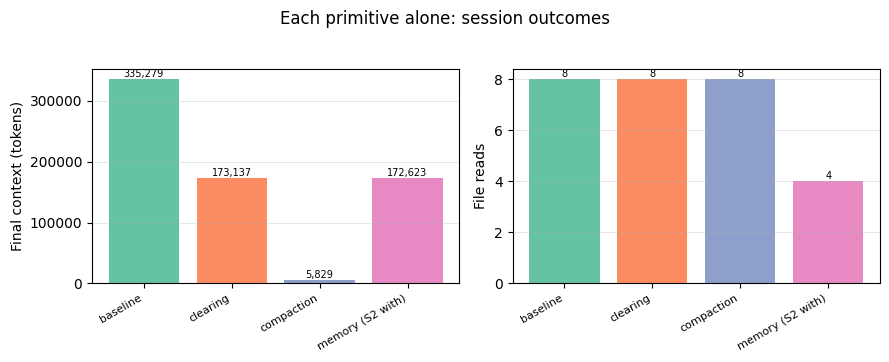
这三个原语分别处理上下文问题的不同层面,因此它们是互补而非竞争的关系。清除和压缩管理当前窗口内的内容;记忆则将信息移出窗口,使其能够跨会话保留。你需要哪些原语,取决于你的工作负载实际触及问题的哪些部分。
组合使用
这三种原语针对上下文问题的不同部分,因此可以分层叠加使用。Claude Code 就是一个真实世界的例子,它将压缩与两个互补的记忆系统结合使用:CLAUDE.md 文件保存用户定义的指令和规则(编码规范、项目架构、工作流),由开发者编写并提交到源代码控制中;自动记忆则保存 Claude 自己写入的学习内容和模式(构建命令、调试见解、从纠正中发现的偏好)。对于 Claude Code 而言,两者都是有用的记忆形式。
Claude Code 的设计表明,同一个智能体的记忆可以呈现不同形态:一种由用户编写,另一种由模型编写。压缩和清除同样如此:每种都有配置选项(触发阈值、自定义指令、要排除的工具),让你可以根据自己的用例调整行为。这就是上文“有效实现”部分中的提示和配置指导之所以重要的原因:默认行为只是一个起点,正确的设置取决于你的智能体实际在做什么。
关于exclude_tools的说明:当将清除与记忆工具结合使用时,exclude_tools: "memory"]设置(如下方配置所示)可以防止智能体的记忆读写被清除。如果没有这个设置,智能体可能会丢失它刚刚保存的内容的追踪。[记忆工具文档在将两者分层使用时明确推荐了这一做法。
下面我们运行研究智能体,同时激活全部三种原语,并追踪每种原语在整个会话过程中的作用。
关于配置的说明:两个触发阈值都设置在第一批次大小(约 167K)之上,因此轨迹在第一批次中会跟随基线。当第二批次将上下文推高到约 330K 时,清除首先触发(keep=6 丢弃最早的读取,留下约 210K),然后压缩在清除留下的内容上触发。记忆全程处于激活状态。这种调优是为了演示,以便三种原语在一次运行中全部激活。生产配置取决于你的智能体特定的上下文增长模式。
# Both triggers sit above batch-1's ~167K so the rise is visible. At
# batch-2 (~330K) clearing fires first (keep=6 drops the earliest 3-4
# reads, leaving ~210K) and compaction then fires on what clearing
# left. Tuned for demo visibility, not a production recommendation.
combo_memory = MemoryToolHandler()
COMBO_CLEARING_TRIGGER = 200_000
COMBO_COMPACTION_TRIGGER = 180_000

combo_run = run_research_session(
    """Compare the model organisms in /research/ on lifespan, genetic
tractability, and translational relevance.

Work in two batches, recording a note after each batch before moving on.
Batch 1 (high-throughput): read celegans_review.md, drosophila_review.md,
yeast_review.md, killifish_review.md, then record a note. Batch 2
(low-throughput): read mouse_review.md, zebrafish_review.md,
nmr_review.md, rhesus_review.md, then record a note. Save a comparative
summary to /memories so future sessions can build on it. Finish with a
detailed synthesis.""",
    betas=["context-management-2025-06-27", "compact-2026-01-12"],
    context_management={
        "edits": [
            {
                "type": "clear_tool_uses_20250919",
                "trigger": {"type": "input_tokens", "value": COMBO_CLEARING_TRIGGER},
                "keep": {"type": "tool_uses", "value": 6},
                "clear_at_least": {"type": "input_tokens", "value": 30_000},
                "exclude_tools": ["memory"],
            },
            {
                "type": "compact_20260112",
                "trigger": {"type": "input_tokens", "value": COMBO_COMPACTION_TRIGGER},
            },
        ],
    },
    memory_handler=combo_memory,
    max_turns=20,
    label="all-three",
)
# Build a timeline showing when each primitive activated over the session
print("=" * 70)
print("SESSION TIMELINE: all three primitives active")
print("=" * 70)

# Build turn-indexed event markers
clear_turns = {e["turn"] for e in combo_run.events if e["kind"] == "clearing"}
compact_turns = {e["turn"] for e in combo_run.events if e["kind"] == "compaction"}

# Find per-turn memory tool calls by walking messages
mem_call_turns = set()
turn = 0
for msg in combo_run.messages:
    if msg["role"] == "assistant" and isinstance(msg["content"], list):
        turn += 1
        for block in msg["content"]:
            if block.get("type") == "tool_use" and block.get("name") == "memory":
                mem_call_turns.add(turn)

# Print turn-by-turn with markers
for t, ctx in combo_run.token_trajectory:
    markers = []
    if t in clear_turns:
        markers.append("✂ CLEARING")
    if t in compact_turns:
        markers.append("⊟ COMPACTION")
    if t in mem_call_turns:
        markers.append("◇ memory")
    marker_str = "  " + "  ".join(markers) if markers else ""
    print(f"  turn {t:2d}  ctx={ctx:>7,}{marker_str}")

# Summary of what each primitive did
n_clearing = len(clear_turns)
n_compaction = len(compact_turns)
n_memory_calls = combo_run.tool_counts.get("memory", 0)
mem_files = sorted(combo_memory.base.iterdir())

print("\n" + "─" * 70)
print("What each primitive did this session:")
print(f"\n  ✂ Tool-result clearing fired {n_clearing} time(s)")
print(
    f"    → Dropped old tool results to keep context capped at ~{max(t for _, t in combo_run.token_trajectory):,} tokens"
)
print(
    f"    → {combo_run.tool_counts.get('read_file', 0)} file reads total "
    f"(vs baseline's {baseline.tool_counts.get('read_file', 0)}); some were re-fetches after context was reset"
)

if n_compaction > 0:
    print(f"\n  ⊟ Compaction fired {n_compaction} time(s)")
    for ev in combo_run.events:
        if ev["kind"] == "compaction":
            print(
                f"    → At turn {ev['turn']}: replaced prior conversation with ~{count_tokens(ev['summary']):,}-token summary"
            )
else:
    print(
        f"\n  ⊟ Compaction did not fire (clearing kept context below the {COMBO_COMPACTION_TRIGGER:,} trigger)"
    )

print(
    f"\n  ◇ Memory tool called {n_memory_calls} time(s), wrote {len(mem_files)} file(s) to /memories"
)
for f in mem_files:
    content = f.read_text()
    print(f"    → {f.name} (~{count_tokens(content):,} tokens)")
    lines = content.split("\n")
    for line in lines[:6]:
        print(f"        {line}")
    if len(lines) > 6:
        print("        ...")

print("\n" + "─" * 70)
print(
    f"Peak context: {max(t for _, t in combo_run.token_trajectory):,} tokens "
    f"(vs baseline's {max(t for _, t in baseline.token_trajectory):,})"
)
print(f"Final context: {combo_run.token_trajectory[-1][1]:,} tokens")
print(
    f"Session {'completed' if not combo_run.hit_limit else 'HIT LIMIT'} "
    f"in {len(combo_run.token_trajectory)} turns"
)
plot_trajectories(
    {"baseline": baseline, "all three active": combo_run},
    "All three primitives active: context stays bounded while the session continues",
    triggers={"clearing": COMBO_CLEARING_TRIGGER, "compaction": COMBO_COMPACTION_TRIGGER},
)
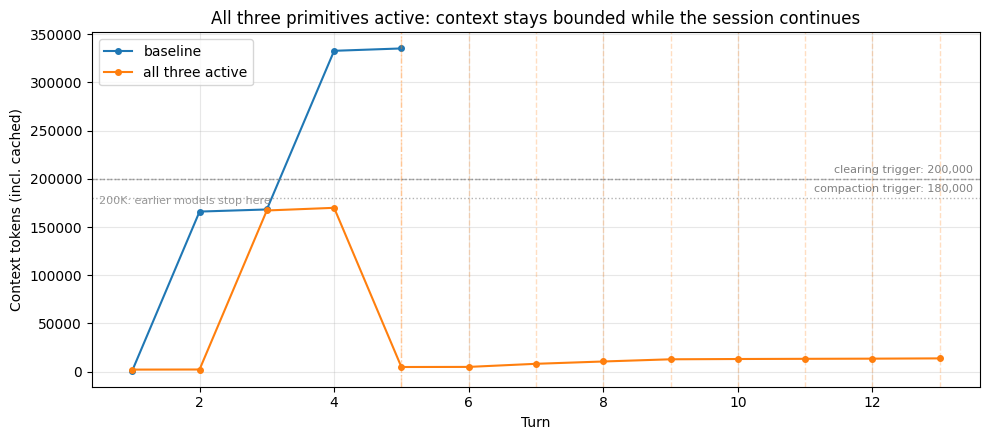
时间线展示了什么
当三个原语全部启用时,每一个都在会话中因各自的原因被激活。轨迹在批次 1 期间一直跟随基线:两个触发阈值都高于第一批的大小,因此在批次 2 将上下文推过约 330K 之前,两个编辑都没有触发。此时,清除丢弃了最早的读取内容,压缩则对剩余内容进行了摘要,让智能体得以继续。记忆全程处于活跃状态,智能体在开始时检查了 /memories,并为未来的会话保存了对比笔记。上面的时间线展示了三者在一个会话中的协同工作。
要让这些原语有效地分工,需要一些调优;请计划针对你自己的负载来试验这些数值。
重点不在于同时运行三者会产生“最佳”数字;而在于当问题真正出现时,它们各自处理问题的不同部分。有用的问题不是“我应该三个都用吗?”,而是“我的负载实际上存在这三个问题中的哪一个?”
什么时候你可能不想要某个原语
并非每个负载都需要每个工具。以下几种情况你会刻意省略其中一个:
- 跳过记忆,如果你希望每个会话都从全新状态开始。一个面向用户的聊天机器人,如果每次对话都应该是独立的,就不需要跨会话持久化;添加记忆会携带你不想要的状态。
- 跳过压缩,如果你的会话足够短,自然就能保持在上下文限制之下。压缩是有损的(具体细节会被摘要掉),所以如果你不需要那部分余量,你就是在白白牺牲保真度。
- 跳过清除,如果智能体确实需要完整地查看过去的工具结果。一个进行跨文档分析、需要并排比较段落的智能体,无法足够快地重新获取已被清除的结果;清除会迫使它进行冗余读取。
要点与后续步骤
实验中的经验教训
在这些不同配置下运行研究代理,可以得出一些实用的经验教训:
轨迹的形状反映了每个工具的作用。 当清除触发时,你会看到在移除旧工具结果的那一轮出现阶梯式下降;在较长的会话中,随着上下文再次攀升超过触发阈值,这种情况可能会重复出现。压缩每次触发时会产生更大的下降,因为摘要替换的是整段连续轮次,而不仅仅是其中的工具结果。本 cookbook 中的图表旨在让这些效果变得可见,这样你就能具体看到当你调整某个旋钮时发生了什么变化。哪个工具适合你的工作负载是一个独立的问题,取决于代理需要做什么。
有损性是一个光谱,而不是二元的。 只要工具可以重新调用,清除就是无损的。压缩以可控的方式有损:摘要器提示(默认或自定义)决定了什么内容会被保留。记忆在保存的内容上是无损的,但其效果取决于代理对保存内容的判断。每个原语以不同的方式权衡保真度。
分层在增加能力的同时也等量增加了复杂性。 将三者一起使用可以覆盖更多上下文问题,但也意味着需要调整更多旋钮、追踪更多交互。在添加一个原语之前,有用的问题是:它解决了你工作负载中的什么具体问题。
关于更大的上下文窗口。 借助 Sonnet 4.6 和 Opus 4.6 提供的 100 万 token 上下文,这些余量很有用:可以保留更多逐字细节,有损操作也可以间隔得更开。但正如基线的上下文分解所示,在 100 万模型上的工作集填满陈旧工具结果的速度,与在 20 万模型上一样快;区别在于硬限制的位置,而不是上下文积累的速度。上下文腐烂和预填充延迟随窗口中内容的多少而扩展,而不是随窗口的限制而扩展,因此即使硬墙还很远,保持工作集精简仍然值得做。
思考你的工作负载
下表概述了工作负载特征以及值得首先尝试的原语。请将这些视为在你自己的代理上测试的假设,而不是答案。每个工作负载都有表格无法捕捉的独特之处。
| 如果你的工作负载具有... | 值得首先尝试 | 注意 |
|---|---|---|
| 跨越数天或数周的会话 | 记忆工具 | 工具调用开销;事实变化时记忆过时 |
| 应跨会话学习用户偏好的代理 | 记忆工具 | PII/敏感数据政策;用户改变主意时偏好过时 |
| 大型、可重新获取的工具结果 | 清除 | 代理重新读取刚被清除的内容;调整 keep 和触发阈值 |
| 以对话为主要上下文 | 压缩 | 具体数字被摘要掉 |
| 不易重新获取的工具结果(临时 API、上传) | 压缩而非清除 | 这些特定结果的摘要保真度 |
| 每个会话都应从新开始 | 跳过记忆 | 你不想要的跨会话状态 |
| 会话远低于窗口限制 | 跳过压缩 | 你不需要的有损性 |
本 cookbook 未涵盖的内容
超越基础的调优。 上面的“有效实现”部分为每个原语提供了起点。下一步是实验:不同的用例会根据参数和提示词从同一个原语中获得不同的价值。一个编码智能体和一个研究智能体可能都会使用压缩,但适用于其中一个的 instructions 字符串不会适用于另一个;清除阈值以及你引导模型写入 /memories 的内容也是如此。
搭建测试框架在这里会有所帮助。举个简单的例子,本 cookbook 中的智能体循环(run_research_session)会返回 token_trajectory、events 和 tool_counts:你可以在若干配置下运行你的智能体,将轨迹并排绘制出来,并衡量对你重要的指标(任务质量、延迟、token 消耗)。
相邻功能。 程序化工具调用(PTC) 通过在模型编写的程序内运行工具,从根本上防止大型结果进入上下文,这是解决工具膨胀问题的一种不同方法。工具搜索 在你拥有大量工具时,可以削减工具定义带来的膨胀。
相关阅读
Memory Cookbook 通过一个代码审查智能体更深入地探讨了记忆模式,而 Compaction Cookbook 则单独介绍了压缩。关于多会话软件智能体中上下文管理技术的详细案例研究,请参阅 Effective harnesses for long-running agents。
结论
本 notebook 介绍了长时运行智能体的三个上下文管理原语:用于压缩对话历史的压缩、用于丢弃可重新获取的工具输出的工具结果清除,以及用于跨会话持久化知识的记忆工具。每个原语都针对上下文问题的不同方面。
哪些原语对你的智能体重要,取决于其上下文增长实际来自哪里。本 cookbook 中的配置和智能体循环是一个起点,让你可以在不同配置下运行自己的工作负载,并观察会发生什么变化。
常见问题
常见错误:ANTHROPIC_API_KEY 未设置导致 ValueError;research_corpus.py 缺失或语料 token 不足 250K 触发断言;上下文窗口超限时 API 抛 BadRequestError,需捕获并标记 hit_limit;压缩块未正确序列化回消息列表导致后续请求丢失摘要;清理与记忆同用时未设置 exclude_tools: ["memory"],导致刚写入的记忆被清除;keep 和 trigger 配置不当造成智能体反复重读同一文档;缓存前缀失效导致成本上升,需用 clear_at_least 确保清除足够 token。排查方法:检查 context_management.applied_edits 字段,绘制 token_trajectory 和事件时间线,对比有无原语的运行结果。
企业应用扩展
生产优化:针对工作负载测试多种 trigger、keep、clear_at_least 组合;自定义压缩 instructions 保留关键定量数据和已读文档列表;引导智能体写入 /memories 的内容,保持目录整洁;限制记忆文件大小和目录总量,清理长期未访问文件。相邻功能:程序化工具调用(PTC)在模型编写的程序内运行工具,从根本上防止大型结果进入上下文;工具搜索在工具数量庞大时削减工具定义膨胀。相关阅读:Memory Cookbook、Compaction Cookbook、Effective harnesses for long-running agents。
总结
本文面向有编程基础的 AI 工程开发者,系统讲解长时程智能体上下文管理的三大原语:压缩、工具结果清理与记忆工具。通过一个跨会话研究型智能体的完整可运行示例,展示如何用 Anthropic API 的 compact_20260112、clear_tool_uses_20250919 和 memory_20250818 分别解决对话膨胀、工具结果堆积和跨会话知识丢失问题。文章包含环境搭建、代码逐段分析、轨迹可视化、常见错误排查与生产调优建议,帮助读者将工作负载特征映射到合适的上下文工程策略。
- --
内容来源与验证
- 内容等级:PREMIUM_A
- 质量等级:S_CANDIDATE
- 难度:高级
- 验证等级:V1
- 原文作者:isabella-anthropic
- 原文日期:2026-03-20
- 来源许可:MIT
- 来源版本:
464cb15a02b12a76e5457c924e4ba793e3933a03 - 查看原文
站内还有更多完整实战教程
加入会员,解锁全部教程、完整代码与持续更新内容。
加入会员