使用GPT-4o视觉功能调用:多模态AI应用指南
技术背景
传统 OCR 和图像描述技术只能提取文本或生成简单描述,无法理解图像中的语义关系并触发业务动作。GPT-4o 结合视觉与函数调用,使模型能根据图像内容推理并调用外部工具,实现自动化决策。适用场景包括客服自动化、文档结构化、流程审批等。主要限制在于图像质量要求高、复杂图表解析可能出错,且需考虑 API 成本与延迟。
核心原理
核心原理是利用 GPT-4o 的多模态理解能力,将图像编码为 base64 并作为消息内容,同时通过 Pydantic 模型定义函数签名(工具)。模型根据图像和指令选择合适工具并生成参数,instructor 库将响应解析为结构化对象。数据流:图像→base64→消息→模型推理→工具调用→参数提取→执行占位函数→返回结果。关键设计决策包括使用 Literal 限定动作、Optional 字段处理可选信息、以及通过 response_model 强制输出结构。
架构分析
系统分为三层:输入层负责图像编码与消息构造;推理层使用 GPT-4o 进行多模态推理并选择工具;执行层根据工具调用执行具体业务逻辑(如退款、换货)。组件关系:OpenAI 客户端与 instructor 集成,将函数调用模式设为 PARALLEL_TOOLS 以支持多工具选择。Pydantic 模型作为数据契约,确保输入输出验证。设计思想是解耦图像理解与业务动作,通过工具抽象实现可扩展性。
完整实战教程
如何将 GPT-4o Vision 与函数调用结合使用
GPT-4o(截至 2024 年 11 月,版本为 gpt-4o-2024-11-20)现已支持结合视觉能力的函数调用,具备更强的推理能力,知识截止日期为 2023 年 10 月。将图像与函数调用结合使用,将开启多模态用例,并利用推理能力,使您超越 OCR 和图像描述的局限。
我们将通过两个示例来演示如何将函数调用与 GPT-4o Vision 结合使用:
- 模拟配送异常支持的客服助手
- 分析组织架构图以提取员工信息
安装与设置
!pip install pymupdf --quiet
!pip install openai --quiet
!pip install matplotlib --quiet
# instructor makes it easy to work with function calling
!pip install instructor --quiet
import base64
import os
from enum import Enum
from io import BytesIO
from typing import Iterable
from typing import List
from typing import Literal, Optional

import fitz
# Instructor is powered by Pydantic, which is powered by type hints. Schema validation, prompting is controlled by type annotations
import instructor
import matplotlib.pyplot as plt
import pandas as pd
from IPython.display import display
from PIL import Image
from openai import OpenAI
from pydantic import BaseModel, Field
1. 模拟一个用于配送异常支持的客服助手
我们将模拟一个配送服务的客服助手,该助手具备分析包裹图像的能力。助手将根据图像分析执行以下操作:
- 如果图像中的包裹看起来有损坏,则根据政策自动处理退款。
- 如果包裹看起来潮湿,则发起换货。
- 如果包裹看起来正常且没有损坏,则升级给人工客服。
让我们看看客服助手将分析以确定适当操作的包裹示例图像。我们将把图像编码为 base64 字符串,以便模型进行处理。
# Function to encode the image as base64
def encode_image(image_path: str):
    # check if the image exists
    if not os.path.exists(image_path):
        raise FileNotFoundError(f"Image file not found: {image_path}")
    with open(image_path, "rb") as image_file:
        return base64.b64encode(image_file.read()).decode('utf-8')


# Sample images for testing
image_dir = "images"

# encode all images within the directory
image_files = os.listdir(image_dir)
image_data = {}
for image_file in image_files:
    image_path = os.path.join(image_dir, image_file)
    # encode the image with key as the image file name
    image_data[image_file.split('.')[0]] = encode_image(image_path)
    print(f"Encoded image: {image_file}")


def display_images(image_data: dict):
    fig, axs = plt.subplots(1, 3, figsize=(18, 6))
    for i, (key, value) in enumerate(image_data.items()):
        img = Image.open(BytesIO(base64.b64decode(value)))
        ax = axs[i]
        ax.imshow(img)
        ax.axis("off")
        ax.set_title(key)
    plt.tight_layout()
    plt.show()


display_images(image_data)
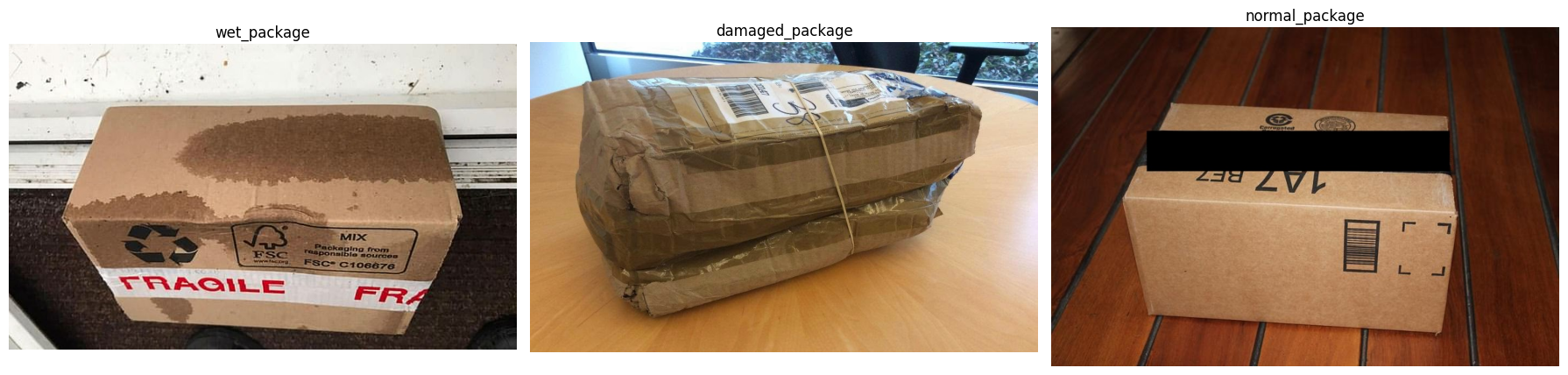
我们已经成功地将示例图像编码为 base64 字符串并显示出来。客服助手将分析这些图像,以根据包裹状况确定适当的操作。
现在,让我们定义用于订单处理的函数/工具,例如将订单升级给人工客服、退款订单和替换订单。我们将创建占位函数,以根据识别出的工具模拟这些操作的处理过程。我们将使用 Pydantic 模型来定义订单操作数据的结构。
MODEL = "gpt-4o-2024-11-20"

class Order(BaseModel):
    """Represents an order with details such as order ID, customer name, product name, price, status, and delivery date."""
    order_id: str = Field(..., description="The unique identifier of the order")
    product_name: str = Field(..., description="The name of the product")
    price: float = Field(..., description="The price of the product")
    status: str = Field(..., description="The status of the order")
    delivery_date: str = Field(..., description="The delivery date of the order")
# Placeholder functions for order processing

def get_order_details(order_id):
    # Placeholder function to retrieve order details based on the order ID
    return Order(
        order_id=order_id,
        product_name="Product X",
        price=100.0,
        status="Delivered",
        delivery_date="2024-04-10",
    )

def escalate_to_agent(order: Order, message: str):
    # Placeholder function to escalate the order to a human agent
    return f"Order {order.order_id} has been escalated to an agent with message: `{message}`"

def refund_order(order: Order):
    # Placeholder function to process a refund for the order
    return f"Order {order.order_id} has been refunded successfully."

def replace_order(order: Order):
    # Placeholder function to replace the order with a new one
    return f"Order {order.order_id} has been replaced with a new order."

class FunctionCallBase(BaseModel):
    rationale: Optional[str] = Field(..., description="The reason for the action.")
    image_description: Optional[str] = Field(
        ..., description="The detailed description of the package image."
    )
    action: Literal["escalate_to_agent", "replace_order", "refund_order"]
    message: Optional[str] = Field(
        ...,
        description="The message to be escalated to the agent if action is escalate_to_agent",
    )
    # Placeholder functions to process the action based on the order ID
    def __call__(self, order_id):
        order: Order = get_order_details(order_id=order_id)
        if self.action == "escalate_to_agent":
            return escalate_to_agent(order, self.message)
        if self.action == "replace_order":
            return replace_order(order)
        if self.action == "refund_order":
            return refund_order(order)

class EscalateToAgent(FunctionCallBase):
    """Escalate to an agent for further assistance."""
    pass

class OrderActionBase(FunctionCallBase):
    pass

class ReplaceOrder(OrderActionBase):
    """Tool call to replace an order."""
    pass

class RefundOrder(OrderActionBase):
    """Tool call to refund an order."""
    pass
模拟用户消息并处理包裹图像
我们将模拟包含包裹图像的用户消息,并使用 GPT-4o with Vision 模型处理这些图像。模型将根据图像分析以及针对损坏、潮湿或正常包裹的预定义操作,识别出合适的工具调用。随后,我们将根据订单 ID 处理识别出的操作并显示结果。
# extract the tool call from the response
ORDER_ID = "12345"  # Placeholder order ID for testing
INSTRUCTION_PROMPT = "You are a customer service assistant for a delivery service, equipped to analyze images of packages. If a package appears damaged in the image, automatically process a refund according to policy. If the package looks wet, initiate a replacement. If the package appears normal and not damaged, escalate to agent. For any other issues or unclear images, escalate to agent. You must always use tools!"

def delivery_exception_support_handler(test_image: str):
    payload = {
        "model": MODEL,
        "response_model": Iterable[RefundOrder | ReplaceOrder | EscalateToAgent],
        "tool_choice": "auto",  # automatically select the tool based on the context
        "temperature": 0.0,  # for less diversity in responses
        "seed": 123,  # Set a seed for reproducibility
    }
    payload["messages"] = [
        {
            "role": "user",
            "content": INSTRUCTION_PROMPT,
        },
        {
            "role": "user",
            "content": [
                {
                    "type": "image_url",
                    "image_url": {
                        "url": f"data:image/jpeg;base64,{image_data[test_image]}"
                    }
                },
            ],
        }
    ]
    function_calls = instructor.from_openai(
        OpenAI(), mode=instructor.Mode.PARALLEL_TOOLS
    ).chat.completions.create(**payload)

    for tool in function_calls:
        print(f"- Tool call: {tool.action} for provided img: {test_image}")
        print(f"- Parameters: {tool}")
        print(f">> Action result: {tool(ORDER_ID)}")
        return tool


print("Processing delivery exception support for different package images...")

print("\n===================== Simulating user message 1 =====================")
assert delivery_exception_support_handler("damaged_package").action == "refund_order"

print("\n===================== Simulating user message 2 =====================")
assert delivery_exception_support_handler("normal_package").action == "escalate_to_agent"

print("\n===================== Simulating user message 3 =====================")
assert delivery_exception_support_handler("wet_package").action == "replace_order"
2. 分析组织架构图以提取员工信息
在第二个示例中,我们将分析一张组织架构图,以提取员工信息,例如员工姓名、角色、经理和经理角色。我们将使用带有视觉功能的 GPT-4o 来处理组织架构图,并提取组织中员工的结构化数据。实际上,函数调用让我们超越了 OCR,能够真正推断和转换图表中的层级关系。
我们将从一个 PDF 格式的示例组织架构图开始,该图是我们想要分析的,并将 PDF 的第一页转换为 JPEG 图像以进行分析。
# Function to convert a single page PDF page to a JPEG image
def convert_pdf_page_to_jpg(pdf_path: str, output_path: str, page_number=0):
    if not os.path.exists(pdf_path):
        raise FileNotFoundError(f"PDF file not found: {pdf_path}")
    doc = fitz.open(pdf_path)
    page = doc.load_page(page_number)  # 0 is the first page
    pix = page.get_pixmap()
    # Save the pixmap as a JPEG
    pix.save(output_path)


def display_img_local(image_path: str):
    img = Image.open(image_path)
    display(img)


pdf_path = 'data/org-chart-sample.pdf'
output_path = 'org-chart-sample.jpg'

convert_pdf_page_to_jpg(pdf_path, output_path)
display_img_local(output_path)
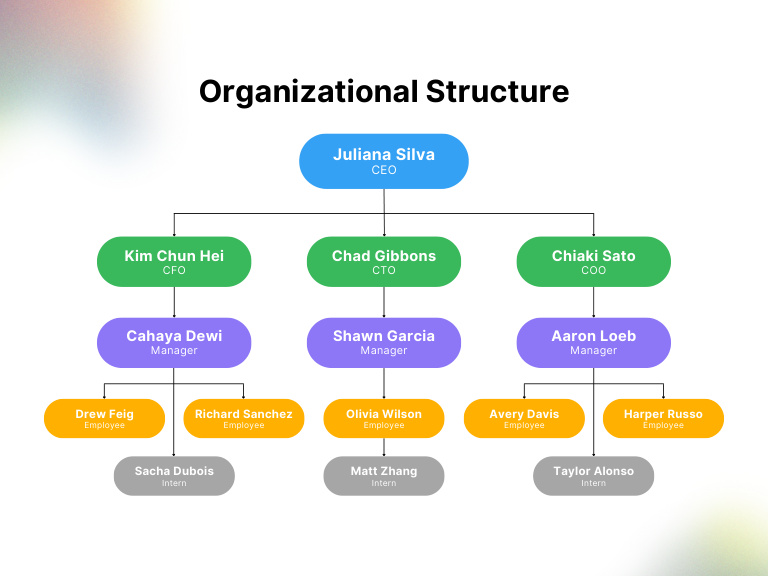
组织架构图已成功从 PDF 文件中提取并显示。现在,让我们定义一个函数,使用带有视觉功能的新版 GPT4o 来分析组织架构图。该函数将从图像中提取有关员工、其角色及其经理的信息。我们将使用函数/工具调用来指定组织结构的输入参数,例如员工姓名、角色以及经理的姓名和角色。我们将使用 Pydantic 模型来定义数据结构。
base64_img = encode_image(output_path)

class RoleEnum(str, Enum):
    """Defines possible roles within an organization."""
    CEO = "CEO"
    CTO = "CTO"
    CFO = "CFO"
    COO = "COO"
    EMPLOYEE = "Employee"
    MANAGER = "Manager"
    INTERN = "Intern"
    OTHER = "Other"

class Employee(BaseModel):
    """Represents an employee, including their name, role, and optional manager information."""
    employee_name: str = Field(..., description="The name of the employee")
    role: RoleEnum = Field(..., description="The role of the employee")
    manager_name: Optional[str] = Field(None, description="The manager's name, if applicable")
    manager_role: Optional[RoleEnum] = Field(None, description="The manager's role, if applicable")


class EmployeeList(BaseModel):
    """A list of employees within the organizational structure."""
    employees: List[Employee] = Field(..., description="A list of employees")

def parse_orgchart(base64_img: str) -> EmployeeList:
    response = instructor.from_openai(OpenAI()).chat.completions.create(
        model=MODEL,
        response_model=EmployeeList,
        messages=[
            {
                "role": "user",
                "content": 'Analyze the given organizational chart and very carefully extract the information.',
            },
            {
                "role": "user",
                "content": [
                    {
                        "type": "image_url",
                        "image_url": {
                            "url": f"data:image/jpeg;base64,{base64_img}"
                        }
                    },
                ],
            }
        ],
    )
    return response
现在,我们将定义一个函数来解析来自具有视觉能力的 GPT-4o 的响应,并提取员工数据。我们将把提取的数据制成表格以便于可视化。请注意,提取数据的准确性可能会因输入图像的复杂性和清晰度而有所不同。
# call the functions to analyze the organizational chart and parse the response
result = parse_orgchart(base64_img)

# tabulate the extracted data
df = pd.DataFrame([{
    'employee_name': employee.employee_name,
    'role': employee.role.value,
    'manager_name': employee.manager_name,
    'manager_role': employee.manager_role.value if employee.manager_role else None
} for employee in result.employees])

display(df)
从组织结构图中提取的数据已成功解析并显示在 DataFrame 中。这种方法使我们能够利用具备视觉能力的 GPT-4o 从图像(如组织结构图和图表)中提取结构化信息,并处理数据以供进一步分析。通过使用函数调用,我们可以扩展多模态模型的功能,以执行特定任务或调用外部函数。
常见问题
常见错误:1. 图像路径错误或格式不支持,需检查文件存在且为 JPEG/PNG;2. base64 编码遗漏前缀导致 API 拒绝,需添加 'data:image/jpeg;base64,';3. 工具调用未触发,检查 tool_choice 和指令是否明确要求使用工具;4. Pydantic 验证失败,确保字段类型匹配;5. 模型返回多余文本,设置 temperature=0 和 seed 提高确定性。排查方法:打印原始响应、检查 API 错误码、简化图像测试。生产优化:缓存图像编码、异步调用、重试机制、监控 token 使用。
企业应用扩展
可扩展方向:1. 集成真实业务系统,将占位函数替换为数据库操作或 API 调用;2. 支持多页 PDF 和复杂图表,结合 OCR 预处理;3. 使用流式响应降低延迟;4. 添加人工审核环节处理低置信度结果;5. 探索其他多模态模型如 Claude 3 或 Gemini 进行对比;6. 将工具调用结果反馈给模型进行多轮对话,实现更复杂的交互。
总结
本文面向有编程基础的开发者,深入讲解如何将 GPT-4o 的视觉能力与函数调用结合,构建多模态 AI 应用。通过两个实战案例——配送异常客服助手和组织架构图分析——演示从环境搭建、图像编码、Pydantic 模型定义、工具调用到结果处理的完整流程。文章不仅提供可运行代码,还剖析设计决策、常见错误及生产优化方案,帮助开发者掌握超越 OCR 的智能图像理解与结构化数据提取技术。
- --
内容来源与验证
- 内容等级:PREMIUM_A
- 质量等级:A
- 难度:中级
- 验证等级:V1
- 原文作者:shyamal-anadkat, MW-OAI
- 原文日期:2024-12-13
- 来源许可:MIT
- 来源版本:
07ff5e15de0b8d8e1b0898585f33c52258b0e3af - 查看原文
站内还有更多完整实战教程
加入会员,解锁全部教程、完整代码与持续更新内容。
加入会员