在GPT-4o上进行视觉微调以实现视觉问答
技术背景
传统文本微调无法处理图像输入,而通用多模态模型在特定领域(如书籍封面OCR、医疗影像问答)中准确率不足。GPT-4o视觉微调允许开发者用图像-文本对定制模型,解决领域适应性问题。适用场景包括视觉问答、文档理解、缺陷检测等。主要限制:模型主要学习如何搜索图像中相关部分,而非注入新知识;效果依赖训练数据质量与多样性;文件大小限制1GB。
核心原理
视觉微调通过Chat Completions格式的对话数据训练模型,每条消息包含role和content,content可混合文本与图像(HTTP URL或base64 data URL)。训练时模型学习根据问题定位图像中的关键区域并生成答案。系统提示定义行为规范,少样本示例引导推理格式。数据需为RGB/RGBA格式,base64编码,可调整JPEG质量控制文件大小。微调后模型能生成更一致、精确的答案,尤其在封闭式问题和领域特定分类任务上提升显著。
架构分析
系统分为数据准备、微调、评估三阶段。数据准备:加载HuggingFace数据集,采样训练/验证/测试集,展开问答对,转换字节图像为PIL图像,编码为base64。构建JSONL文件,每行包含messages数组,含system、few-shot user/assistant、当前user/assistant消息。微调:通过Files API上传训练和验证文件,调用fine_tuning.jobs.create启动任务。评估:使用ThreadPoolExecutor并发调用微调模型和基线模型生成预测,再用GPT-4o作为评判员,通过Pydantic定义输出schema,按相似度评分。关键设计:测试集不包含assistant消息,确保模型自主生成答案。
完整实战教程
在 GPT-4o 上进行视觉微调以实现视觉问答
我们很高兴宣布推出 GPT-4o 视觉微调,这是一项前沿的多模态微调能力,使开发者能够使用图像和文本对 GPT-4o 进行微调。借助这一新功能,你可以定制模型以获得更强的图像理解能力,从而在各行各业和应用场景中解锁更多可能性。
从高级视觉搜索到面向自动驾驶汽车或智慧城市的改进目标检测,视觉微调让你能够打造针对特定需求量身定制的解决方案。通过结合文本和图像输入,该产品在视觉问答等任务中具有独特优势——这类任务需要基于图像分析得出详细且具有上下文感知能力的答案。总体而言,当模型接收到的问题和图像与训练数据相似时,效果似乎最为显著,因为我们能够教会模型如何搜索并识别图像中的相关部分,从而正确回答问题。与基于文本输入的微调类似,视觉微调在向模型传授新信息方面效果并不理想。
在本指南中,我们将带你逐步完成使用多模态输入微调 GPT-4o 的流程。具体来说,我们将演示如何训练一个模型来回答与书籍图像相关的问题,但其潜在应用涵盖无数领域——从网页设计和教育到医疗健康和科研。
无论你是想为制造业构建更智能的缺陷检测模型,增强复杂文档处理和图表理解能力,还是为各种其他用例开发具有更好视觉理解能力的应用,本指南都将向你展示上手是多么快速和简单。
如需了解更多信息,请查看完整的文档。
from openai import OpenAI, ChatCompletion
import json
import os

client = OpenAI()
加载数据集
我们将使用 OCR-VQA 数据集 中关于书籍图像的问题-答案对数据集,该数据集可通过 HuggingFace 访问。该数据集包含 207,572 张书籍图像,并附有关于书籍标题、作者、版本、年份和类型的问题-答案对。总体而言,该数据集包含约 100 万个问答对。在本指南中,我们仅使用该数据集的一小部分来训练、验证和测试我们的模型。
我们相信该数据集非常适合多模态输入的微调,因为它要求模型不仅能够准确识别相关边界框以提取关键信息,还要对图像内容进行推理以正确回答问题。
from datasets import load_dataset

# load dataset
ds = load_dataset("howard-hou/OCR-VQA")
我们首先抽取 150 个训练样本、50 个验证样本和 100 个测试样本。我们还会将 questions 和 answers 列展开,为每一行创建一个单独的问答对。此外,由于我们的图像以字节字符串形式存储,我们会将它们转换为图像以便处理。
import pandas as pd
from io import BytesIO
from PIL import Image

# sample 150 training examples, 50 validation examples and 100 test examples
ds_train = ds['train'].shuffle(seed=42).select(range(150))
ds_val = ds['validation'].shuffle(seed=42).select(range(50))
ds_test = ds['test'].shuffle(seed=42).select(range(100))

# convert to pandas dataframe
ds_train = ds_train.to_pandas()
ds_val = ds_val.to_pandas()
ds_test = ds_test.to_pandas()

# convert byte strings to images
ds_train['image'] = ds_train['image'].apply(lambda x: Image.open(BytesIO(x['bytes'])))
ds_val['image'] = ds_val['image'].apply(lambda x: Image.open(BytesIO(x['bytes'])))
ds_test['image'] = ds_test['image'].apply(lambda x: Image.open(BytesIO(x['bytes'])))

# explode the 'questions' and 'answers' columns
ds_train = ds_train.explode(['questions', 'answers'])
ds_val = ds_val.explode(['questions', 'answers'])
ds_test = ds_test.explode(['questions', 'answers'])

# rename columns
ds_train = ds_train.rename(columns={'questions': 'question', 'answers': 'answer'})
ds_val = ds_val.rename(columns={'questions': 'question', 'answers': 'answer'})
ds_test = ds_test.rename(columns={'questions': 'question', 'answers': 'answer'})

# create unique ids for each example
ds_train = ds_train.reset_index(drop=True)
ds_val = ds_val.reset_index(drop=True)
ds_test = ds_test.reset_index(drop=True)

# select columns
ds_train = ds_train[['question', 'answer', 'image']]
ds_val = ds_val[['question', 'answer', 'image']]
ds_test = ds_test[['question', 'answer', 'image']]
让我们检查训练集中的一个随机样本。
在这个例子中,问题提示模型确定书的标题。在这种情况下,答案相当模糊,因为图像的不同部分既有主标题“Patty's Patterns - Advanced Series Vol. 1 & 2”,也有副标题“100 Full-Page Patterns Value Bundle”。此外,这里的作者名称不是个人,而是一个名为“Penny Farthing Graphics”的团体,这可能会被误认为是标题的一部分。
这类任务是视觉问答中的典型任务,模型必须解释复杂的图像并提供准确的、针对上下文的回答。通过训练这类问题,我们可以增强模型在各种领域进行详细图像分析的能力。
from IPython.display import display

# display a random training example
print('QUESTION:', ds_train.iloc[198]['question'])
display(ds_train.iloc[198]['image'])
print('ANSWER:', ds_train.iloc[198]['answer'])

数据准备
为了确保模型微调成功,正确构建训练数据至关重要。正确地格式化数据有助于避免训练过程中的验证错误,并确保模型能够有效地从文本和图像输入中学习。好消息是,这个过程相当简单。
训练数据集中的每个示例都应该是与 Chat Completions API 格式相同的对话。具体来说,这意味着将数据结构化为一系列 messages,其中每条消息包含一个 role(如 "user" 或 "assistant")以及消息的 content。
由于我们同时处理文本和图像以进行视觉微调,我们将构建这些消息以包含两种内容类型。对于每个训练样本,关于图像的问题以用户消息的形式呈现,相应的答案以助手消息的形式提供。
图像可以通过以下两种方式之一包含:
* 作为 HTTP URL,引用图像的位置。
* 作为包含 base64 编码图像的 data URL。
以下是消息格式应如何呈现的示例:
{
    "messages":
    [
        {
            "role": "system",
            "content": "Use the image to answer the question."
        },
        {
            "role": "user",
            "content": [
                {"type": "text", "text": "What is the title of this book?"},
                {"type": "image_url", "image_url": {"url": "data:image/jpeg;base64,<encoded_image>"}}
            ]
        }
    ]
}
让我们先为模型定义系统指令。这些指令为模型提供了重要的上下文,指导它在处理训练数据时应如何表现。清晰简洁的系统指令对于确保模型在文本和图像上都能良好推理尤为有用。
SYSTEM_PROMPT = """
Generate an answer to the question based on the image of the book provided.
Questions will include both open-ended questions and binary "yes/no" questions.
The questions will inquire about the title, author, edition, year and genre of the book in the image.

You will read the question and examine the corresponding image to provide an accurate answer.

# Steps

1. **Read the Question:** Carefully analyze the question to understand what information is being asked.
2. **Examine the Image:**
   - **Identify Relevant Bounding Boxes (if applicable):** For questions requiring specific details like the title or author, focus on the relevant areas or bounding boxes within the image to extract the necessary text. There may be multiple relevant bounding boxes in the image, so be sure to consider all relevant areas.
   - **Analyze the Whole Image:** For questions that need general reasoning (e.g., "Is this book related to Children's Books?"), consider the entire image, including title, graphics, colors, and overall design elements.
3. **Formulate a Reasoned Answer:**
   - For binary questions (yes/no), use evidence from the image to support your answer.
   - For open-ended questions, provide the exact text from the image or a concise phrase that best describes the requested information.

# Output Format

- Provide your answer in a concise and clear manner. Always return the final conclusion only, no additional text or reasoning.
- If the question is binary, answer with "Yes" or "No."
- For open-ended questions requesting specific details (e.g., title, author), return the exact text from the image.
- For questions about general attributes like "genre," return a single word or phrase that best describes it.

# Notes

- Always prioritize accuracy and clarity in your responses.
- If multiple authors are listed, return the first author listed.
- If the information is not present in the image, try to reason about the question using the information you can gather from the image e.g. if the author is not listed, use the title and genre to find the author.
- Ensure reasoning steps logically lead to the conclusions before stating your final answer.

# Examples
You will be provided with examples of questions and corresponding images of book covers, along with the reasoning and conclusion for each example. Use these examples to guide your reasoning process."""
为了确保我们的图像能够正确用于视觉微调,它们必须采用 base64 格式,并且是 RGB 或 RGBA 格式。这能确保模型在训练过程中准确处理图像。下面是一个处理图像编码的函数,必要时还会将图像转换为正确的格式。
这个函数允许我们控制图像编码的质量,如果我们想减小文件大小,这会很有用。100 是最高质量,1 是最低质量。微调任务的最大文件大小为 1GB,但即使训练数据量非常大,我们也不太可能看到改进。不过,如果需要满足文件大小限制,我们可以使用 quality 参数来减小文件大小。
import base64

def encode_image(image, quality=100):
    if image.mode != 'RGB':
        image = image.convert('RGB')  # Convert to RGB
    buffered = BytesIO()
    image.save(buffered, format="JPEG", quality=quality)
    return base64.b64encode(buffered.getvalue()).decode("utf-8")
我们还将从训练集中加入少样本示例作为用户和助手消息,以帮助引导模型的推理过程。
FEW_SHOT_EXAMPLES = [
    {
        "role": "user",
        "content": [
            {"type": "text", "text": "**Example 1:**\n\n**Question:** Who wrote this book?"},
            {"type": "image_url", "image_url": {"url": f"data:image/jpeg;base64,{encode_image(ds_train.iloc[286]['image'], quality=50)}"}}
        ]
    },
    {
        "role": "assistant",
        "content": [
            {"type": "text", "text": "**Reasoning:** The cover clearly displays two authors' names, 'Evelyn M. Thomson' and 'Orlen N. Johnson,' at the bottom of the cover, with Evelyn M. Thomson listed first. Typically, the first-listed author is considered the primary author or main contributor.\n\n**Conclusion:** Evelyn Thomson"}
        ]
    },
    {
        "role": "user",
        "content": [
            {"type": "text", "text": "**Example 2:**\n\n**Question:** What is the title of this book?"},
            {"type": "image_url", "image_url": {"url": f"data:image/jpeg;base64,{encode_image(ds_train.iloc[22]['image'], quality=50)}"}}
        ]
    },
    {
        "role": "assistant",
        "content": [
            {"type": "text", "text": "**Answer:**\n\n**Reasoning:** The cover prominently displays the title across the top and center of the image. The full title reads, 'Computer Systems: An Integrated Approach to Architecture and Operating Systems,' with each component of the title clearly separated and formatted to stand out.\n\n**Conclusion:** Computer Systems: An Integrated Approach to Architecture and Operating Systems"}
        ]
    },
    {
        "role": "user",
        "content": [
            {"type": "text", "text": "**Example 3:**\n\n**Question:** Is this book related to Children's Books?"},
            {"type": "image_url", "image_url": {"url": f"data:image/jpeg;base64,{encode_image(ds_train.iloc[492]['image'], quality=50)}"}}
        ]
    },
    {
        "role": "assistant",
        "content": [
            {"type": "text", "text": "**Answer:**\n\n**Reasoning:** The cover illustration features a whimsical mermaid holding a red shoe, with gentle, child-friendly artwork that suggests it is targeted toward a young audience. Additionally, the style and imagery are typical of children's literature.\n\n**Conclusion:** Yes"}
        ]
    },
    {
        "role": "user",
        "content": [
            {"type": "text", "text": "**Example 4:**\n\n**Question:** Is this book related to History?"},
            {"type": "image_url", "image_url": {"url": f"data:image/jpeg;base64,{encode_image(ds_train.iloc[68]['image'], quality=50)}"}}
        ]
    },
    {
        "role": "assistant",
        "content": [
            {"type": "text", "text": "**Answer:**\n\n**Reasoning:** The title 'Oliver Wendell Holmes, Jr.: Civil War Soldier, Supreme Court Justice' clearly indicates that this book focuses on the life of Oliver Wendell Holmes, Jr., providing a biographical account rather than a general historical analysis. Although it references historical elements (Civil War, Supreme Court), the primary focus is on the individual rather than historical events as a whole.\n\n**Conclusion:** No"}
        ]
    },
    {
        "role": "user",
        "content": [
            {"type": "text", "text": "**Example 5:**\n\n**Question:** What is the genre of this book?"},
            {"type": "image_url", "image_url": {"url": f"data:image/jpeg;base64,{encode_image(ds_train.iloc[42]['image'], quality=50)}"}}
        ]
    },
    {
        "role": "assistant",
        "content": [
            {"type": "text", "text": "**Answer:**\n\n**Reasoning:** The cover prominently features an image of a train station and the title 'Railway Depots, Stations & Terminals,' which directly suggests a focus on railway infrastructure. This points to the book being related to topics within Engineering & Transportation.\n\n**Conclusion:** Engineering & Transportation"}
        ]
    },
    {
        "role": "user",
        "content": [
            {"type": "text", "text": "**Example 6:**\n\n**Question:** What type of book is this?"},
            {"type": "image_url", "image_url": {"url": f"data:image/jpeg;base64,{encode_image(ds_train.iloc[334]['image'], quality=50)}"}}
        ]
    },
    {
        "role": "assistant",
        "content": [
            {"type": "text", "text": "**Answer:**\n\n**Reasoning:** The title 'Principles and Practice of Modern Chromatographic Methods' suggests a focus on chromatography, a scientific technique used in chemistry and biology. This aligns with the academic and technical nature typical of books in the 'Science & Math' category.\n\n**Conclusion:** Science & Math"}
        ]
    }
]
现在我们已经准备好了系统指令、少样本示例和图像编码函数,下一步是遍历训练集并构建微调所需的消息。提醒一下,每个训练示例都必须格式化为一段对话,并且必须同时包含图像(base64 格式)以及对应的问题和答案。
要微调 GPT-4o,我们建议至少提供 10 个示例,但通常使用 50 到 100 个训练示例时,你会看到明显的改进。在本例中,我们将全力以赴,使用更大的训练样本——150 张图像和 721 个问答对——来微调模型。
from tqdm import tqdm

# constructing the training set
json_data = []

for idx, example in tqdm(ds_train.iterrows()):
    system_message = {
        "role": "system",
        "content": [{"type": "text", "text": SYSTEM_PROMPT}]
    }

    user_message = {
        "role": "user",
        "content": [
            {"type": "text", "text": f"Question [{idx}]: {example['question']}"},
            {"type": "image_url", "image_url": {"url": f"data:image/jpeg;base64,{encode_image(example['image'], quality=50)}"}}
        ]
    }

    assistant_message = {
        "role": "assistant",
        "content": [{"type": "text", "text": example["answer"]}]
    }

    all_messages = [system_message] + FEW_SHOT_EXAMPLES + [user_message, assistant_message]

    json_data.append({"messages": all_messages})
我们将最终的训练集保存到一个 .jsonl 文件中,文件中的每一行代表训练数据集中的一个样本。
# save the JSON data to a file
with open("ocr-vqa-train.jsonl", "w") as f:
    for message in json_data:
        json.dump(message, f)
        f.write("\n")
就像训练集一样,我们需要以相同的消息格式来构建验证集和测试集。然而,对于测试集,有一个关键区别:由于测试集用于评估,我们不包含助手的消息(即答案)。这确保模型生成自己的答案,之后我们可以将其与真实答案进行比较,以评估性能。
# constructing the validation set
json_data = []

for idx, example in tqdm(ds_val.iterrows()):
    system_message = {
        "role": "system",
        "content": [{"type": "text", "text": SYSTEM_PROMPT}]
    }

    user_message = {
        "role": "user",
        "content": [
            {"type": "text", "text": f"Question [{idx}]: {example['question']}"},
            {"type": "image_url", "image_url": {"url": f"data:image/jpeg;base64,{encode_image(example['image'], quality=50)}"}}
        ]
    }

    assistant_message = {
        "role": "assistant",
        "content": [{"type": "text", "text": example["answer"]}]
    }

    all_messages = [system_message] + FEW_SHOT_EXAMPLES + [user_message, assistant_message]

    json_data.append({"messages": all_messages})

# save the JSON data to a file
with open("ocr-vqa-validation.jsonl", "w") as f:
    for message in json_data:
        json.dump(message, f)
        f.write("\n")
# constructing the test set
json_data = []

for idx, example in tqdm(ds_test.iterrows()):
    system_message = {
        "role": "system",
        "content": [{"type": "text", "text": SYSTEM_PROMPT}]
    }

    user_message = {
        "role": "user",
        "content": [
            {"type": "text", "text": f"Question [{idx}]: {example['question']}"},
            {"type": "image_url", "image_url": {"url": f"data:image/jpeg;base64,{encode_image(example['image'], quality=50)}"}}
        ]
    }

    all_messages = [system_message] + FEW_SHOT_EXAMPLES + [user_message]

    json_data.append({"messages": all_messages})

# save the JSON data to a file
with open("ocr-vqa-test.jsonl", "w") as f:
    for message in json_data:
        json.dump(message, f)
        f.write("\n")
微调
现在我们已经以正确的格式准备好了训练和验证数据集,我们可以使用 Files API 上传它们以进行微调。
# upload training file
train_file = client.files.create(
  file=open("ocr-vqa-train.jsonl", "rb"),
  purpose="fine-tune"
)

# upload validation file
val_file = client.files.create(
  file=open("ocr-vqa-validation.jsonl", "rb"),
  purpose="fine-tune"
)
文件上传完成后,我们就可以进入下一步:启动微调任务。
要创建微调任务,我们使用微调 API。这可能需要一些时间才能完成,但你可以在 Platform UI 中跟踪微调任务的进度。
# create fine tuning job
file_train = train_file.id
file_val = val_file.id

client.fine_tuning.jobs.create(
  training_file=file_train,
  # note: validation file is optional
  validation_file=file_val,
  model="gpt-4o-2024-08-06"
)
评估
一旦微调任务完成,就该通过在测试集上运行推理来评估我们模型的性能了。这一步涉及使用微调后的模型为测试集中的问题生成回答,并将其预测结果与真实答案进行比较以进行评估。我们还将使用未经微调的 GPT-4o 模型在测试集上运行推理,以便进行对比。
from concurrent.futures import ThreadPoolExecutor, as_completed
import re

# load the test data from JSONL file
test_data = []
with open("ocr-vqa-test.jsonl", "r") as f:
    for line in f:
        test_data.append(json.loads(line))

def process_example(example, model):
    response = client.chat.completions.create(
        model=model,
        messages=example["messages"],
        store=True,
        metadata={'dataset': 'ocr-vqa-test'}
    )
    predicted_answer = response.choices[0].message.content.strip()

    # regex to get the question ID
    match = re.search(r'\[(\d+)\]', example["messages"][-1]["content"][0]["text"])
    if match:
        example_id = int(match.group(1))
    else:
        example_id = -1

    actual_answer = ds_test.iloc[example_id]['answer']

    return {
        "example_id": example_id,
        "predicted_answer": predicted_answer,
        "actual_answer": actual_answer
    }

# run the prompts through the finetuned model and store the results
model = "ft:gpt-4o-2024-08-06:openai::AOY1M8VG"
results = []
with ThreadPoolExecutor() as executor:
    futures = {executor.submit(process_example, example, model): example for example in test_data}
    for future in tqdm(as_completed(futures), total=len(futures)):
        results.append(future.result())

# save the results to a file
with open("ocr-vqa-ft-results.jsonl", "w") as f:
    for result in results:
        json.dump(result, f)
        f.write("\n")

# run the prompts through the non-fine-tuned model and store the results
model = "gpt-4o"
results = []
with ThreadPoolExecutor() as executor:
    futures = {executor.submit(process_example, example, model): example for example in test_data}
    for future in tqdm(as_completed(futures), total=len(futures)):
        results.append(future.result())

# save the results to a file
with open("ocr-vqa-4o-results.jsonl", "w") as f:
    for result in results:
        json.dump(result, f)
        f.write("\n")
现在我们已经使用微调后的模型进行了推理,接下来让我们检查几个具体示例,以了解模型相较于实际答案的表现如何。
# Q: What is the title of this book?
{"example_id": 6, "predicted_answer": "A Wrinkle in Time", "actual_answer": "A Wrinkle in Time (Time Quintet)"}
# Q: Who wrote this book?
{"example_id": 10, "predicted_answer": "DK Travel", "actual_answer": "DK Publishing"}
# Q: What is the title of this book?
{"example_id": 11, "predicted_answer": "DK Eyewitness Travel Guide: Peru", "actual_answer": "DK Eyewitness Travel Guide: Peru"}
# Q: What type of book is this?
{"example_id": 12, "predicted_answer": "Travel", "actual_answer": "Travel"}
# Q: Who wrote this book?
{"example_id": 437, "predicted_answer": "Cookshack, Inc.", "actual_answer": "Cookshack"}
# Q: What type of book is this?
{"example_id": 482, "predicted_answer": "Christian Books & Bibles", "actual_answer": "Religion & Spirituality"}
正如我们所见,微调后的模型在回答问题时表现非常出色,许多回答完全正确。
然而,也存在一些情况,模型的预测答案与真实答案接近,但并不完全匹配,尤其是在开放式问题中,措辞或细节可能有所不同。为了评估这些预测的质量,我们将使用 GPT-4o 来评估预测回答与数据集中的真实标签之间的相似度。
为了评估我们的模型回答,我们将使用 GPT-4o 来判断真实答案与预测回答之间的相似度。我们将根据以下标准对预测答案进行评级:
* 非常相似:预测答案与真实答案完全匹配,没有遗漏重要信息,尽管可能存在一些轻微的遗漏或标点差异。
* 大部分相似:预测答案与真实答案高度一致,可能缺少一些单词或短语。
* 有些相似:尽管预测答案与真实答案有明显差异,但核心内容准确且语义相似,可能缺少一些信息。
* 不正确:预测答案完全错误、不相关,或包含与真实答案相比的关键错误或遗漏。
from pydantic import BaseModel, Field

# define output schema
class Result(BaseModel):
    example_id: int = Field(description="The unique ID of the question")
    rating: str = Field(description="The assigned similarity rating. One of [Very Similar | Mostly Similar | Somewhat Similar | Incorrect]")
    type: str = Field(description="The type of question. Open if the question is binary yes/no, otherwise Closed. One of [Open | Closed]")

EVAL_PROMPT = """
Evaluate the closeness between the predicted answer and the ground truth for each provided result.
Rank the predicted answer based on the following criteria:

1. **Very Similar**: The predicted answer exactly matches the ground truth and there is no important information omitted, although there may be some minor ommissions or discrepancies in punctuation.
2. **Mostly Similar**: The predicted answer closely aligns with the ground truth, perhaps with some missing words or phrases.
3. **Somewhat Similar**: Although the predicted answer has noticeable differences to the ground truth, the core content is accurate and semantically similar, perhaps with some missing information.
4. **Incorrect**: The predicted answer is completely incorrect, irrelevant, or contains critical errors or omissions from the ground truth.

Ensure to consider both open-ended and yes/no questions.

# Steps
1. **Analyze the Answers**: Read the predicted answer, and ground truth carefully.
2. **Evaluate Similarity**:
    - Check if the predicted answer contains the same core information and correctness as the ground truth.
    - Determine if there are any important omissions or errors.
3. **Assign a Rating**: Based on your evaluation, assign the appropriate rating: Very Similar, Mostly Similar, Somewhat Similar, or Incorrect.

# Output Format
[
{
"example_id": [example_id],
"rating": "[Very Similar | Mostly Similar | Somewhat Similar | Incorrect]",
"type": "[Open | Closed]
}
]
# Examples

**Input:**
{"example_id": 6, "predicted_answer": "A Wrinkle in Time", "actual_answer": "A Wrinkle in Time (Time Quintet)"}
**Reasoning:**
The predicted answer "A Wrinkle in Time" is a very close match to the ground truth "A Wrinkle in Time (Time Quintet)" with a missing tagline or subtitle.
**Output:**
{ "example_id": 6, "rating": "Mostly Similar", "type": "Open" }
**Input:**
{"example_id": 437, "predicted_answer": "Cookshack, Inc.", "actual_answer": "Cookshack"}
**Reasoning:**
The predicted answer "Cookshack, Inc." is exactly the same as the ground truth "Cookshack", with only a difference in punctuation.
**Output:**
{ "example_id": 437, "rating": "Very Similar", "type": "Open" }
**Input:**
{"example_id": 482, "predicted_answer": "Christian Books & Bibles", "actual_answer": "Religion & Spirituality"}
**Reasoning:**
The predicted answer "Christian Books & Bibles" is semantically similar to the ground truth "Religion & Spirituality", however there is a key difference in the predicted answer.
**Output:**
{ "example_id": 482, "rating": "Somewhat Similar", "type": "Open" }
**Input:**
{ "example_id": 417, "predicted_answer": "yes", "actual_answer": "no" }
**Reasoning:**
The predicted answer "yes" is completely incorrect compared to the actual answer "no."
**Output:**
{ "example_id": 417, "rating": "Incorrect", "type": "Closed" }
"""

def process_result(result):
messages = [
{
"role": "system",
"content": EVAL_PROMPT
},
{
"role": "user",
"content": str(result)
}
]

response = client.beta.chat.completions.parse(
model='gpt-4o',
messages=messages,
temperature=0,
response_format=Result
)

return json.loads(response.choices[0].message.content)

# fine-tuned model results with scores
results = []
with open("ocr-vqa-ft-results.jsonl", "r") as f:
for line in f:
results.append(json.loads(line))

results_w_scores = []
with ThreadPoolExecutor() as executor:
futures = {executor.submit(process_result, result): result for result in results}
for future in tqdm(as_completed(futures), total=len(futures)):
results_w_scores.append(future.result())

# Save the results to a file
with open("ocr-vqa-ft-similarity.jsonl", "w") as f:
for score in results_w_scores:
json.dump(score, f)
f.write("\n")

# non-fine-tuned model results with scores
results = []
with open("ocr-vqa-4o-results.jsonl", "r") as f:
for line in f:
results.append(json.loads(line))

results_w_scores_4o = []
with ThreadPoolExecutor() as executor:
futures = {executor.submit(process_result, result): result for result in results}
for future in tqdm(as_completed(futures), total=len(futures)):
results_w_scores_4o.append(future.result())

# Save the results to a file
with open("ocr-vqa-4o-similarity.jsonl", "w") as f:
for score in results_w_scores_4o:
json.dump(score, f)
f.write("\n")
为了充分理解微调带来的影响,我们还使用未经微调的 GPT-4o 模型对同一组测试问题进行了评估。
让我们首先比较微调模型与未微调模型在封闭式(是/否)问题上的表现。
请注意,使用微调模型时,我们可以检查预测答案与实际答案之间的精确匹配,因为模型已经学会生成符合系统提示中指定响应格式的一致答案。然而,对于未微调模型,我们需要考虑预测答案中措辞和表述的变化。下面是一个未微调模型输出的示例。如我们所见,最终答案是正确的,但响应格式不一致,并且在响应中输出了推理过程。
# example of non-fine-tuned model output
{"example_id": 14, "predicted_answer": "**Answer:**\n\nNo. \n\n**Reasoning:** The cover shows \"Eyewitness Travel\" and \"Peru,\" indicating it is a travel guide focused on the country, rather than a pharmaceutical book.", "actual_answer": "No"}
# read in results
results_ft = []
with open("ocr-vqa-ft-results.jsonl", "r") as f:
    for line in f:
        results_ft.append(json.loads(line))

results_4o = []
with open("ocr-vqa-4o-results.jsonl", "r") as f:
    for line in f:
        results_4o.append(json.loads(line))

# filter results for yes/no questions
results_ft_closed = [result for result in results_ft if result['actual_answer'] in ['Yes', 'No']]
results_4o_closed = [result for result in results_4o if result['actual_answer'] in ['Yes', 'No']]

# check for correct predictions
correct_ft_closed = [result for result in results_ft_closed if result['predicted_answer'] == result['actual_answer']]
correct_4o_closed = [
    result for result in results_4o_closed
    if result['predicted_answer'].lower() == result['actual_answer'].lower()
    or result['actual_answer'].lower() in result['predicted_answer'].lower()
]
print(f"Fine-tuned model accuracy: {round(100*len(correct_ft_closed) / len(results_ft_closed), 2)}%")
print(f"Non-fine-tuned model accuracy: {round(100*len(correct_4o_closed) / len(results_4o_closed), 2)}%")
在对非微调模型的措辞和表述给予宽松容忍(包括忽略大小写和允许部分匹配)的情况下,微调模型在这组问题上仍然比非微调模型高出 2.64%。
现在,让我们比较微调模型与非微调模型在所有开放式问题上的表现。首先,我们将检查预测答案与实际答案之间的精确匹配,同样对非微调模型的措辞和表述给予一般性容忍,但对微调模型保持严格标准。
# filter results for open-ended questions
results_ft_open = [result for result in results_ft if result['actual_answer'] not in ['Yes', 'No']]
results_4o_open = [result for result in results_4o if result['actual_answer'] not in ['Yes', 'No']]

# check for correct predictions
correct_ft_open = [result for result in results_ft_open if result['predicted_answer'] == result['actual_answer']]
correct_4o_open = [
    result for result in results_4o_open
    if result['predicted_answer'].lower() == result['actual_answer'].lower()
    or result['actual_answer'].lower() in result['predicted_answer'].lower()
]
print(f"Fine-tuned model accuracy: {round(100*len(correct_ft_open) / len(results_ft_open), 2)}%")
print(f"Non-fine-tuned model accuracy: {round(100*len(correct_4o_open) / len(results_4o_open), 2)}%")
这里的准确率提升要显著得多,即使对未微调模型在措辞和用语变化上给予了非常宽松的容忍度,微调模型仍以 17.97% 的大幅优势超过了未微调模型!
如果我们对微调模型也给予同样的宽松度,准确率将再提升 4.1%,使总提升幅度达到 22.07%。
为了更深入地了解,我们还可以按问题类型来查看准确率。
import matplotlib.pyplot as plt

# seperate by question type
def get_question_type(question):
    if question in ["What is the title of this book?"]:
        return "Title"
    elif question in ["What is the genre of this book?", "What type of book is this?"]:
        return "Genre"
    elif question in ["Who wrote this book?", "Who is the author of this book?"]:
        return "Author"
    else:
        return "Other"

# get index numbers for each question type
question_type_indexes = {
    "Title": [],
    "Genre": [],
    "Author": [],
    "Other": []
}

for idx, row in ds_test.iterrows():
    question_type = get_question_type(row['question'])
    question_type_indexes[question_type].append(idx)

# plot accuracy by question type]
accuracy_by_type_ft = {}
accuracy_by_type_4o = {}

for question_type, indexes in question_type_indexes.items():
    correct_predictions_ft = [
        result for result in results_ft if result['example_id'] in indexes and (
            result['predicted_answer'].lower() == result['actual_answer'].lower() or
            result['actual_answer'].lower() in result['predicted_answer'].lower()
        )
    ]
    correct_predictions_4o = [
        result for result in results_4o if result['example_id'] in indexes and (
            result['predicted_answer'].lower() == result['actual_answer'].lower() or
            result['actual_answer'].lower() in result['predicted_answer'].lower()
        )
    ]
    accuracy_ft = len(correct_predictions_ft) / len(indexes) if indexes else 0
    accuracy_4o = len(correct_predictions_4o) / len(indexes) if indexes else 0
    accuracy_by_type_ft[question_type] = accuracy_ft * 100
    accuracy_by_type_4o[question_type] = accuracy_4o * 100

# prepare data for plotting
question_types = list(accuracy_by_type_ft.keys())
accuracies_ft = list(accuracy_by_type_ft.values())
accuracies_4o = list(accuracy_by_type_4o.values())

# plot grouped bar chart
bar_width = 0.35
index = range(len(question_types))

plt.figure(figsize=(10, 6))
bar1 = plt.bar(index, accuracies_ft, bar_width, label='Fine-tuned GPT-4o', color='skyblue')
bar2 = plt.bar([i + bar_width for i in index], accuracies_4o, bar_width, label='Non-fine-tuned GPT-4o', color='lightcoral')

plt.xlabel('Question Type')
plt.ylabel('Accuracy (%)')
plt.title('Accuracy by Question Type')
plt.ylim(0, 100)
plt.xticks([i + bar_width / 2 for i in index], question_types, rotation=45)
plt.legend()

plt.show()
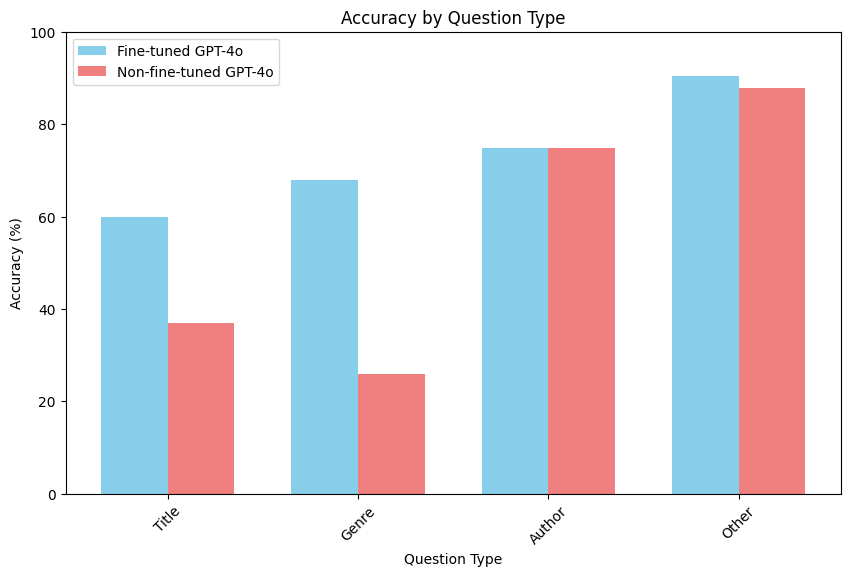
看起来,微调模型在 Genre 类别的问题上性能提升最大,例如“这本书是什么类型的?”或“这本书的体裁是什么?”这可能展示了微调的一个好处:我们教会模型根据训练数据中存在的类别来对体裁进行分类。这也突显了模型强大的视觉理解能力,因为模型仅凭书籍封面的视觉内容就能识别出体裁。
此外,我们看到 Title 类别也有显著提升,这表明微调增强了模型的 OCR 能力,以及它理解书籍封面布局和结构以提取相关信息的能力。
最后,让我们比较微调模型和未微调模型之间相似度评分的分布,以考虑措辞和用词的变化。
from collections import Counter

# extract ratings
ratings_ft = [result['rating'] for result in results_w_scores if result['type'] == 'Open']
ratings_4o = [result['rating'] for result in results_w_scores_4o if result['type'] == 'Open']

# count occurrences of each rating
rating_counts_ft = Counter(ratings_ft)
rating_counts_4o = Counter(ratings_4o)

# define the order of ratings
rating_order = ["Very Similar", "Mostly Similar", "Somewhat Similar", "Incorrect"]

# create bar chart
bar_width = 0.35
index = range(len(rating_order))

fig, ax = plt.subplots()
bar1 = ax.bar(index, [rating_counts_ft.get(rating, 0) for rating in rating_order], bar_width, label='FT GPT-4o')
bar2 = ax.bar([i + bar_width for i in index], [rating_counts_4o.get(rating, 0) for rating in rating_order], bar_width, label='GPT-4o')

ax.set_xlabel('Ratings')
ax.set_ylabel('Count')
ax.set_title('Ratings Distribution')
ax.set_xticks([i + bar_width / 2 for i in index])
ax.set_xticklabels(rating_order)
ax.legend()

plt.show()
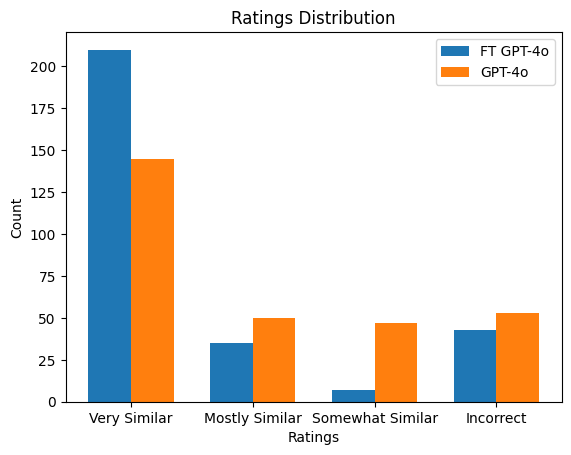
结果清晰地展示了通过微调所获得的收益,且未进行任何其他修改。
对比微调后的 GPT-4o 模型与未微调的 GPT-4o 之间的评分分布,我们可以看到微调后的模型获得了更多完全正确的响应,而错误响应的数量相当。
关键要点
* 更高的精确度:微调帮助模型生成更精确的答案,使其更符合真实标签,尤其是在像书封 OCR 这样高度领域特定的任务中。
* 更好的泛化能力:虽然未经微调的 GPT-4o 能够对许多问题至少给出某种程度上接近真实标签的回答,但其一致性较差。得益于训练期间接触了多模态数据,微调后的模型在各种测试问题上表现出更好的泛化能力。
虽然视觉微调的结果令人鼓舞,但仍有改进的空间。与文本微调非常相似,视觉微调的效果在很大程度上取决于训练数据的质量、多样性和代表性。特别是,模型能从聚焦于错误最频繁出现的案例中受益,从而实现有针对性的改进。
在审查错误结果时,微调模型给出的许多“错误”回答实际上是由于数据集标签不一致造成的。例如,一些真实答案只提供了作者的名和姓,而图像实际上还显示了中间名首字母。同样,一些标题的真实标签包含副标题和标语,而另一些则没有。
另一个常见主题是体裁的错误分类。尽管模型几乎总能生成与真实标签语义相似的体裁,但答案有时会出现偏差。这很可能是因为训练数据中缺乏这些体裁。为模型提供更多样化的训练示例以覆盖这些体裁,或为处理边缘情况提供更清晰的指令,可以帮助引导模型的理解。
后续步骤:
* 扩展训练数据集:添加更多样化的示例,覆盖模型的薄弱领域,例如识别体裁,可以显著提升性能。
* 专家指导的提示:将领域特定的指令纳入训练提示中,可以进一步优化模型在复杂情况下准确解释和回应的能力。
尽管在这个特定任务上仍有待进步,但初步结果非常令人鼓舞。通过最少的设置和努力,我们已经观察到视觉微调在整体准确率上带来了显著提升,这表明这种方法具有巨大潜力。视觉微调为广泛的视觉问答任务以及其他依赖强大视觉理解的任务开辟了改进的可能性。
常见问题
常见错误:1. 图像格式非RGB导致编码失败,需用PIL转换;2. base64编码遗漏data URL前缀;3. JSONL文件格式错误,每行必须是完整JSON对象;4. 文件大小超1GB,可降低JPEG质量;5. 微调任务失败,检查训练文件是否包含至少10个示例;6. 评估时模型输出格式不一致,需在系统提示中明确要求仅返回结论;7. 并发请求超限,需控制ThreadPoolExecutor的max_workers;8. 相似度评分解析失败,确保response_format正确。排查方法:检查API返回错误信息,验证JSONL格式,使用小样本测试。
企业应用扩展
生产优化:1. 扩展训练数据,覆盖薄弱领域如体裁分类;2. 引入专家指导的提示,优化复杂场景;3. 使用数据增强提升多样性;4. 监控微调任务进度,利用Platform UI;5. 对评估结果进行人工复核,修正标签不一致;6. 考虑模型版本更新,定期重新微调;7. 结合RAG架构,将微调模型作为检索增强的生成器;8. 探索多任务微调,同时优化多个视觉问答子任务。
总结
本文基于OpenAI官方指南,系统讲解GPT-4o视觉微调的完整流程。内容涵盖OCR-VQA数据集加载与预处理、多模态消息格式构建、base64图像编码、少样本示例设计、微调任务创建、并发推理评估以及基于GPT-4o的相似度评分。通过对比微调与未微调模型在封闭式和开放式问题上的表现,展示视觉微调在领域特定任务中的显著提升,并总结常见错误与生产优化方向。
- --
内容来源与验证
- 内容等级:PREMIUM_A
- 质量等级:A
- 难度:中级
- 验证等级:V1
- 原文作者:danial-openai
- 原文日期:2024-11-01
- 来源许可:MIT
- 来源版本:
faafe956951249aeb0aa064dd5c0bc9244a7febf - 查看原文
站内还有更多完整实战教程
加入会员,解锁全部教程、完整代码与持续更新内容。
加入会员