如何评估LLM生成SQL的性能:测试与评估框架指南
技术背景
LLM的非确定性导致输出不一致,难以直接用于生产。在自然语言转SQL场景中,生成的SQL需满足语法正确且语义相关,否则无法执行或返回错误结果。传统软件测试方法无法直接套用,需要结合单元测试与LLM评估。本文旨在提供一套系统化评估框架,解决LLM应用开发中质量监控与迭代优化问题,适用于需要将LLM集成到数据查询、代码生成等生产环境的开发者。
核心原理
核心原理包括:1) 使用Pydantic模型定义LLM响应结构,强制JSON格式,便于解析与验证;2) 通过SQLite内存数据库执行生成的CREATE和SELECT语句,捕获语法错误;3) 采用G-Eval方法,利用LLM(如GPT-4o-mini)根据预设标准(相关性1-5分)评估生成SQL与用户问题的匹配度。数据流:用户问题→LLM生成JSON→解析验证→SQL执行测试→LLM评估相关性→记录结果。关键设计决策:分离格式验证与语义评估,结合确定性测试与概率性评估,确保全面覆盖。
架构分析
系统架构分为四层:1) 数据层:HuggingFace数据集提供问题-SQL对;2) 生成层:OpenAI API调用LLM生成JSON响应;3) 测试层:单元测试(test_valid_schema、test_llm_sql)和评估函数(get_geval_score);4) 报告层:Pandas汇总结果,Matplotlib可视化。组件关系:test_system_prompt函数协调生成、测试与评估,输出DataFrame。设计思想:模块化、可扩展,通过替换提示词或评估标准适配不同代码生成任务。
完整实战教程
如何测试和评估LLM的SQL生成能力
LLM本质上是非确定性的。这一特性使其响应富有创造性和动态性。然而,这一特性也给实现一致性带来了重大挑战,而一致性是将LLM集成到生产环境中的关键方面。
在实际应用中发挥LLM潜力的关键在于持续且系统的评估。这有助于识别和纠正不一致之处,并随着应用的发展监控进展。
本笔记本的范围
本笔记本旨在展示一个评估LLM的框架,特别关注:
* 单元测试: 对于评估应用的各个组件至关重要。
* 评估指标: 定量衡量模型有效性的方法。
* 运行手册文档: 记录历史评估以跟踪进展和回归。
本示例侧重于自然语言到SQL的用例——当您将代码验证与代码执行结合时,代码生成用例也适用于此方法,这样您的应用可以在生成代码时实时测试代码以确保一致性。
尽管本笔记本使用SQL生成用例来演示概念,但该方法通用,可应用于各种LLM驱动的应用。
我们将使用两个版本的提示来执行SQL生成。然后,我们将使用单元测试和评估函数来测试提示的性能。具体来说,在本演示中,我们将评估:
- JSON响应的一致性。
- 响应中SQL的语法正确性。
目录
- 设置: 安装所需库,下载包含SQL查询及相应自然语言翻译的数据。
- 测试开发: 为SQL生成过程创建单元测试并定义评估指标。
- 评估: 使用不同提示进行测试,以评估对性能的影响。
- 报告: 编制报告,简洁呈现不同测试中观察到的性能差异。
设置
导入我们的库以及我们将使用的数据集,即来自 HuggingFace 的自然语言转 SQL 数据集 b-mc2/sql-create-context。
# Uncomment this to install all necessary dependencies
# !pip install openai datasets pandas pydantic matplotlib python-dotenv numpy tqdm
from datasets import load_dataset
from openai import OpenAI
import pandas as pd
import pydantic
import os
import sqlite3
from sqlite3 import Error
from pprint import pprint
import matplotlib.pyplot as plt
import numpy as np
from dotenv import load_dotenv
from tqdm.notebook import tqdm
from IPython.display import HTML, display

# Loads key from local .env file to setup API KEY in env variables
%reload_ext dotenv
%dotenv

GPT_MODEL = 'gpt-4o'
dataset = load_dataset("b-mc2/sql-create-context")

print(dataset['train'].num_rows, "rows")
查看数据集
我们使用 Huggingface datasets 库来下载 SQL 创建上下文数据集。该数据集包含:
- 问题,以自然语言表达
- 答案,以 SQL 表达,旨在回答自然语言问题。
- 上下文,以 CREATE SQL 语句表达,描述可用于回答该问题的表。
在今天的演示中,我们将使用 LLM 尝试回答(自然语言)问题。LLM 需要生成一个 CREATE SQL 语句,以创建适合回答用户问题的上下文,并生成相应的 SELECT SQL 查询,旨在完整回答用户问题。
数据集如下所示:
sql_df = dataset['train'].to_pandas()
sql_df.head()
测试开发
为了测试 LLM 生成的输出,我们将开发两个单元测试和一个评估,它们将结合起来为我们提供一个基本的评估框架,以评估我们 LLM 迭代的质量。
重申一下,我们的目的是衡量 LLM 在给定问题下输出的正确性和一致性。
单元测试
单元测试应测试 LLM 应用程序中最细粒度的组件。
在本节中,我们将开发单元测试来测试以下内容:
test_valid_schema将检查 LLM 是否返回可解析的create和select语句。test_llm_sql将在sqlite数据库上执行create和select语句,以确保它们在语法上正确。
from pydantic import BaseModel


class LLMResponse(BaseModel):
    """This is the structure that we expect the LLM to respond with.

    The LLM should respond with a JSON string with `create` and `select` fields.
    """
    create: str
    select: str
提示 LLM
出于演示目的,我们使用一个相当简单的提示,要求 GPT 生成一个 (context, answer) 对。context 是 CREATE SQL 语句,answer 是 SELECT SQL 语句。我们将自然语言问题作为提示的一部分提供。我们要求响应采用 JSON 格式,以便于解析。
system_prompt = """Translate this natural language request into a JSON
object containing two SQL queries. The first query should be a CREATE
tatement for a table answering the user's request, while the second
should be a SELECT query answering their question."""

# Sending the message array to GPT, requesting a response (ensure that you
# have API key loaded to Env for this step)
client = OpenAI()

def get_response(system_prompt, user_message, model=GPT_MODEL):
    messages = []
    messages.append({"role": "system", "content": system_prompt})
    messages.append({"role": "user", "content": user_message})

    response = client.beta.chat.completions.parse(
        model=GPT_MODEL,
        messages=messages,
        response_format=LLMResponse,
    )
    return response.choices[0].message.content

question = sql_df.iloc[0]['question']
content = get_response(system_prompt, question)
print("Question:", question)
print("Answer:", content)
检查 JSON 格式
我们的第一个简单单元测试检查 LLM 响应是否可以解析为我们定义的 LLMResponse Pydantic 类。
我们将测试第一个响应是否通过,然后创建一个失败的示例来检查该检查是否失败。这个逻辑将封装在一个简单的函数 test_valid_schema 中。
我们期望 GPT 返回有效的 SQL,我们可以使用 LLMResponse 基类来验证这一点。test_valid_schema 旨在帮助我们验证这一点。
def test_valid_schema(content):
    """Tests whether the content provided can be parsed into our Pydantic model."""
    try:
        LLMResponse.model_validate_json(content)
        return True
    # Catch pydantic's validation errors:
    except pydantic.ValidationError as exc:
        print(f"ERROR: Invalid schema: {exc}")
        return False
test_valid_schema(content)
测试负面场景
为了模拟从 GPT 获取无效 JSON 响应的场景,我们将无效的 JSON 硬编码为响应。我们期望 test_valid_schema 函数抛出异常。
failing_query = 'CREATE departments, select * from departments'
test_valid_schema(failing_query)
正如预期的那样,我们从 test_valid_schema 函数中得到了一个抛出的异常。
测试 SQL 查询
接下来我们将验证 SQL 的正确性。此测试旨在验证:
- GPT 响应中返回的 CREATE SQL 在语法上是正确的。
- GPT 响应中返回的 SELECT SQL 在语法上是正确的。
为实现这一点,我们将使用一个 SQLite 实例。我们会将返回的 SQL 语句发送到 SQLite 实例。如果语句有效,SQLite 将接受并执行它们;否则,我们预期会抛出异常。
下面的 create_connection 函数将设置一个 SQLite 实例(默认在内存中)并创建一个稍后使用的连接。
# Set up SQLite to act as our test database
def create_connection(db_file=":memory:"):
    """create a database connection to a SQLite database"""
    try:
        conn = sqlite3.connect(db_file)
        # print(sqlite3.version)
    except Error as e:
        print(e)
        return None

    return conn

def close_connection(conn):
    """close a database connection"""
    try:
        conn.close()
    except Error as e:
        print(e)


conn = create_connection()
接下来,我们将创建以下函数来执行语法正确性检查。
test_create:测试 CREATE SQL 语句是否成功的函数。test_select:测试 SELECT SQL 语句是否成功的函数。test_llm_sql:执行上述两个测试的包装函数。
def test_select(conn, cursor, select, should_log=True):
    """Tests that a SQLite select query can be executed successfully."""
    try:
        if should_log:
            print(f"Testing select query: {select}")
        cursor.execute(select)
        record = cursor.fetchall()
        if should_log:
            print(f"Result of query: {record}")

        return True

    except sqlite3.Error as error:
        if should_log:
            print("Error while executing select query:", error)
        return False


def test_create(conn, cursor, create, should_log=True):
    """Tests that a SQLite create query can be executed successfully"""
    try:
        if should_log:
            print(f"Testing create query: {create}")
        cursor.execute(create)
        conn.commit()

        return True

    except sqlite3.Error as error:
        if should_log:
            print("Error while creating the SQLite table:", error)
        return False


def test_llm_sql(llm_response, should_log=True):
    """Runs a suite of SQLite tests"""
    try:
        conn = create_connection()
        cursor = conn.cursor()

        create_response = test_create(conn, cursor, llm_response.create, should_log=should_log)

        select_response = test_select(conn, cursor, llm_response.select, should_log=should_log)

        if conn:
            close_connection(conn)

        if create_response is not True:
            return False

        elif select_response is not True:
            return False

        else:
            return True

    except sqlite3.Error as error:
        if should_log:
            print("Error while creating a sqlite table", error)
        return False
# Viewing CREATE and SELECT sqls returned by GPT

test_query = LLMResponse.model_validate_json(content)
print(f"CREATE SQL is: {test_query.create}")
print(f"SELECT SQL is: {test_query.select}")
# Testing the CREATE and SELECT sqls are valid (we expect this to be succesful)

test_llm_sql(test_query)
# Again we'll perform a negative test to confirm that a failing SELECT will return an error.

test_failure_query = '{"create": "CREATE TABLE departments (id INT, name VARCHAR(255), head_of_department VARCHAR(255))", "select": "SELECT COUNT(*) FROM departments WHERE age > 56"}'
test_failure_query = LLMResponse.model_validate_json(test_failure_query)
test_llm_sql(test_failure_query)
使用 LLM 评估相关性
接下来,我们评估生成的 SQL 是否真正回答了用户的问题。该测试将由 gpt-4o-mini 执行,并评估生成的 SQL 查询与初始用户请求相比的相关性。
这是一个简单的示例,改编自 G-Eval 论文中概述的方法,并在我们的另一个 cookbook 中进行了测试。
EVALUATION_MODEL = "gpt-4o-mini"

EVALUATION_PROMPT_TEMPLATE = """
You will be given one summary written for an article. Your task is to rate the summary on one metric.
Please make sure you read and understand these instructions very carefully.
Please keep this document open while reviewing, and refer to it as needed.

Evaluation Criteria:

{criteria}

Evaluation Steps:

{steps}

Example:

Request:

{request}

Queries:

{queries}

Evaluation Form (scores ONLY):

- {metric_name}
"""

# Relevance

RELEVANCY_SCORE_CRITERIA = """
Relevance(1-5) - review of how relevant the produced SQL queries are to the original question. \
The queries should contain all points highlighted in the user's request. \
Annotators were instructed to penalize queries which contained redundancies and excess information.
"""

RELEVANCY_SCORE_STEPS = """
1. Read the request and the queries carefully.
2. Compare the queries to the request document and identify the main points of the request.
3. Assess how well the queries cover the main points of the request, and how much irrelevant or redundant information it contains.
4. Assign a relevance score from 1 to 5.
"""
def get_geval_score(
    criteria: str, steps: str, request: str, queries: str, metric_name: str
):
    """Given evaluation criteria and an observation, this function uses EVALUATION GPT to evaluate the observation against those criteria.
"""
    prompt = EVALUATION_PROMPT_TEMPLATE.format(
        criteria=criteria,
        steps=steps,
        request=request,
        queries=queries,
        metric_name=metric_name,
    )
    response = client.chat.completions.create(
        model=EVALUATION_MODEL,
        messages=[{"role": "user", "content": prompt}],
        temperature=0,
        max_tokens=5,
        top_p=1,
        frequency_penalty=0,
        presence_penalty=0,
    )
    return response.choices[0].message.content
# Test out evaluation on a few records

evaluation_results = []

for x,y in sql_df.head(3).iterrows():
    score = get_geval_score(
        RELEVANCY_SCORE_CRITERIA,
        RELEVANCY_SCORE_STEPS,
        y['question'],
        y['context'] + '\n' + y['answer'],'relevancy'
    )
    evaluation_results.append((y['question'],y['context'] + '\n' + y['answer'],score))
for result in evaluation_results:
    print(f"User Question \t: {result[0]}")
    print(f"CREATE SQL Returned \t: {result[1].splitlines()[0]}")
    print(f"SELECT SQL Returned \t: {result[1].splitlines()[1]}")
    print(f"{result[2]}")
    print("*" * 20)
评估
我们将结合单元测试和评估来测试这些函数,以测试两个系统提示。
每次输入/输出和评分的迭代都应存储为一次 run。可选地,你可以在评估中添加 GPT-4 注释,或作为单独步骤来审查整个 run 并突出显示错误原因。
在此示例中,第二个系统提示将包含一行额外的说明,以便我们评估其对 SQL 有效性和解决方案质量的影响。
构建测试框架
我们希望构建一个函数 test_system_prompt,它将针对给定的系统提示运行我们的单元测试和评估。
def execute_unit_tests(input_df, output_list, system_prompt):
    """Unit testing function that takes in a dataframe and appends test results to an output_list."""

    for x, y in tqdm(input_df.iterrows(), total=len(input_df)):
        model_response = get_response(system_prompt, y['question'])

        format_valid = test_valid_schema(model_response)

        try:
            test_query = LLMResponse.model_validate_json(model_response)
            # Avoid logging since we're executing many rows at once
            sql_valid = test_llm_sql(test_query, should_log=False)
        except:
            sql_valid = False

        output_list.append((y['question'], model_response, format_valid, sql_valid))

def evaluate_row(row):
    """Simple evaluation function to categorize unit testing results.

    If the format or SQL are flagged it returns a label, otherwise it is correct"""
    if row['format'] is False:
        return 'Format incorrect'
    elif row['sql'] is False:
        return 'SQL incorrect'
    else:
        return 'SQL correct'

def test_system_prompt(test_df, system_prompt):
    # Execute unit tests and capture results
    results = []
    execute_unit_tests(
        input_df=test_df,
        output_list=results,
        system_prompt=system_prompt
    )

    results_df = pd.DataFrame(results)
    results_df.columns = ['question','response','format','sql']

    # Use `apply` to calculate the geval score and unit test evaluation
    # for each generated response
    results_df['evaluation_score'] = results_df.apply(
        lambda x: get_geval_score(
            RELEVANCY_SCORE_CRITERIA,
            RELEVANCY_SCORE_STEPS,
            x['question'],
            x['response'],
            'relevancy'
        ),
        axis=1
    )
    results_df['unit_test_evaluation'] = results_df.apply(
        lambda x: evaluate_row(x),
        axis=1
    )
    return results_df
系统提示词 1
被测系统是如下所示的第一个系统提示词。此 run 将为该系统提示词生成响应,并使用我们目前创建的函数评估这些响应。
system_prompt = """Translate this natural language request into a JSON object
containing two SQL queries.

The first query should be a CREATE statement for a table answering the user's
request, while the second should be a SELECT query answering their question.
"""

# Select 50 unseen queries to test this one
test_df = sql_df.tail(50)

results_df = test_system_prompt(test_df, system_prompt)
我们现在可以将以下结果分组:
* 单元测试,用于测试响应的结构;以及
* 评估,用于检查 SQL 在语法上是否正确。
results_df['unit_test_evaluation'].value_counts()
results_df['evaluation_score'].value_counts()
系统提示词 2
我们现在使用一个新的系统提示词来运行相同的单元测试和评估。
system_prompt_2 = """Translate this natural language request into a JSON
object containing two SQL queries.

The first query should be a CREATE statement for a table answering the user's
request, while the second should be a SELECT query answering their question.

Ensure the SQL is always generated on one line, never use \\n to separate rows."""


results_2_df = test_system_prompt(test_df, system_prompt)
如上所述,我们可以将单元测试和评估结果分组。
results_2_df['unit_test_evaluation'].value_counts()
results_2_df['evaluation_score'].value_counts()
报告
我们将创建一个简单的数据框来存储和展示运行性能——在这里,你可以使用 Weights & Biases Prompts 或 Gantry 等工具来存储结果,以便对你的不同迭代进行分析。
results_df['run'] = 1
results_df['Evaluating Model'] = 'gpt-4'

results_2_df['run'] = 2
results_2_df['Evaluating Model'] = 'gpt-4'

run_df = pd.concat([results_df,results_2_df])
run_df.head()
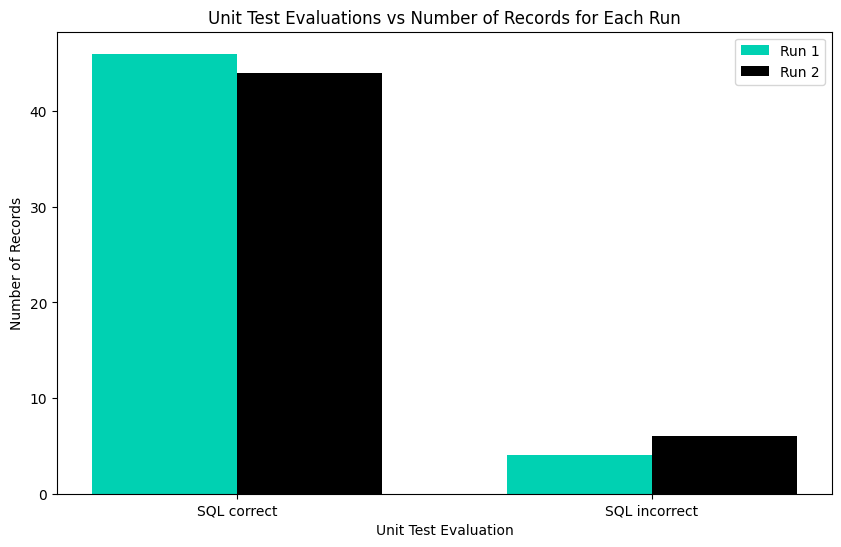
绘制单元测试结果
我们可以创建一个简单的条形图来可视化两次运行的单元测试结果。
unittest_df_pivot = pd.pivot_table(
    run_df,
    values='format',
    index=['run','unit_test_evaluation'],
    aggfunc='count'
)
unittest_df_pivot.columns = ['Number of records']
unittest_df_pivot
unittest_df_pivot.reset_index(inplace=True)

# Plotting
plt.figure(figsize=(10, 6))

# Set the width of each bar
bar_width = 0.35

# OpenAI brand colors
openai_colors = ['#00D1B2', '#000000']  # Green and Black

# Get unique runs and unit test evaluations
unique_runs = unittest_df_pivot['run'].unique()
unique_unit_test_evaluations = unittest_df_pivot['unit_test_evaluation'].unique()

# Ensure we have enough colors (repeating the pattern if necessary)
colors = openai_colors * (len(unique_runs) // len(openai_colors) + 1)

# Iterate over each run to plot
for i, run in enumerate(unique_runs):
    run_data = unittest_df_pivot[unittest_df_pivot['run'] == run]

    # Position of bars for this run
    positions = np.arange(len(unique_unit_test_evaluations)) + i * bar_width

    plt.bar(positions, run_data['Number of records'], width=bar_width, label=f'Run {run}', color=colors[i])

# Setting the x-axis labels to be the unit test evaluations, centered under the groups
plt.xticks(np.arange(len(unique_unit_test_evaluations)) + bar_width / 2, unique_unit_test_evaluations)

plt.xlabel('Unit Test Evaluation')
plt.ylabel('Number of Records')
plt.title('Unit Test Evaluations vs Number of Records for Each Run')
plt.legend()
plt.show()
绘制评估结果
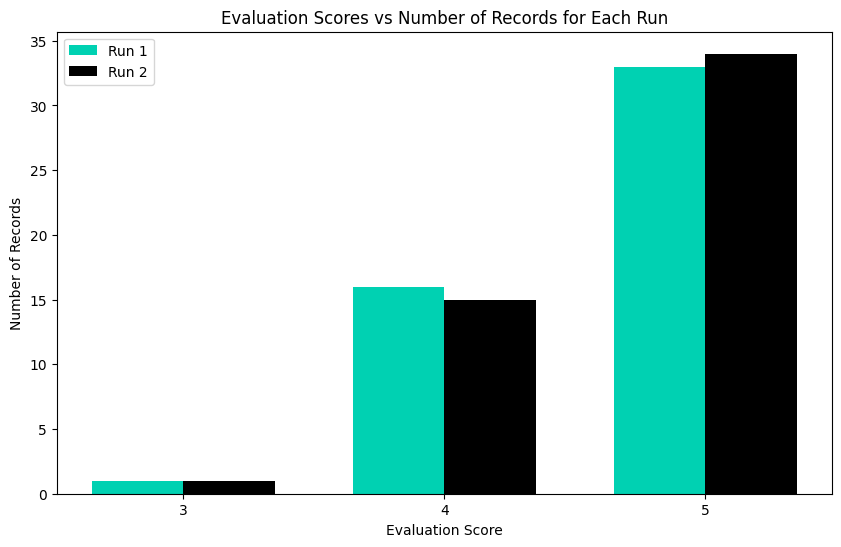
我们可以类似地绘制评估结果。
evaluation_df_pivot = pd.pivot_table(
    run_df,
    values='format',
    index=['run','evaluation_score'],
    aggfunc='count'
)
evaluation_df_pivot.columns = ['Number of records']
evaluation_df_pivot
# Reset index without dropping the 'run' and 'evaluation_score' columns
evaluation_df_pivot.reset_index(inplace=True)

# Plotting
plt.figure(figsize=(10, 6))

bar_width = 0.35

# OpenAI brand colors
openai_colors = ['#00D1B2', '#000000']  # Green, Black

# Identify unique runs and evaluation scores
unique_runs = evaluation_df_pivot['run'].unique()
unique_evaluation_scores = evaluation_df_pivot['evaluation_score'].unique()

# Repeat colors if there are more runs than colors
colors = openai_colors * (len(unique_runs) // len(openai_colors) + 1)

for i, run in enumerate(unique_runs):
    # Select rows for this run only
    run_data = evaluation_df_pivot[evaluation_df_pivot['run'] == run].copy()

    # Ensure every 'evaluation_score' is present
    run_data.set_index('evaluation_score', inplace=True)
    run_data = run_data.reindex(unique_evaluation_scores, fill_value=0)
    run_data.reset_index(inplace=True)

    # Plot each bar
    positions = np.arange(len(unique_evaluation_scores)) + i * bar_width
    plt.bar(
        positions,
        run_data['Number of records'],
        width=bar_width,
        label=f'Run {run}',
        color=colors[i]
    )

# Configure the x-axis to show evaluation scores under the grouped bars
plt.xticks(np.arange(len(unique_evaluation_scores)) + bar_width / 2, unique_evaluation_scores)

plt.xlabel('Evaluation Score')
plt.ylabel('Number of Records')
plt.title('Evaluation Scores vs Number of Records for Each Run')
plt.legend()
plt.show()
结论
现在你已经有了一个使用 LLM 测试 SQL 生成的框架,通过一些调整,这种方法可以扩展到许多其他代码生成用例。借助 GPT-4 和积极参与的人工标注者,你可以致力于自动化这些测试用例的评估,形成一个迭代循环,其中新示例被添加到测试集中,而此结构可检测任何性能回归。
我们希望你觉得这有用,并请提供任何反馈。
常见问题
常见错误:1) API密钥未设置:检查.env文件及环境变量;2) JSON解析失败:确保LLM响应符合Pydantic模型,可调整提示词强调格式;3) SQL执行错误:检查SQLite语法,如列名不存在或类型不匹配;4) 评估分数异常:调整G-Eval提示词或温度参数。排查方法:启用日志(should_log=True)查看详细错误;使用小批量数据测试。生产优化:缓存LLM响应减少API调用;并行执行单元测试;集成Weights & Biases跟踪实验;设置重试机制处理API限流。
企业应用扩展
扩展方向:1) 支持多轮对话SQL生成评估;2) 增加更多评估指标(如执行结果准确性、效率);3) 自动化回归测试,当提示词或模型更新时触发;4) 集成CI/CD流水线,确保每次部署前通过评估;5) 使用更复杂的数据库模式(如多表连接)测试泛化能力;6) 结合人工反馈循环,持续优化评估标准。
总结
本文面向AI工程师,系统介绍评估LLM生成SQL能力的工程框架。内容涵盖单元测试(验证JSON格式与SQL语法)、基于G-Eval的LLM评估(衡量相关性),以及运行手册文档化。通过两个系统提示的对比实验,展示如何量化提示变更对生成质量的影响。文章提供完整代码示例,包括环境配置、数据集加载、SQLite执行测试、评估函数实现及结果可视化,帮助开发者构建可迭代、可监控的LLM应用评估流水线,适用于自然语言转SQL及其他代码生成场景。
- --
内容来源与验证
- 内容等级:PREMIUM_A
- 质量等级:S_CANDIDATE
- 难度:中级
- 验证等级:V1
- 原文作者:colin-openai
- 原文日期:2024-01-23
- 来源许可:MIT
- 来源版本:
ac179e68e5931c1e87466cd29c30547ce3b5eeb9 - 查看原文
站内还有更多完整实战教程
加入会员,解锁全部教程、完整代码与持续更新内容。
加入会员