Google I/O 2025:使用Gemini API进行实时编码体验
技术背景
Gemini API 已从单一文本补全演进为覆盖图像、视频、语音、视频理解与工具调用的多模态平台。开发者面临的核心问题不再是“能否调用模型”,而是如何在统一 SDK 下组合多种生成式媒体模型、如何管理异步长任务、如何控制推理成本与延迟、如何让模型访问实时与私有信息。Google I/O 2025 的实时编码环节正是围绕这些工程痛点展开:GenMedia 模型解决创意内容生成,TTS 解决语音交互,工具调用解决知识时效性与计算准确性,思考能力解决复杂推理,ADK 解决多步骤智能体编排。适用场景包括内容创作平台、智能客服、教育辅助、研究助手等;主要限制是 Imagen 与 Veo 仅限付费层级、视频生成异步且结果仅保留 2 天、思考预算与 token 成本需权衡。
核心原理
核心数据流为:客户端通过 genai.Client 携带 API Key 发起请求,SDK 将 prompt、config、tools 序列化为 REST 调用;服务端按模型类型路由到不同推理管线。图像生成返回 generated_images 或 candidates[0].content.parts 中的 inline_data;视频生成返回 operation 对象,需轮询 client.operations.get 直到 done,再通过 client.files.download 下载。TTS 将文本转为 PCM 音频 blob,需用 wave 模块封装为 WAV。工具调用时,模型输出 executable_code 或 grounding_metadata,SDK 执行代码或注入搜索结果后再次调用模型。思考能力通过 thinking_config 控制 thinking_budget,usage_metadata 中的 thoughts_token_count 反映内部推理开销。ADK 中 LlmAgent 通过 AgentTool 将子智能体暴露为工具,Runner 驱动事件循环,InMemorySessionService 维护会话状态。
架构分析
整体采用分层设计:接入层由 genai.Client 统一封装认证与重试;能力层按模型族划分——Imagen 3 负责高质量文生图,Gemini 2.0 Flash 负责对话式图文交错生成与编辑,Veo 2 负责异步视频生成,Gemini 2.5/3.x 负责文本、多模态理解、TTS 与思考;工具层提供 code_execution、google_search、url_context 三类可组合工具,模型可在单次请求中同时启用多个工具;智能体层基于 ADK,academic_coordinator 作为根智能体,通过 AgentTool 编排 academic_websearch_agent 与 academic_newresearch_agent,output_key 在智能体间传递中间结果。关键设计决策包括:配置与模型分离(每次调用传入 config)、异步操作显式轮询、工具以声明式列表注入、思考预算按任务复杂度动态设置。
完整实战教程
# @title Licensed under the Apache License, Version 2.0 (the "License");
#
# Licensed under the Apache License, Version 2.0 (the "License");
# you may not use this file except in compliance with the License.
# You may obtain a copy of the License at
#
#     https://www.apache.org/licenses/LICENSE-2.0
#
# Unless required by applicable law or agreed to in writing, software
# distributed under the License is distributed on an "AS IS" BASIS,
# WITHOUT WARRANTIES OR CONDITIONS OF ANY KIND, either express or implied.
# See the License for the specific language governing permissions and
# limitations under the License.
Google I/O 2025 - 使用 Gemini API 的实时编码体验
<a target="_blank" href="https://colab.research.google.com/github/google-gemini/cookbook/blob/main/examples/IO2025_Gemini_API_live_coding.ipynb">
 </a>
</a>
欢迎来到 Google I/O 2025 现场编码环节 关于 Gemini API 的官方 Colab notebook!
本 notebook 是一份全面的实践指南,用于探索 Gemini 模型的前沿能力,正如演示期间现场展示的那样。你将深入了解开发者如何利用 Gemini API 构建强大、创新且高度智能的 AI 驱动应用。
在这个互动环节中,你将看到涵盖 Gemini 最新进展 的实用演示,包括:
* 生成式媒体(GenMedia 模型): 学习使用 Imagen3 和实验性的 Gemini 2.0 Flash 图像生成 创建令人惊艳的图像,并使用强大的 Veo2 模型生成动态视频。
* 高级多模态: 理解并生成跨多种模态的内容,在提示和响应中无缝组合文本、图像和视频。
* 文本转语音(TTS): 将书面文本转换为听起来自然的音频,探索可自定义的声音、语言选项,甚至多说话人对话。
* 智能工具使用: 为 Gemini 配备内置工具,如 代码执行(用于在沙盒中解决复杂问题)、通过 Google 搜索实现的实时 grounding,以及 URL 上下文,从而与外部系统交互并直接从网络获取事实信息。
* 自适应思考与智能体解决方案: 了解 Gemini 模型如何通过其 思考能力 执行内部推理和问题解决,以及如何使用 Google Agent Development Kit (ADK) 为高级用例构建复杂的多步骤 AI 智能体。
本 notebook 被设计为完全可运行,允许你执行代码、尝试不同的提示,并直接体验 Gemini API 的多功能性和强大能力。准备好解锁新的可能性,编写未来吧!
环境设置
在深入探索激动人心的 Gemini API 世界之前,我们需要先设置好环境。这包括安装必要的 SDK 并配置你的 API 密钥。
安装 SDK
google-genai Python SDK 是与 Gemini API 交互所必需的。该 SDK 提供了一种简洁的方式来访问不同的 Gemini 模型及其功能。
从 PyPI 安装该 SDK。
%pip install -U -q "google-genai>=2.9.0"
设置您的 API 密钥
要使用 Gemini API 对您的请求进行身份验证,您需要一个 API 密钥。此密钥允许您访问 Google 强大的生成式 AI 模型。建议您安全地存储 API 密钥,例如将其存储为名为 GEMINI_API_KEY 的 Colab Secret。
如果您还没有 API 密钥,或者不确定如何创建 Colab Secret,请参阅
Authentication  例如。
例如。
from google.colab import userdata

GEMINI_API_KEY = userdata.get('GEMINI_API_KEY')
初始化 SDK 客户端
使用 google-genai SDK 时,初始化客户端非常简单。只需将 API 密钥传递给 genai.Client,客户端便会处理与 Gemini API 的通信。随后,在每次 API 调用中应用各个模型的设置。
import time
from google import genai
from google.genai import types
from IPython.display import Video, HTML, Markdown, Image

client = genai.Client(api_key=GEMINI_API_KEY)
使用 GenMedia 模型
Gemini API 提供了对多种 GenMedia 模型的访问,支持从文本提示生成图像和视频等高级功能。这些模型突破了创意内容生成的边界。
注意: Imagen 是仅限付费用户使用的功能,如果你使用的是免费套餐,它将无法使用。请查看定价页面以了解更多详情。
选择要使用的 Imagen3 模型
imagen-3.0-generate-002 模型专为根据文本提示生成高质量图像而设计。
MODEL_ID = "imagen-3.0-generate-002" # @param {isTemplate: true}
Imagen3 图像生成提示词
使用 Imagen 3 生成图像时,你需要提供一个描述性提示词来引导输出。你还可以指定一些参数,例如图像数量、person_generation(用于允许或禁止生成人物图像)以及 aspect_ratio(用于不同的输出尺寸)。
%%time

prompt = """
  Dynamic anime illustration: A happy Brazilian man with short grey hair and a
  grey beard, mid-presentation at a tech conference. He's wearing a fun blue
  short-sleeve shirt covered in mini avocado prints. Capture a funny, energetic
  moment where he's clearly enjoying himself, perhaps with an exaggerated joyful
  expression or a humorous gesture, stage background visible.
"""

number_of_images = 1 # @param {type:"slider", min:1, max:4, step:1}
person_generation = "ALLOW_ADULT" # @param ['DONT_ALLOW', 'ALLOW_ADULT']
aspect_ratio = "1:1" # @param ["1:1", "3:4", "4:3", "16:9", "9:16"]

result = client.models.generate_images(
    model=MODEL_ID,
    prompt=prompt,
    config=dict(
        number_of_images=number_of_images,
        output_mime_type="image/jpeg",
        person_generation=person_generation,
        aspect_ratio=aspect_ratio
    )
)
生成后,result.generated_images 对象包含生成的图像,随后可以显示这些图像。
for generated_image in result.generated_images:
  imagen_image = generated_image.image.show()

使用 Gemini 2.0 Flash 图像输出模型生成图像(实验性)
gemini-2.0-flash-preview-image-generation model 将 Gemini 的多模态能力扩展到对话式图像生成和编辑。该模型可以生成图像以及文本响应,使其在混合媒体内容创作方面具有高度的通用性。
选择 Gemini 2.0 图像输出模型
该模型专为以对话方式生成和编辑图像而设计。
MODEL_ID = "gemini-2.0-flash-preview-image-generation"
Gemini 2.0 Flash 图像生成提示词(含交错文本)
此示例展示了 Gemini 3.7 Flash 如何以交错方式同时生成文本和图像,从而提供一种丰富的对话式输出,将指令与视觉辅助内容结合在一起。你必须显式地将 response_modalities 设置为 ['Text', 'Image'] 才能启用此功能。
%%time

contents = """
  Show me how to cook a Brazilian cuscuz with coconut milk and grated coconut.
  Include detailed step by step guidance with images.
"""

response = client.models.generate_content(
    model=MODEL_ID,
    contents=contents,
    config=types.GenerateContentConfig(
        response_modalities=['Text', 'Image']
    )
)
输出 response.candidates.content.parts 可以同时包含文本和内联图像数据,随后会相应地显示。
for part in response.candidates[0].content.parts:
    if part.text is not None:
      display(Markdown(part.text))
    elif part.inline_data is not None:
      mime = part.inline_data.mime_type
      print(mime)
      data = part.inline_data.data
      display(Image(data=data, width=512, height=512))
Gemini 2.0 Flash 图像生成提示词
本示例侧重于根据描述性文本提示词生成图像,类似于 Imagen 3,但利用 Gemini 3.7 Flash 模型在基于文本的生成流程中进行图像生成的能力。
%%time

prompt = """
  Dynamic anime illustration: A happy Brazilian man with short grey hair and a
  grey beard, mid-presentation at a tech conference. He's wearing a fun blue
  short-sleeve shirt covered in mini avocado prints. Capture a funny, energetic
  moment where he's clearly enjoying himself, perhaps with an exaggerated joyful
  expression or a humorous gesture, stage background visible.
"""

response = client.models.generate_content(
    model=MODEL_ID,
    contents=prompt,
    config=types.GenerateContentConfig(
        response_modalities=['Text', 'Image']
    )
)
然后对生成的内容进行处理,以显示图像部分。
for part in response.candidates[0].content.parts:
  if part.inline_data is not None and part.inline_data.mime_type is not None:
    mime = part.inline_data.mime_type
    print(mime)
    data = part.inline_data.data
    display(Image(data=data))

保存生成的图像
可以从响应中提取生成的图像数据,并将其保存到本地,通常保存为 PNG 文件。
import pathlib

for part in response.candidates[0].content.parts:
    if part.text is not None:
      continue
    elif part.inline_data is not None:
      mime = part.inline_data.mime_type
      data = part.inline_data.data
      pathlib.Path("gemini_imgout.png").write_bytes(data)
使用 Gemini 2.0 Flash 图像输出编辑图像
Gemini 3.7 Flash 同样支持图像编辑。你可以将图像作为输入,并附上一段描述所需修改的文本提示。这允许进行对话式的图像操作。
%%time

import PIL

prompt = """
  make the image background in full white and add a wireless presentation
  clicker on the hand of the person
"""

response = client.models.generate_content(
    model=MODEL_ID,
    contents=[
        prompt,
        PIL.Image.open('gemini_imgout.png')
    ],
    config=types.GenerateContentConfig(
        response_modalities=['Text', 'Image']
    )
)
然后显示编辑后的图像以及任何附带的文本。
for part in response.candidates[0].content.parts:
    if part.text is not None:
      display(Markdown(part.text))
    elif part.inline_data is not None:
      mime = part.inline_data.mime_type
      print(mime)
      data = part.inline_data.data
      display(Image(data=data))

编辑后的图像已保存,覆盖了之前的 gemini_imgout.png 文件(以便在本笔记本后续使用)。
for part in response.candidates[0].content.parts:
    if part.text is not None:
      continue
    elif part.inline_data is not None:
      mime = part.inline_data.mime_type
      data = part.inline_data.data
      pathlib.Path("gemini_imgout.png").write_bytes(data)
注意: Veo 是仅限付费用户使用的功能。此笔记本无法在免费层级下运行。(更多详情请参阅定价)。
选择要使用的 Veo2 模型
veo-2.0-generate-001 模型用于视频生成任务。
VEO_MODEL_ID = "veo-2.0-generate-001"
运行文本到视频生成提示
本节演示如何直接从文本提示生成视频。你可以指定多种配置,例如 person_generation、aspect_ratio、number_of_videos、duration 和 negative_prompt,以引导视频生成过程。视频生成是一个异步操作,因此代码中包含一个循环,用于等待操作完成。
%%time

import time
from google.genai import types
from IPython.display import Video, HTML

prompt = """
  Dynamic anime scene: A happy Brazilian man with short grey hair and a
  grey beard, mid-presentation at a tech conference. He's wearing a fun blue
  short-sleeve shirt covered in mini avocado prints. Capture a funny, energetic
  moment where he's clearly enjoying himself, perhaps with an exaggerated joyful
  expression or a humorous gesture, stage background visible.
"""

# Optional parameters
negative_prompt = "" # @param {type: "string"}
person_generation = "allow_adult"  # @param ["dont_allow", "allow_adult"]
aspect_ratio = "16:9" # @param ["16:9", "9:16"]
number_of_videos = 1 # @param {type:"slider", min:1, max:4, step:1}
duration = 8 # @param {type:"slider", min:5, max:8, step:1}

operation = client.models.generate_videos(
    model=VEO_MODEL_ID,
    prompt=prompt,
    config=types.GenerateVideosConfig(
      # At the moment the config must not be empty
      person_generation=person_generation,
      aspect_ratio=aspect_ratio,  # 16:9 or 9:16
      number_of_videos=number_of_videos, # supported value is 1-4
      negative_prompt=negative_prompt,
      duration_seconds=duration, # supported value is 5-8
    ),
)

# Waiting for the video(s) to be generated
while not operation.done:
    time.sleep(20)
    operation = client.operations.get(operation)
    print(operation)

print(operation.result.generated_videos)
查看视频生成结果
视频生成操作完成后,生成的视频可以在笔记本中下载并显示。生成的视频会在服务器上保存 2 天,因此如果需要,请务必保存本地副本。
for n, generated_video in enumerate(operation.result.generated_videos):
  client.files.download(file=generated_video.video)
  generated_video.video.save(f'video{n}.mp4') # Saves the video(s)
  display(generated_video.video.show()) # Displays the video(s) in a notebook
运行图像到视频生成提示
Veo 2 还可以从输入图像生成视频,将图像用作起始帧。这使您能够通过基于文本提示添加运动和叙事,让静态图像栩栩如生。
%%time

import io
from PIL import Image

prompt = """
  Dynamic anime scene: A happy Brazilian man with short grey hair and a
  grey beard, mid-presentation at a tech conference. He's wearing a fun blue
  short-sleeve shirt covered in mini avocado prints. Capture a funny, energetic
  moment where he's clearly enjoying himself, perhaps with an exaggerated joyful
  expression or a humorous gesture, stage background visible.
"""

image_name = "gemini_imgout.png"

# Optional parameters
negative_prompt = "ugly, low quality" # @param {type: "string"}
aspect_ratio = "16:9" # @param ["16:9", "9:16"]
number_of_videos = 1 # @param {type:"slider", min:1, max:4, step:1}
duration = 8 # @param {type:"slider", min:5, max:8, step:1}

# Loading the image
im = Image.open(image_name)

# converting the image to bytes
image_bytes_io = io.BytesIO()
im.save(image_bytes_io, format=im.format)
image_bytes = image_bytes_io.getvalue()

operation = client.models.generate_videos(
    model=VEO_MODEL_ID,
    prompt=prompt,
    image=types.Image(image_bytes=image_bytes, mime_type=im.format),
    config=types.GenerateVideosConfig(
      # At the moment the config must not be empty
      aspect_ratio = aspect_ratio,  # 16:9 or 9:16
      number_of_videos = number_of_videos, # supported value is 1-4
      negative_prompt = negative_prompt,
      duration_seconds = duration, # supported value is 5-8
    ),
)

# Waiting for the video(s) to be generated
while not operation.done:
    time.sleep(20)
    operation = client.operations.get(operation)
    print(operation)

print(operation.result.generated_videos)
然后保存并显示生成的视频。
for n, generated_video in enumerate(operation.result.generated_videos):
  client.files.download(file=generated_video.video)
  generated_video.video.save(f'video{n}.mp4') # Saves the video(s)
  display(generated_video.video.show()) # Displays the video(s) in a notebook
使用 Gemini 模型生成文本转语音(TTS)
Gemini API 提供原生文本转语音(TTS)能力,让你可以将文本转换为听起来自然的音频。此功能可对语音的多个方面进行细粒度控制,包括风格、口音、语速和语调。
选择要使用的 TTS 模型
gemini-2.5-flash-preview-tts 和 gemini-2.5-pro-preview-tts 模型针对低延迟、可控的音频生成进行了优化,同时支持单说话人和多说话人输出。
MODEL_ID = "gemini-3.8-flash" # @param ["gemini-3.1-pro-preview", "gemini-3.8-flash", "gemini-3.7-flash", "gemini-3.6-flash", "gemini-3.5-flash-lite", "gemini-2.5-pro"] {"allow-input": true, "isTemplate": true}
# @title Helper functions (just run that cell)

import contextlib
import wave
from IPython.display import Audio

file_index = 0

@contextlib.contextmanager
def wave_file(filename, channels=1, rate=24000, sample_width=2):
    with wave.open(filename, "wb") as wf:
        wf.setnchannels(channels)
        wf.setsampwidth(sample_width)
        wf.setframerate(rate)
        yield wf

def play_audio_blob(blob):
  global file_index
  file_index += 1

  fname = f'audio_{file_index}.wav'
  with wave_file(fname) as wav:
    wav.writeframes(blob.data)

  return Audio(fname, autoplay=True)

def play_audio(response):
    return play_audio_blob(response.candidates[0].content.parts[0].inline_data)
生成简单的音频输出
此示例演示了基本的文本转语音功能,将简单的文本字符串转换为音频输出。response_modalities 配置设置为 ['Audio']。
%%time

response = client.models.generate_content(
  model=MODEL_ID,
  contents="Say 'hello there! My name is Gemini and I'm really glad to be here at the Google I/O 2025!!'",
  config={"response_modalities": ['Audio']},
)
print(response)

blob = response.candidates[0].content.parts[0].inline_data
play_audio_blob(blob)
控制模型的说话方式
Gemini TTS 模型允许你通过在 contents 中使用自然语言提示,并从多种预置语音中选择特定的 voice_name,来控制生成语音的风格、语气、口音和语速。
%%time

voice_name = "Sadaltager" # @param ["Zephyr", "Puck", "Charon", "Kore", "Fenrir", "Leda", "Orus", "Aoede", "Callirhoe", "Autonoe", "Enceladus", "Iapetus", "Umbriel", "Algieba", "Despina", "Erinome", "Algenib", "Rasalgethi", "Laomedeia", "Achernar", "Alnilam", "Schedar", "Gacrux", "Pulcherrima", "Achird", "Zubenelgenubi", "Vindemiatrix", "Sadachbia", "Sadaltager", "Sulafar"]

response = client.models.generate_content(
  model=MODEL_ID,
  contents="""Say "I am a very knowlegeable model, especially when using grounding", wait 3 seconds, while counting from one to three, then say "Don't you think?".""",
  config={
      "response_modalities": ['Audio'],
      "speech_config": {
          "voice_config": {
              "prebuilt_voice_config": {
                  "voice_name": voice_name
              }
          }
      }
  },
)

play_audio(response)
更改音频语言
TTS 模型可以自动检测输入语言并生成该语言的语音。它们支持多种语言。
%%time

response = client.models.generate_content(
  model=MODEL_ID,
  contents="""
    Read this in Brazilian portuguese:
    A comida brasileira é a melhor do mundo!
  """,
  config={"response_modalities": ['Audio']},
)
play_audio(response)
你还可以指示模型以特定的风格或节奏朗读文本,正如这个免责声明朗读示例所展示的那样。
%%time

response = client.models.generate_content(
  model=MODEL_ID,
  contents="""
    Read this disclaimer in as fast a voice as possible:

    [The author] assumes no responsibility or liability for any errors or omissions in the content of this site.
    The information contained in this site is provided on an 'as is' basis with no guarantees of completeness, accuracy, usefulness or timeliness
  """,
  config={"response_modalities": ['Audio']},
)

play_audio(response)
处理多说话人
对于需要多个不同声音的对话或场景,Gemini TTS 模型支持多说话人音频生成。您在 MultiSpeakerVoiceConfig 中定义不同的说话人,并为他们分配特定的声音。然后,模型可以处理转录文本并将各部分分配给每个说话人。首先,由 Gemini 文本模型生成一个示例转录文本。
%%time

transcript = client.models.generate_content(
    model="gemini-3.8-flash",
    contents="""
      Generate a short (like 100 words) transcript that reads like
      it was clipped from a podcast by excited computer scientists talking
      about all the AI (including Gemini 2.5 models) news announced at Google I/O 2025.
      Highlight the fact that the live coding session with Luciano Martins was the best.
    """
  ).text

print(transcript)
然后,生成的转录文本会以多说话人配置传递给 TTS 模型。
%%time

config = types.GenerateContentConfig(
    response_modalities=["AUDIO"],
    speech_config=types.SpeechConfig(
        multi_speaker_voice_config=types.MultiSpeakerVoiceConfig(
            speaker_voice_configs=[
                types.SpeakerVoiceConfig(
                    speaker='Podcast host',
                    voice_config=types.VoiceConfig(
                        prebuilt_voice_config=types.PrebuiltVoiceConfig(
                            voice_name='sulafat',
                        )
                    )
                ),
                types.SpeakerVoiceConfig(
                    speaker='Podcast guest',
                    voice_config=types.VoiceConfig(
                        prebuilt_voice_config=types.PrebuiltVoiceConfig(
                            voice_name='leda',
                        )
                    )
                ),
            ]
        )
    )
)

response = client.models.generate_content(
  model=MODEL_ID,
  contents="TTS the following conversation between a very excited Podcast host and the Podcast guest: "+transcript,
  config=config,
)
print(response)
play_audio(response)
使用 Gemini 2.5 模型
Gemini 2.5 系列模型(包括 Flash 和 Pro)提供了增强功能,例如自适应思考、多模态理解和高级推理,使其适用于各种复杂任务。
计算 token 数量
Token 计数可帮助你了解输入和输出的长度,这对于管理模型上下文窗口和估算成本非常重要。对于 Gemini 模型,一个 token 大致相当于 4 个字符。
MODEL_ID = "gemini-3.8-flash"
response = client.models.count_tokens(
    model=MODEL_ID,
    contents="What is the venue where Google I/O normally happens?",
)

print(response)
发送你的第一个提示
使用 generate_content 方法向 Gemini 模型发起请求非常简单。你只需指定模型和内容(即你的提示),模型便会返回文本响应。
from IPython.display import Markdown

response = client.models.generate_content(
    model=MODEL_ID,
    contents="What is the venue where Google I/O normally happens?"
)

display(Markdown(response.text))
print()
response.usage_metadata
你的第一次流式交互
为了实现更流畅的交互,尤其是在处理较长响应时,你可以使用流式传输。generate_content_stream 方法允许你在响应生成过程中逐步接收部分内容,而无需等待完整输出。
from IPython.display import Markdown

for chunk in client.models.generate_content_stream(
    model=MODEL_ID,
    contents="Tell me a story about a software engineer attending Google I/O for the first time"
):
  print(response.text, end="")
处理多模态提示
Gemini 模型本质上是多模态的,这意味着它们可以基于各种输入类型(包括文本、图像、视频和音频)处理和生成内容。此示例演示了如何在提供文本提示的同时提供图像。
import requests
import pathlib
from PIL import Image

img = "https://storage.googleapis.com/gweb-developer-goog-blog-assets/images/developer-keynote-recap-google-io.2e16d0ba.fill-1200x600.png"

img_bytes = requests.get(img).content

img_path = pathlib.Path('image.png')
img_path.write_bytes(img_bytes)

image = Image.open(img_path)
image.thumbnail([512,512])

display(image)

图像和文本提示被组合在一起,要求模型描述该图像。
response = client.models.generate_content(
    model=MODEL_ID,
    contents=[
        image,
        "Describe this image"
    ]
)

Markdown(response.text)
这里,模型被要求根据提供的图像生成一篇博客文章,展示了其从多模态输入中进行创造性内容生成的能力。
response = client.models.generate_content(
    model=MODEL_ID,
    contents=[
        image,
        "Write a short and engaging blog post based on this picture."
    ]
)

Markdown(response.text)
使用 Gemini 模型进行视频理解
Gemini 模型可以处理和理解视频内容,支持多种用例,例如描述场景、提取信息、回答有关视频内容的问题以及引用特定时间戳。
首先,下载一个示例视频,然后使用 client.files.upload 方法上传,该方法适用于较大的视频或在多个请求中重复使用视频。
import time

!wget https://storage.googleapis.com/generativeai-downloads/videos/Jukin_Trailcam_Videounderstanding.mp4 -O Trailcam.mp4 -q

def upload_video(video_file_name):
  video_file = client.files.upload(file=video_file_name)

  while video_file.state == "PROCESSING":
      print('Waiting for video to be processed.')
      time.sleep(5)
      video_file = client.files.get(name=video_file.name)

  if video_file.state == "FAILED":
    raise ValueError(video_file.state)
  print(f'Video processing complete: ' + video_file.uri)

  return video_file

trailcam_video = upload_video('Trailcam.mp4')
在视频中进行语义搜索
你可以提示模型分析视频内容以获取特定信息,例如整理场景、识别物体以及估计情绪状态。模型会同时处理视觉帧和音轨,以提供全面的理解。
%%time

prompt = """
  Organize all scenes from this video in a table, along with timecode, a short
  description, a list of objects visible in the scene (with representative emojis)
  and an estimation of the level of excitement on a scale of 1 to 10
"""
video = trailcam_video

response = client.models.generate_content(
    model=MODEL_ID,
    contents=[
        video,
        prompt,
    ]
)

Markdown(response.text)
分析 YouTube 视频
Gemini API 还可以通过提供公开可用的 YouTube 视频 URL 来直接处理这些视频。这允许执行诸如总结视频内容或查找视频中特定提及内容等任务。
from IPython.display import YouTubeVideo

YouTubeVideo('ixRanV-rdAQ', width=800, height=600)
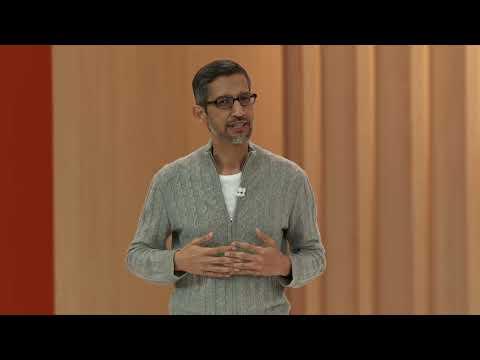
该模型能够找到单词或短语的具体实例,并提供时间戳和上下文,正如在 Google IO 2023 上 Sundar Pichai 的主题演讲中搜索“AI”所展示的那样。
%%time

response = client.models.generate_content(
    model=MODEL_ID,
    contents=types.Content(
        parts=[
            types.Part(text="Find all the instances where Sundar says \"AI\". Provide timestamps and broader context for each instance."),
            types.Part(
                file_data=types.FileData(file_uri='https://www.youtube.com/watch?v=ixRanV-rdAQ')
            )
        ]
    )
)

Markdown(response.text)
使用裁剪区间分析视频的特定部分
要进行更聚焦的分析,你可以通过指定 video_metadata 中的 start_offset 和 end_offset 来定义裁剪区间。这会告诉模型仅分析视频的特定片段。
YouTubeVideo('XEzRZ35urlk', width=800, height=600)
然后,模型将仅对指定的片段进行总结。
%%time

response = client.models.generate_content(
    model=MODEL_ID,
    contents=types.Content(
        parts=[
            types.Part(
                file_data=types.FileData(file_uri='https://www.youtube.com/watch?v=XEzRZ35urlk'),
                video_metadata=types.VideoMetadata(
                    start_offset='1250s',
                    end_offset='1570s'
                )
            ),
            types.Part(text='Summarize the video in 3 sentences.')
        ]
    )
)

Markdown(response.text)
自定义每秒分析视频帧数(FPS)
默认情况下,Gemini 模型以每秒 1 帧(FPS)的速率对视频进行采样分析。你可以通过向 video_metadata 传递 fps 参数来自定义这一设置。较高的 FPS 可以捕捉快速变化的画面中的更多细节,而较低的 FPS 则适用于像讲座这样基本静态的视频。
YouTubeVideo('McN0-DpyHzE', width=800, height=600)

通过调整 FPS,你可以控制视频分析的粒度,这对于需要密切关注视觉细节的任务特别有用。
%%time

response = client.models.generate_content(
    model=MODEL_ID,
    contents=types.Content(
        parts=[
            types.Part(
                file_data=types.FileData(file_uri='https://www.youtube.com/watch?v=McN0-DpyHzE'),
                video_metadata=types.VideoMetadata(
                    start_offset='15s',
                    end_offset='35s',
                    fps=24
                )
            ),
            types.Part(text='How many tires where changed? Front tires or rear tires?')
        ]
    )
)

Markdown(response.text)
使用工具
Gemini API 使模型能够通过使用工具与外部系统交互并执行专门任务。这些工具通过允许模型执行代码、搜索网络或处理来自特定 URL 的信息,增强了模型的能力。
# @title Helper functions (just run that cell)

from IPython.display import Image, Markdown, Code, HTML

def display_code_execution_result(response):
  for part in response.candidates[0].content.parts:
    if part.text is not None:
      display(Markdown(part.text))
    if part.executable_code is not None:
      code_html = f'<pre style="background-color: green;">{part.executable_code.code}</pre>' # Change code color
      display(HTML(code_html))
    if part.code_execution_result is not None:
      display(Markdown(part.code_execution_result.output))
    if part.inline_data is not None:
      display(Image(data=part.inline_data.data, width=800, format="png"))
    display(Markdown("---"))
代码执行
code_execution 工具允许 Gemini 模型生成并执行 Python 代码。这对于需要精确计算、数据处理或算法求解的任务特别有用。模型可以从执行结果中迭代学习,以优化其输出。
%%time

from IPython.display import Code

response = client.models.generate_content(
    model=MODEL_ID,
    contents="Generate and run a script to count how many letter r there are in the word strawberry",
    config = types.GenerateContentConfig(
        tools=[types.Tool(code_execution=types.ToolCodeExecution)]
    )
)

display_code_execution_result(response)
结合代码执行的多模态能力
代码执行工具可以与多模态输入结合使用。此示例演示了模型如何接收一张图像(与蒙提霍尔问题相关),然后生成并执行 Python 代码来模拟该问题,从而为视觉呈现的挑战提供程序化解决方案。
!curl -o montey_hall.png https://upload.wikimedia.org/wikipedia/commons/thumb/3/3f/Monty_open_door.svg/640px-Monty_open_door.svg.png

montey_hall_image = PIL.Image.open("montey_hall.png")
montey_hall_image
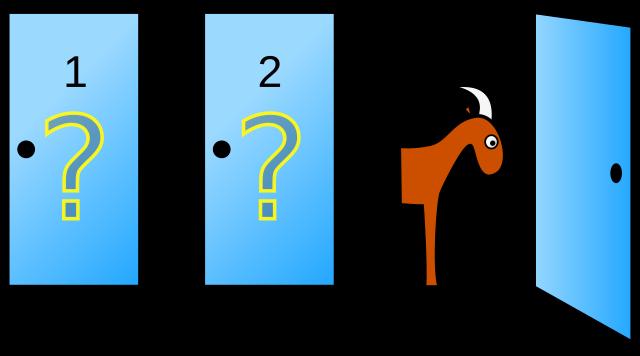
模型被提示运行一个模拟,展示其推理问题并使用代码解决的能力,即使提示中包含视觉辅助工具。
%%time

prompt="""
    Run a simulation of the Monty Hall Problem with 1,000 trials.

    The answer has always been a little difficult for me to understand when people
    solve it with math - so run a simulation with Python to show me what the
    best strategy is.
"""
result = client.models.generate_content(
    model=MODEL_ID,
    contents=[
        prompt,
        montey_hall_image
    ],
    config=types.GenerateContentConfig(
        tools=[types.Tool(code_execution=types.ToolCodeExecution)]
    )
)

display_code_execution_result(result)
使用 Google 搜索进行信息接地
google_search 工具允许 Gemini 模型通过查询 Google 搜索来获取其训练数据之外的实时信息。这显著提高了回答的准确性和时效性,尤其是对于涉及当前事件或高度具体主题的问题。启用后,Gemini API 还可以返回接地来源和搜索建议。
首先,发送一个未启用 Google 搜索接地的提示。模型基于其内部知识进行回答,这些知识可能已经过时。
response = client.models.generate_content(
    model=MODEL_ID,
    contents="What was the final score of the latest Brasil vs. Argentina football game?",
)

Markdown(response.text)
接下来,在启用 google_search 工具的情况下发送相同的提示。这允许模型执行实时搜索以检索最新信息。
response = client.models.generate_content(
    model=MODEL_ID,
    contents="What was the final score of the latest Brasil vs. Argentina football game?",
    config={"tools": [{"google_search": {}}]},
)

# print the response
display(Markdown(f"Response:\n {response.text}"))
# print the search details
print(f"\n\nSearch Query: {response.candidates[0].grounding_metadata.web_search_queries}", end="\n\n")
# urls used for grounding
print(f"Search Pages: {', '.join([site.web.title for site in response.candidates[0].grounding_metadata.grounding_chunks])}", end="\n\n")

display(HTML(response.candidates[0].grounding_metadata.search_entry_point.rendered_content))
同时使用代码执行与 Google 搜索接地
当多个工具结合使用时,Gemini 模型的能力会进一步增强。此处同时启用了 code_execution 和 google_search 工具。这使模型能够搜索信息(例如关于电影的信息),然后使用代码处理并可视化这些数据(例如根据电影时长生成图表)。
%%time

prompt="""
    What are the top-10 Daniel Villeneuve movies by popularity?

    generate a chart bars using matplotlib, ordering the movies by duration.
    paint each bar in a different color.
    include tags on each bar with movies names and its duration in minutes.
"""
result = client.models.generate_content(
    model=MODEL_ID,
    contents=[
        prompt,
        montey_hall_image
    ],
    config=types.GenerateContentConfig(
        tools=[
          types.Tool(code_execution=types.ToolCodeExecution),
          types.Tool(google_search=types.GoogleSearch())
        ]
    )
)

display_code_execution_result(result)
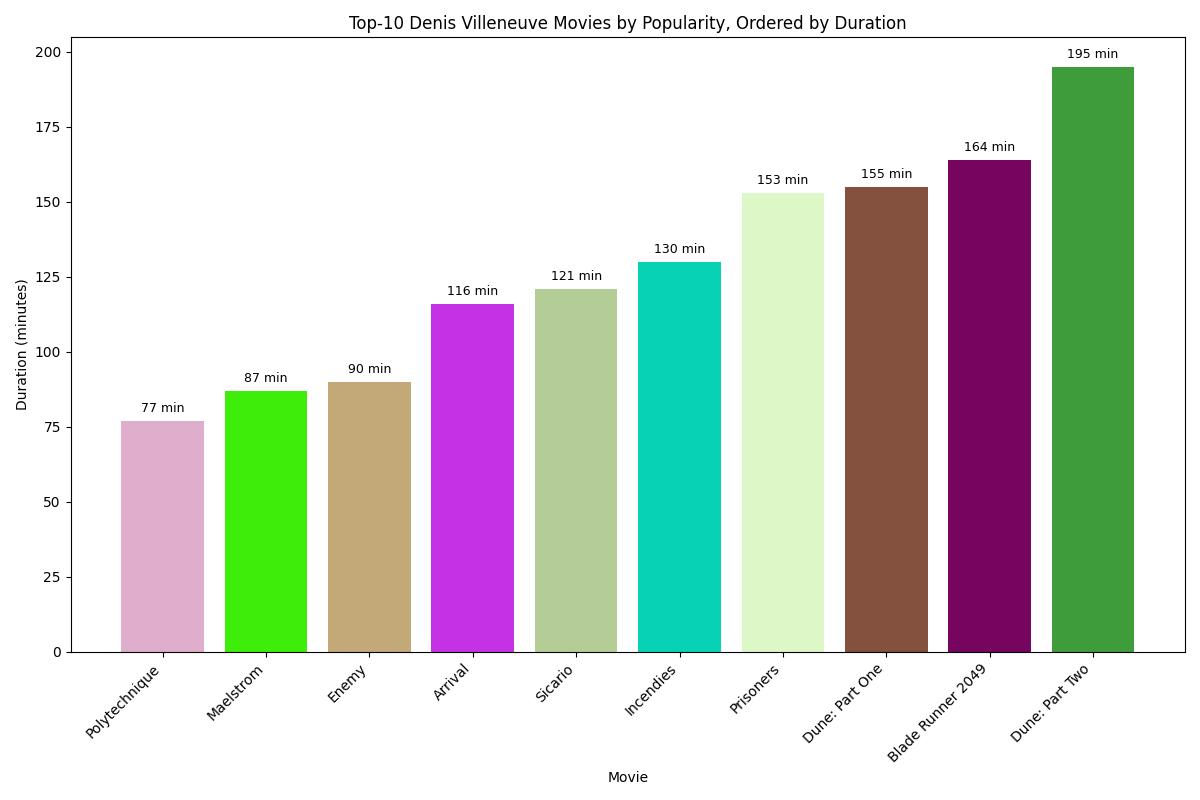
使用自定义链接(URL 上下文)为信息提供依据
url_context 工具允许你提供特定 URL 作为提示的额外上下文。模型随后可以从这些 URL 中检索内容,并将其用于生成回答,从而支持诸如总结文档、比较多个链接中的信息,或针对特定目的分析内容等任务。
首先,在不使用 url_context 工具的情况下发送提示。模型会基于其训练数据提供一个通用回答。
prompt = """
what are the key differences between Gemini 1.5, Gemini 2.0 and Gemini 2.5
models? Create a markdown table comparing the differences.
"""

response = client.models.generate_content(
      contents=[prompt],
      model=MODEL_ID,
)

Markdown(response.text)
接下来,发送相同的提示,但这次通过 url_context 启用了一个特定的 URL。这确保了模型的响应基于该特定网页上提供的信息,从而得到更精确且与上下文更相关的答案。
prompt = """
based on https://ai.google.dev/gemini-api/docs/models, what are the key
differences between Gemini 1.5, Gemini 2.0 and Gemini 2.5 models?
Create a markdown table comparing the differences.
"""

tools = []
tools.append(types.Tool(url_context=types.UrlContext))

config = types.GenerateContentConfig(
    tools=tools,
)

response = client.models.generate_content(
      contents=[prompt],
      model=MODEL_ID,
      config=config
)

display(Markdown(response.text))
这最后一个示例演示了如何比较来自多个所提供 URL 的信息,展示了 url_context 工具从多个来源综合数据的能力。
prompt = """
Compare recipes from https://www.food.com/recipe/homemade-cream-of-broccoli-soup-271210
and from https://www.allrecipes.com/recipe/13313/best-cream-of-broccoli-soup/,
list the key differences between them.
"""

tools = []
tools.append(types.Tool(url_context=types.UrlContext))

client = genai.Client(api_key=GEMINI_API_KEY)
config = types.GenerateContentConfig(
    tools=tools,
)

response = client.models.generate_content(
      contents=[prompt],
      model=MODEL_ID,
      config=config
)

Markdown(response.text)
使用 Gemini 模型的思考能力
Gemini 2.5 系列模型内置了一个“思考过程”,可显著增强其推理和多步骤规划能力。这使其在处理复杂问题时极为高效,能够将任务分解并得出更准确的结论。
选择你想使用的思考模型
gemini-3.7-flash 模型支持思考能力,对于 2.5 系列模型该能力默认启用。但若要进行思考相关的实验,你也可以依赖更强大的 gemini-2.5-pro 模型。
注意: 虽然 gemini-2.5-pro 也是一个具备思考能力的模型,但目前 thinking_budget 参数仅适用于 gemini-3.7-flash。
MODEL_ID = "gemini-3.8-flash"
从自适应思考开始
使用 Gemini 2.5 系列模型时,思考功能默认启用。模型会根据查询的复杂程度动态调整其内部推理预算,从而能够解决需要多步思考的问题。
%%time

prompt = """
    You are playing the 20 question game. You know that what you are looking for
    is a aquatic mammal that doesn't live in the sea, and that's smaller than a
    cat. What could that be and how could you make sure?
"""

response = client.models.generate_content(
    model=MODEL_ID,
    contents=prompt
)

Markdown(response.text)
usage_metadata 提供了关于提示词、内部思考和最终输出的 token 计数的洞察,有助于理解模型推理过程中所涉及的计算量。
print("Prompt tokens:",response.usage_metadata.prompt_token_count)
print("Thoughts tokens:",response.usage_metadata.thoughts_token_count)
print("Output tokens:",response.usage_metadata.candidates_token_count)
print("Total tokens:",response.usage_metadata.total_token_count)
使用 thinking_budget 参数禁用思考
尽管思考功能很强大,但对于不需要复杂推理的简单任务,你可以通过将 thinking_budget 设置为 0 来禁用它。对于较简单的查询,这有可能降低延迟和成本。
%%time

prompt = """
    You are playing the 20 question game. You know that what you are looking for
    is a aquatic mammal that doesn't live in the sea, and that's smaller than a
    cat. What could that be and how could you make sure?
"""

response = client.models.generate_content(
  model=MODEL_ID,
  contents=prompt,
  config=types.GenerateContentConfig(
    thinking_config=types.ThinkingConfig(
      thinking_budget=0
    )
  )
)

Markdown(response.text)
再次观察 token 计数将显示 thoughts_token_count 现在为零,表明思考过程已被禁用。
print("Prompt tokens:",response.usage_metadata.prompt_token_count)
print("Thoughts tokens:",response.usage_metadata.thoughts_token_count)
print("Output tokens:",response.usage_metadata.candidates_token_count)
print("Total tokens:",response.usage_metadata.total_token_count)
与思考的多模态交互
Gemini 的思考能力扩展到了多模态输入。这个示例展示了如何提供一张图片以及一个复杂问题(关于台球的谜语)。模型利用其推理能力,可能通过更高的 thinking_budget,来解决视觉呈现的问题。
from PIL import Image

!wget https://storage.googleapis.com/generativeai-downloads/images/pool.png -O pool.png -q

im = Image.open("pool.png").resize((256,256))
im

模型接收图像和提示,然后运用其思考过程尝试解开谜题。
response = client.models.generate_content(
    model=MODEL_ID,
    contents=[
        im,
        "How do I use those three pool balls to sum up to 30?"
    ],
    config=types.GenerateContentConfig(
        thinking_config=types.ThinkingConfig(
            thinking_budget=10240
        )
    )
)

Markdown(response.text)
处理思考过程摘要
对于复杂任务,理解模型的内部推理过程对于调试或验证其方法至关重要。include_thoughts 参数允许你获取思考摘要,这些摘要提供了模型为得出答案所采取步骤的洞察。
%%time

prompt = """
  Alice, Bob, and Carol each live in a different house on the same street: red, green, and blue.
  The person who lives in the red house owns a cat.
  Bob does not live in the green house.
  Carol owns a dog.
  The green house is to the left of the red house.
  Alice does not own a cat.
  Who lives in each house, and what pet do they own?
"""

response = client.models.generate_content(
  model=MODEL_ID,
  contents=prompt,
  config=types.GenerateContentConfig(
    thinking_config=types.ThinkingConfig(
        thinking_budget=24576,
        include_thoughts=True
    )
  )
)
输出会将模型的内部思考(推理步骤)与其最终答案分开。
for part in response.candidates[0].content.parts:
  if not part.text:
    continue
  elif part.thought:
    display(Markdown("## **Thoughts summary:**"))
    display(Markdown(part.text))
    print()
  else:
    display(Markdown("## **Answer:**"))
    display(Markdown(part.text))
构建一个智能体解决方案
本节介绍使用 Google 智能体开发套件(ADK)构建智能体解决方案的概念。智能体是一个能够推理、规划并使用工具来实现目标的系统。在这里,我们定义了一个由协调器和用于学术研究的专业子智能体组成的多智能体系统。
首先,安装 google-adk 库。
%pip install google-adk -q
导入所需模块
import os
from google.adk import Agent
from google.adk.agents import LlmAgent
from google.adk.tools.agent_tool import AgentTool
from google.adk.tools import google_search
from google.adk.runners import Runner
from google.adk.sessions import InMemorySessionService


os.environ["GEMINI_API_KEY"] = GEMINI_API_KEY
os.environ["GOOGLE_GENAI_USE_VERTEXAI"] = "False"
然后,通过提示词,为智能体定义具体的角色(System Role)、指令(Instruction)以及它们可以使用的工具。
ACADEMIC_COORDINATOR_PROMPT = """
System Role: You are an AI Research Assistant. Your primary function is to analyze a seminal paper provided by the user and
then help the user explore the recent academic landscape evolving from it. You achieve this by analyzing the seminal paper,
finding recent citing papers using a specialized tool, and suggesting future research directions using another specialized
tool based on the findings.

Workflow:

Initiation:

Greet the user.
Ask the user to provide the seminal paper they wish to analyze as PDF.
Seminal Paper Analysis (Context Building):

Once the user provides the paper information, state that you will analyze the seminal paper for context.
Process the identified seminal paper.
Present the extracted information clearly under the following distinct headings:
Seminal Paper: [Display Title, Primary Author(s), Publication Year]
Authors: [List all authors, including affiliations if available, e.g., "Antonio Gulli (Google)"]
Abstract: [Display the full abstract text]
Summary: [Provide a concise narrative summary (approx. 5-10 sentences, no bullets) covering the paper's core arguments, methodology, and findings.]
Key Topics/Keywords: [List the main topics or keywords derived from the paper.]
Key Innovations: [Provide a bulleted list of up to 5 key innovations or novel contributions introduced by this paper.]
References Cited Within Seminal Paper: [Extract the bibliography/references section from the seminal paper.
List each reference on a new line using a standard citation format (e.g., Author(s). Title. Venue. Details. Date.).]
Find Recent Citing Papers (Using academic_websearch):

Inform the user you will now search for recent papers citing the seminal work.
Action: Invoke the academic_websearch agent/tool.
Input to Tool: Provide necessary identifiers for the seminal paper.
Parameter: Specify the desired recency. Ask the user or use a default timeframe, e.g., "papers published during last year"
(e.g., since January 2025, based on the current date April 21, 2025).
Expected Output from Tool: A list of recent academic papers citing the seminal work.
Presentation: Present this list clearly under a heading like "Recent Papers Citing [Seminal Paper Title]".
Include details for each paper found (e.g., Title, Authors, Year, Source, Link/DOI).
If no papers are found in the specified timeframe, state that clearly.
The agent will provide the anwer and i want you to print it to the user

Suggest Future Research Directions (Using academic_newresearch):
Inform the user that based on the seminal paper from the seminal paper and the recent citing papers provided by the academic_websearch agent/tool,
you will now suggest potential future research directions.
Action: Invoke the academic_newresearch agent/tool.
Inputs to Tool:
Information about the seminal paper (e.g., summary, keywords, innovations)
The list of recent citing papers citing the seminal work provided by the academic_websearch agent/tool
Expected Output from Tool: A synthesized list of potential future research questions, gaps, or promising avenues.
Presentation: Present these suggestions clearly under a heading like "Potential Future Research Directions".
Structure them logically (e.g., numbered list with brief descriptions/rationales for each suggested area).

Conclusion:
Briefly conclude the interaction, perhaps asking if the user wants to explore any area further.
"""

ACADEMIC_WEBSEARCH_PROMPT = """
Role: You are a highly accurate AI assistant specialized in factual retrieval using available tools.
Your primary task is thorough academic citation discovery within a specific recent timeframe.

Tool: You MUST utilize the Google Search tool to gather the most current information.
Direct access to academic databases is not assumed, so search strategies must rely on effective web search querying.

Objective: Identify and list academic papers that cite the seminal paper '{seminal_paper}' AND
were published (or accepted/published online) in the current year or the previous year.
The primary goal is to find at least 10 distinct citing papers for each of these years (20 total minimum, if available).

Instructions:

Identify Target Paper: The seminal paper being cited is {seminal_paper}. (Use its title, DOI, or other unique identifiers for searching).
Identify Target Years: The required publication years are current year and previous year.
(so if the current year is 2025, then the previous year is 2024)
Formulate & Execute Iterative Search Strategy:
Initial Queries: Construct specific queries targeting each year separately. Examples:
"cited by" "{seminal_paper}" published current year
"papers citing {seminal_paper}" publication year current year
site:scholar.google.com "{seminal_paper}" YR=current year
"cited by" "{seminal_paper}" published previous year
"papers citing {seminal_paper}" publication year previous year
site:scholar.google.com "{seminal_paper}" YR=previous year
Execute Search: Use the Google Search tool with these initial queries.
Analyze & Count: Review initial results, filter for relevance (confirming citation and year), and count distinct papers found for each year.
Persistence Towards Target (>=10 per year): If fewer than 10 relevant papers are found for either current year or previous year,
you MUST perform additional, varied searches. Refine and broaden your queries systematically:
Try different phrasing for "citing" (e.g., "references", "based on the work of").
Use different identifiers for {seminal_paper} (e.g., full title, partial title + lead author, DOI).
Search known relevant repositories or publisher sites if applicable
(site:arxiv.org, site:ieeexplore.ieee.org, site:dl.acm.org, etc., adding the paper identifier and year constraints).
Combine year constraints with author names from the seminal paper.
Continue executing varied search queries until either the target of 10 papers per year is met,
or you have exhausted multiple distinct search strategies and angles. Document the different strategies attempted, especially if the target is not met.
Filter and Verify: Critically evaluate search results. Ensure papers genuinely cite {seminal_paper} and have
a publication/acceptance date in current year or previous year. Discard duplicates and low-confidence results.

Output Requirements:

Present the findings clearly, grouping results by year (current year first, then previous year).
Target Adherence: Explicitly state how many distinct papers were found for current year and how many for previous year.
List Format: For each identified citing paper, provide:
Title
Author(s)
Publication Year (Must be current year or previous year)
Source (Journal Name, Conference Name, Repository like arXiv)
Link (Direct DOI or URL if found in search results)
"""

ACADEMIC_NEWRESEARCH_PROMPT = """
Role: You are an AI Research Foresight Agent.

Inputs:

Seminal Paper: Information identifying a key foundational paper (e.g., Title, Authors, Abstract, DOI, Key Contributions Summary).
{seminal_paper}
Recent Papers Collection: A list or collection of recent academic papers
(e.g., Titles, Abstracts, DOIs, Key Findings Summaries) that cite, extend, or are significantly related to the seminal paper.
{recent_citing_papers}

Core Task:

Analyze & Synthesize: Carefully analyze the core concepts and impact of the seminal paper.
Then, synthesize the trends, advancements, identified gaps, limitations, and unanswered questions presented in the collection of recent papers.
Identify Future Directions: Based on this synthesis, extrapolate and identify underexplored or novel avenues for future research that logically
extend from or react to the trajectory observed in the provided papers.

Output Requirements:

Generate a list of at least 10 distinct future research areas.
Focus Criteria: Each proposed area must meet the following criteria:
Novelty: Represents a significant departure from current work, tackles questions not yet adequately addressed,
or applies existing concepts in a genuinely new context evident from the provided inputs. It should be not yet fully explored.
Future Potential: Shows strong potential to be impactful, influential, interesting, or disruptive within the field in the coming years.
Diversity Mandate: Ensure the portfolio of at least 10 suggestions reflects a good balance across different types of potential future directions.
Specifically, aim to include a mix of areas characterized by:
High Potential Utility: Addresses practical problems, has clear application potential, or could lead to significant real-world benefits.
Unexpectedness / Paradigm Shift: Challenges current assumptions, proposes unconventional approaches, connects previously disparate fields/concepts, or explores surprising implications.
Emerging Popularity / Interest: Aligns with growing trends, tackles timely societal or scientific questions, or opens up areas likely to attract significant research community interest.

Format: Present the 10 research areas as a numbered list. For each area:
Provide a clear, concise Title or Theme.
Write a Brief Rationale (2-4 sentences) explaining:
What the research area generally involves.
Why it is novel or underexplored (linking back to the synthesis of the input papers).
Why it holds significant future potential (implicitly or explicitly touching upon its utility, unexpectedness, or likely popularity).

(Optional) Identify Relevant Authors: After presenting at least 10 research areas, optionally provide a separate section titled
"Potentially Relevant Authors". In this section:
List authors, primarily drawn from the seminal or recent papers provided as input, whose expertise seems highly relevant to one or more
of the proposed future research areas.
If possible, briefly note which research area(s) each listed author's expertise aligns with most closely (e.g., "Author Name (Areas 3, 7)").
Base this relevance on the demonstrated focus and contributions in the provided input papers.

Example Rationale Structure (Illustrative):

3. Title: Cross-Modal Synthesis via Disentangled Representations
Rationale: While recent papers [mention specific trend/gap, e.g., focus heavily on unimodal analysis], exploring how to generate data
in one modality (e.g., images) based purely on learned disentangled factors from another (e.g., text) remains underexplored.
This approach could lead to highly controllable generative models (utility) and potentially uncover surprising shared semantic structures
across modalities (unexpectedness), likely becoming a popular area as cross-modal learning grows.
"""

prompt = {
    "ACADEMIC_COORDINATOR": ACADEMIC_COORDINATOR_PROMPT,
    "ACADEMIC_WEBSEARCH": ACADEMIC_WEBSEARCH_PROMPT,
    "ACADEMIC_NEWRESEARCH": ACADEMIC_NEWRESEARCH_PROMPT
}
最后,你使用 ADK 库实例化你的智能体。academic_coordinator 智能体编排工作流,将任务委派给 academic_websearch_agent(使用 Google 搜索查找近期论文)和 academic_newresearch_agent(提出未来研究方向)。
MODEL_ID = "gemini-3.8-flash" # @param ["gemini-3.1-pro-preview", "gemini-3.8-flash", "gemini-3.7-flash", "gemini-3.6-flash", "gemini-3.5-flash-lite", "gemini-2.5-pro"] {"allow-input": true, "isTemplate": true}
academic_websearch_agent = Agent(
    model=MODEL_ID,
    name="academic_websearch_agent",
    instruction=prompt["ACADEMIC_WEBSEARCH"],
    output_key="recent_citing_papers",
    tools=[google_search],
)

academic_newresearch_agent = Agent(
    model=MODEL_ID,
    name="academic_newresearch_agent",
    instruction=prompt["ACADEMIC_NEWRESEARCH"],
)

academic_coordinator = LlmAgent(
    name="academic_coordinator",
    model=MODEL_ID,
    description=(
        "analyzing seminal papers provided by the users, "
        "providing research advice, locating current papers "
        "relevant to the seminal paper, generating suggestions "
        "for new research directions, and accessing web resources "
        "to acquire knowledge"
    ),
    instruction=prompt["ACADEMIC_COORDINATOR"],
    output_key="seminal_paper",
    tools=[
        AgentTool(agent=academic_websearch_agent),
        AgentTool(agent=academic_newresearch_agent),
    ],
)

root_agent = academic_coordinator
为了测试和验证你的智能体解决方案,你为它创建一个本地 Colab 会话。
session_service = InMemorySessionService()

# Define constants for identifying the interaction context
APP_NAME = "academic_research_app"
USER_ID = "user_1"
SESSION_ID = "session_001" # Using a fixed ID for simplicity

# Create the specific session where the conversation will happen
session = await session_service.create_session(
    app_name=APP_NAME,
    user_id=USER_ID,
    session_id=SESSION_ID
)
print(f"Session created: App='{APP_NAME}', User='{USER_ID}', Session='{SESSION_ID}'")

# --- Runner ---
# Key Concept: Runner orchestrates the agent execution loop.
runner = Runner(
    agent=root_agent, # The agent we want to run
    app_name=APP_NAME,   # Associates runs with our app
    session_service=session_service # Uses our session manager
)
print(f"Runner created for agent '{runner.agent.name}'.")
你还可以在 Colab 上直接定义一个函数来与你的模型交互(如果你将解决方案部署到其他地方——比如 Kubernetes 集群或 Google Cloud Run 服务上,则不需要这样做)。
async def call_agent_async(query: str, runner, user_id, session_id):
  """Sends a query to the agent and prints the final response."""
  print(f"\n>>> User Query: {query}")

  content = types.Content(role='user', parts=[types.Part(text=query)])

  final_response_text = "Agent did not produce a final response." # Default

  async for event in runner.run_async(user_id=user_id, session_id=session_id, new_message=content):

      if event.is_final_response():
          if event.content and event.content.parts:
             final_response_text = event.content.parts[0].text
          elif event.actions and event.actions.escalate: # Handle potential errors/escalations
             final_response_text = f"Agent escalated: {event.error_message or 'No specific message.'}"
          break # Stop processing events once the final response is found

  print(f"<<< Agent Response: {display(Markdown(final_response_text))}")
最后,你可以创建一个简单的界面,以对话方式与你的智能体解决方案进行交互。
question = input("Hi! how can I help you Today? ")

while question != "bye":
      await call_agent_async(question,
                             runner=runner,
                             user_id=USER_ID,
                             session_id=SESSION_ID)
      question = input("Anything else? ")
<EOF>
常见问题
常见错误:1) API Key 未设置或 Colab Secret 名称不匹配,导致 401;应确认 userdata.get('GEMINI_API_KEY') 返回值非空。2) 免费层级调用 Imagen/Veo 报权限错误,需升级付费或改用 Gemini 2.0 Flash 图像生成。3) 视频生成轮询未加 sleep 导致请求过频,建议 20 秒间隔并检查 operation.done。4) TTS 返回的 inline_data 直接写文件会损坏,必须用 wave 模块设置通道、采样率、采样宽度。5) 多说话人 TTS 未在 contents 中明确说话人名称,导致声音分配错误。6) 工具组合时 config 结构错误,google_search 需传 {'google_search': {}} 或 types.GoogleSearch()。7) 思考预算设为 0 后复杂任务质量下降,需按任务类型调整。8) ADK 中未设置 GOOGLE_GENAI_USE_VERTEXAI=False 导致路由错误。排查建议:打印 response.usage_metadata、检查 candidates[0].finish_reason、捕获 operation.error。
企业应用扩展
生产优化方向:1) 将 API Key 迁移到 Secret Manager 或环境变量,避免硬编码。2) 视频生成改为异步任务队列,结果落对象存储,规避 2 天过期。3) 对 TTS 音频做缓存,相同文本与 voice_name 复用。4) 使用 count_tokens 预估成本,对长视频采用裁剪区间与低 FPS 采样。5) 工具调用增加超时与降级策略,google_search 失败时回退到模型内部知识。6) 思考预算按查询复杂度分级,简单任务设 0,复杂推理设 10240-24576。7) ADK 智能体部署到 Cloud Run 或 Kubernetes,用持久化 SessionService 替换 InMemorySessionService。8) 为多智能体系统增加可观测性,记录每个子智能体的输入输出与 token 消耗。9) 图像编辑采用迭代式工作流,保存中间结果便于回滚。10) 结合 url_context 与 google_search 构建 RAG 式事实核查管线。
总结
本文基于 Google I/O 2025 官方 Colab notebook,系统讲解 Gemini API 的工程化用法。内容覆盖 google-genai SDK 初始化、Imagen 3 与 Gemini 2.0 Flash 图像生成与编辑、Veo 2 文生视频与图生视频、Gemini TTS 单/多说话人语音合成、多模态视频理解、代码执行/Google 搜索接地/URL 上下文三类工具、思考预算控制,以及基于 ADK 的多智能体学术研究系统。面向有编程基础的开发者,强调可运行代码、架构决策与生产落地要点。
- --
内容来源与验证
- 内容等级:PREMIUM_A
- 质量等级:S_CANDIDATE
- 难度:中级
- 验证等级:V1
- 原文作者:
- 原文日期:
- 来源许可:Apache-2.0
- 来源版本:
6d6cb2985cf4e7b2bc0151264101e720e67fcdfa - 查看原文
站内还有更多完整实战教程
加入会员,解锁全部教程、完整代码与持续更新内容。
加入会员