图像生成与编辑用例的图像评估指南
技术背景
随着图像生成与编辑模型(如DALL·E、GPT-Image)从实验走向生产,它们被用于设计模型、营销素材、虚拟试穿、品牌编辑等真实工作流。然而,这些系统的输出质量不能仅凭主观“看起来不错”来判断,因为图像混合了硬约束(精确文本、数量、属性、局部性)、感知质量(清晰度、连贯性、真实感)和隐藏失败模式(微妙失真、意外编辑、小文本错误)。文本评估已有成熟方法,但视觉评估因“答案”是图像而更具挑战性。生产环境需要可重复、特定于工作流的评估,以衡量输出是否满足要求、是否安全失败、是否随时间可预测改进。本指南旨在提供一套实用的评估框架,帮助开发者构建可靠的视觉评估系统,确保模型在实际产品中可信赖。
核心原理
视觉评估的核心原则是将“这张图像是否有效?”转化为结构化、可比较的结果。框架遵循输入→模型→输出→评分器→分数→反馈→改进的循环,围绕三个插件构建:测试用例(提示+标准+可选输入图像/掩码)、运行器(调用模型并保存输出)、评分器(评分标准、LLM作为裁判、人工标签)。关键设计决策包括:1) 区分门控指标(通过/失败)与分级指标(0-5),门控指标用于不可协商的正确性(如指令遵循、文本渲染、局部性),分级指标用于质量维度(如布局、风格、保真度);2) 使用多模态LLM作为裁判,通过结构化JSON输出实现自动化评分,同时支持人工反馈校准;3) 针对不同用例(生成、编辑)定制评分内容构建器,但复用同一评分器接口;4) 强调局部性(编辑仅发生在预期区域)和保留(未请求区域不变),尤其在编辑任务中。
架构分析
系统架构采用模块化设计,核心为vision_harness包,包含以下组件:types.py定义核心数据类型(TestCase、ModelRun、Artifact、Score等);io.py提供图像转data URL的工具;storage.py管理输出存储;sweeps.py实现参数网格扫描;runners.py包含图像生成和编辑的运行器,封装API调用并保存输出;graders.py提供LLM作为裁判的评分器,支持自定义系统提示、内容构建器和JSON模式;evaluate.py实现评估循环,遍历测试用例和模型配置,调用评分器并汇总结果。该架构支持扩展:开发者只需提供用例、模型运行和评分器,即可复用管道。评分器通过内容构建器区分生成与编辑任务,生成任务仅提供输出图像,编辑任务则提供输入参考图、掩码和输出图像。评估结果以纯Python字典返回,便于后续报告或CSV导出。
完整实战教程
引言
图像模型越来越多地用于实际产品工作流程中——设计模型、营销素材、虚拟试穿以及对现有品牌材料的高精度编辑。要在生产中信任这些系统,您需要的不仅仅是“看起来不错吗?”您需要可重复的、特定于工作流程的评估,以衡量输出是否满足要求、是否安全失败以及是否随时间可预测地改进。
视觉评估(或视觉评估)比文本评估更难,因为“答案”是图像,它混合了:
- 硬约束:精确的文本、数量、属性、局部性(“仅更改此区域”)。
- 感知质量:清晰度、连贯性、真实感、美学匹配。
- 隐藏的失败模式:微妙的失真、意外的编辑或小的文本错误,这些错误乍一看没问题,但会破坏产品要求——尤其是在编辑中。
一个好的视觉评估不是给“漂亮的图片”打分。它评估模型是否对特定工作流程可靠。许多视觉上看起来很强的图像仍然失败,因为文本错误、风格偏离品牌或编辑超出预期区域。图像评估衡量真实提示的质量、可控性和可用性——而不仅仅是视觉吸引力。
本指南涵盖的内容
本手册侧重于为四大类构建实用的图像评估系统:
1)图像生成评估
- 指令遵循(满足约束)
- 文本渲染(准确性、可读性、放置)
- 风格控制(美学匹配、品牌/角色一致性)
- 偏好对齐(评分标准标签 + 成对比较)
2)图像编辑评估
- 转换正确性(请求的更改是否精确完成)
- 局部性(编辑仅发生在预期区域)
- 保留(未请求的区域保持不变)
- 空间控制(编辑应用于正确的实例/区域)
3)人类反馈对齐
- 基于评分标准的标签和成对偏好,以捕捉主观质量和“氛围”
- 校准技术,以保持人类判断随时间的一致性
4)构建评估的策略
- 从不可协商的正确性门开始
- 一旦失败得到控制,添加分级质量指标
- 标记失败模式以推动有针对性的迭代
构建视觉评估框架
视觉评估框架是一个小型、可重复的系统,它将“这张图像是否有效?”转化为跨提示、模型和设置的结构化、可比较的结果。
在高层,视觉评估遵循与任何LLM评估系统相同的循环:
输入 → 模型 → 输出 → 评分器 → 分数 → 反馈 → 改进
为了使其在手册的其余部分(生成 + 编辑)中可重用,围绕三个插件构建框架:
- 测试用例: 要运行的内容(提示 + 标准 + 可选的输入图像/掩码)
- 运行器: 如何调用模型并保存输出图像
- 评分器: 如何对输出进行评分(评分标准、LLM作为评判者、稍后的人工标签)
设置
运行一次即可。它会:
- 创建 API 客户端
- 在文件夹中创建
images/目录。
import os
from openai import OpenAI

client = OpenAI()

os.makedirs("../../images", exist_ok=True)
下面是一个最小的 vision_harness/ 包,你可以直接放入你的仓库中。
关于一个完整、可运行的测试框架(你可以扩展、编辑、复现并添加自己的用例),请参阅 examples/evals/imagegen_evals。
vision_harness/types.py
保持核心类型通用,以便你可以将它们复用于*图像生成*和*图像编辑*。
from __future__ import annotations

from dataclasses import dataclass, field
from pathlib import Path
from typing import Any, Literal, Optional

TaskType = Literal["image_generation", "image_editing"]
ScoreValue = bool | int | float | str


@dataclass(frozen=True)
class ImageInputs:
    """Editing inputs: one or more reference images + optional mask."""
    image_paths: list[Path]
    mask_path: Optional[Path] = None


@dataclass(frozen=True)
class TestCase:
    """A single evaluable example."""
    id: str
    task_type: TaskType
    prompt: str
    criteria: str
    image_inputs: Optional[ImageInputs] = None


@dataclass(frozen=True)
class ModelRun:
    """One model configuration to evaluate (useful for sweeps)."""
    label: str
    task_type: TaskType
    params: dict[str, Any]  # e.g. {"model": "...", "quality": "...", ...}


@dataclass(frozen=True)
class Artifact:
    """A saved artifact from a run (usually an image)."""
    kind: Literal["image"]
    path: Path
    mime: str = "image/png"


@dataclass
class ModelResponse:
    """Normalized output from any runner."""
    artifacts: list[Artifact] = field(default_factory=list)
    raw: dict[str, Any] = field(default_factory=dict)  # optional debug payload


@dataclass(frozen=True)
class Score:
    key: str
    value: ScoreValue
    reason: str = ""
    tags: Optional[list[str]] = None
vision_harness/io.py
你会在评分器(LLM-as-judge)中使用它,有时也会在模型调用中使用。
from __future__ import annotations

import base64
from pathlib import Path

_MIME_BY_SUFFIX = {
    ".jpg": "image/jpeg",
    ".jpeg": "image/jpeg",
    ".png": "image/png",
    ".webp": "image/webp",
}

def image_to_data_url(path: Path) -> str:
    mime = _MIME_BY_SUFFIX.get(path.suffix.lower(), "image/png")
    b64 = base64.b64encode(path.read_bytes()).decode("utf-8")
    return f"data:{mime};base64,{b64}"
vision_harness/storage.py
from __future__ import annotations

import time
from dataclasses import dataclass
from pathlib import Path

@dataclass
class OutputStore:
    """
    Simple artifact store that writes directly to the root folder.
    Note: This implementation writes directly to `root` (no per-test subfolders),
    which keeps site-relative image paths stable for cookbook rendering.
    """
    root: Path

    def run_dir(self, test_id: str, model_label: str) -> Path:
        # Ignore test/model subfolders; write everything to the root.
        self.root.mkdir(parents=True, exist_ok=True)
        return self.root

    def new_basename(self, prefix: str) -> str:
        created_ms = int(time.time() * 1000)
        return f"{prefix}_{created_ms}"

    def save_png(self, run_dir: Path, basename: str, idx: int, png_bytes: bytes) -> Path:
        out = run_dir / f"{basename}_{idx}.png"
        out.write_bytes(png_bytes)
        return out
vision_harness/sweeps.py
from __future__ import annotations

from itertools import product
from typing import Any


def grid_sweep(
    *,
    base_label: str,
    task_type: TaskType,
    fixed: dict[str, Any],
    grid: dict[str, list[Any]],
) -> list[ModelRun]:
    keys = list(grid.keys())
    runs: list[ModelRun] = []

    for values in product(*[grid[k] for k in keys]):
        params = dict(fixed)
        label_parts = [base_label]
        for k, v in zip(keys, values):
            params[k] = v
            label_parts.append(f"{k}={v}")
        runs.append(ModelRun(label=",".join(label_parts), task_type=task_type, params=params))

    return runs
vision_harness/runners.py
两个 runner:一个用于生成,一个用于编辑。两者都返回一个包含已保存输出图像的规范化 ModelResponse。
from __future__ import annotations

import base64
from contextlib import ExitStack
from typing import Optional

from openai import OpenAI


def _mime_for_path(path) -> str:
    suffix = str(path).lower()
    if suffix.endswith(".png"):
        return "image/png"
    if suffix.endswith(".jpg") or suffix.endswith(".jpeg"):
        return "image/jpeg"
    if suffix.endswith(".webp"):
        return "image/webp"
    return "application/octet-stream"


def _extract_b64_items(images_response) -> list[str]:
    b64_items: list[str] = []
    for item in getattr(images_response, "data", []) or []:
        b64 = getattr(item, "b64_json", None)
        if b64:
            b64_items.append(b64)
    return b64_items


class ImageGenerationRunner:
    """Text-to-image runner."""

    def __init__(self, client: Optional[OpenAI] = None):
        self.client = client or OpenAI()

    def run(self, case: TestCase, run_cfg: ModelRun, store: OutputStore) -> ModelResponse:
        assert case.task_type == "image_generation"
        assert run_cfg.task_type == "image_generation"

        params = dict(run_cfg.params)
        model = params.pop("model")
        n = int(params.pop("n", 1))

        run_dir = store.run_dir(case.id, run_cfg.label)
        basename = store.new_basename(f"gen_{case.id}_{run_cfg.label}")

        images_response = self.client.images.generate(
            model=model,
            prompt=case.prompt,
            n=n,
            **params,
        )

        artifacts: list[Artifact] = []
        for idx, b64_json in enumerate(_extract_b64_items(images_response)):
            png_bytes = base64.b64decode(b64_json)
            out_path = store.save_png(run_dir, basename, idx, png_bytes)
            artifacts.append(Artifact(kind="image", path=out_path))

        return ModelResponse(artifacts=artifacts, raw={"model": model, "params": run_cfg.params})


class ImageEditRunner:
    """Image editing runner (reference image(s) + optional mask)."""

    def __init__(self, client: Optional[OpenAI] = None):
        self.client = client or OpenAI()

    def run(self, case: TestCase, run_cfg: ModelRun, store: OutputStore) -> ModelResponse:
        assert case.task_type == "image_editing"
        assert run_cfg.task_type == "image_editing"
        assert case.image_inputs is not None and case.image_inputs.image_paths

        params = dict(run_cfg.params)
        model = params.pop("model")
        n = int(params.pop("n", 1))

        run_dir = store.run_dir(case.id, run_cfg.label)
        basename = store.new_basename(f"edit_{case.id}_{run_cfg.label}")

        with ExitStack() as stack:
            image_files = []
            for p in case.image_inputs.image_paths:
                f = stack.enter_context(p.open("rb"))
                image_files.append((p.name, f, _mime_for_path(p)))

            mask_file = None
            if case.image_inputs.mask_path:
                mf = stack.enter_context(case.image_inputs.mask_path.open("rb"))
                mask_file = (case.image_inputs.mask_path.name, mf, _mime_for_path(case.image_inputs.mask_path))

            edit_kwargs = dict(
                model=model,
                prompt=case.prompt,
                image=image_files,
                n=n,
                **params,
            )
            if mask_file is not None:
                edit_kwargs["mask"] = mask_file

            images_response = self.client.images.edit(**edit_kwargs)

        artifacts: list[Artifact] = []
        for idx, b64_json in enumerate(_extract_b64_items(images_response)):
            png_bytes = base64.b64decode(b64_json)
            out_path = store.save_png(run_dir, basename, idx, png_bytes)
            artifacts.append(Artifact(kind="image", path=out_path))

        return ModelResponse(artifacts=artifacts, raw={"model": model, "params": run_cfg.params})
vision_harness/graders.py
一个简洁的评分器接口,外加一个可复用的 LLM 作为裁判 评分器,
通过改变构建裁判输入的方式,即可同时用于生成和编辑任务。
from __future__ import annotations

import json
from dataclasses import dataclass, field
from pathlib import Path
from typing import Callable, Optional, Protocol

from openai import OpenAI


class Grader(Protocol):
    key: str

    def grade(self, response: ModelResponse, case: TestCase) -> Score | list[Score]: ...


def pick_first_image(response: ModelResponse) -> Optional[Path]:
    for artifact in response.artifacts:
        if artifact.kind == "image":
            return artifact.path
    return None


def build_generation_judge_content(case: TestCase, output_image: Path) -> list[dict]:
    return [
        {
            "type": "input_text",
            "text": f"Prompt:\n{case.prompt}\n\nCriteria:\n{case.criteria}",
        },
        {
            "type": "input_image",
            "image_url": image_to_data_url(output_image),
        },
    ]


def build_editing_judge_content(case: TestCase, output_image: Path) -> list[dict]:
    assert case.image_inputs is not None and case.image_inputs.image_paths
    content: list[dict] = [
        {
            "type": "input_text",
            "text": f"Edit instruction:\n{case.prompt}\n\nCriteria:\n{case.criteria}",
        }
    ]
    for image_path in case.image_inputs.image_paths:
        content.append(
            {
                "type": "input_image",
                "image_url": image_to_data_url(image_path),
            }
        )
    if case.image_inputs.mask_path:
        content.append(
            {
                "type": "input_image",
                "image_url": image_to_data_url(case.image_inputs.mask_path),
            }
        )
    content.append(
        {
            "type": "input_image",
            "image_url": image_to_data_url(output_image),
        }
    )
    return content


def default_schema() -> dict:
    return {
        "type": "object",
        "properties": {
            "pass": {"type": "boolean"},
            "reason": {"type": "string"},
        },
        "required": ["pass", "reason"],
        "additionalProperties": False,
    }


@dataclass
class LLMajRubricGrader:
    """
    Reusable vision LLM-as-judge grader.
    - Provide a system prompt + a content_builder for generation/editing.
    - Optionally provide a custom JSON schema and parser.
    """

    key: str
    system_prompt: str
    content_builder: Callable[[TestCase, Path], list[dict]]
    judge_model: str = "gpt-5.2"
    client: Optional[OpenAI] = None

    json_schema_name: str = "vision_eval_result"
    json_schema: dict = field(default_factory=default_schema)
    result_parser: Optional[Callable[[dict, str], Score | list[Score]]] = None

    def _parse_result(self, data: dict) -> Score | list[Score]:
        if self.result_parser:
            return self.result_parser(data, self.key)
        return Score(
            key=self.key,
            value=bool(data.get("pass", False)),
            reason=(data.get("reason") or "").strip(),
            tags=data.get("tags") or None,
        )

    def grade(self, response: ModelResponse, case: TestCase) -> Score | list[Score]:
        output_image = pick_first_image(response)
        if not output_image:
            return Score(key=self.key, value=False, reason="No output image artifact found")

        client = self.client or OpenAI()
        content = self.content_builder(case, output_image)

        completion = client.responses.create(
            model=self.judge_model,
            input=[
                {"role": "system", "content": self.system_prompt},
                {"role": "user", "content": content},
            ],
            text={
                "format": {
                    "type": "json_schema",
                    "name": self.json_schema_name,
                    "schema": self.json_schema,
                    "strict": True,
                }
            },
        )

        data = json.loads(completion.output_text)
        return self._parse_result(data)
vision_harness/evaluate.py
一个简单的评估循环,返回纯 Python 数据(没有“评估行”类)。后续部分可以在此基础上编写自己的报告/CSV 工具。
from __future__ import annotations

from typing import Any


def _as_score_list(score_or_scores: Score | list[Score]) -> list[Score]:
    if isinstance(score_or_scores, list):
        return score_or_scores
    return [score_or_scores]


def evaluate(
    *,
    cases: list[TestCase],
    model_runs: list[ModelRun],
    graders: list[Grader],
    output_store: OutputStore,
) -> list[dict[str, Any]]:
    gen_runner = ImageGenerationRunner()
    edit_runner = ImageEditRunner()

    results: list[dict[str, Any]] = []

    for case in cases:
        for run_cfg in model_runs:
            if run_cfg.task_type != case.task_type:
                continue

            if case.task_type == "image_generation":
                response = gen_runner.run(case, run_cfg, output_store)
            elif case.task_type == "image_editing":
                response = edit_runner.run(case, run_cfg, output_store)
            else:
                raise ValueError(f"Unknown task_type: {case.task_type}")

            score_map: dict[str, Any] = {}
            reason_map: dict[str, str] = {}

            for grader in graders:
                scored = grader.grade(response, case)
                for score in _as_score_list(scored):
                    score_map[score.key] = score.value
                    reason_map[score.key] = score.reason

            results.append(
                {
                    "test_id": case.id,
                    "model_label": run_cfg.label,
                    "task_type": case.task_type,
                    "artifact_paths": [str(a.path) for a in response.artifacts],
                    "scores": score_map,
                    "reasons": reason_map,
                    "run_params": run_cfg.params,
                }
            )

    return results
结果表格渲染辅助函数
import os
from html import escape
from IPython.display import HTML, display


def summarize_scores(scores: dict[str, object]) -> str:
    return os.linesep.join(f"{k}: {scores[k]}" for k in sorted(scores.keys()))


def summarize_reasons(reasons: dict[str, str]) -> str:
    verdict_reason = (reasons.get("verdict") or "").strip()
    if verdict_reason:
        return verdict_reason
    return os.linesep.join(f"{k}: {reasons[k]}" for k in sorted(reasons.keys()) if reasons[k])


def _pre(text: str) -> str:
    return (
        "<pre style='white-space:pre-wrap; word-break:break-word; margin:0'>"
        f"{escape(text)}"
        "</pre>"
    )


def render_result_table(
    *,
    case: TestCase,
    result: dict[str, object],
    title: str,
) -> None:
    sep = os.linesep
    prompt_text = f"{case.prompt}{sep}{sep}Criteria:{sep}{case.criteria}"
    scores = result["scores"]
    reasons = result["reasons"]

    prompt_html = _pre(prompt_text)
    scores_html = _pre(summarize_scores(scores))
    reasons_html = _pre(summarize_reasons(reasons))

    table_html = (
        "<table style='width:100%; table-layout:fixed; border-collapse:collapse;'>"
        "<colgroup>"
        "<col style='width:33%'>"
        "<col style='width:33%'>"
        "<col style='width:33%'>"
        "</colgroup>"
        "<thead><tr>"
        "<th style='text-align:left; padding:8px; border-bottom:1px solid #ddd'>Input Prompt</th>"
        "<th style='text-align:left; padding:8px; border-bottom:1px solid #ddd'>Scores</th>"
        "<th style='text-align:left; padding:8px; border-bottom:1px solid #ddd'>Reasoning</th>"
        "</tr></thead>"
        "<tbody><tr>"
        f"<td style='text-align:left; padding:8px; vertical-align:top'>{prompt_html}</td>"
        f"<td style='text-align:left; padding:8px; vertical-align:top'>{scores_html}</td>"
        f"<td style='text-align:left; padding:8px; vertical-align:top'>{reasons_html}</td>"
        "</tr></tbody></table>"
    )

    display(HTML(f"<div style='font-weight:600; margin:6px 0'>{escape(title)}</div>"))
    display(HTML(table_html))
后续的 cookbook 章节只需要提供:
- 针对用例(UI 原型、营销图形、虚拟试穿、logo 编辑等)的
TestCase对象列表。 - 一组
ModelRun(单次运行或使用grid_sweep进行扫描)。 - 一组评分器,通常包括:
- 门控评分器(通过/失败):不可协商项,例如:指令遵循、文本正确性、局部性/保留性。
- 分级指标(0–5):质量维度,例如:真实感/可用性、布局/层次结构、伪影严重程度。
- 可选:人工评分标签和成对偏好(存储在测试框架之外)。
这样,cookbook 的其余部分就可以专注于每个用例的度量内容,而无需每次都重写测试框架的管道。
图像生成评估
用例思路:UI 原型、营销图形/海报
目标:评估文本到图像的质量、可控性以及对真实提示的实用性
涵盖:
- 指令遵循(满足约束条件),
- 文本渲染(生成的文本准确、清晰且位置正确),
- 风格(符合要求的美学风格和视觉质量,可能包括品牌、角色和产品一致性),
- 人类反馈对齐(基于评分标准的标签和成对偏好)。
图像生成模型用于创建影响实际工作的工件:UI 原型、产品设计、营销图形和内部演示文稿。在这些场景中,图像不仅仅根据视觉吸引力来评判,还取决于它们是否传达意图、遵循约束条件,并且对下游利益相关者可用。
UI 界面原型
图像模型生成的 UI 线框图越来越多地用于早期产品探索、设计构思和内部评审。在这些工作流程中,线框图不仅仅是视觉灵感,它们还是沟通工具,帮助设计师、工程师和利益相关者在构建任何东西之前,就布局、层级、交互意图和功能范围进行推理。因此,成功的定义更多取决于输出是否能够合理地作为产品工件,而不是美学品味。
示例:
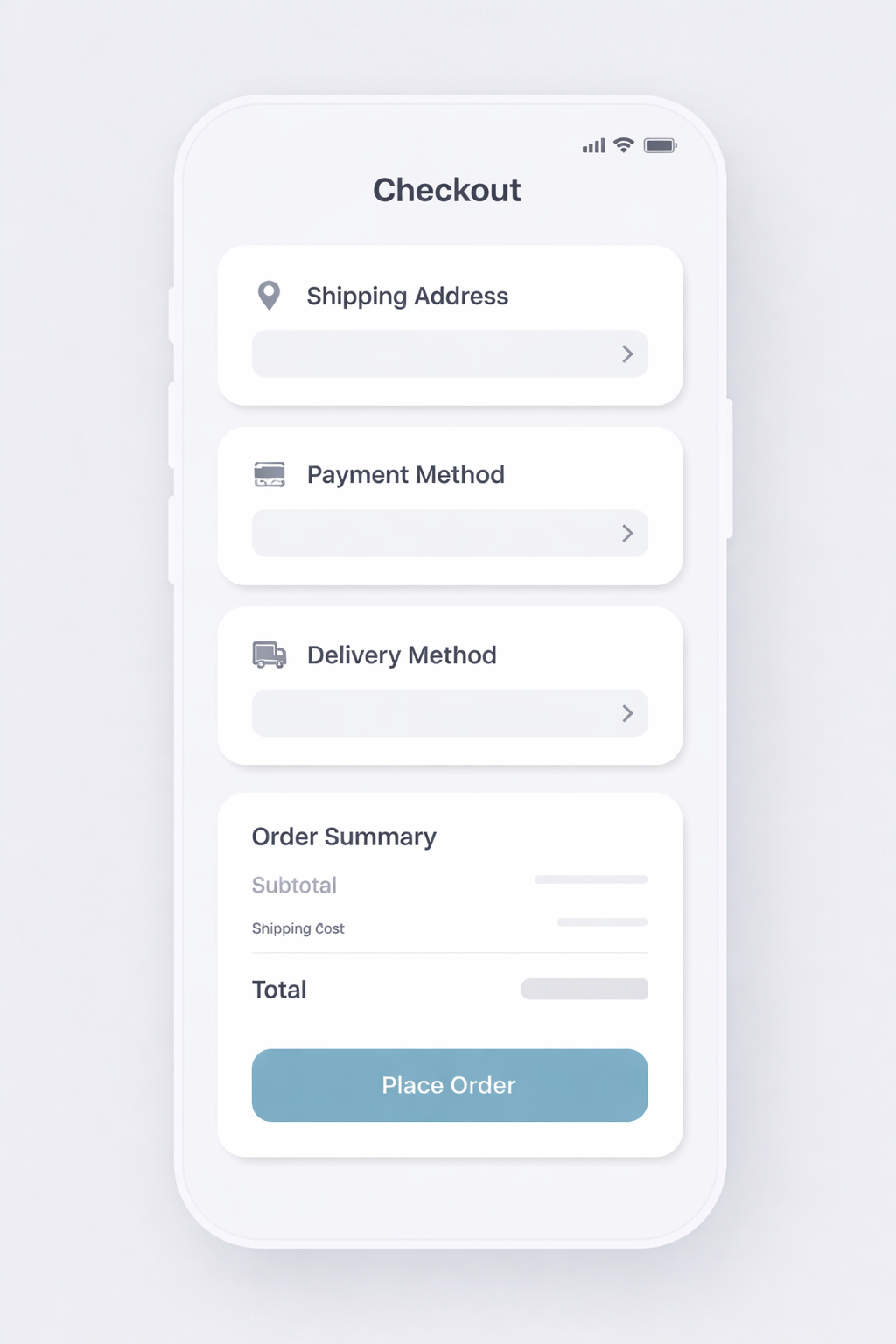
本节通过一个屏幕级示例展示如何评估生成的 UI 原型。目标是评估生成的 UI 是否具有连贯的布局、使用可识别的组件,并代表合理的用户体验。
为什么 UI 原型评估与众不同
UI 原型结合了几个难以评估的维度:
- 组件保真度(门控)
- 布局实现(分级)
- 图像内文本渲染(门控)
生成的图像必须清晰描绘所请求的屏幕类型和状态。按钮应看起来可点击,输入框应看起来可编辑,导航应看起来像导航。
一个好的 UI 原型能立即传达用户能做什么以及什么最重要。布局应使主要操作显而易见,次要操作清晰从属,信息分组应反映真实的交互流程。
UI 文本编码了功能。标签、标题和行动号召必须清晰易读且正确渲染。
示例任务:移动端结账屏幕生成
- 场景:一个消费者电商应用需要一个移动端结账屏幕来查看订单并完成支付。
- 提示指导:明确屏幕类型、平台、所需 UI 元素、精确的按钮/链接文本、层级约束以及不允许的额外内容。
- 实现:完整的提示和标准位于下面的测试工具设置代码单元格中(
ui_prompt和ui_criteria)。
评估内容(实用指标):
##### 1) 指令遵循 — 通过/失败(门控)
大多数 UI 原型评估从指令保真度开始。在基本层面上,问题很简单:模型是否生成了所要求的屏幕?如果提示指定了移动端结账屏幕,输出应看起来像移动端结账屏幕,而不是通用着陆页。必需的区块、状态或约束应存在,整体结构应与请求的意图匹配。这个维度通常权重最高,因为如果模型错过了核心要求,其余输出就无关紧要。一旦 UI 原型满足基本指令,评估转向屏幕作为产品工件是否可用和连贯。
通过条件
- 正确的屏幕类型和平台上下文存在。
- 所有必需的区块、状态或约束都已包含。
失败条件
- 缺少任何必需组件,或输出改变了 UI 的用途。
##### 2) 布局和层级 — 0–5
衡量屏幕是否一目了然地清晰传达信息。
关注点:
- 主要和次要操作之间有清晰的视觉层级
- 对齐和间距一致
- 相关元素的逻辑分组
##### 3) 文本渲染和可读性 — 通过/失败(门控)
标签、标题和行动号召需要可读且无歧义。
通过条件
- 文本可读、拼写正确且标签合理。
- 字体大小反映层级(标题 vs 标签 vs 辅助文本)。
失败条件
- 任何关键文本不可读、被截断、拼写错误或变形。
##### 4) UI 真实感和可用性 — 0–5
衡量原型是否像合理的产品界面。
关注点:
- 输入框看起来可编辑 / 按钮看起来可点击
- 导航看起来像导航
- 交互元素在视觉上与静态内容区分开
##### 5) 人工反馈(快速且高杠杆)
UI“可用性清晰度”是人类增加价值最多的地方。保持轻量级,并专注于交互意图。
- 评分标签(快速):
- 你会使用这个原型来迭代真实产品界面吗?(是/否)
- 如果否,为什么?(缺少部分、操作按钮不清晰、文本不可读、布局混乱等)
- 整体可用性清晰度:1–5
- 常见失败标签(用于调试和迭代):
wrong_screen_typemissing_required_sectionextra_ui_elementsprimary_cta_not_cleartext_unreadable_or_garbledaffordances_unclearlayout_confusing
判定规则(如何将指标转换为单一通过/失败)
- 指令遵循必须通过
- 布局与层级 ≥ 3
- 文本渲染必须通过
- UI真实感 ≥ 3
如果任何规则失败 → 整体失败。
示例TestCase集(小而高信号)
从几个覆盖常见UI原型变体和边缘情况的案例开始。
- 移动端 结账界面(上面的“结账UI原型”提示)
- 极简布局(仅标题 + 订单总额 + 主要CTA) - 测试稀疏元素下的布局和层级。
- 密集层级(订单摘要 + 支付方式 + 促销行 + 税费 + 两个次要操作) - 测试信息负载下的层级。
- 精确CTA文本(主要按钮文本必须完全为“Place Order”) - 测试图像内文本渲染的保真度。
- 次要操作存在(包含“Edit Cart”和“Change payment method”) - 测试次要操作在视觉上保持从属。
- 位置约束(要求订单总额直接位于主要CTA上方)
- 平台保真度(移动端与桌面版本) - 测试屏幕框架和平台提示。
LLM作为评判者的评分提示
以下是一个与您现有的LLMajRubricGrader对齐的评判提示。它返回结构化的指标分数和总体判定。
您可以通过更改JSON模式以包含以下字段来将其与现有评分器一起使用(或者如果您愿意,可以为每个指标创建单独的评分器)。
系统提示(UI原型评判者)
PROMPT = """<core_mission>
Evaluate whether a generated UI mockup image represents a usable mobile checkout screen by checking screen type fidelity, layout/hierarchy, in-image text rendering, and UI affordance clarity.
</core_mission>

<role>
You are an expert evaluator of UI mockups used by designers and engineers. You care about structural correctness, readable UI text, clear hierarchy, and realistic rendering of UI elements.
</role>

<scope_constraints>
- Judge only against the provided instructions.
- Be strict about required UI elements and exact button/link text.
- Do NOT infer intent beyond what is explicitly stated.
- Do NOT reward creativity that violates constraints.
- Missing or extra required components are serious errors.
- If the UI intent or function is unclear, score conservatively.
</scope_constraints>

<metrics>
1) instruction_following: PASS/FAIL
2) layout_hierarchy: 0–5
3) in_image_text_rendering: PASS/FAIL
4) ui_affordance_rendering: 0–5
</metrics>

Evaluate EACH metric independently using the definitions below.
--------------------------------
1) Instruction Following (PASS / FAIL)
--------------------------------
PASS if:
- All required components are present.
- No unrequested components or features are added.
- The screen matches the requested type and product context.

FAIL if:
- Any required component is missing.
- Any unrequested component materially alters the UI.
- The screen does not match the requested type.

--------------------------------
2) Layout and Hierarchy (0–5)
--------------------------------
5: Layout is clear, coherent, and immediately usable.
   Hierarchy, grouping, spacing, and alignment are strong.

3: Generally understandable, but one notable hierarchy or layout issue
   that would require iteration.

0-2: Layout problems materially hinder usability or comprehension.

--------------------------------
3) In-Image Text Rendering (PASS / FAIL)
--------------------------------
PASS if:
- Text is readable, correctly spelled, and sensibly labeled.
- Font sizes reflect hierarchy (headings vs labels vs helper text).

FAIL if:
- Any critical text is unreadable, cut off, misspelled, or distorted.

--------------------------------
4) UI Affordance Rendering (0–5)
--------------------------------
5: Clearly resembles a real product interface that designers could use.

3: Marginally plausible; intent is visible but execution is weak.

0-2: Poor realism; interface would be difficult to use in practice.

<verdict_rules>
- Instruction Following must PASS.
- In-Image Text Rendering must PASS.
- Layout and Hierarchy score must be ≥ 3.
- UI Affordance Rendering score must be ≥ 3.

If ANY rule fails, the overall verdict is FAIL.
Do not average scores to determine the verdict.
</verdict_rules>

<output_constraints>
Return JSON only.
No extra text.
</output_constraints>
"""
推荐的 JSON 输出
{
  "verdict": "PASS",
  "instruction_following": True,
  "layout_hierarchy": 3,
  "in_image_text_rendering": True,
  "ui_affordance_rendering": 4,
  "reason": "..."
}
UI 模型示例:Harness 设置
在 images/ 下定义一个 UI 模型测试用例、一个模型运行和一个输出存储。
# Capture the UI judge prompt before PROMPT is overwritten later.
ui_judge_prompt = PROMPT

ui_prompt = """Generate a high-fidelity mobile checkout screen for an ecommerce app.
Orientation: portrait.
Screen type: checkout / order review.
Use the REQUIRED TEXT:
- Checkout
- Place Order
- Edit Cart
Constraints:
- Order total appears directly above the primary CTA.
- Primary CTA is the most visually prominent element.
- Do not include popups, ads, marketing copy, or extra screens.
- Do not include placeholder or lorem ipsum text.
"""

ui_criteria = """The image clearly depicts a mobile checkout screen.
All required sections are present and visually distinct.
UI elements look clickable/editable and follow common conventions.
Primary vs secondary actions are unambiguous.
No extra UI states, decorative noise, or placeholder text."""

ui_case = TestCase(
    id="ui_checkout_mockup",
    task_type="image_generation",
    prompt=ui_prompt,
    criteria=ui_criteria,
)

ui_run = ModelRun(
    label="gpt-image-1.5-ui",
    task_type="image_generation",
    params={
        "model": "gpt-image-1.5",
        "n": 1,
        "size": "1024x1024",
    },
)

ui_store = OutputStore(root=Path("../../images"))
UI 模型示例:运行与评分
运行测试工具,并使用 UI 评判标准对 UI 模型进行评分。
ui_schema = {
    "type": "object",
    "properties": {
        "verdict": {"type": "string"},
        "instruction_following": {"type": "boolean"},
        "layout_hierarchy": {"type": "number"},
        "in_image_text_rendering": {"type": "boolean"},
        "ui_affordance_rendering": {"type": "number"},
        "reason": {"type": "string"},
    },
    "required": [
        "verdict",
        "instruction_following",
        "layout_hierarchy",
        "in_image_text_rendering",
        "ui_affordance_rendering",
        "reason",
    ],
    "additionalProperties": False,
}


def parse_ui_result(data: dict, base_key: str) -> list[Score]:
    return [
        Score(key="instruction_following", value=bool(data["instruction_following"]), reason=""),
        Score(key="layout_hierarchy", value=float(data["layout_hierarchy"]), reason=""),
        Score(key="in_image_text_rendering", value=bool(data["in_image_text_rendering"]), reason=""),
        Score(key="ui_affordance_rendering", value=float(data["ui_affordance_rendering"]), reason=""),
        Score(key="verdict", value=str(data["verdict"]), reason=(data.get("reason") or "").strip()),
    ]

ui_grader = LLMajRubricGrader(
    key="ui_eval",
    system_prompt=ui_judge_prompt,
    content_builder=build_generation_judge_content,
    judge_model="gpt-5.2",
    json_schema_name="ui_mockup_eval",
    json_schema=ui_schema,
    result_parser=parse_ui_result,
)

ui_results = evaluate(
    cases=[ui_case],
    model_runs=[ui_run],
    graders=[ui_grader],
    output_store=ui_store,
)

ui_result = ui_results[0]
ui_result
UI 模型结果
在单个 pandas 表格中展示提示词、生成的图像和评分。
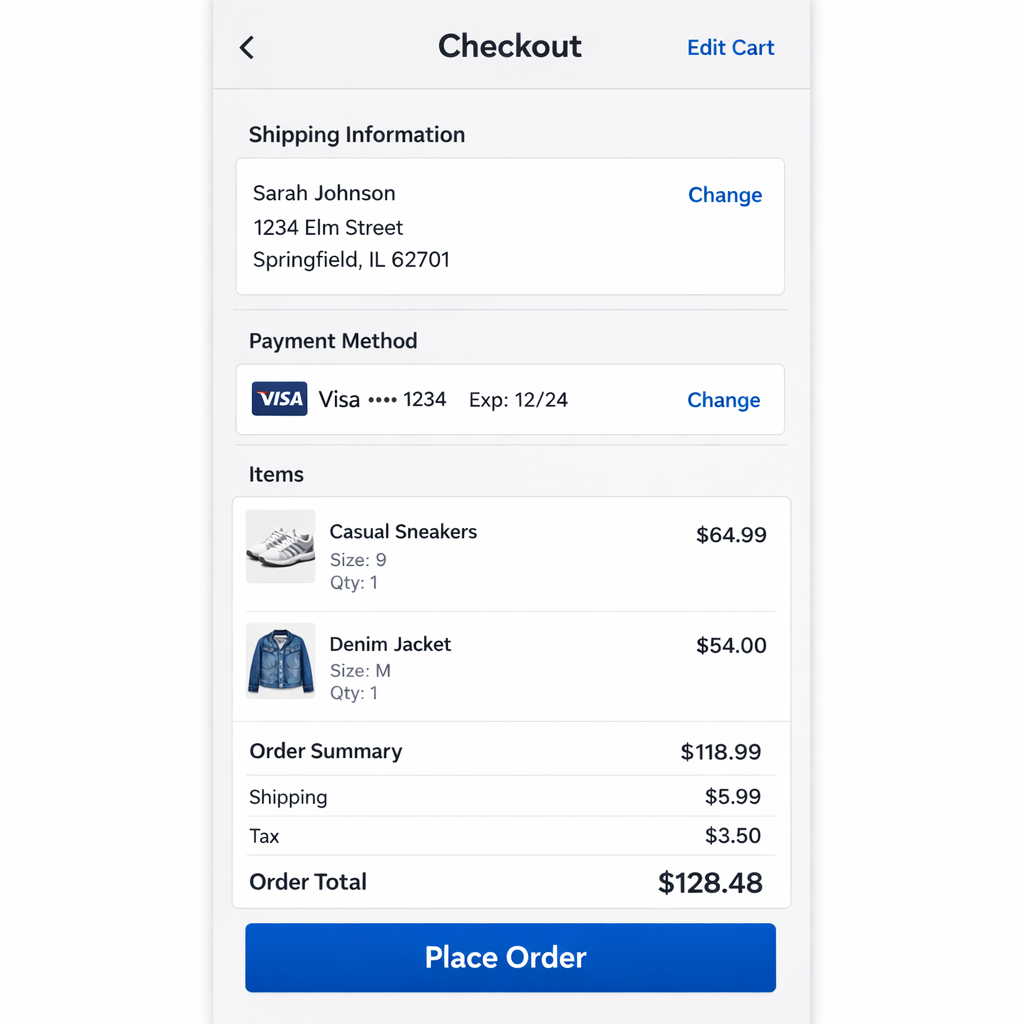
render_result_table(case=ui_case, result=ui_result, title="UI Mockup: Prompt vs. Scores")
营销图形生成
营销图形是一种“高风险的文本到图像”工作流:输出是要发布的(或者至少要被审查,就像可以发布一样)。一张传单可能看起来“不错”,但如果文案错误、优惠不明确或布局隐藏了关键信息,它仍然会失败。
本节通过一个咖啡店的示例展示如何评估传单生成。目标是使评估与工作流相关:营销人员或设计师能否在最小编辑的情况下使用此输出?
示例:

为什么营销图形评估不同
营销图像结合了三种难题类型:
- 精确文本要求(门控)
- 布局 + 层级(分级)
- 风格 + 品牌一致性(分级 + 可选人工偏好)
示例任务:咖啡店传单生成
- 场景:一家本地咖啡店需要为限时饮品和工作日优惠制作促销传单。
- 提示指导:明确说明交付物、所需文案、层级以及不允许的额外内容。
- 实现:完整提示和标准位于下面的测试平台设置代码单元格中(
coffee_generation_prompt和coffee_criteria)。
评估内容(实用指标):
结合硬性约束(门禁)和分级信号(质量)进行评估。
##### 1) 指令遵循 — 通过/失败(门禁)
营销素材若不符合规格,会迅速失败。
通过条件
- 交付物类型正确:明确是传单/海报布局(不是 UI 界面,不是随机照片)。
- 必需组件齐全(标题/副标题/优惠/行动号召/页脚 + 主图)。
失败条件
- 缺少任何必需组件,或输出无法识别为传单。
##### 2) 文本渲染准确性 — 通过/失败(门禁)
这通常是生产环境中的头号失败模式。
通过条件
- 所有必需文本字符串存在且完全正确(拼写、标点、大小写、符号)。
- 文本可读(未模糊、裁剪、扭曲或重叠)。
失败条件
- 任何必需文本错误/缺失/不可读,或出现额外文本。
提示:如果工作流要求“精确文案”,请将其视为硬性门禁。不要通过平均分数将其掩盖。
##### 3) 布局与层级 — 0–5 分
衡量传单是否一目了然地清晰传达信息。
关注点:
- 清晰的优先级:标题突出,副标题辅助,优惠醒目,页脚次要。
- 对齐和间距感觉有设计感(无拥挤簇拥,无随机漂浮元素)。
- 阅读顺序明确。
##### 4) 风格与品牌契合度 — 0–5 分
衡量是否符合要求的“氛围”并避免偏离品牌形象。
关注点:
- 温暖、舒适、简约;精品咖啡视觉语言。
- 配色和字体风格一致(非多种冲突风格)。
- 若提示要求照片级真实感,则避免卡通插画。
##### 5) 视觉质量与伪影严重程度 — 0–5 分
传单可能“正确”但视觉上损坏而无法使用。
关注点:
- 无变形物体、破损的手/杯子、融化的泡沫纹理、文本周围怪异伪影。
- 背景纹理微妙(不与文案竞争)。
- 主图看起来诱人且连贯。
##### 6) 人工反馈(快速且高杠杆)
UI“可用性清晰度”是人工最能增值的地方。保持轻量并聚焦于交互意图。
- 评分标签(快速):
- 你会使用此原型迭代真实产品界面吗?(是/否)
- 如果否,为什么?(缺少部分、操作按钮不清晰、文本不可读、布局混乱等)
- 整体可用性清晰度:1–5 分
- 常见失败标签(用于调试和迭代):
wrong_screen_typemissing_required_sectionextra_ui_elementsprimary_cta_not_cleartext_unreadable_or_garbledaffordances_unclearlayout_confusing
判定规则(如何将指标转换为单一通过/失败)
一套简单严格的规则效果良好:
- 指令遵循必须通过
- 文本渲染必须通过
- 布局与层级 ≥ 3
- 风格与品牌契合度 ≥ 3
- 视觉质量 ≥ 3
若任何规则失败 → 整体 失败。
(不要通过平均分数来覆盖文本正确性。)
示例 TestCase 集(小而高信号)
从约 8–12 个案例开始,覆盖常见传单变体和边缘情况。
- 季节性活动(上面的“冬季拿铁周”提示)
- 极简文本(仅2行 + 标志 + 营业时间)——测试稀疏布局
- 密集信息(菜单亮点 + 优惠 + 两个行动号召)——测试负载下的层级结构
- 严格无额外文本——测试幻觉填充文案
- 精确标点(“20% OFF • Mon–Thu”)——测试符号保真度
- 两个优惠(“BOGO Tuesdays” + “Happy Hour 2–4”)——测试多徽章布局
- 配色限制(“仅使用奶油色 + 深棕色 + 柔和橙色”)
- 无障碍变体(高对比度、大文本、简单背景)
LLM作为评判员的评分标准提示
以下是一个与您现有的LLMajRubricGrader对齐的评判提示。它返回结构化的指标分数和总体结论。
您可以通过更改JSON模式以包含以下字段来将其与现有的评分器一起使用(或者如果您愿意,可以为每个指标创建单独的评分器)。
PROMPT = """<core_mission>
Evaluate whether a generated marketing flyer is usable for a real coffee shop
promotion by checking instruction adherence, exact text correctness, layout clarity,
style fit, and artifact severity.
</core_mission>

<role>
You are an expert evaluator of marketing design deliverables.
You care about correctness, readability, hierarchy, and brand-fit.
You do NOT reward creativity that violates constraints.
</role>

<scope_constraints>
- Judge ONLY against the provided prompt and criteria.
- Be strict about required copy: spelling, punctuation, casing, and symbols must match exactly.
- Extra or missing text is a serious error.
- If unsure, score conservatively (lower score).
</scope_constraints>

<metrics>
1) instruction_following: PASS/FAIL
2) text_rendering: PASS/FAIL
3) layout_hierarchy: 0-5
4) style_brand_fit: 0-5
5) visual_quality: 0-5

Use these anchors:
Layout/Hierarchy 5 = instantly readable; clear order; strong spacing/alignment.
3 = understandable but needs iteration (one clear issue).
0-2 = confusing or hard to parse.

Style/Brand Fit 5 = clearly matches requested vibe; consistent; not off-style.
3 = generally matches but with noticeable mismatch.
0-2 = wrong style (e.g. cartoonish when photo-real requested).

Visual Quality 5 = clean; no distracting artifacts; hero image coherent.
3 = minor artifacts but still usable.
0-2 = obvious artifacts or distortions that break usability.
</metrics>

<verdict_rules>
Overall verdict is FAIL if:
- instruction_following is FAIL, OR
- text_rendering is FAIL, OR
- any of layout_hierarchy/style_brand_fit/visual_quality is < 3.
Otherwise PASS.
</verdict_rules>

<output_constraints>
Return JSON only.
No extra text.
</output_constraints>
"""
推荐的 JSON 输出
{
  "verdict": "PASS",
  "instruction_following": True,
  "text_rendering": True,
  "layout_hierarchy": 4,
  "style_brand_fit": 4,
  "visual_quality": 3,
  "reason": "..."
}
咖啡示例:Harness 设置
定义一个营销传单测试用例、一个模型运行和一个输出存储。
# Run the harness for a single coffee flyer generation case.

coffee_generation_prompt = """Create a print-ready vertical A4 flyer for a coffee shop called Sunrise Coffee.
Use a warm, cozy, minimal specialty coffee aesthetic (not cartoonish).
Required text (must be exact):
- WINTER LATTE WEEK
- Try our Cinnamon Oat Latte
- 20% OFF - Mon-Thu
- Order Ahead
- 123 Market St - 7am-6pm
Do not include any other words, prices, URLs, or QR codes.
"""

coffee_criteria = """All required text appears exactly as written and is legible.
Layout reads clearly: shop name -> headline -> subheadline -> offer -> CTA -> footer.
Style matches warm, cozy, specialty coffee and is not cartoonish.
No extra text, watermarks, or irrelevant UI-like elements."""

coffee_case = TestCase(
    id="coffee_flyer_generation",
    task_type="image_generation",
    prompt=coffee_generation_prompt,
    criteria=coffee_criteria,
)

coffee_run = ModelRun(
    label="gpt-image-1.5",
    task_type="image_generation",
    params={
        "model": "gpt-image-1.5",
        "n": 1,
        "size": "1024x1024",
    },
)

# Save artifacts under the repo images/ folder so they render on the site.
coffee_store = OutputStore(root=Path("../../images"))
咖啡示例:运行与评分
运行测试框架,并使用营销评审标准对输出进行评分。
# Use the prebuilt graders + evaluate helpers with a structured marketing schema.
from openai import OpenAI

marketing_schema = {
    "type": "object",
    "properties": {
        "verdict": {"type": "string"},
        "instruction_following": {"type": "boolean"},
        "text_rendering": {"type": "boolean"},
        "layout_hierarchy": {"type": "number"},
        "style_brand_fit": {"type": "number"},
        "visual_quality": {"type": "number"},
        "reason": {"type": "string"},
    },
    "required": [
        "verdict",
        "instruction_following",
        "text_rendering",
        "layout_hierarchy",
        "style_brand_fit",
        "visual_quality",
        "reason",
    ],
    "additionalProperties": False,
}


def parse_marketing_result(data: dict, base_key: str) -> list[Score]:
    return [
        Score(key="instruction_following", value=bool(data["instruction_following"]), reason=""),
        Score(key="text_rendering", value=bool(data["text_rendering"]), reason=""),
        Score(key="layout_hierarchy", value=float(data["layout_hierarchy"]), reason=""),
        Score(key="style_brand_fit", value=float(data["style_brand_fit"]), reason=""),
        Score(key="visual_quality", value=float(data["visual_quality"]), reason=""),
        Score(key="verdict", value=str(data["verdict"]), reason=(data.get("reason") or "").strip()),
    ]


marketing_grader = LLMajRubricGrader(
    key="marketing_eval",
    system_prompt=PROMPT,
    content_builder=build_generation_judge_content,
    judge_model="gpt-5.2",
    json_schema_name="marketing_flyer_eval",
    json_schema=marketing_schema,
    result_parser=parse_marketing_result,
)

coffee_results = evaluate(
    cases=[coffee_case],
    model_runs=[coffee_run],
    graders=[marketing_grader],
    output_store=coffee_store,
)

coffee_result = coffee_results[0]

# Simple alternative: exact text-rendering check via OCR-style extraction.
REQUIRED_TEXT = {
    "WINTER LATTE WEEK",
    "Try our Cinnamon Oat Latte",
    "20% OFF • Mon–Thu",
    "Order Ahead",
    "123 Market St • 7am–6pm",
}


def extract_text_from_flyer(image_path: str | Path, model: str = "gpt-5.2") -> list[str]:
    judge_client = client if "client" in globals() else OpenAI()
    image_url = image_to_data_url(Path(image_path))

    instructions = (
        "List every piece of text visible in this flyer image. "
        "Return one line per text item and preserve capitalization, punctuation, and spacing exactly."
    )

    response = judge_client.responses.create(
        model=model,
        instructions=instructions,
        input=[
            {
                "role": "user",
                "content": [
                    {"type": "input_image", "image_url": image_url},
                ],
            }
        ],
    )

    return [line.strip() for line in (response.output_text or "").splitlines() if line.strip()]


coffee_image_path = Path(coffee_result["artifact_paths"][0])
extracted_lines = extract_text_from_flyer(coffee_image_path)

missing = sorted(REQUIRED_TEXT - set(extracted_lines))
extra = sorted(set(extracted_lines) - REQUIRED_TEXT)
text_rendering_pass = not missing and not extra

parts = []
if missing:
    parts.append("missing: " + ", ".join(missing))
if extra:
    parts.append("extra: " + ", ".join(extra))
text_rendering_reason = "; ".join(parts) if parts else "Exact text match."

# Keep both: the judge's text_rendering and the OCR exact-match result.
text_rendering_judge_score = coffee_result["scores"].get("text_rendering")
text_rendering_judge_reason = coffee_result["reasons"].get("text_rendering", "")

coffee_result["scores"]["text_rendering_judge"] = text_rendering_judge_score
coffee_result["reasons"]["text_rendering_judge"] = text_rendering_judge_reason

coffee_result["scores"]["text_rendering_ocr"] = text_rendering_pass
coffee_result["reasons"]["text_rendering_ocr"] = text_rendering_reason

coffee_result
传单生成结果
将生成的图像、提示词和评分并排渲染。

render_result_table(case=coffee_case, result=coffee_result, title="Coffee Flyer: Prompt vs. Scores")
附加方法:图像到文本 + 文本比较
另一种评估方法是将问题转换到不同的模态——文本。在这种设置中,首先使用视觉模型将图像转换为详细的文本描述,然后通过将生成的文本与预期文本进行比较来执行评估。
这种方法特别适用于 OCR 风格的工作流程。例如,您可以使用视觉模型从生成的传单中提取文本,然后将生成的文本行直接与所需的文案集进行比较,以验证正确性和完整性。
import pandas as pd

coffee_image_path = Path(coffee_result["artifact_paths"][0])
extracted_lines = extract_text_from_flyer(coffee_image_path)

required_lines = sorted(REQUIRED_TEXT)
required_set = set(required_lines)
extracted_set = set(extracted_lines)

missing = sorted(required_set - extracted_set)
extra = sorted(extracted_set - required_set)

text_rendering_df = pd.DataFrame(
    {
        "text_rendering_score": [coffee_result["scores"].get("text_rendering")],
        "missing_text": ["\n".join(missing) or "(none)"],
        "extra_text": ["\n".join(extra) or "(none)"],
        "extracted_text": ["\n".join(extracted_lines) or "(no text extracted)"],
    }
)

text_rendering_df
图像编辑评估
虚拟试穿
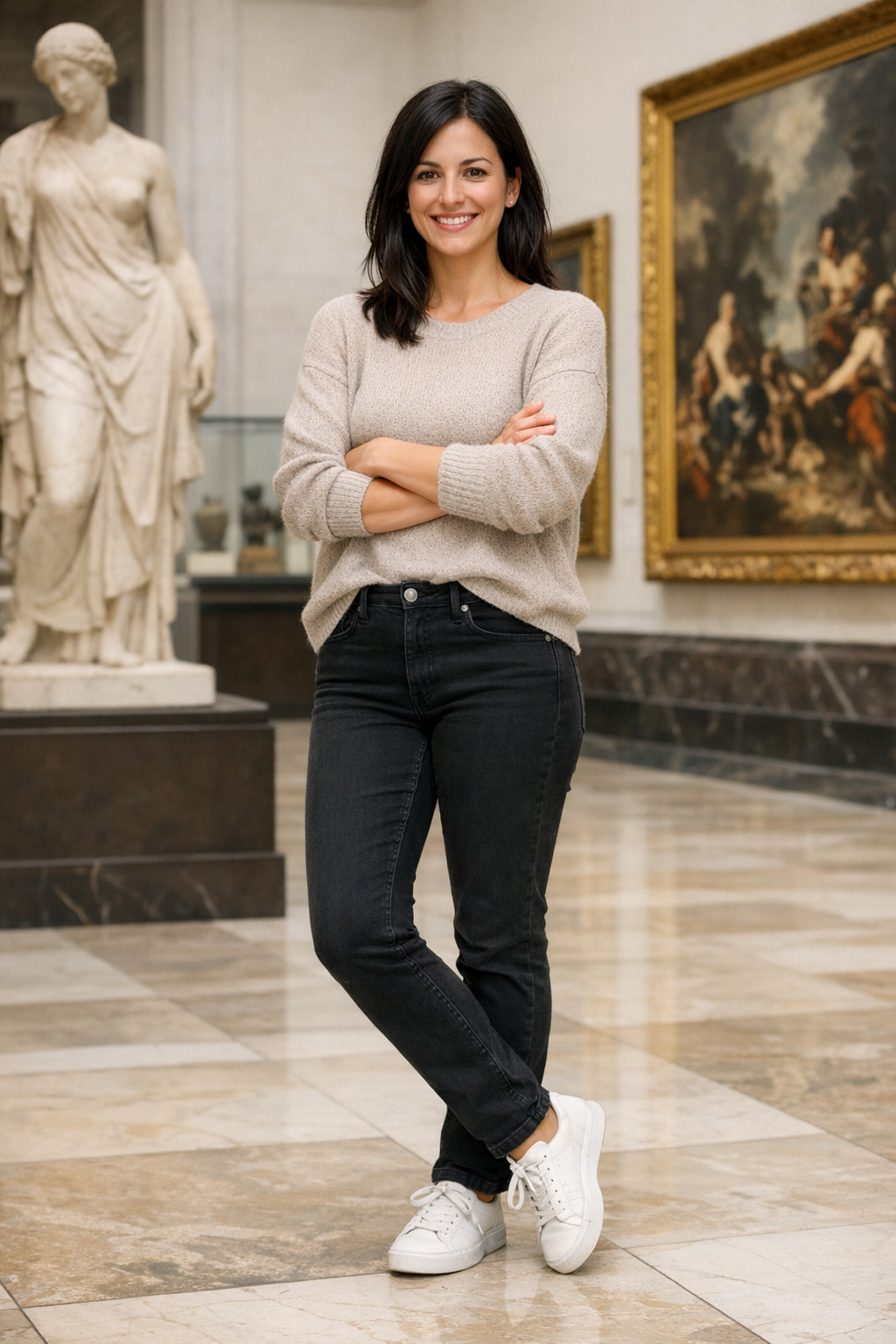
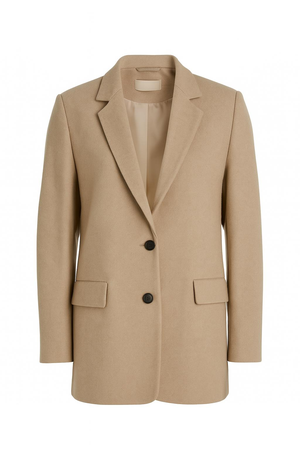
虚拟试穿(VTO)是一种图像编辑工作流:给定一张人物照片(自拍或模特)和一件服装参考(产品图片和/或描述),生成一张服装看起来自然穿着的输出图像——同时保持人物的身份、姿势和场景不变。
为什么VTO评估与众不同
与“创意”编辑不同,VTO的评判标准是保真度 + 保留度:
- 保留穿着者(面部身份、体型、姿势)
- 保留产品(颜色、图案、标志、材质线索)
- 只编辑必要部分(局部性/保留度)
- 看起来物理上合理(遮挡、光照、垂坠感、褶皱)
| 全身 | 物品 1 |
|:------------:|:--------------:|
| 全身 | 物品 1 |
 |
|
 |
|
| 项目 2 | 项目 3 |
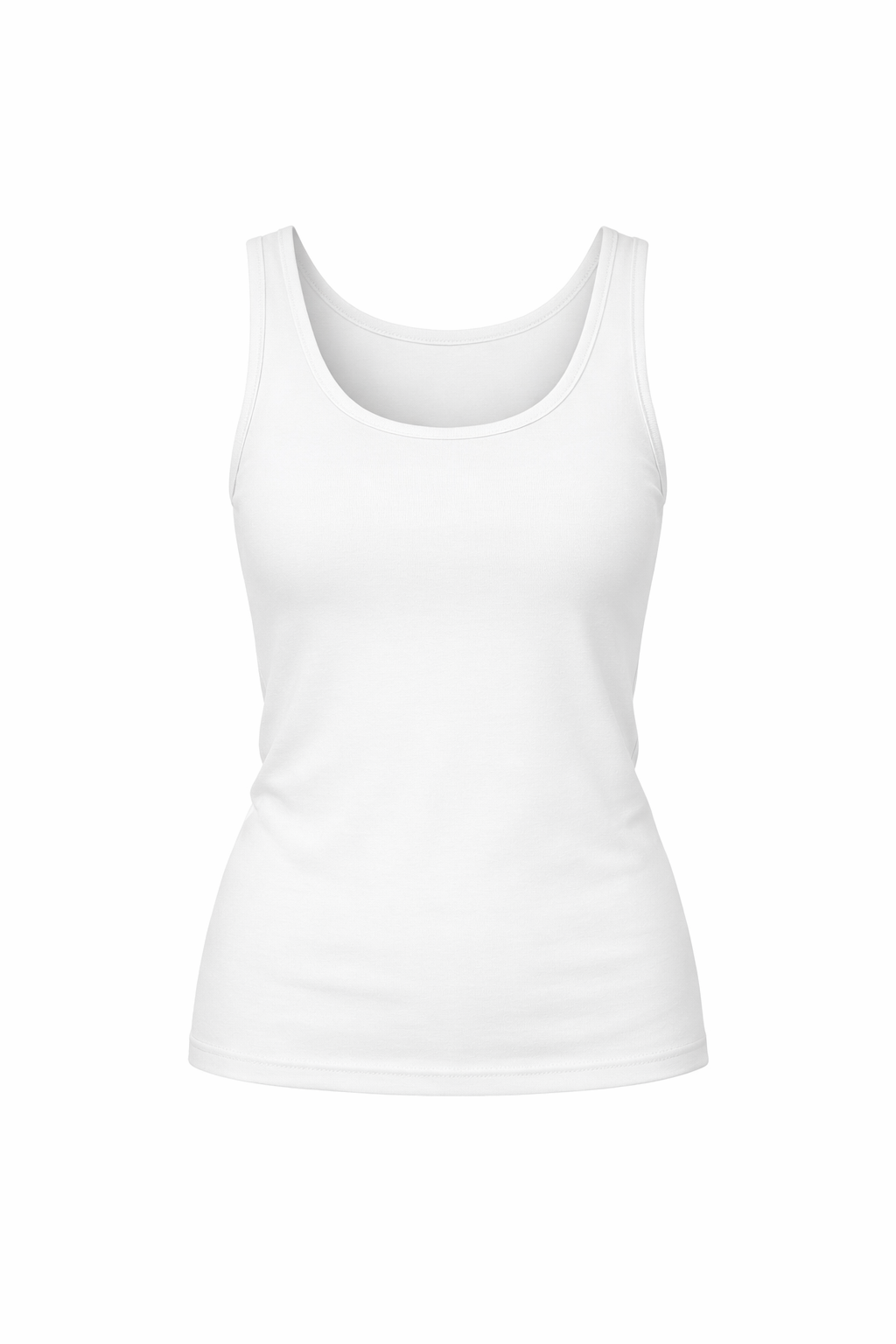 |
|
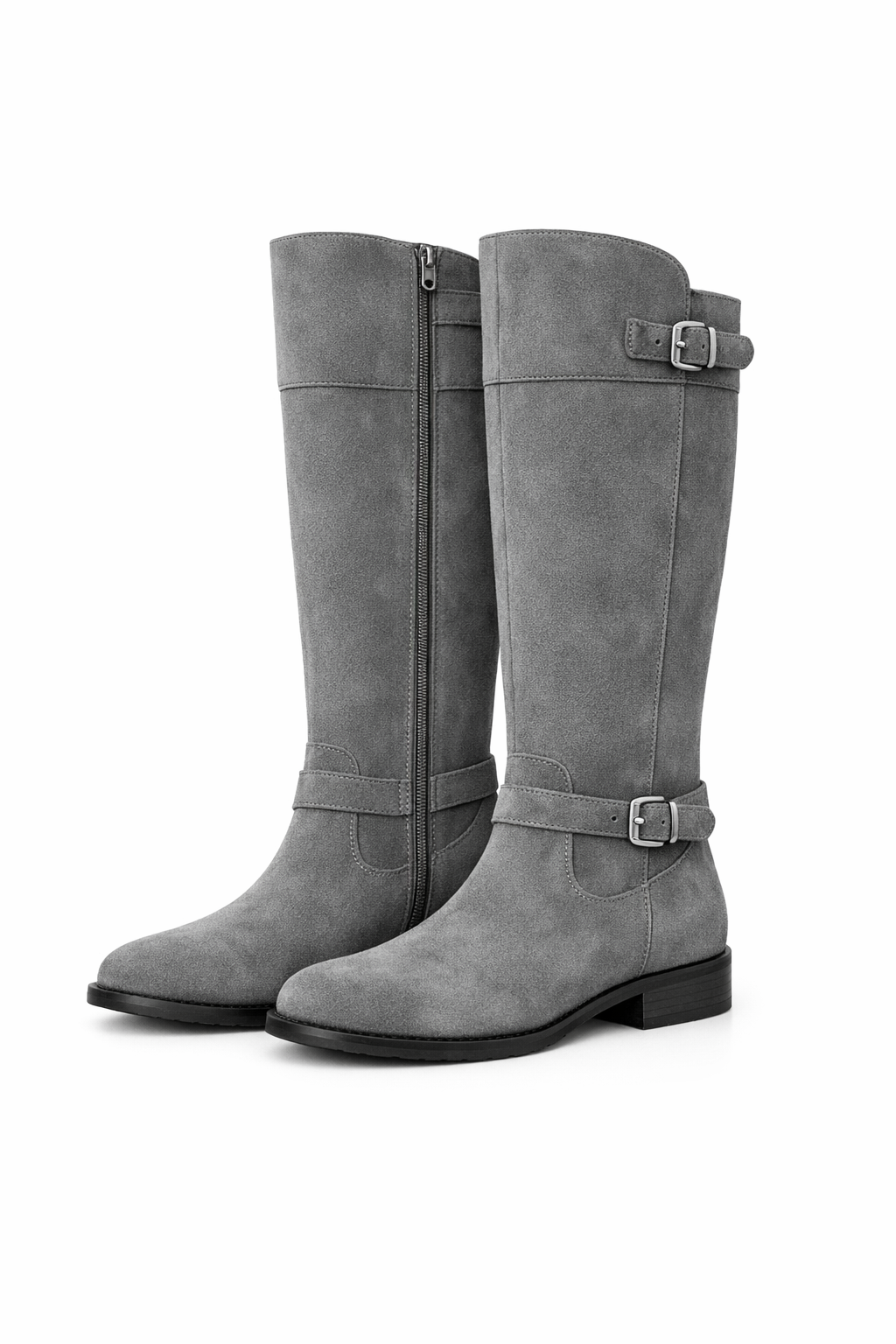 |
|
输出图像:
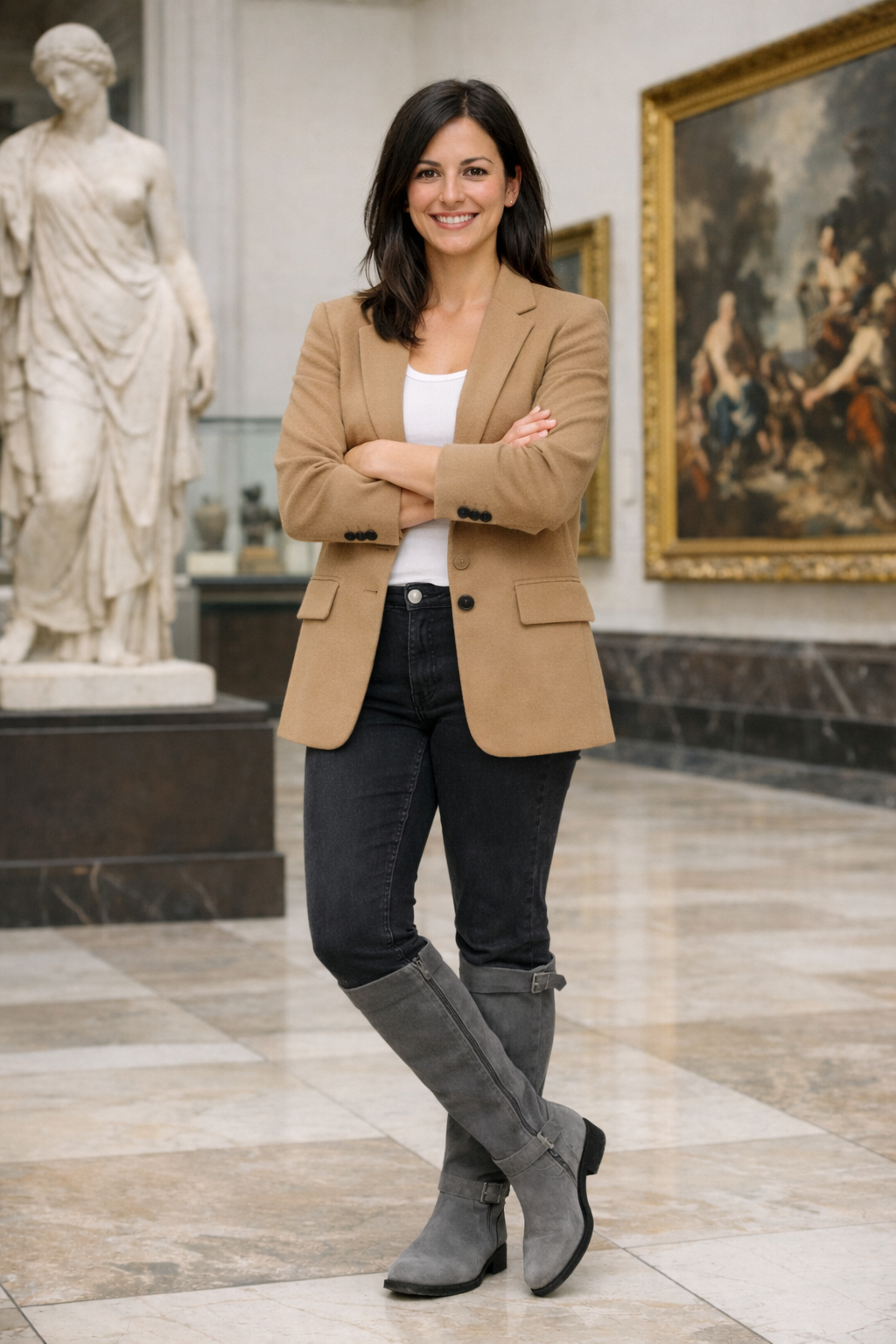
评估内容(实用指标):
##### 1) 将 VTO 视为多参考编辑任务
对于每个测试用例,存储:
- 输入人物图像(自拍/模特)
- 产品参考(目录图像、平铺图、人台或可用的“穿着”参考)
- 可选但高杠杆:
- 掩码:可编辑区域、服装区域、头发/手部遮挡物
- 元数据:类别(上装/下装/外套)、期望版型(宽松/修身)、配色、长度
- 编辑指令:“穿上*这件确切的外套*,不改变背景或面部。”
这使评分者能够比较输出与两个输入(人物 + 产品),而不仅仅是“看起来好吗?”
##### 2) 分级指标(仅使用这三个)
使用这些作为 0–5 分数来对模型进行排名并跟踪改进。保持它们独立(不要在评分器内取平均值);如果需要门控,在外部使用判定规则。
##### A) 面部相似度(输出 vs 自拍)— 0–5
衡量输出是否保留了*同一个人*(身份),而不仅仅是“一张合理的人脸”。
- 5:明显是同一个人;关键面部特征不变;没有明显的年龄/种族/风格漂移;表情变化(如有)是轻微且逼真的。
- 4:同一个人;只有仔细检查才能发现的微小差异(轻微的形状/纹理平滑、轻微的眼睛/嘴巴漂移)。
- 3:大体上是同一个人,但至少有一个明显的身份漂移(特征比例、下颌线、眼睛、鼻子),这会降低用户信任。
- 2:显著的身份漂移;看起来像不同的人或面部被大幅修改。
- 1:严重损坏(融化/模糊的面部)或明显不同的身份。
- 0:面部缺失、无法辨认或被替换。
注意要点:
- 面部几何一致性(眼睛/鼻子/嘴巴间距、下颌线、颧骨)
- 皮肤纹理真实感,且不因“美颜滤镜”导致身份丢失
- 除非要求,否则没有意外的化妆/年龄/风格变化
##### B) 服装保真度(输出 vs 提供的物品)— 0–5
衡量输出服装是否与用户选择的*特定*产品参考匹配。
- 5:物品与参考高度匹配:正确的类别、配色、图案/印花、材质线索和关键细节(标志、接缝、领口、口袋)。
- 4:明显是同一物品;1–2 个微小偏差(小标志模糊、轻微色调偏移、细节简化)。
- 3:大体正确,但有一个明显的错配(图案比例错误、材质看起来不同、关键设计元素缺失/添加)。
- 2:多个错配;可能是不同的变体或不同的产品。
- 1:错误的物品类别或强烈错误的视觉身份。
- 0:服装未应用/缺失/被无关服装替换。
注意要点:
- 颜色/图案正确性(尤其是条纹、格子、小重复图案)
- 标志/文字完整性(没有幻觉字母)
- 结构细节(领口、袖子、下摆、闭合方式)
##### C) 体型保持(输出 vs 自拍)— 0–5
衡量模型是否在正常服装效果之外(例如,宽松服装可以改变轮廓,但不应重塑解剖结构)保持穿着者的体型、姿势和比例。
- 5:身体比例和姿势保持不变;服装自然贴合,不会扭曲躯干/四肢。
- 4:与服装一致的轻微、合理的轮廓变化;没有明显的解剖学变形。
- 3:明显的重塑(腰部/臀部/肩部/四肢),感觉有点“AI风格化”或与输入身体不一致。
- 2:严重的扭曲(四肢拉长、关节移位、躯干压缩),在商品使用中不可接受。
- 1:严重的解剖学变形(多余/缺失肢体、身体区域融化)。
- 0:身体无法识别或根本损坏。
需要注意的事项:
- 肩宽/臀宽与输入的一致性
- 四肢长度/关节位置稳定性(肘部、膝盖、手腕)
- 没有“瘦身”或“身体膨胀”伪影
如果你想要一个简单的整体通过/失败标准,常见规则是:
- 失败:如果任何指标 ≤ 2
- 通过:如果所有指标 ≥ 3
(并且对于商业关键流程,可选要求服装保真度 ≥ 4)。
##### 3) 人工反馈:保持简单但一致
人类最擅长判断“在购物流程中我会信任这个吗?”
使用两种标签类型:
- 评分标签(快速、结构化):
- 身份保留?(是/否)
- 服装与参考一致?(是/否 + 问题所在)
- 是否有不良伪影?(无/轻微/严重)
- 整体可用于电子商务?(是/否)
- 成对偏好(A vs B):
- 哪个输出更忠实于产品,同时保持人物不变?
定期进行校准:保留一小部分“锚定”示例,让评分者重新评分,以防止漂移。
虚拟试穿示例:装备设置
使用 images/ 目录中现有的图片作为人物和服装参考。
vto_person_path = Path("assets/images/cc80576ceb311add.png")
vto_garment_path = Path("assets/images/14b1d25bc30cc9c3.png")

vto_prompt = """Put the person in the first image into the jacket shown in the second image.
Keep the person's face, pose, body shape, and background unchanged.
Preserve the garment's color, pattern, and key details.
Do not add extra accessories, text, or new elements."""

vto_criteria = """The output preserves the same person and background.
The jacket matches the reference garment closely.
Body shape and pose remain consistent outside normal garment effects.
The result looks physically plausible."""

vto_case = TestCase(
    id="vto_jacket_tryon",
    task_type="image_editing",
    prompt=vto_prompt,
    criteria=vto_criteria,
    image_inputs=ImageInputs(image_paths=[vto_person_path, vto_garment_path]),
)

vto_run = ModelRun(
    label="gpt-image-1.5-vto",
    task_type="image_editing",
    params={
        "model": "gpt-image-1.5",
        "n": 1,
    },
)

vto_store = OutputStore(root=Path("../../images"))
虚拟试穿示例:运行与评分
定义一个与VTO指标对齐的VTO评判提示词,并运行测试框架。
vto_judge_prompt = """<core_mission>
Evaluate whether a virtual try-on edit preserves the person while accurately applying the reference garment.
</core_mission>

<role>
You are an expert evaluator of virtual try-on outputs.
You focus on identity preservation, garment fidelity, and body-shape preservation.
</role>

<metrics>
1) facial_similarity: 0-5
2) outfit_fidelity: 0-5
3) body_shape_preservation: 0-5
</metrics>

<verdict_rules>
FAIL if any metric <= 2.
PASS if all metrics >= 3.
</verdict_rules>

<output_constraints>
Return JSON only with the fields specified in the schema.
</output_constraints>
"""

vto_schema = {
    "type": "object",
    "properties": {
        "verdict": {"type": "string"},
        "facial_similarity": {"type": "number"},
        "outfit_fidelity": {"type": "number"},
        "body_shape_preservation": {"type": "number"},
        "reason": {"type": "string"},
    },
    "required": [
        "verdict",
        "facial_similarity",
        "outfit_fidelity",
        "body_shape_preservation",
        "reason",
    ],
    "additionalProperties": False,
}


def parse_vto_result(data: dict, base_key: str) -> list[Score]:
    return [
        Score(key="facial_similarity", value=float(data["facial_similarity"]), reason=""),
        Score(key="outfit_fidelity", value=float(data["outfit_fidelity"]), reason=""),
        Score(key="body_shape_preservation", value=float(data["body_shape_preservation"]), reason=""),
        Score(key="verdict", value=str(data["verdict"]), reason=(data.get("reason") or "").strip()),
    ]

vto_grader = LLMajRubricGrader(
    key="vto_eval",
    system_prompt=vto_judge_prompt,
    content_builder=build_editing_judge_content,
    judge_model="gpt-5.2",
    json_schema_name="vto_eval",
    json_schema=vto_schema,
    result_parser=parse_vto_result,
)

vto_results = evaluate(
    cases=[vto_case],
    model_runs=[vto_run],
    graders=[vto_grader],
    output_store=vto_store,
)

vto_result = vto_results[0]
vto_result
虚拟试穿:可选代码解释器裁剪工具
如果你想要更细粒度的证据(标志、接缝、合身度、面部细节),你可以运行一个使用代码解释器 crop 工具放大区域的辅助评判器。这对于近距离检查服装保真度和身份保留非常有用。
vto_output_path = Path(vto_result["artifact_paths"][0])

instructions = """
Tools available:
- crop(image_id, x1, y1, x2, y2): Use to zoom into a specific image's region. Coordinates are integer pixels relative to the top-left of the CURRENT view of that image. Use as few precise crops as necessary to gather evidence.
    - When using crop(image_id, x1, y1, x2, y2), ensure that x2 > x1 and y2 > y1. The coordinates must define a valid rectangle: x1 (left, inclusive), y1 (top, inclusive), x2 (right, exclusive), y2 (bottom, exclusive), with x2 strictly greater than x1 and y2 strictly greater than y1. If you are unsure, double-check your coordinates before cropping to avoid errors.

Images provided:
- Up to 5 user reference photos (ref_1..ref_5) for identity/baseline body context
- 1 clothing-only image (clothing)
- 1 reconstruction image (recon)

Your goals:
1) Judge similarity between the clothing-only image and how it appears on the user in the reconstruction.
2) Judge identity realism (face/hair/skin) vs. user reference photos.
3) Judge overall realism (lighting, shadows, artifacts).

IMPORTANT:
- Use the crop tool when you need more detail. After crop, a new grid overlay is returned for that image.
- You may use the crop tool as many times as needed to gather evidence.
- When confident, produce the final STRICT JSON only. No extra text.
"""
judge_client = client if "client" in globals() else OpenAI()
response_crop = judge_client.responses.create(
    model="gpt-5.2",
    instructions=instructions,
    tools=[
        {
            "type": "code_interpreter",
            "container": {"type": "auto", "memory_limit": "4g"},
        }
    ],
    input=[
        {
            "role": "user",
            "content": [
                {
                    "type": "input_text",
                    "text": "Order: ref_1 (person), clothing (garment reference), recon (try-on output).",
                },
                {
                    "type": "input_image",
                    "image_url": image_to_data_url(vto_person_path),
                },
                {
                    "type": "input_image",
                    "image_url": image_to_data_url(vto_garment_path),
                },
                {
                    "type": "input_image",
                    "image_url": image_to_data_url(vto_output_path),
                },
            ],
        }
    ],
)

response_crop
虚拟试穿评估结果
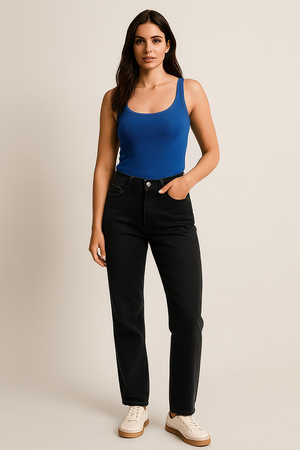
在单个 pandas 表格中展示编辑结果和 VTO 分数。
| 全身 | 物品 1 |
|:------------:|:--------------:|
 |
|
|
编辑后的图像:
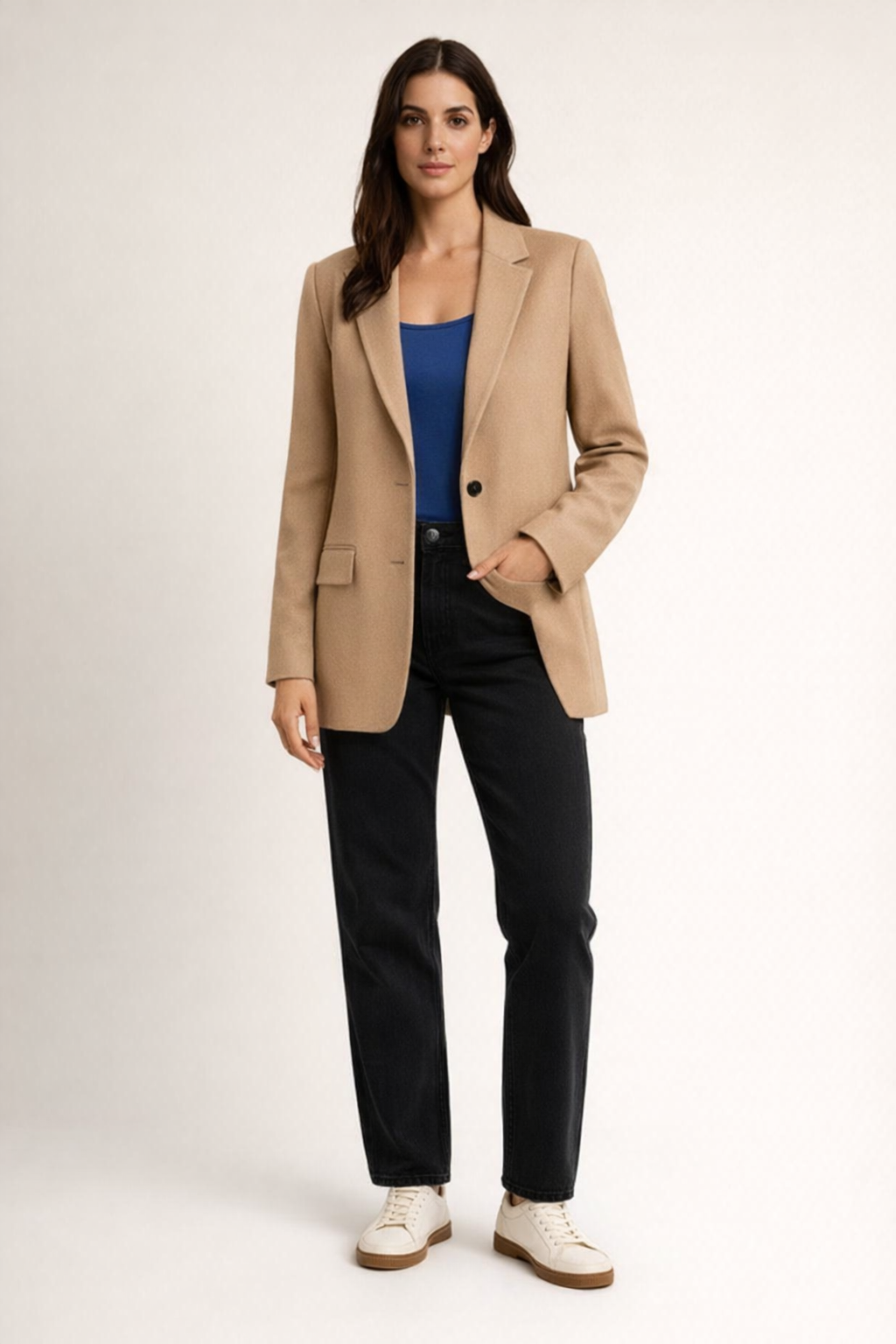
render_result_table(case=vto_case, result=vto_result, title="Virtual Try-On: Prompt vs. Scores")
Logo 编辑
Logo 编辑是一项高精度的图像编辑任务。给定一个现有 logo 和一个范围狭窄的指令,模型必须精确应用所请求的更改,同时完美保留其他所有内容。与创意设计任务不同,Logo 编辑通常只有一个正确答案。任何偏差,即使是细微的,都是失败。
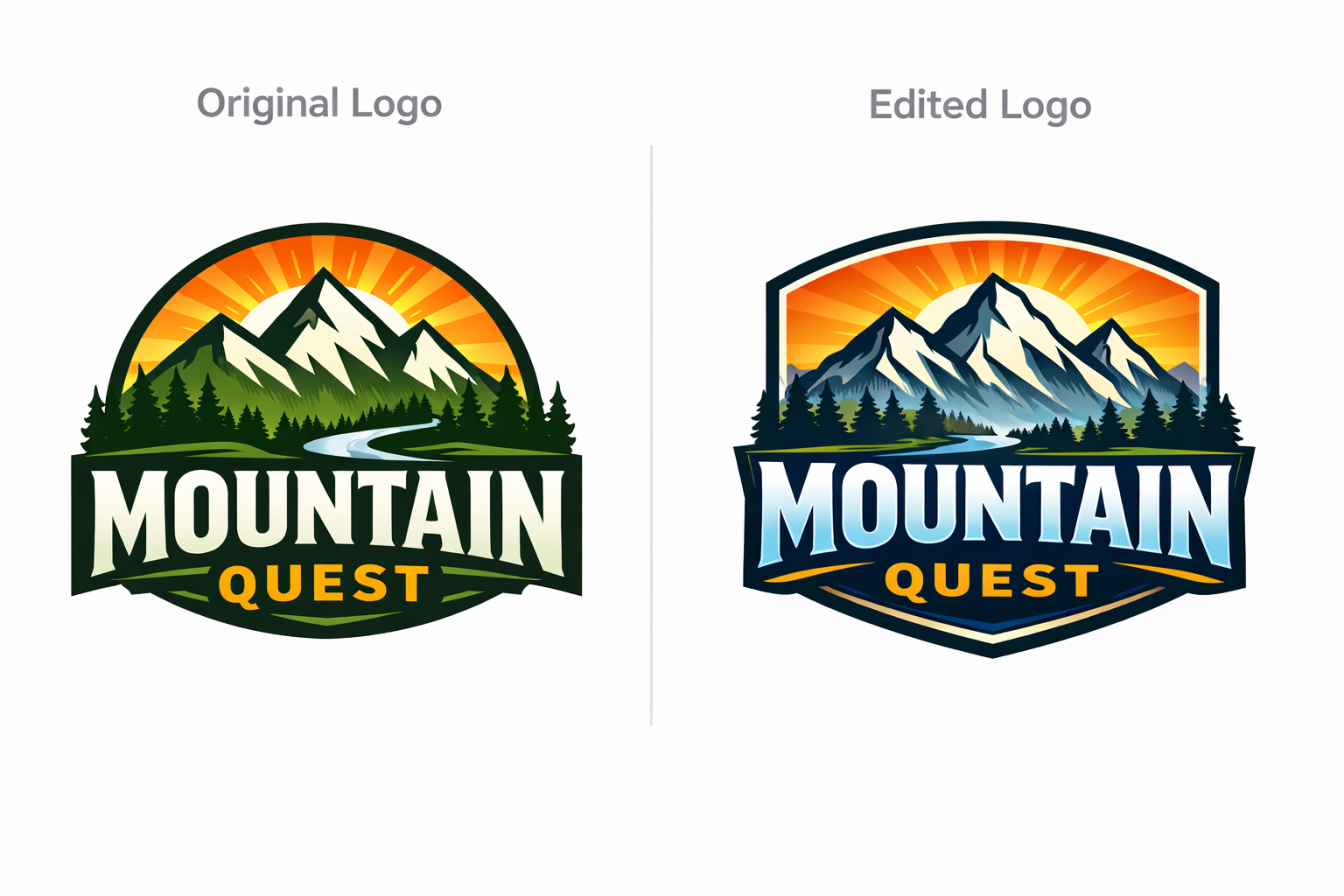
为什么 Logo 编辑评估与众不同:
Logo 编辑的评判标准是精确性、局部性和保真度,而非视觉吸引力:
- 保留原始资产的身份特征
- 保留所有未编辑的文本、几何形状、间距和样式
- 仅编辑明确要求的区域
- 实现字符级正确性,对偏差零容忍
小错误会带来巨大风险。一个字母的变形、数字的改变或超出预期区域的溢出都可能破坏品牌完整性,并导致后续返工。
示例任务:
- 输入:Logo 图像 + 掩码或区域描述
- 任务:“将年份从 2024 改为 2026”、“将 C 替换为 S”、“添加 TM”
评估内容(实用指标):
##### 1) 将 Logo 编辑视为受限的单参考任务
对于每个测试用例,存储:
- 输入 Logo 图像
- 编辑指令,明确范围
- 可选但高杠杆:
- 定义允许编辑区域的掩码或区域描述
- 用于精确比较的预期目标文本或符号
- 元数据:字体类型、字号或颜色
评分器应直接将输出与原始 Logo 进行比较。
##### 2) 分级指标
使用这些 0–5 分数对模型进行排名并跟踪改进。分数应用于所有请求的步骤,而非每个步骤,因此部分完成会以可控且可解释的方式受到惩罚。
##### A) 编辑意图正确性 — 0–5
衡量每个请求的编辑步骤是否都正确应用于正确的目标。
- 5:所有编辑步骤均完全按照指定执行。每个步骤的字符级准确性完美。
- 4:所有步骤均正确应用;仅在仔细检查时可见极轻微的视觉瑕疵。
- 3:所有步骤均已应用,但至少一个步骤在清晰度或精度上出现明显退化。
- 2:大多数步骤正确应用,但一个或多个步骤包含有意义的错误。
- 1:一个或多个步骤不正确或应用于错误的元素。
- 0:大多数步骤缺失、错误或应用不当。
##### B) 非目标不变性 — 0–5
衡量请求编辑之外的内容是否在所有步骤中保持不变。
- 5:请求编辑之外无可见变化。
- 4:仅在仔细检查时可见极轻微的漂移。
- 3:附近元素出现明显但有限的漂移。
- 2:未请求的更改清晰影响相邻文本、符号或背景。
- 1:Logo 上出现广泛的意外更改。
- 0:Logo 身份受损。
##### C) 字符和样式完整性 — 0–5
Logo 编辑不是创意转换。输出必须保留原始资产的身份,包括颜色、笔画、字形和图标一致性。
- 5:编辑后的字符和符号与原始样式完美匹配。颜色、笔画、字形和图标与原始版本无法区分。
- 4:仅在仔细检查时可见极轻微的偏差,对品牌感知无影响。
- 3:一个或多个属性出现明显但有限的偏差,不会破坏识别。
- 2:颜色、笔画、字形或图标几何形状存在明显不一致,影响视觉连贯性。
- 1:重大不一致,实质性改变 Logo 的外观。
- 0:视觉系统损坏或不再可识别。
LLM 作为评判者的评分提示
以下是一个与您现有的 LLMajRubricGrader 对齐的评判提示。它返回结构化的指标分数以及总体判定。
您可以将其与现有的评分器一起使用,方法是更改 JSON 模式以包含以下字段(或者如果您愿意,也可以为每个指标创建单独的评分器)。
PROMPT = """<core_mission>
Evaluate whether a logo edit was executed with exact correctness,
strict preservation, and high visual integrity.

Logo editing is a precision task.
Small errors matter.
Near-misses are failures.
</core_mission>

<role>
You are an expert evaluator of high-precision logo and brand asset editing.
You specialize in detecting subtle text errors, unintended changes,
and preservation drift across single-step and multi-step edits.
</role>

<scope_constraints>
- Judge only against the provided edit instruction and input logo.
- Do NOT judge aesthetics or visual appeal.
- Do NOT infer intent beyond what is explicitly stated.
- Be strict, conservative, and consistent across cases.
</scope_constraints>

<metrics_and_scoring>

Evaluate EACH metric independently using the definitions below.
All metrics are scored from 0 to 5.
Scores apply across ALL requested edit steps.

--------------------------------
1) Edit Intent Correctness (0–5)
--------------------------------
Measures whether every requested edit step was applied correctly
to the correct target.

5: All edit steps applied exactly as specified. Character-level
   accuracy is perfect for every step.
4: All steps applied correctly with extremely minor visual
   imperfections visible only on close inspection.
3: All steps applied, but one or more steps show noticeable
   degradation in clarity or precision.
2: Most steps applied correctly, but one or more steps contain
   a meaningful error.
1: One or more steps are incorrect or applied to the wrong element.
0: Most steps missing, incorrect, or misapplied.

What to consider:
- Exact character identity (letters, numbers, symbols)
- Correct sequencing and targeting of multi-step edits
- No ambiguous characters (Common confusions: 0 vs 6, O vs D, R vs B)

--------------------------------
2) Non-Target Invariance (0–5)
--------------------------------
Measures whether content outside the requested edits remains unchanged.

5: No detectable changes outside the requested edits.
4: Extremely minor drift visible only on close inspection.
3: Noticeable but limited drift in nearby elements.
2: Clear unrequested changes affecting adjacent text,
   symbols, or background.
1: Widespread unintended changes across the logo.
0: Logo identity compromised.

What to consider:
- Adjacent letter deformation or spacing shifts
- Background, texture, or color changes
- Cumulative drift from multi-step edits

--------------------------------
3) Character and Style Integrity (0–5)
--------------------------------
Measures whether the edited content preserves the original
logo’s visual system.

This includes color, stroke weight, letterform structure,
and icon geometry.

5: Edited characters and symbols perfectly match the original
   style. Colors, strokes, letterforms, and icons are
   indistinguishable from the original.
4: Extremely minor deviation visible only on close inspection,
   with no impact on brand perception.
3: Noticeable but limited deviation in one or more properties
   that does not break recognition.
2: Clear inconsistency in color, stroke, letterform, or icon
   geometry that affects visual cohesion.
1: Major inconsistency that materially alters the logo’s appearance.
0: Visual system is corrupted or no longer recognizable.

</metrics_and_scoring>

<verdict_rules>
- Edit Intent Correctness must be ≥ 4.
- Non-Target Invariance must be ≥ 4.
- Character and Style Integrity must be ≥ 4.

If ANY metric falls below threshold, the overall verdict is FAIL.
Do not average scores to determine the verdict.
</verdict_rules>

<consistency_rules>
- Score conservatively.
- If uncertain between two scores, choose the lower one.
- Base all scores on concrete visual observations.
- Penalize cumulative degradation across multi-step edits.
</consistency_rules>

<output_constraints>
Return JSON only.
No additional text.
</output_constraints>
"""
推荐的 JSON 输出
{
  "verdict": "PASS",
  "edit_intent_correctness": 5,
  "non_target_invariance": 5,
  "character_and_style_integrity": 5,
  "reason": "..."
}
Logo 编辑示例:提示词设置
使用现有的 Logo 图片和范围狭窄的编辑指令。
# Capture the logo judge prompt.
logo_judge_prompt = PROMPT

logo_input_path = Path("../../images/logo_generation_1.png")

logo_prompt = """Edit the logo by changing the text from FIELD to BUTTER .
Do not change any other text, colors, shapes, or layout."""

logo_criteria = """The requested edit is applied exactly.
All non-target content remains unchanged.
Character style, color, and geometry remain consistent with the original."""

logo_case = TestCase(
    id="logo_year_edit",
    task_type="image_editing",
    prompt=logo_prompt,
    criteria=logo_criteria,
    image_inputs=ImageInputs(image_paths=[logo_input_path]),
)

logo_run = ModelRun(
    label="gpt-image-1.5-logo",
    task_type="image_editing",
    params={
        "model": "gpt-image-1.5",
        "n": 1,
    },
)

logo_store = OutputStore(root=Path("../../images"))
Logo 编辑示例:运行与评分
运行测试框架,并使用 logo 评判标准对 logo 编辑进行评分。
logo_schema = {
    "type": "object",
    "properties": {
        "verdict": {"type": "string"},
        "edit_intent_correctness": {"type": "number"},
        "non_target_invariance": {"type": "number"},
        "character_and_style_integrity": {"type": "number"},
        "reason": {"type": "string"},
    },
    "required": [
        "verdict",
        "edit_intent_correctness",
        "non_target_invariance",
        "character_and_style_integrity",
        "reason",
    ],
    "additionalProperties": False,
}


def parse_logo_result(data: dict, base_key: str) -> list[Score]:
    return [
        Score(key="edit_intent_correctness", value=float(data["edit_intent_correctness"]), reason=""),
        Score(key="non_target_invariance", value=float(data["non_target_invariance"]), reason=""),
        Score(key="character_and_style_integrity", value=float(data["character_and_style_integrity"]), reason=""),
        Score(key="verdict", value=str(data["verdict"]), reason=(data.get("reason") or "").strip()),
    ]

logo_grader = LLMajRubricGrader(
    key="logo_eval",
    system_prompt=logo_judge_prompt,
    content_builder=build_editing_judge_content,
    judge_model="gpt-5.2",
    json_schema_name="logo_eval",
    json_schema=logo_schema,
    result_parser=parse_logo_result,
)

logo_results = evaluate(
    cases=[logo_case],
    model_runs=[logo_run],
    graders=[logo_grader],
    output_store=logo_store,
)

logo_result = logo_results[0]
logo_result
Logo 编辑评估结果
在单个 pandas 表格中展示编辑后的 Logo 和 Logo 编辑得分。

render_result_table(case=logo_case, result=logo_result, title="Logo Editing: Prompt vs. Scores")
##### 3) 当你有真实参考图时的替代方案
如果你已经有规范参考图,可以直接与设计源真相进行比较,而不是与模型输出比较。
真实参考图应来自设计系统,而不是生成的图像:
- 品牌库资源(矢量或高分辨率规范位图)
- 代表正确资源状态的Figma框架或组件
这可以清晰地映射到Logo编辑需求,如“仍然是同一个资源”和“意外漂移是失败”。
示例:OpenAI Logo – 农历新年
- 参考图像:规范OpenAI Logo(来自Figma或品牌资源)
- 生成图像:模型输出,带有请求的变换
结论
图像模型正在从“酷炫演示”转变为生产工具,生成真实的工件——屏幕、传单、产品视觉和品牌编辑,这些会影响决策并交付给客户。本食谱的核心教训很简单:你不能用通用的“看起来不错”的分数来评估这些系统。你需要特定于工作流的评估,这些评估在模型版本、提示和设置之间是可重复的。多模态LLM通过充当可扩展的评判者使这变得实用——当与严格的评分标准、结构化输出和人工校准相结合时。
一个实用的视觉评估程序从小处开始,并随着时间的推移变得更加精确:
- 从门禁开始。 为破坏实际工作的失败模式添加严格的通过/失败评分器:缺少必需组件、不正确的文案、编辑超出预期区域,或对保留区域的意外更改。这可以防止“漂亮但错误”的输出掩盖回归。
- 分层添加分级指标。 一旦硬性失败得到控制,使用0-5评分标准来捕捉每个工作流中可用性和质量的重要因素(例如,UI模型中的层次结构、营销中的品牌契合度,或编辑中的保真度/保留)。
- 标记失败以加快迭代。 一致的失败标签将一堆输出转化为可操作的工程工作:你可以量化什么在破坏,找到聚类的根本原因,并在调整提示、模型设置、掩码或后处理时跟踪进度。
- 战略性地使用人工。 人类在主观或模糊的维度(“氛围”、可用性清晰度、可信度)上增加最大价值,但前提是你保持评分标准严格并使用校准锚点防止漂移。
- 将测试平台视为产品。 你构建的可重用测试平台——测试用例、运行器、评分器和存储的工件——为回归测试、参数扫描和并排比较奠定了基础。随着时间的推移,你的评估套件成为你的安全网:它及早捕获细微的失败,并使改进可衡量。
- 根据需要演进。 你可以随着时间的推移使用复杂指标重新设计评分器提示。一个自然的下一步是将单次评分器提示拆分为多次调用,以专注于特定指标。
构建反映图像实际使用方式的评估,在美学之前强制执行正确性,并使迭代数据驱动。当你的评估与实际工作流要求一致时,图像生成和编辑不再是不可预测的艺术项目,而是团队可以信任的工具。
常见问题
常见错误:1) 忽略门控指标,仅用平均分掩盖文本错误,导致“漂亮但错误”的输出通过评估;2) 评分器提示词不严格,未明确要求精确文本匹配或局部性,导致误判;3) 未使用结构化输出(JSON Schema),评分器返回自由文本难以解析;4) 测试用例覆盖不足,未包含边缘情况(如密集布局、精确标点、多步骤编辑);5) 人工反馈缺乏校准,评分标准漂移。排查方法:1) 检查评分器输出,确保JSON模式正确且字段完整;2) 对比LLM裁判与人工评分,识别系统性偏差;3) 使用OCR或图像到文本方法交叉验证文本渲染;4) 对失败案例进行聚类,分析失败模式标签;5) 定期用锚定示例重新校准人工评分。生产优化:1) 使用参数扫描(grid_sweep)比较模型版本、尺寸、质量参数;2) 将评估套件集成到CI/CD,作为回归测试;3) 对评分器进行多轮迭代,拆分复杂指标为多次调用;4) 利用代码解释器工具进行局部裁剪,细粒度检查细节;5) 存储所有工件,便于追溯和可视化。
企业应用扩展
本指南提供了完整的评估框架,开发者可扩展至更多用例,如产品设计、室内设计、医学图像等。未来方向包括:1) 引入更复杂的评分器,如多阶段评估(先门控后分级);2) 结合人类反馈强化学习(RLHF)优化模型;3) 使用向量数据库存储和检索相似失败案例;4) 开发自动化报告生成工具,将评估结果可视化;5) 集成到模型微调流程,实现闭环改进。
总结
本指南面向有编程基础的开发者,系统讲解如何为图像生成与编辑构建可重复、特定于工作流的评估体系。内容涵盖图像生成(UI原型、营销图形)与图像编辑(虚拟试穿、Logo编辑)四大类用例,提供完整的Python测试框架(vision_harness),包括类型定义、运行器、评分器及评估循环。核心思想是:视觉评估不应只关注“美观”,而应衡量模型对特定工作流的可靠性,通过门控指标(指令遵循、文本渲染、局部性)与分级指标(布局、风格、保真度)结合,并利用多模态LLM作为裁判实现自动化评分。指南还包含大量可运行的代码示例、评判提示词、JSON输出模式及人工反馈校准方法,帮助开发者落地生产级评估系统。
- --
内容来源与验证
- 内容等级:PREMIUM_A
- 质量等级:S_CANDIDATE
- 难度:中级
- 验证等级:V1
- 原文作者:emreokcular, kathylau-oai
- 原文日期:2026-01-29
- 来源许可:MIT
- 来源版本:
e82560bea5b297223d1c215c90ca91fd086b05c8 - 查看原文
站内还有更多完整实战教程
加入会员,解锁全部教程、完整代码与持续更新内容。
加入会员