使用Claude进行摘要生成:法律文档指南
技术背景
在信息过载场景下,法律、金融、合规等领域的文档动辄数十上百页,人工阅读成本极高。传统抽取式摘要难以生成连贯表达,而通用LLM直接摘要又面临输出不可控、结构不可解析、长文档超上下文、质量难以量化等问题。Claude具备长上下文与强指令遵循能力,适合做生成式摘要,但要把能力工程化,需要解决提示设计、输出约束、分块聚合、检索排序与评估闭环等一整套问题。本指南正是为希望把LLM摘要从Demo推进到可维护系统的开发者准备的。
核心原理
核心原理有三层。第一层是输出控制:通过system角色设定专家身份,在messages中预置assistant前言(如'Here is the summary...<summary>'),并用stop_sequences=['</summary>']截断,使模型输出被包裹在可控边界内,便于解析。第二层是提示工程:少样本示例让模型隐式学习格式与粒度;引导式摘要显式列出关注维度(当事方、标的、条款、日期、特殊条款),领域特定版本进一步定制为转租协议字段,并要求缺失信息标注'Not specified',降低幻觉。第三层是长文档与检索:分块后逐块摘要再元摘要,解决上下文限制;摘要索引文档则为每个文档生成摘要,用Haiku对摘要与查询做0-10相关性打分排序,再对Top-K原文抽取相关条款,实现比传统RAG更省上下文的文档级检索。
架构分析
系统由五个组件构成:数据层负责PDF抽取、正则清洗与token截断;摘要层封装basic、multishot、guided、domain-specific、meta-summary等函数,统一采用assistant前言加停止序列模式;索引层LegalSummaryIndexedDocuments维护documents与summaries列表,提供add_document、generate_summaries、rank_documents、extract_relevant_clauses;评估层用Promptfoo跑测试集,输出PASS/FAIL与分数,再用pandas、seaborn做通过率与分数分布可视化;迭代层根据评估结果调整提示、分块策略与temperature、max_tokens。关键设计决策是:摘要生成与排序分离,用便宜快速的Haiku做排序、Sonnet做最终摘要,兼顾成本与质量;摘要阶段只取前2000字符,因为排序不需要全文。
完整实战教程
介绍
摘要提取是自然语言处理中的一项关键任务,它涉及将大量文本压缩成更短、更易消化的格式,同时保留关键信息。在当今信息丰富的世界中,从冗长文档中快速提取和综合要点的能力在各个行业和应用中都非常宝贵。
本指南重点介绍如何利用Claude的摘要能力,特别强调法律文档。法律文档通常冗长且阅读起来很繁琐——尤其是在有大量细则和法律术语的情况下。我们将探讨有效摘要此类文档的技术、评估摘要质量的方法,以及系统化提升摘要性能的策略。
我们将涵盖的关键方面包括:
- 为摘要设计有效的提示
- 从文档中提取特定的元数据
- 处理超出典型令牌限制的较长文档
- 使用自动化方法评估摘要质量(例如,ROUGE分数和Promptfoo自定义方法)
- 迭代改进摘要性能
- 关于如何优化摘要工作流的一般性结论建议
通过本指南,您将扎实理解如何使用Claude实现和优化摘要任务,并掌握将这些技术应用于您自己特定用例的框架。
在开始之前,值得讨论一下本指南中的评估。评估摘要质量是一项众所周知的挑战性任务。与许多其他自然语言处理任务不同,摘要评估通常缺乏明确、客观的指标。这个过程可能高度主观,不同的读者看重摘要的不同方面。传统的经验方法如ROUGE分数虽然有用,但在捕捉连贯性、事实准确性和相关性等细微方面存在局限性。此外,“最佳”摘要可能因具体用例、目标受众和所需详细程度而异。尽管存在这些挑战,我们在本指南中探索了几种可以利用的方法,结合自动化指标、正则表达式和任务特定标准。在本指南中,我们认识到最有效的方法通常涉及针对特定摘要任务量身定制的技术组合。
目录
设置
要完成本指南,你需要安装以下软件包:
- anthropic
- pypdf
- pandas
- matplotlib
- sklearn
- numpy
- rouge-score
- nltk
- seaborn
- promptfoo(用于评估)
你还需要一个 Claude API 密钥。
让我们从安装所需的软件包并设置环境开始:
# install packages
%pip install anthropic pypdf pandas matplotlib numpy rouge-score nltk seaborn --quiet
import re

import anthropic
import matplotlib.pyplot as plt
import numpy as np
import pandas as pd
import seaborn as sns

# Set up Anthropic client
# You can set up a .env file with your API key to keep it private, and import it like so:
# from dotenv import load_dotenv
# load_dotenv()

# or add your key directly
api_key = "ANTHROPIC_API_KEY"  # Replace ANTHROPIC_API_KEY with your actual API key
client = anthropic.Anthropic(api_key=api_key)

print("Setup complete!")
数据准备
在我们开始总结文档之前,需要先准备数据。这包括从 PDF 中提取文本、清理文本,并确保其准备好输入到我们的语言模型中。出于本演示的目的,我们已从 sec.gov 网站获取了一份公开可用的转租协议。
如果您有任何想要测试的 PDF,请随意将其导入此目录,然后更改下面的文件路径。如果您只想通过复制粘贴使用文本块,请跳过此步骤并定义 text = <text blob>。
以下是一组处理此过程的函数:
import re

import pypdf

pdf_path = "data/Sample Sublease Agreement.pdf"


def extract_text_from_pdf(pdf_path):
    with open(pdf_path, "rb") as file:
        reader = pypdf.PdfReader(file)
        text = ""
        for page in reader.pages:
            text += page.extract_text() + "\n"
    return text


def clean_text(text):
    # Remove extra whitespace
    text = re.sub(r"\s+", " ", text)
    # Remove page numbers
    text = re.sub(r"\n\s*\d+\s*\n", "\n", text)
    return text.strip()


def prepare_for_llm(text, max_tokens=180000):
    # Truncate text to fit within token limit (approximate)
    return text[: max_tokens * 4]  # Assuming average of 4 characters per token


def get_llm_text(path):
    extracted_text = extract_text_from_pdf(path)
    cleaned_text = clean_text(extracted_text)
    llm_ready_text = prepare_for_llm(cleaned_text)
    return llm_ready_text


# You can now use get_llm_text in your LLM prompt
text = get_llm_text(pdf_path)
print(text[:500])
这种设置使我们能够轻松处理 PDF 文档并为其摘要做好准备。在下一节中,我们将从基本的摘要方法开始,然后在此基础上构建更高级的技术。
基础摘要
让我们从使用 Claude 的一个简单摘要函数开始。这是使用 Claude 对上述文档中的文本进行摘要的一次简单尝试。随着本指南的深入,我们将改进这个方法。
需要注意的一点是,虽然这看起来可能很基础,但我们实际上已经在使用 Claude 的一些重要功能。值得注意的一点是 assistant 角色和停止序列的使用。assistant 前言引导 Claude 在最终短语 <summary> 之后直接包含摘要。停止序列 </summary> 随后告诉 Claude 停止生成。这是我们在本指南中将继续使用的一种模式。
def basic_summarize(text, max_tokens=1000):
    # Prompt the model to summarize the text
    prompt = f"""Summarize the following text in bullet points. Focus on the main ideas and key details:
    {text}
    """

    response = client.messages.create(
        model="claude-sonnet-4-6",
        max_tokens=max_tokens,
        system="You are a legal analyst known for highly accurate and detailed summaries of legal documents.",
        messages=[
            {"role": "user", "content": prompt},
            {
                "role": "assistant",
                "content": "Here is the summary of the legal document: <summary>",
            },
        ],
        stop_sequences=["</summary>"],
    )

    return response.content[0].text
basic_response = basic_summarize(text, max_tokens=1000)

print(basic_response)
这种基本方法提供了简单的摘要,但可能无法捕捉法律或财务文件所需的所有细微差别。你也会注意到,当你重新运行上面的单元格时,没有标准化的、形式化的输出。相反,我们得到的是文档的基本摘要,没有太多可解析的结构化输出。这使得它更难阅读,更难以信任(我们怎么知道它没有遗漏什么?),因此在任何现实世界的场景中都更难以使用。
让我们看看能否调整提示词,以获得更结构化的摘要版本。
多示例基础摘要
能够如此快速地总结大量文档已经很酷了,但我们还能做得更好。让我们尝试在提示中添加几个示例,看看能否改进输出,并在转向更高级的技术之前,为输出创建一些结构。
注意,这里我们并没有真正改变请求的实际格式,尽管我们附加了两个额外的部分:
- 我们告诉模型“不要前言”。当需要将模型输出限制为我们想要的答案时,这通常是个好主意,可以避免你之前使用 Claude 时可能熟悉的那种初始对话式角度。当我们没有在提示中使用其他“指令”时(正如本指南后面可能会做的那样),这一点尤为重要。
- 我们附加了 3 个摘要文档的示例。这被称为少样本或多示例学习,它可以帮助模型理解我们想要什么。
让我们看看输出会如何变化:
# We import from our data directory to save space in our notebook
from data.multiple_subleases import document1, document2, document3, sample1, sample2, sample3


def basic_summarize_multishot(text, max_tokens=1000):
    # Prompt the model to summarize the text
    prompt = f"""Summarize the following text in bullet points. Focus on the main ideas and key details:
        {text}

    Do not preamble.

    Use these examples for guidance in summarizing:

    <example1>
        <original1>
            {document1}
        </original1>

        <summary1>
            {sample1}
        </summary1>
    </example1>

    <example2>
        <original2>
            {document2}
        </original2>

        <summary2>
            {sample2}
        </summary2>
    </example2>

    <example3>
        <original3>
            {document3}
        </original3>

        <summary3>
            {sample3}
        </summary3>
    </example3>
    """

    response = client.messages.create(
        model="claude-sonnet-4-6",
        max_tokens=max_tokens,
        system="You are a legal analyst known for highly accurate and detailed summaries of legal documents.",
        messages=[
            {"role": "user", "content": prompt},
            {
                "role": "assistant",
                "content": "Here is the summary of the legal document: <summary>",
            },
        ],
        stop_sequences=["</summary>"],
    )

    return response.content[0].text
basic_multishot_response = basic_summarize_multishot(text, max_tokens=1000)

print(basic_multishot_response)
如果你查看我们提供的示例,你会发现上面输出的格式是相同的*(请前往 data/<任意 .txt 文件> 查看)*。这很有趣——我们并没有明确告诉 Claude 遵循示例的格式,但它似乎还是学会了。这说明了少样本学习的力量,以及 Claude 如何能够从少量示例泛化到新的输入。
高级摘要技术
引导式摘要
引导式摘要是指我们明确为模型定义一个框架,让其在摘要任务中遵循。我们可以完全通过提示来实现这一点,通过调整提示的细节来引导 Claude 变得更详细或更简洁、包含更多或更少的技术术语,或者提供对当前上下文更高层次或更低层次的总结。对于法律文件,我们可以引导摘要聚焦于特定方面。
注意,我们很可能可以通过示例(我们在上文已探讨过)来实现下面展示的相同格式化输出!
def guided_legal_summary(text, max_tokens=1000):
    # Prompt the model to summarize the text
    prompt = f"""Summarize the following legal document. Focus on these key aspects:

    1. Parties involved
    2. Main subject matter
    3. Key terms and conditions
    4. Important dates or deadlines
    5. Any unusual or notable clauses

    Provide the summary in bullet points under each category.

    Document text:
    {text}

    """

    response = client.messages.create(
        model="claude-sonnet-4-6",
        max_tokens=max_tokens,
        system="You are a legal analyst known for highly accurate and detailed summaries of legal documents.",
        messages=[
            {"role": "user", "content": prompt},
            {
                "role": "assistant",
                "content": "Here is the summary of the legal document: <summary>",
            },
        ],
        stop_sequences=["</summary>"],
    )

    return response.content[0].text
# Example usage
legal_summary = guided_legal_summary(text)
print(legal_summary)
这无疑使得解析文档中最相关的部分以及理解具体行项目和重要条款的含义变得更加容易。
领域特定的引导式摘要
你可以将上述引导式摘要提示词用于任何类型的文档,但通过针对特定文档类型进行定制,我们可以使其更加强大。例如,如果我们知道正在处理一份转租协议,我们可以引导模型专注于该特定类型文档中最相关的法律术语和概念。当我们使用 Claude 处理特定用例并明确知道我们想要提取的最相关值时,这一点最为相关。
以下是一个示例,说明我们如何为转租协议修改引导式摘要函数。请注意,我们还会将 'model' 作为附加参数添加到函数中,以便我们可以根据任务更轻松地选择不同的模型进行摘要:
def guided_sublease_summary(text, model="claude-sonnet-4-6", max_tokens=1000):
    # Prompt the model to summarize the sublease agreement
    prompt = f"""Summarize the following sublease agreement. Focus on these key aspects:

    1. Parties involved (sublessor, sublessee, original lessor)
    2. Property details (address, description, permitted use)
    3. Term and rent (start date, end date, monthly rent, security deposit)
    4. Responsibilities (utilities, maintenance, repairs)
    5. Consent and notices (landlord's consent, notice requirements)
    6. Special provisions (furniture, parking, subletting restrictions)

    Provide the summary in bullet points nested within the XML header for each section. For example:

    <parties involved>
    - Sublessor: [Name]
    // Add more details as needed
    </parties involved>

    If any information is not explicitly stated in the document, note it as "Not specified". Do not preamble.

    Sublease agreement text:
    {text}

    """

    response = client.messages.create(
        model=model,
        max_tokens=max_tokens,
        system="You are a legal analyst specializing in real estate law, known for highly accurate and detailed summaries of sublease agreements.",
        messages=[
            {"role": "user", "content": prompt},
            {
                "role": "assistant",
                "content": "Here is the summary of the sublease agreement: <summary>",
            },
        ],
        stop_sequences=["</summary>"],
    )

    return response.content[0].text
# Example usage
sublease_summary = guided_sublease_summary(text)
print(sublease_summary)
因为我们决定将摘要的每个部分输出在 XML 标签中,所以现在可以像这样分别解析它们(这也可以通过 JSON 或任何其他格式来实现):
import re


def parse_sections_regex(text):
    pattern = r"<(.*?)>(.*?)</\1>"
    matches = re.findall(pattern, text, re.DOTALL)

    parsed_sections = {}
    for tag, content in matches:
        items = [item.strip("- ").strip() for item in content.strip().split("\n") if item.strip()]
        parsed_sections[tag] = items

    return parsed_sections


# Parse the sections
parsed_sections = parse_sections_regex(sublease_summary)

# Check if parsing was successful
if isinstance(parsed_sections, dict) and "parties involved" in parsed_sections:
    print("Parties involved:")
    for item in parsed_sections["parties involved"]:
        print(f"- {item}")
else:
    print("Error: Parsing failed or 'parties involved' section not found.")
    print("Parsed result:", parsed_sections)
包含多个文档的上下文(元摘要)
如果我们有大量与同一客户相关的文档怎么办?我们可以使用分块方法来处理这个问题。这是一种将文档分解为更小、更易管理的块,然后分别处理每个块的技术。然后我们可以将每个块的摘要组合起来,创建整个文档的元摘要。当我们想要总结大量文档,或者想要总结一个非常长的单个文档时,这尤其有用。
以下是我们可能如何做到这一点的示例:
from data.multiple_subleases import document1, document2, document3


def chunk_text(text, chunk_size=2000):
    return [text[i : i + chunk_size] for i in range(0, len(text), chunk_size)]


def summarize_long_document(text, max_tokens=2000):
    chunks = chunk_text(text)

    # Iterate over chunks and summarize each one
    # We use guided_legal_summary here, but you can use basic_summarize or any other summarization function
    # Note that we'll also use haiku for the interim summaries, and the 3.5 sonnet for the final summary
    chunk_summaries = [
        guided_sublease_summary(chunk, model="claude-haiku-4-5", max_tokens=max_tokens)
        for chunk in chunks
    ]

    final_summary_prompt = f"""

    You are looking at the chunked summaries of multiple documents that are all related. Combine the following summaries of the document from different truthful sources into a coherent overall summary:

    {"".join(chunk_summaries)}

    1. Parties involved (sublessor, sublessee, original lessor)
    2. Property details (address, description, permitted use)
    3. Term and rent (start date, end date, monthly rent, security deposit)
    4. Responsibilities (utilities, maintenance, repairs)
    5. Consent and notices (landlord's consent, notice requirements)
    6. Special provisions (furniture, parking, subletting restrictions)

    Provide the summary in bullet points nested within the XML header for each section. For example:

    <parties involved>
    - Sublessor: [Name]
    // Add more details as needed
    </parties involved>

    If any information is not explicitly stated in the document, note it as "Not specified".

    Summary:
    """

    response = client.messages.create(
        model="claude-sonnet-4-6",
        max_tokens=max_tokens,
        system="You are a legal expert that summarizes notes on one document.",
        messages=[
            {"role": "user", "content": final_summary_prompt},
            {
                "role": "assistant",
                "content": "Here is the summary of the legal document: <summary>",
            },
        ],
        stop_sequences=["</summary>"],
    )

    return response.content[0].text


# Example usage
# combine 3 documents (all related) together
text = document1 + document2 + document3
long_summary = summarize_long_document(text)
print(long_summary)
摘要索引文档:一种高级 RAG 方法
摘要索引文档是一种在文档级别操作的高级检索增强生成(RAG)方法。
与传统 RAG 技术相比,该方法具有多项优势,特别是在处理大型文档或需要精确信息检索的场景中。
工作原理
- 文档摘要:为语料库中的每个文档生成简洁的摘要(查询文本子集并快速总结)。
- 上下文窗口优化:确保所有摘要都能适应语言模型的上下文窗口。
- 相关性评分:让模型对每个摘要与所提查询的相关性进行排序。
- 重排序(可选):应用重排序技术进一步细化和压缩前 K 个结果。
- 回答当前查询。
这种方法有一些明显的优势:
- 更高效的文档排序检索方式,比传统 RAG 方法使用更少的上下文。
- 在特定任务上表现优异:优于其他 RAG 方法,始终将正确文档排在首位。
- 优化的信息检索:重排序有助于压缩结果,确保向模型呈现最简洁和相关的信息。
class LegalSummaryIndexedDocuments:
    def __init__(self, client):
        self.client = client  # Claude client
        self.documents: list[dict[str, str]] = []  # List of docs to store
        self.summaries: list[str] = []

    def add_document(self, doc_id: str, content: str):
        # Adds a document to the index
        self.documents.append({"id": doc_id, "content": content})

    def generate_summaries(self):
        # Generates summaries for all documents in the index
        for doc in self.documents:
            summary = self._generate_legal_summary(doc["content"])
            self.summaries.append(summary)

    def _generate_legal_summary(self, content: str) -> str:
        # Note how we constrain the content to a maximum of 2000 words. We do this because we don't need that much information for the intial ranking.
        prompt = f"""
        Summarize the following sublease agreement. Focus on these key aspects:

        1. Parties involved (sublessor, sublessee, original lessor)
        2. Property details (address, description, permitted use)
        3. Term and rent (start date, end date, monthly rent, security deposit)
        4. Responsibilities (utilities, maintenance, repairs)
        5. Consent and notices (landlord's consent, notice requirements)
        6. Special provisions (furniture, parking, subletting restrictions)

        Provide the summary in bullet points nested within the XML header for each section. For example:

        <parties involved>
        - Sublessor: [Name]
        // Add more details as needed
        </parties involved>

        If any information is not explicitly stated in the document, note it as "Not specified".

        Sublease agreement text:
        {content[:2000]}...

        Summary:
        """

        response = client.messages.create(
            model="claude-sonnet-4-6",
            max_tokens=500,
            temperature=0.2,
            messages=[
                {"role": "user", "content": prompt},
                {
                    "role": "assistant",
                    "content": "Here is the summary of the legal document: <summary>",
                },
            ],
            stop_sequences=["</summary>"],
        )
        return response.content[0].text

    def rank_documents(self, query: str, top_k: int = 3) -> list[tuple[str, float]]:
        """
        Rank documents based on their relevance to the given query.
        We use Haiku here as a cheaper, faster model for ranking.
        """
        ranked_scores = []
        for summary in self.summaries:
            prompt = f"Legal document summary: {summary}\n\nLegal query: {query}\n\nRate the relevance of this legal document to the query on a scale of 0 to 10. Only output the numeric value:"

            response = client.messages.create(
                model="claude-haiku-4-5",
                max_tokens=2,
                temperature=0,
                messages=[{"role": "user", "content": prompt}],
            )
            ranked_score = float(response.content[0].text)
            ranked_scores.append(ranked_score)

        ranked_indices = np.argsort(ranked_scores)[::-1][:top_k]
        return [(self.documents[i]["id"], ranked_scores[i]) for i in ranked_indices]

    def extract_relevant_clauses(self, doc_id: str, query: str) -> list[str]:
        """
        Extracts relevant clauses from a document based on a query.
        """
        doc_content = next(doc["content"] for doc in self.documents if doc["id"] == doc_id)

        prompt = f"""
        Given the following legal query and document content, extract the most relevant clauses or sections and write the answer to the query.
        Provide each relevant clause or section separately, preserving the original legal language:

        Legal query: {query}

        Document content: {doc_content}...

        Relevant clauses or sections (separated by '---'):"""

        response = client.messages.create(
            model="claude-sonnet-4-6",
            max_tokens=1000,
            temperature=0,
            messages=[{"role": "user", "content": prompt}],
        )

        clauses = re.split(r"\n\s*---\s*\n", response.content[0].text.strip())
        return [clause.strip() for clause in clauses if clause.strip()]
from data.multiple_subleases import document1, document2, document3

lsid = LegalSummaryIndexedDocuments(client=client)

# Add documents
lsid.add_document("doc1", document1)
lsid.add_document("doc2", document2)
lsid.add_document("doc3", document3)

# Generate summaries - this would happen at ingestion
lsid.generate_summaries()

# Rank documents for a legal query
legal_query = "What contract is for the sublessor Apex Innovations, LLC?"
ranked_results = lsid.rank_documents(legal_query)

print("Initial ranking:", ranked_results)

# Extract relevant clauses from the top-ranked document
top_doc_id = ranked_results[0][0]
relevant_clauses = lsid.extract_relevant_clauses(top_doc_id, legal_query)

print("\nRelevant clauses from the top-ranked document:")
for i, clause in enumerate(relevant_clauses[1:], 1):
    print(f"Clause {i}: {clause}")
摘要式 RAG 的最佳实践
- 最佳摘要长度:尝试不同的摘要长度,以在简洁性和信息量之间找到合适的平衡。
- 迭代重排序:考虑进行多轮重排序以获得更精确的结果,尤其是在文档集较大时。
- 缓存:为摘要和初始排序实现缓存机制,以提升重复查询时的性能。
摘要索引文档为 RAG 提供了一种强大的方法,尤其适用于涉及大型文档的场景,或在需要精确信息检索时表现出色。通过利用文档摘要、对数概率评分以及可选的重排序,该方法提供了一种高效且有效的方式,用于检索相关信息并将其呈现给语言模型。
评估
正如本手册引言中所述,评估摘要的质量是一项困难的工作。这是因为总结文档的方式有很多种,不同的摘要可能同样有效。根据使用场景的不同,摘要的不同方面可能或多或少更为重要。
你可以在此处阅读更多关于我们提示工程实证方法论的内容。使用 Jupyter Notebook 是开始提示工程的好方法,但随着数据集变得更大、提示数量变得更多,利用能够随之扩展的工具就变得很重要。
在本指南的这一部分,我们将探索使用 Promptfoo,这是一个开源的 LLM 评估工具包。要开始使用,请前往 ./evaluation 目录并查看 ./evaluation/README.md。
当你成功运行评估后,回到这里查看结果。在生成一些结果后,你还可以使用命令 npx promptfoo@latest view 以动态方式查看结果。
import re

import matplotlib.pyplot as plt
import pandas as pd
import seaborn as sns

%matplotlib inline
plt.style.use("seaborn")

# Load the data
df = pd.read_csv("data/results.csv")


# Function to extract PASS/FAIL and score
def extract_result(text):
    match = re.search(r"\[(PASS|FAIL)\]\s*\((\d+\.\d+)\)", str(text))
    if match:
        return match.group(1), float(match.group(2))
    return "UNKNOWN", 0.0


# Apply the extraction to relevant columns
for col in df.columns[2:]:
    df[f"{col}_result"], df[f"{col}_score"] = zip(*df[col].apply(extract_result), strict=False)

# Prepare data for grouped accuracy score
models = ["3.5 Sonnet", "3.0 Haiku"]
prompts = ["basic_summarize", "guided_legal_summary", "summarize_long_document"]

results = []
for model in models:
    for prompt in prompts:
        col = f"[{model}] prompts.py:{prompt}_result"
        if col in df.columns:
            pass_rate = (df[col] == "PASS").mean()
            results.append({"Model": model, "Prompt": prompt, "Pass Rate": pass_rate})

result_df = pd.DataFrame(results)

# 1. Grouped bar chart for accuracy scores
plt.figure(figsize=(12, 6))
result_pivot = result_df.pivot(index="Prompt", columns="Model", values="Pass Rate")
result_pivot.plot(kind="bar")
plt.title("Pass Rate by Model and Prompt")
plt.ylabel("Pass Rate")
plt.legend(title="Model")
plt.xticks(rotation=45, ha="right")
plt.tight_layout()
plt.show()

# 2. Box plot of scores
plt.figure(figsize=(8, 8))
score_cols = [col for col in df.columns if col.endswith("_score")]
score_data = df[score_cols].melt()
sns.boxplot(x="variable", y="value", data=score_data)
plt.title("Distribution of Scores")
plt.xticks(rotation=90)
plt.xlabel("Model and Prompt")
plt.ylabel("Score")
plt.tight_layout()
plt.show()

# Display summary statistics
summary_stats = df[[col for col in df.columns if col.endswith("_score")]].describe()
display(summary_stats)
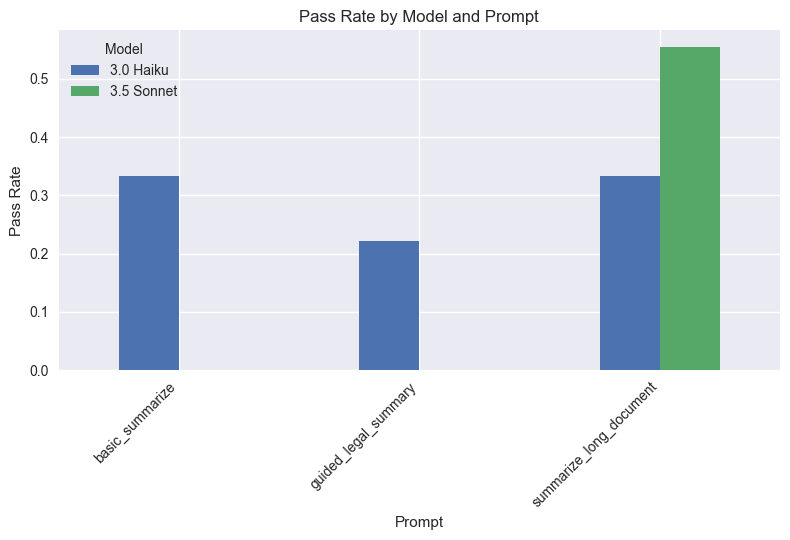
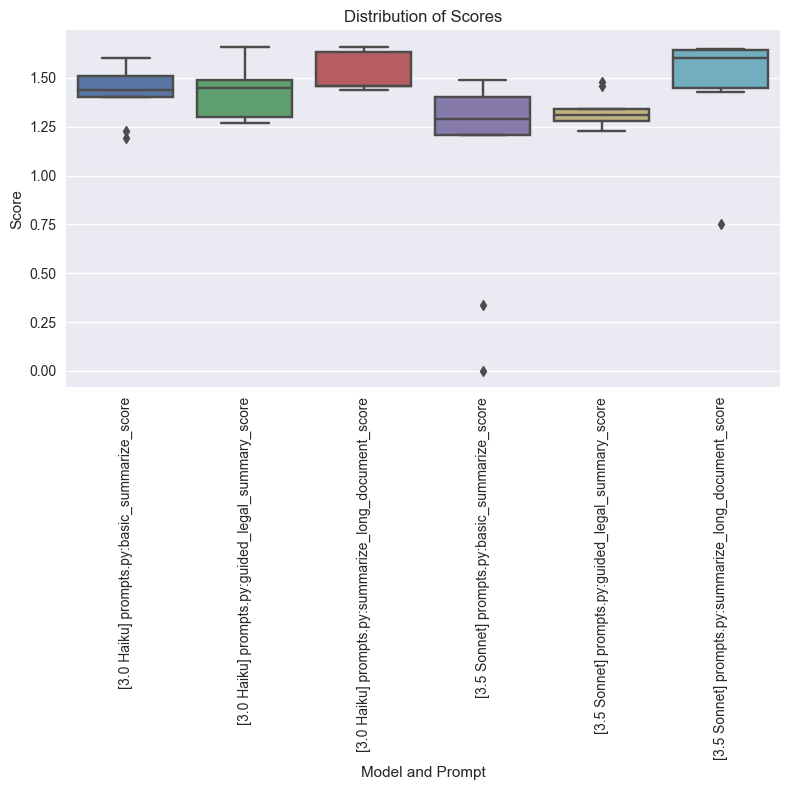
从结果来看,表现最佳的是 3.5 Sonnet,在所有评估中通过率达到 66%,45 个测试中仅有 3 个失败(当一个提示的某个测试失败时,即视为失败)。而这仅仅是开始——我们在这里使用的完全是虚构数据,这些数据要么 (a) 由 Claude 生成,要么 (b) 取自 SEC 政府网站。当我们拥有真实数据时,可以做得更好,因为我们对所处理的具体问题集有更深入的了解。
迭代改进
当我们更深入地查看评估结果时,会发现仍有持续改进的空间。这正是提示工程中迭代部分的用武之地。以下是我们为改进结果可以采取的一些步骤:
- 分析 Promptfoo 结果以识别优势与不足——例如,我们的 contains 评估似乎经常失败。这可能是因为某些文档不包含 XML 标签中所要求的信息。如果我们要准确评估性能,就应该改进这个评估(但这只是一个示例!)。
- 优化提示以解决具体问题(例如,提高简洁性或完整性)——我们看到 multi-shot 最初是一个非常好的首次尝试。我们应该将其与一些高级技术结合使用,以进一步提升性能。
- 针对长文档尝试不同的分块策略。
- 微调 temperature 和 max_tokens 参数。
- 实施后处理步骤以提升摘要质量。
结论与最佳实践
在本指南中,我们介绍了一系列使用 Claude 进行文档摘要的技术,并重点关注法律文档。构建一个完美的摘要系统和摘要评估框架是一门艺术:它需要结合这些方法才能成功。正如我们在开头提到的,摘要是一个非常主观的话题,但我们还是努力尝试了寻找可行的评估方法,并对我们的结果感到满意。同时也要始终记住——你不是在将结果与 100% 的准确率进行基准对比。你是在与你自己完成这项复杂任务的表现进行基准对比;而借助本指南中所展示的 Claude 的速度和效率,你会开始意识到这种方法论方法的真正好处,这样你就可以把时间花在真正的决策上。
总结这里的建议,我们列出了一些需要牢记的最佳实践:
- 编写清晰且具体的提示。使用诸如“不要前言”之类的内容来约束输出。
- 至少使用 2 个示例。
- 对领域特定文档使用引导式摘要。
- 为长文档实施有效的高级策略。
- 定期评估并优化你的方法。
- 考虑 AI 生成摘要的伦理影响和局限性。
常见问题
常见错误包括:API Key未配置或.env未加载导致认证失败;PDF抽取出现乱码或页眉页脚混入,需加强clean_text正则;输出缺少</summary>导致解析为空,应检查stop_sequences与max_tokens是否过小;rank_documents中float解析失败,因模型返回非纯数字,需加异常处理与重试;分块边界切断条款语义,应改为按段落或标题切分;评估中contains频繁失败,往往是文档本身不含目标字段,应修正评估标准而非模型。生产优化建议:对摘要与排序结果做缓存;用异步并发处理多文档;对长文档采用层次化摘要并保留来源引用;设置temperature=0保证可复现;加入人工抽检与ROUGE、事实一致性双重评估;对敏感法律文档做脱敏与访问控制。
企业应用扩展
可进一步扩展的方向:将摘要索引文档与向量检索混合,先摘要粗排再向量精排;引入重排序模型对Top-K摘要二次压缩;用JSON Schema或工具调用替代XML标签,获得更强结构化输出;把评估集从虚构数据替换为真实业务标注数据,并加入事实一致性、引用可追溯性指标;将整个流程封装为可配置的摘要服务,支持按文档类型切换提示模板与模型;结合成本监控,按文档长度动态选择Haiku或Sonnet,形成可持续迭代的AI工程闭环。
总结
本文面向有编程基础的开发者,系统讲解如何用Claude构建生产级文本摘要系统。内容覆盖PDF文本抽取与清洗、基础摘要、少样本多示例摘要、引导式与领域特定摘要、长文档分块元摘要,以及摘要索引文档这一高级RAG方法。文章强调通过assistant前言与停止序列约束输出结构,用XML标签实现可解析摘要,并借助Promptfoo、ROUGE等工具做自动化评估与迭代优化,最终给出可落地的环境准备、代码分析、常见错误排查与生产优化建议。
- --
内容来源与验证
- 内容等级:PREMIUM_A
- 质量等级:S_CANDIDATE
- 难度:中级
- 验证等级:V1
- 原文作者:Briiick
- 原文日期:2024-08-07
- 来源许可:MIT
- 来源版本:
de3db71037231f9d888aacbcc5b8212a1530258c - 查看原文
站内还有更多完整实战教程
加入会员,解锁全部教程、完整代码与持续更新内容。
加入会员