Gemini嵌入与Haystack跨模态检索教程
技术背景
传统检索系统通常按模态分别建模:文本用 BM25 或文本嵌入,图像用 CLIP 类模型,PDF 与音视频另建索引,导致跨模态查询需要多套模型和融合逻辑,工程复杂度高。Gemini Embedding 2 将文本、图像、视频、音频和 PDF 映射到同一向量空间,使任意模态可作为查询检索任意模态,显著简化架构。Haystack 作为生产级 LLM 编排框架,提供 DocumentStore、Embedder、Retriever、Pipeline 等标准组件,把嵌入模型接入可组合的数据流。该方案适用于多模态 RAG、语义搜索、媒体资产管理、论文图表检索等场景;限制在于需要付费层级速率限制、嵌入调用有成本与延迟、InMemoryDocumentStore 不适合生产规模。
核心原理
核心是统一嵌入空间:Gemini Embedding 2 对不同模态输入编码为同维度向量,语义相近的内容无论模态如何,余弦相似度都更高。Haystack 的数据流为:Document 对象承载 content 或 meta.file_path,Embedder 组件调用 Gemini API 生成 embedding 并写回 Document,DocumentStore 持久化向量,Retriever 接收查询向量并按相似度返回 top_k。文本查询用 GoogleGenAITextEmbedder,多模态文档用 GoogleGenAIMultimodalDocumentEmbedder,二者输出同一空间向量,因此可交叉检索。RAG 管道中 text_embedder 输出连接到 retriever.query_embedding,retriever 输出文档注入 ChatPromptBuilder 模板,再交给 GoogleGenAIChatGenerator 生成答案。Gemini 嵌入模型采用套娃表示学习(MRL),可通过 config 的 output_dimensionality 控制向量维度,在存储与精度间权衡。
架构分析
系统由四层组成:输入层负责准备 Document,文本直接写入 content,图像/视频/PDF 写入 meta.file_path 并可按 page_number 指定页;嵌入层由 GoogleGenAIDocumentEmbedder、GoogleGenAITextEmbedder、GoogleGenAIMultimodalDocumentEmbedder 组成,统一调用 gemini-embedding-2;存储与检索层使用 InMemoryDocumentStore 配合 cosine 相似度函数和 InMemoryEmbeddingRetriever;生成层由 ChatPromptBuilder 与 GoogleGenAIChatGenerator 构成 RAG 管道。关键设计决策包括:查询与文档使用同一嵌入模型保证空间一致;PDF 按页拆分为独立 Document 以提升检索粒度;通过 prefix 参数为查询添加任务前缀以匹配模型训练格式;用 Pipeline.connect 显式声明组件依赖,使检索、提示构建、生成可独立替换。生产环境应将 InMemoryDocumentStore 替换为向量数据库集成。
完整实战教程
##### 版权所有 2026 Google LLC。
# @title Licensed under the Apache License, Version 2.0 (the "License");
# you may not use this file except in compliance with the License.
# You may obtain a copy of the License at
#
# https://www.apache.org/licenses/LICENSE-2.0
#
# Unless required by applicable law or agreed to in writing, software
# distributed under the License is distributed on an "AS IS" BASIS,
# WITHOUT WARRANTIES OR CONDITIONS OF ANY KIND, either express or implied.
# See the License for the specific language governing permissions and
# limitations under the License.
Gemini API:使用 Gemini Embedding 2 和 Haystack 进行跨模态检索

注意: 本笔记本需要付费层级的速率限制才能正常运行。(更多详情请参阅定价)。
概述
Gemini Embedding 2 是一个多模态嵌入模型,可将文本、图像、视频、音频和 PDF 映射到统一的嵌入空间中。
Haystack 是一个开源 AI 编排框架,用于构建上下文工程化、可投入生产的 LLM 应用。你可以用它来构建 Agent、RAG、多模态应用、语义搜索等。
在本 notebook 中,你将看到多种将 Gemini Embedding 2 与 Haystack 结合使用的方式,从文本检索和 RAG 开始,扩展到多个跨模态示例,即使用一种模态来搜索其他模态。你可以在发布博客文章中了解更多关于此集成的信息。
<!-- Community Contributor Badge -->
<table>
<tr>
<!-- Author Avatar Cell -->
<td bgcolor="#d7e6ff">
<a href="https://github.com/anakin87" target="_blank" title="在 GitHub 上查看 anakin87 的个人资料">
 </a>
</a>
</td>
<td bgcolor="#d7e6ff">
<a href="https://github.com/bilgeyucel" target="_blank" title="在 GitHub 上查看 bilgeyucel 的个人资料">
 </a>
</a>
</td>
<!-- Text Content Cell -->
<td bgcolor="#d7e6ff">
<h2><font color='black'>本 notebook 由 <a href="https://github.com/anakin87" target="_blank"><font color='#217bfe'><strong>Stefano Fiorucci</strong></font></a> 和 <a href="https://github.com/bilgeyucel" target="_blank"><font color='#217bfe'><strong>Bilge Yücel</strong></font></a> 贡献。</font></h2>
<h5><font color='black'><a href="https://www.linkedin.com/in/stefano-fiorucci"><font color="#078efb">Stefano 的 LinkedIn</font></a> - <a href="https://www.linkedin.com/in/bilge-yucel"><font color="#078efb">Bilge 的 LinkedIn</font></a></h5></font><br>
<!-- Footer -->
<font color='black'><small><em>有有趣的 Gemini 示例?欢迎<a href="https://github.com/google-gemini/cookbook/blob/main/CONTRIBUTING.md" target="_blank"><font color="#078efb">也来分享</font></a>!</em></small></font>
</td>
</tr>
</table>
设置
首先,安装相关包并配置你的 API 密钥。
安装
安装 Haystack 的 Python 库 haystack-ai、Haystack 针对 Gemini API 的集成包 google-genai-haystack,以及运行示例所需的其他库。
%pip install --quiet haystack-ai google-genai-haystack
%pip install --quiet datasets pypdfium2 pillow
配置你的 API 密钥
要运行以下单元格,你的 API 密钥必须存储在名为 GEMINI_API_KEY 的 Colab Secret 中。如果你还没有 API 密钥,或者不确定如何创建 Colab Secret,请参阅 Authentication 获取示例。
import os
from google.colab import userdata

os.environ["GEMINI_API_KEY"] = userdata.get("GEMINI_API_KEY")
EMBEDDING_MODEL = "gemini-embedding-2"  # @param ["gemini-embedding-2"] {"allow-input":true, isTemplate: true}
GENERATIVE_MODEL = "gemini-3.8-flash"  # @param ["gemini-3.1-pro-preview", "gemini-3.8-flash", "gemini-3.7-flash", "gemini-3.6-flash", "gemini-3.5-flash-lite", "gemini-2.5-pro"] {"allow-input": true, "isTemplate": true}
文本检索
在第一个示例中,你将嵌入一组关于古代世界七大奇迹的文档,然后使用语义相似度对其进行搜索。
你将使用:
GoogleGenAIDocumentEmbedder来嵌入包含文本的文档GoogleGenAITextEmbedder来嵌入查询(文本字符串)
创建、嵌入并存储文档
从存储在 Hugging Face 上的数据集开始创建文档,使用 GoogleGenAIDocumentEmbedder 对它们进行嵌入,然后将它们存储到 InMemoryDocumentStore 中。
InMemoryDocumentStore 是最简单的入门 DocumentStore,但不推荐用于生产环境。要了解 Haystack 支持的不同类型外部数据库的更多信息,请参阅 DocumentStore 集成。
from datasets import load_dataset
from haystack import Document
from haystack.document_stores.in_memory import InMemoryDocumentStore
from haystack_integrations.components.embedders.google_genai import (
    GoogleGenAIDocumentEmbedder,
    GoogleGenAITextEmbedder,
)

document_store = InMemoryDocumentStore(embedding_similarity_function="cosine")

dataset = load_dataset("bilgeyucel/seven-wonders", split="train")

docs = [Document(content=doc["content"], meta=doc["meta"]) for doc in dataset]

doc_embedder = GoogleGenAIDocumentEmbedder(model=EMBEDDING_MODEL, batch_size=32)
docs_with_embeddings = doc_embedder.run(docs)
document_store.write_documents(docs_with_embeddings["documents"])
检索文档
现在你可以嵌入查询,并使用 InMemoryEmbeddingRetriever 来查找相似文档。
from haystack.components.retrievers.in_memory import InMemoryEmbeddingRetriever

retriever = InMemoryEmbeddingRetriever(document_store)

query = "What does Statue of Zeus look like?"  # @param {type:"string"}
text_embedder = GoogleGenAITextEmbedder(model=EMBEDDING_MODEL)
query_embedding = text_embedder.run(query)["embedding"]

result = retriever.run(query_embedding=query_embedding, top_k=3)

for doc in result["documents"]:
    print(doc.meta)
    print(doc.content)
    print(doc.score)
    print("-" * 10)
创建 RAG 管道
现在你已经获得了良好的检索结果,可以创建一个 RAG 管道。
除了上面介绍的组件之外,你还需要使用:
- ChatPromptBuilder 来创建动态提示词
- GoogleGenAIChatGenerator,即 LLM,使用
gemini-3.7-flash
要更好地理解管道在 Haystack 上的工作方式,请查看使用检索增强创建你的第一个 QA 管道教程。
from haystack import Pipeline
from haystack.components.builders.chat_prompt_builder import ChatPromptBuilder
from haystack_integrations.components.generators.google_genai import GoogleGenAIChatGenerator

template = """
{% message role="user"%}
Given these documents, briefly answer the question.
Documents:
{% for doc in documents %}
    {{ doc.content }}
{% endfor %}

Question: {{ query }}
{% endmessage %}
"""

pipe = Pipeline()
pipe.add_component(
    "text_embedder",
    GoogleGenAITextEmbedder(
        model=EMBEDDING_MODEL,
        prefix="task: search result | query: "
    ),
)
pipe.add_component("retriever", InMemoryEmbeddingRetriever(document_store))
pipe.add_component(
    "prompt_builder", ChatPromptBuilder(template=template, required_variables="*")
)
pipe.add_component("llm", GoogleGenAIChatGenerator(model=GENERATIVE_MODEL))

pipe.connect("text_embedder.embedding", "retriever.query_embedding")
pipe.connect("retriever", "prompt_builder")
pipe.connect("prompt_builder", "llm")

query = "What does Statue of Zeus look like?"  # @param {type:"string"}

results = pipe.run(
    {
        "text_embedder": {"text": query},
        "prompt_builder": {"query": query},
    },
)

print(results["llm"]["replies"][0].text)
跨模态检索:使用文本在多种模态上进行搜索
由于 Gemini Embedding 2 将文本、图像、PDF、音频和视频嵌入到同一个嵌入空间中,因此它支持跨模态检索。
在本示例中,你将使用文本查询在包含不同模态数据的集合上进行搜索。
下载文件
从网上下载一些文件,主要是关于动物的。
!wget -q -O kangaroo.mp4 "https://www.pexels.com/download/video/5739690/"
!wget -q -O tiger.jpg "https://upload.wikimedia.org/wikipedia/commons/thumb/b/b0/Bengal_tiger_%28Panthera_tigris_tigris%29_female_3_crop.jpg/960px-Bengal_tiger_%28Panthera_tigris_tigris%29_female_3_crop.jpg"
!wget -q -O sample.pdf "https://pdfobject.com/pdf/sample.pdf"
!wget -q -O dog.jpg "https://upload.wikimedia.org/wikipedia/commons/3/3b/BlkStdSchnauzer2.jpg"
!wget -q -O cat.jpg "https://upload.wikimedia.org/wikipedia/commons/thumb/1/12/Tabby_cat_with_visible_nictitating_membrane.jpg/500px-Tabby_cat_with_visible_nictitating_membrane.jpg"
嵌入文档
由于此处不嵌入文本,请使用 GoogleGenAIMultimodalDocumentEmbedder,并仅在文档的 meta 中指定文件路径。
from haystack.document_stores.in_memory import InMemoryDocumentStore
from haystack import Document
from haystack_integrations.components.embedders.google_genai import GoogleGenAIMultimodalDocumentEmbedder

document_store = InMemoryDocumentStore()

docs = [
    Document(meta={"file_path": "kangaroo.mp4"}),
    Document(meta={"file_path": "tiger.jpg"}),
    Document(meta={"file_path": "sample.pdf"}),
    Document(meta={"file_path": "dog.jpg"}),
    Document(meta={"file_path": "cat.jpg"}),
]

doc_multimodal_embedder = GoogleGenAIMultimodalDocumentEmbedder(model=EMBEDDING_MODEL)
docs_with_embeddings = doc_multimodal_embedder.run(docs)
document_store.write_documents(docs_with_embeddings["documents"])
document_store.filter_documents()
搜索相似文档
现在你可以嵌入查询,并使用 InMemoryEmbeddingRetriever 来查找相似文档。
from haystack.components.retrievers.in_memory import InMemoryEmbeddingRetriever
from haystack_integrations.components.embedders.google_genai import GoogleGenAITextEmbedder


retriever = InMemoryEmbeddingRetriever(document_store)

query = "australian animals"  # @param {type:"string"}
text_embedder = GoogleGenAITextEmbedder(model=EMBEDDING_MODEL)
query_embedding = text_embedder.run(query)["embedding"]

result = retriever.run(query_embedding=query_embedding)

for doc in result["documents"]:
    print(doc.meta)
    print(doc.score)
    print("-" * 10)
跨模态检索:在 PDF 页面上搜索
Haystack 可以轻松地将 PDF 文档转换为 JPEG 图像(每页一张),这些图像可以单独嵌入,以实现更精确的检索。
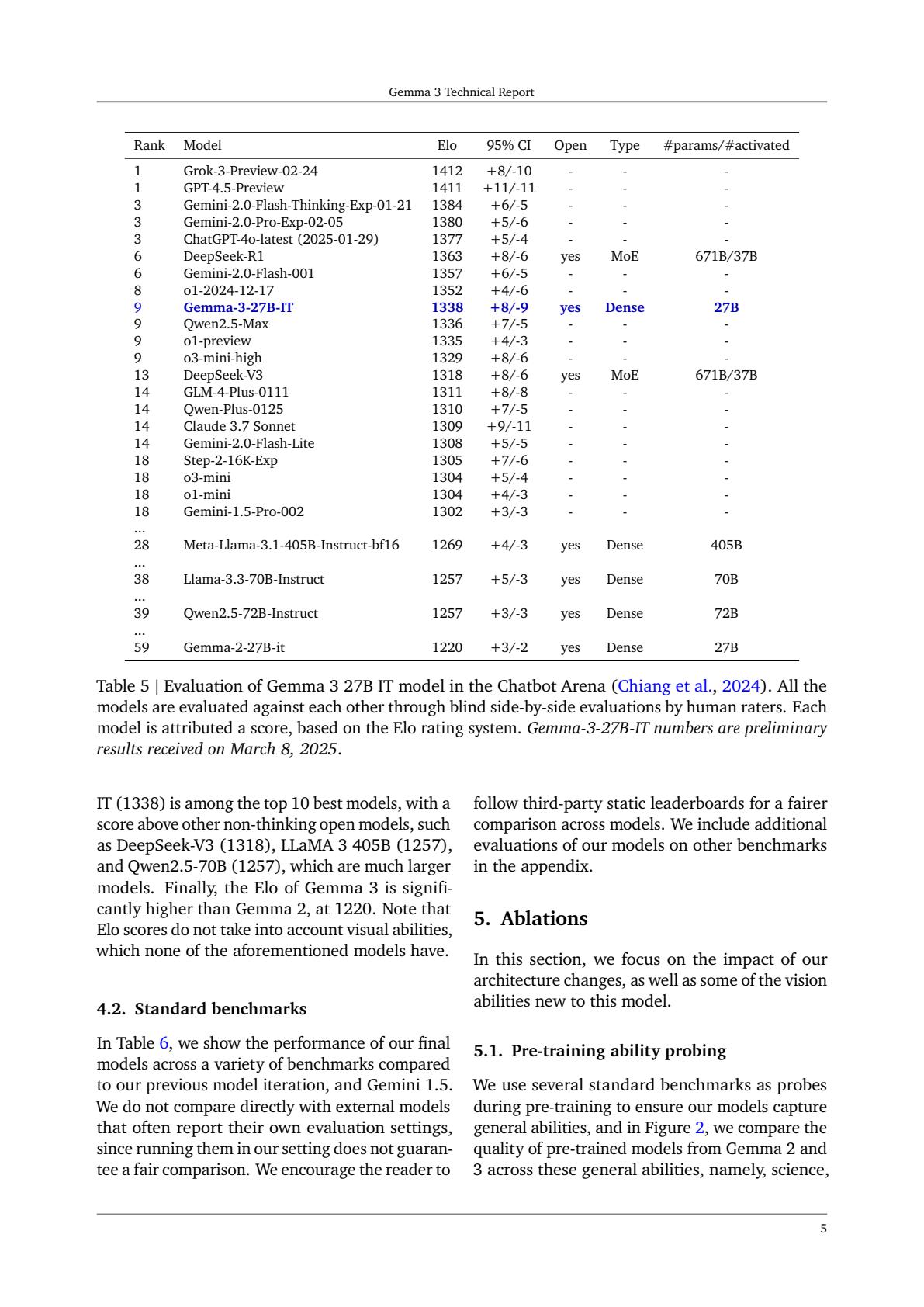
在本示例中,你将使用文本查询来搜索 Gemma 3 技术报告中的图表。
下载论文并嵌入
!wget -q "https://arxiv.org/pdf/2503.19786" -O gemma_3_report.pdf
from haystack import Document
from haystack.document_stores.in_memory import InMemoryDocumentStore

from haystack_integrations.components.embedders.google_genai import (
    GoogleGenAIMultimodalDocumentEmbedder,
)

documents = [
    Document(meta={"file_path": "gemma_3_report.pdf", "page_number": i})
    for i in range(1, 12)
]

multimodal_document_embedder = GoogleGenAIMultimodalDocumentEmbedder(
    model=EMBEDDING_MODEL
)

result = multimodal_document_embedder.run(documents)

document_store = InMemoryDocumentStore()
document_store.write_documents(result["documents"])
搜索相关页面
现在你可以嵌入查询,并使用 InMemoryEmbeddingRetriever 来查找相关页面。
from haystack.components.retrievers.in_memory import InMemoryEmbeddingRetriever
from haystack_integrations.components.embedders.google_genai import GoogleGenAITextEmbedder

query = "Evaluation of Gemma 3 27B IT model in the Chatbot Arena table"  # @param {type:"string"}

text_embedder = GoogleGenAITextEmbedder(model=EMBEDDING_MODEL)
query_embedding = text_embedder.run(text=query)["embedding"]
embedding_retriever = InMemoryEmbeddingRetriever(document_store=document_store)

results = embedding_retriever.run(query_embedding=query_embedding, top_k=3)["documents"]
for doc in results:
    print(doc.meta)
    print(doc.score)
    print("-" * 100)
验证检索结果
通过显示检索到的页面,检查其是否相关。
#@title Helper function to display a PDF page
import pypdfium2 as pdfium
from IPython.display import display


def show_pdf_page(file, page_number):
    pdf = pdfium.PdfDocument(file)
    page = pdf[page_number - 1]
    bitmap = page.render(scale=2)
    img = bitmap.to_pil()
    display(img)
show_pdf_page("gemma_3_report.pdf", results[0].meta["page_number"])
跨模态检索:图像到文本搜索
在此示例中,您使用图像嵌入来检索相似的文本。
由于所有模态共享相同的向量空间,您可以使用此方法支持任意方向的跨模态检索,例如文本到图像、图像到文本、音频到视频或视频到文档搜索。
您还可以选择嵌入维度:由于 Gemini 嵌入模型使用套娃表示学习(MRL)进行训练,您可以控制输出嵌入的大小,以节省存储空间并提高计算效率,同时将质量损失降至最低。
创建文档集合,嵌入并存储它们
from haystack import Document

documents = [
    Document(
        content=(
            "The capybara is the largest rodent in the world and is native to South America, "
            "where it lives near rivers, lakes, and wetlands. It is highly social and often "
            "seen relaxing in groups, spending much of its time swimming or soaking in water."
        )
    ),
    Document(
        content=(
            "Dogs are domesticated mammals known for their loyalty, intelligence, and strong "
            "bond with humans. They have been bred for thousands of years for roles such as "
            "companionship, hunting, guarding, and assisting people with various tasks."
        )
    ),
    Document(
        content=(
            "The tiger is the largest species of big cat and is recognized by its distinctive "
            "orange coat with black stripes. It is a powerful solitary predator that inhabits "
            "forests, grasslands, and wetlands across parts of Asia."
        )
    ),
    Document(
        content=(
            "The giraffe is the tallest land animal on Earth, easily identified by its long neck "
            "and distinctive spotted coat. It uses its height to reach leaves high in acacia trees "
            "and roams the savannas and open woodlands of Africa."
        )
    ),
]
from haystack.document_stores.in_memory import InMemoryDocumentStore
from haystack_integrations.components.embedders.google_genai import (
    GoogleGenAIDocumentEmbedder,
)

document_store = InMemoryDocumentStore(embedding_similarity_function="cosine")

doc_embedder = GoogleGenAIDocumentEmbedder(
    model=EMBEDDING_MODEL,
    batch_size=5,
    config={"output_dimensionality": 768},
)
docs_with_embeddings = doc_embedder.run(documents)
document_store.write_documents(docs_with_embeddings["documents"])
document_store.filter_documents()
下载图片并嵌入
现在,下载一张狗的图片,以便搜索相似的文本类文档。
!wget -q -O dog.jpg https://upload.wikimedia.org/wikipedia/commons/3/3b/BlkStdSchnauzer2.jpg
from haystack_integrations.components.embedders.google_genai import (
    GoogleGenAIMultimodalDocumentEmbedder,
)

image_doc = Document(meta={"file_path": "dog.jpg"})

image_embedder = GoogleGenAIMultimodalDocumentEmbedder(
    model=EMBEDDING_MODEL, config={"output_dimensionality": 768}
)

image_embedding = image_embedder.run([image_doc])["documents"][0].embedding
len(image_embedding)
使用图像嵌入来查找相关文档
from haystack.components.retrievers.in_memory import InMemoryEmbeddingRetriever

embedding_retriever = InMemoryEmbeddingRetriever(document_store=document_store)

results = embedding_retriever.run(query_embedding=image_embedding, top_k=3)["documents"]
for doc in results:
    print(doc.content)
    print(doc.score)
    print("-" * 100)
接下来是什么?
本 notebook 展示了如何将 Gemini Embedding 2 与 Haystack 结合,用于文本检索、RAG 以及跨模态检索。
Haystack-Gemini 集成还有更多用例。你可以在这里探索它们。
常见问题
常见错误:1) GEMINI_API_KEY 未配置或权限不足,报认证错误,需在 Colab Secret 中设置并确认付费层级;2) 免费层级触发速率限制,需降低 batch_size 或申请付费配额;3) 多模态文档只传 content 不传 meta.file_path,导致嵌入器找不到文件;4) PDF 页码越界,page_number 从 1 开始且需确认总页数;5) 查询与文档嵌入维度不一致,使用 output_dimensionality 时两侧必须相同;6) 检索结果不相关,检查是否遗漏 prefix 任务前缀或相似度函数设置;7) wget 下载失败导致文件缺失,需验证文件存在与大小。排查时先打印 document_store.filter_documents() 确认写入,再检查 embedding 长度与 score 分布。
企业应用扩展
可扩展方向:将 InMemoryDocumentStore 替换为 Elasticsearch、Qdrant、Weaviate 等生产级 DocumentStore;引入混合检索结合 BM25 与向量召回;对 PDF 先做版面解析再按图表区域嵌入;用 output_dimensionality 压缩向量降低存储成本;将 RAG 管道封装为 Haystack Pipeline 并暴露 REST 服务;增加重排序模型提升 top_k 精度;对音视频做分段嵌入以支持时间戳定位;结合 Agent 实现多轮跨模态问答。更多集成可参考 Haystack Google GenAI 集成文档与发布博客。
总结
本教程面向有编程基础的开发者,讲解如何用 Gemini Embedding 2 与 Haystack 构建跨模态检索与 RAG 系统。内容涵盖统一嵌入空间原理、文本检索、文本到图像/视频/PDF 的跨模态搜索、图像到文本检索,以及 MRL 维度控制。通过可执行代码演示文档嵌入、InMemoryDocumentStore 存储、InMemoryEmbeddingRetriever 检索和 ChatPromptBuilder 驱动的 RAG 管道,并给出常见错误排查与生产优化建议。
- --
内容来源与验证
- 内容等级:PREMIUM_A
- 质量等级:A
- 难度:中级
- 验证等级:V1
- 原文作者:
- 原文日期:
- 来源许可:Apache-2.0
- 来源版本:
2a1b629060125041ea69ba74afa497bc6903aa3f - 查看原文
站内还有更多完整实战教程
加入会员,解锁全部教程、完整代码与持续更新内容。
加入会员