使用Codex CLI与Agents SDK构建一致的工作流
技术背景
在AI工程实践中,开发者常面临智能体行为不可控、上下文管理混乱、多智能体协作困难等问题。Codex CLI作为OpenAI的编码代理,可通过MCP(Model Context Protocol)服务器暴露为工具,与Agents SDK无缝集成。这种架构允许开发者利用Codex的代码生成能力,同时通过Agents SDK的编排、交接和追踪功能,实现复杂工作流的自动化与可审计性。适用于代码重构、功能开发、测试生成等场景,但需注意MCP服务器已弃用,新项目应转向Codex SDK或应用服务器。
核心原理
核心原理是将Codex CLI作为MCP服务器运行,通过标准输入输出与Agents SDK通信。MCP服务器暴露两个工具:codex()用于创建对话,codex-reply()用于继续对话。Agents SDK中的Agent通过mcp_servers参数挂载该服务器,从而在推理过程中调用Codex执行代码生成任务。数据流为:用户输入→Agent(如项目经理)→调用Codex MCP工具→Codex执行代码生成→返回结果→Agent根据结果决定下一步(如交接给其他Agent)。关键设计决策包括:设置client_session_timeout_seconds为360000以应对长时间任务;在指令中指定approval-policy和sandbox参数,实现无人工干预的文件写入;使用RECOMMENDED_PROMPT_PREFIX优化交接提示。
架构分析
系统采用分层架构:顶层为Agents SDK的Agent编排层,负责任务分解、交接和状态管理;中间层为MCP服务器,作为Agent与Codex CLI的桥梁;底层为Codex CLI,执行具体的代码生成和文件操作。多代理工作流中,项目经理Agent作为协调者,通过handoffs列表管理设计师、前端、后端、测试等专业Agent。每个Agent拥有明确的指令和交付物,通过门控逻辑确保工件存在后才进行交接。这种设计体现了职责分离、可扩展性和可观测性,但需注意Agent间交接的复杂性和潜在的性能瓶颈。
完整实战教程
存档示例 — Codex MCP服务器已弃用。 本笔记本使用codex mcp-server,当前文档为现有集成保留了该功能。对于新的自动化和CI作业,请从Codex SDK开始。对于需要管理身份验证、对话历史、审批和流式事件的更深入集成,请使用Codex应用服务器。这些是不同的接口;下面的代码不是迁移示例。
确保可重复、可追踪且可扩展的智能体开发
简介
开发者在做任何事情时都追求一致性。借助Codex CLI和Agents SDK,这种一致性现在可以以前所未有的方式扩展。无论你是重构大型代码库、推出新功能,还是引入新的测试框架,Codex都能无缝集成到CLI、IDE和云工作流中,以自动化和强制执行可重复的开发模式。
在本教程中,我们将使用Agents SDK构建单智能体和多智能体系统,并将Codex CLI作为MCP服务器暴露。这可以实现:
- 一致性和可重复性:为每个智能体提供范围限定的上下文。
- 可扩展的编排:协调单智能体和多智能体系统。
- 可观测性和可审计性:通过查看完整的智能体堆栈跟踪。
我们将涵盖的内容
- 将Codex CLI初始化为MCP服务器:如何将Codex作为长期运行的MCP进程运行。
- 构建单智能体系统:使用Codex MCP处理范围限定的任务。
- 编排多智能体工作流:协调多个专业智能体。
- 追踪智能体行为:利用智能体跟踪实现可见性和评估。
先决条件和设置
在开始本教程之前,请确保你具备以下条件:
- 基本的编码熟悉度:你应该熟悉Python和JavaScript。
- 开发环境:你需要一个IDE,如VS Code或Cursor。
- OpenAI API密钥:在OpenAI仪表板中创建或找到你的API密钥。
环境设置
- 在你的目录中创建一个
.env文件夹,并添加你的OPENAI_API_KEY密钥。 - 安装依赖。
%pip install openai-agents openai ## install dependencies
将 Codex CLI 初始化为 MCP 服务器
这里在 Agents SDK 中运行 Codex CLI 作为 MCP 服务器。我们提供了 codex mcp 的初始化参数。此命令将 Codex CLI 作为 MCP 服务器启动,并暴露 MCP 服务器上可用的两个 Codex 工具——codex() 和 codex-reply()。这些是 Agents SDK 在需要调用 Codex 时将调用的底层工具。
codex()用于创建对话。codex-reply()用于继续对话。
import asyncio
from agents import Agent, Runner
from agents.mcp import MCPServerStdio

async def main() -> None:
    async with MCPServerStdio(
        name="Codex CLI",
        params={
            "command": "npx",
            "args": ["-y", "codex", "mcp-server"],
        },
        client_session_timeout_seconds=360000,
    ) as codex_mcp_server:
        print("Codex MCP server started.")
        # We will add more code here in the next section
        return
另请注意,我们延长了 MCP 服务器的超时时间,以便让 Codex CLI 有足够的时间执行并完成给定的任务。
- --
构建单代理系统
让我们从一个简单的示例开始,使用我们的 Codex MCP 服务器。我们定义两个代理:
- 设计代理 – 为游戏进行头脑风暴并创建简短的设计概要。
- 开发代理 – 根据设计代理的规格实现一个简单的游戏。
developer_agent = Agent(
    name="Game Developer",
    instructions=(
        "You are an expert in building simple games using basic html + css + javascript with no dependencies. "
        "Save your work in a file called index.html in the current directory."
        "Always call codex with \"approval-policy\": \"never\" and \"sandbox\": \"workspace-write\""
    ),
    mcp_servers=[codex_mcp_server],
)

designer_agent = Agent(
    name="Game Designer",
    instructions=(
        "You are an indie game connoisseur. Come up with an idea for a single page html + css + javascript game that a developer could build in about 50 lines of code. "
        "Format your request as a 3 sentence design brief for a game developer and call the Game Developer coder with your idea."
    ),
    model="gpt-5",
    handoffs=[developer_agent],
)

result = await Runner.run(designer_agent, "Implement a fun new game!")
请注意,我们赋予了 Developer agent 直接向项目目录写入文件的能力,无需向用户请求权限。
现在运行代码,你会看到一个 index.html 文件生成。打开该文件,开始玩游戏吧!
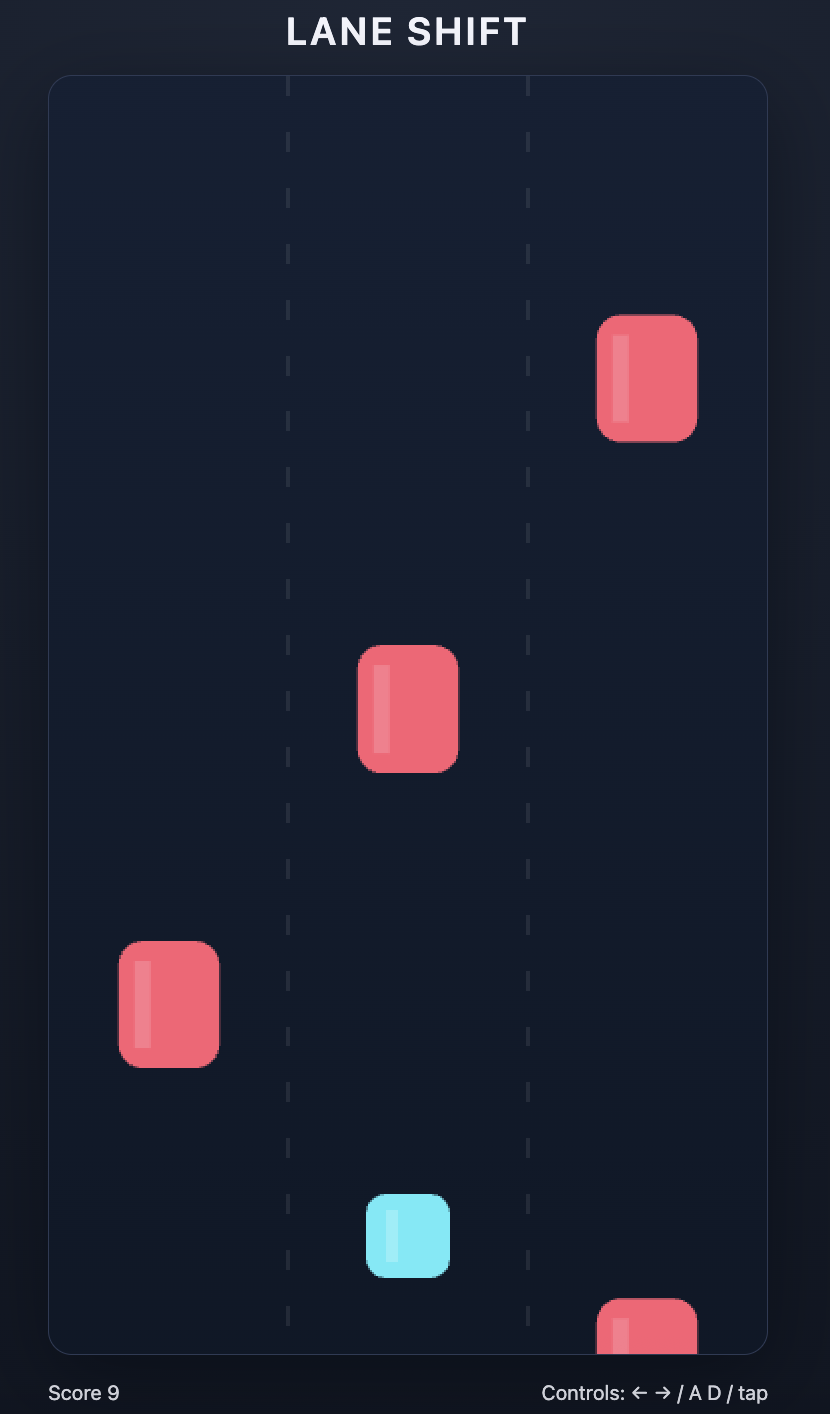
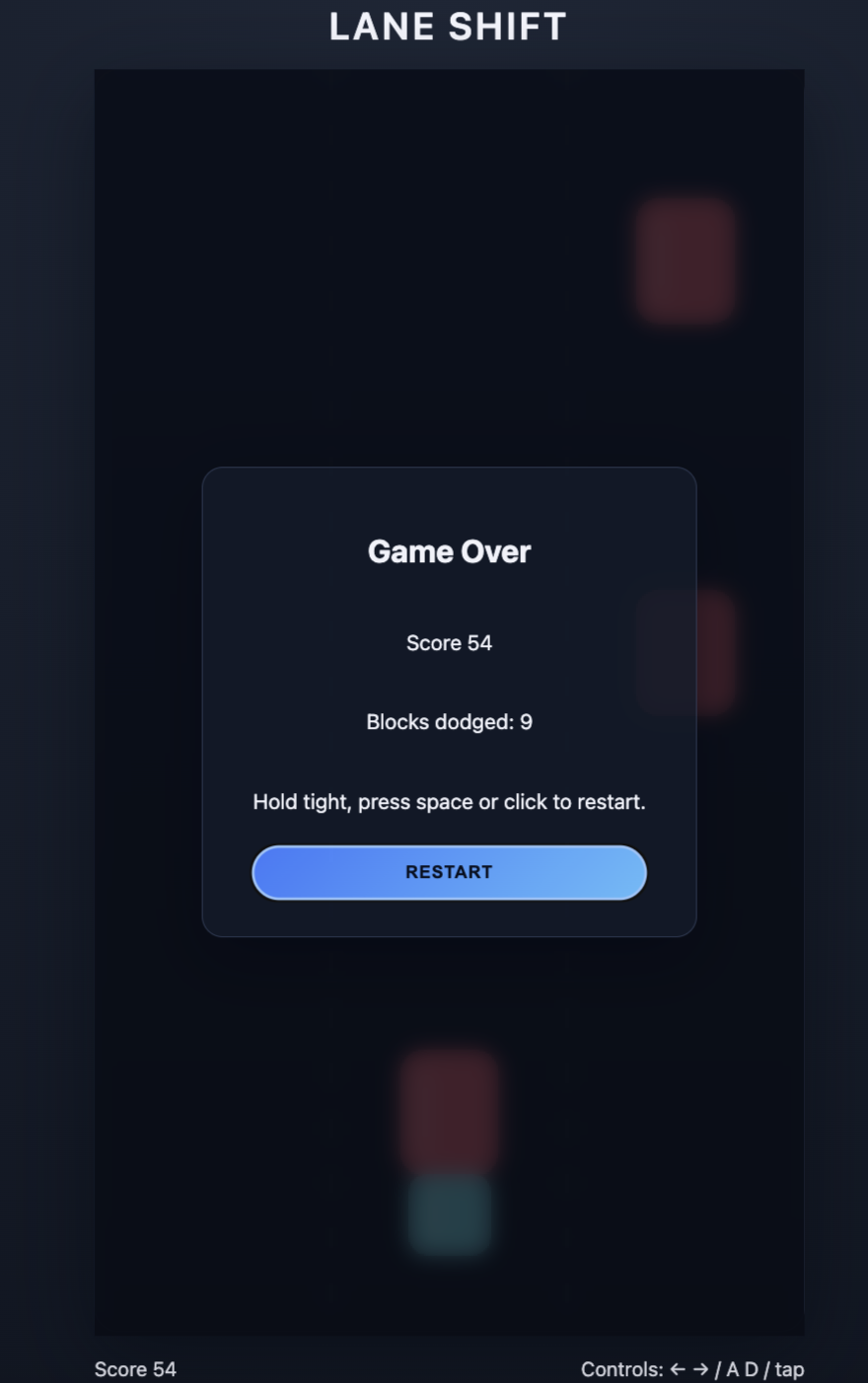
以下是我的 agentic 系统创建的游戏截图。你的可能会有所不同!
| 游戏示例 | 游戏结束得分 |
| :---: | :---: |
 |
|
 |
|
以下是完整的可执行代码。请注意,运行可能需要几分钟时间。如果生成了 index.html 文件,则说明运行成功。您可能还会看到一些关于格式的 MCP 事件警告。您可以忽略这些事件。
import os
from dotenv import load_dotenv
import asyncio
from agents import Agent, Runner, set_default_openai_api
from agents.mcp import MCPServerStdio

load_dotenv(override=True) # load the API key from the .env file. We set override to True here to ensure the notebook is loading any changes
set_default_openai_api(os.getenv("OPENAI_API_KEY"))

async def main() -> None:
    async with MCPServerStdio(
        name="Codex CLI",
        params={
            "command": "npx",
            "args": ["-y", "codex", "mcp-server"],
        },
        client_session_timeout_seconds=360000,
    ) as codex_mcp_server:
        developer_agent = Agent(
            name="Game Developer",
            instructions=(
                "You are an expert in building simple games using basic html + css + javascript with no dependencies. "
                "Save your work in a file called index.html in the current directory."
                "Always call codex with \"approval-policy\": \"never\" and \"sandbox\": \"workspace-write\""
            ),
            mcp_servers=[codex_mcp_server],
        )

        designer_agent = Agent(
            name="Game Designer",
            instructions=(
                "You are an indie game connoisseur. Come up with an idea for a single page html + css + javascript game that a developer could build in about 50 lines of code. "
                "Format your request as a 3 sentence design brief for a game developer and call the Game Developer coder with your idea."
            ),
            model="gpt-5",
            handoffs=[developer_agent],
        )

        result = await Runner.run(designer_agent, "Implement a fun new game!")
        # print(result.final_output)


if __name__ == "__main__":
    # Jupyter/IPython already runs an event loop, so calling asyncio.run() here
    # raises "asyncio.run() cannot be called from a running event loop".
    # Workaround: if a loop is running (notebook), use top-level `await`; otherwise use asyncio.run().
    try:
        asyncio.get_running_loop()
        await main()
    except RuntimeError:
        asyncio.run(main())
编排多代理工作流
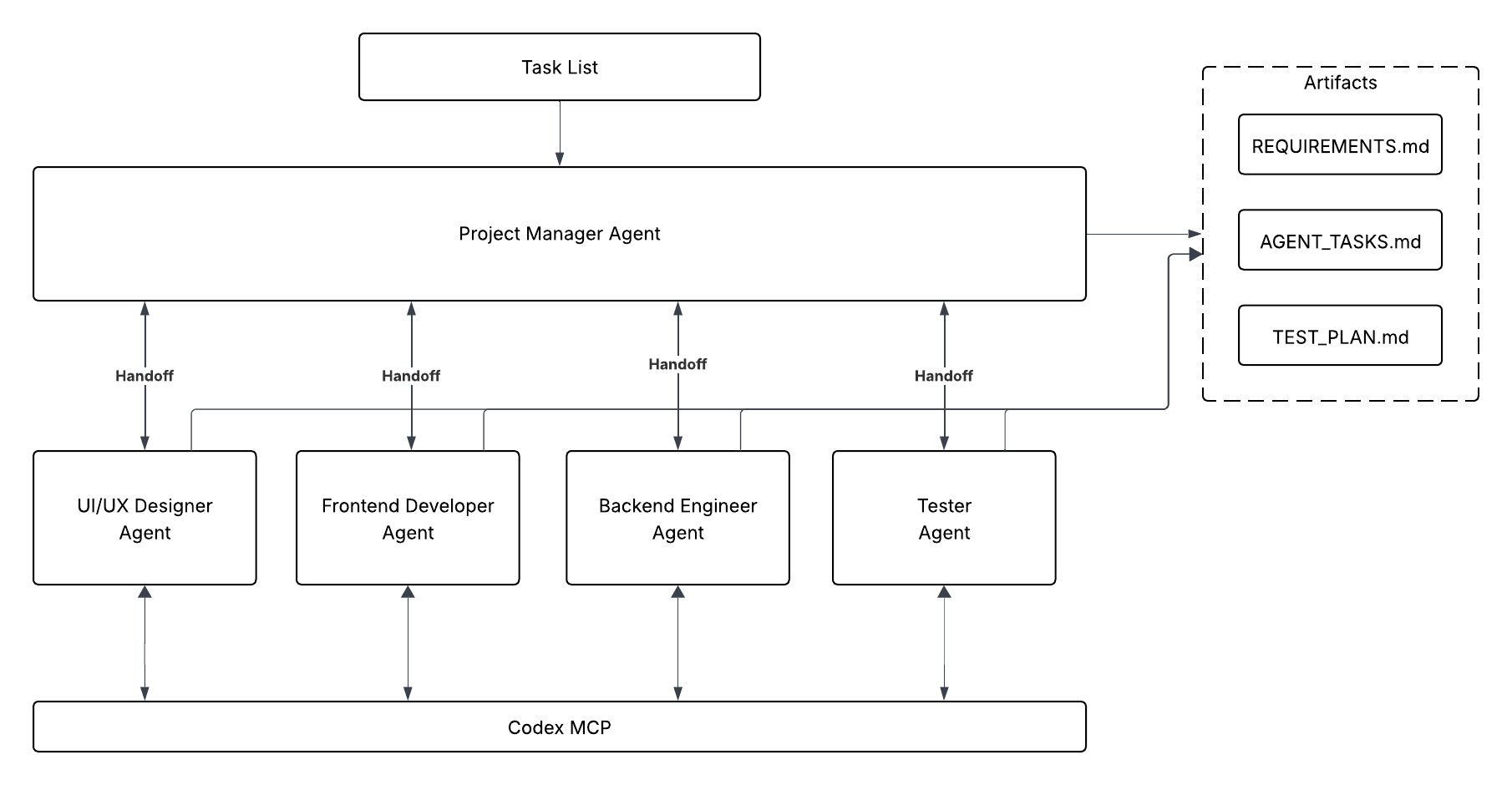
对于更大的工作流,我们引入了一个代理团队:
- 项目经理:分解任务列表,创建需求,并协调工作。
- 设计师:生成 UI/UX 规范。
- 前端开发人员:实现 UI/UX。
- 后端开发人员:实现 API 和逻辑。
- 测试人员:根据验收标准验证输出。
在此示例中,我们特意让项目经理代理在专业化的下游代理之间强制执行门控逻辑。这确保了在交接之前工件已经存在。这反映了现实世界中的企业工作流,例如 JIRA 任务编排、长链发布和 QA 签署。
<div align="center">
 <br />
<em>使用 Codex MCP 和门控交接进行多代理编排,生成工件。</em>
</div>
在这种结构中,每个代理都有专门的用途。项目经理总体负责协调所有其他代理,并确保整体任务完成。
定义 Codex CLI MCP 服务器
我们像在单代理示例中那样设置 MCP 服务器来初始化 Codex CLI。
async def main() -> None:
    async with MCPServerStdio(
        name="Codex CLI",
        params={
            "command": "npx",
            "args": ["-y", "codex", "mcp-server"],
        },
        client_session_timeout_seconds=360000,
    ) as codex_mcp_server:
        print("Codex MCP server started.")
        # We will add more code here in the next section
        return
Define each specialized agent
Below we define each of our specialized agents and provide access to our Codex MCP server. Notice that we are also passing the RECOMMENDED_PROMPT_PREFIX to each agent that helps the system optimize for handoffs between agents.
# Downstream agents are defined first for clarity, then PM references them in handoffs.
designer_agent = Agent(
    name="Designer",
    instructions=(
        f"""{RECOMMENDED_PROMPT_PREFIX}"""
        "You are the Designer.\n"
        "Your only source of truth is AGENT_TASKS.md and REQUIREMENTS.md from the Project Manager.\n"
        "Do not assume anything that is not written there.\n\n"
        "You may use the internet for additional guidance or research."
        "Deliverables (write to /design):\n"
        "- design_spec.md – a single page describing the UI/UX layout, main screens, and key visual notes as requested in AGENT_TASKS.md.\n"
        "- wireframe.md – a simple text or ASCII wireframe if specified.\n\n"
        "Keep the output short and implementation-friendly.\n"
        "When complete, handoff to the Project Manager with transfer_to_project_manager."
        "When creating files, call Codex MCP with {\"approval-policy\":\"never\",\"sandbox\":\"workspace-write\"}."
    ),
    model="gpt-5",
    tools=[WebSearchTool()],
    mcp_servers=[codex_mcp_server],
    handoffs=[],
)

frontend_developer_agent = Agent(
    name="Frontend Developer",
    instructions=(
        f"""{RECOMMENDED_PROMPT_PREFIX}"""
        "You are the Frontend Developer.\n"
        "Read AGENT_TASKS.md and design_spec.md. Implement exactly what is described there.\n\n"
        "Deliverables (write to /frontend):\n"
        "- index.html – main page structure\n"
        "- styles.css or inline styles if specified\n"
        "- main.js or game.js if specified\n\n"
        "Follow the Designer’s DOM structure and any integration points given by the Project Manager.\n"
        "Do not add features or branding beyond the provided documents.\n\n"
        "When complete, handoff to the Project Manager with transfer_to_project_manager_agent."
        "When creating files, call Codex MCP with {\"approval-policy\":\"never\",\"sandbox\":\"workspace-write\"}."
    ),
    model="gpt-5",
    mcp_servers=[codex_mcp_server],
    handoffs=[],
)

backend_developer_agent = Agent(
    name="Backend Developer",
    instructions=(
        f"""{RECOMMENDED_PROMPT_PREFIX}"""
        "You are the Backend Developer.\n"
        "Read AGENT_TASKS.md and REQUIREMENTS.md. Implement the backend endpoints described there.\n\n"
        "Deliverables (write to /backend):\n"
        "- package.json – include a start script if requested\n"
        "- server.js – implement the API endpoints and logic exactly as specified\n\n"
        "Keep the code as simple and readable as possible. No external database.\n\n"
        "When complete, handoff to the Project Manager with transfer_to_project_manager_agent."
        "When creating files, call Codex MCP with {\"approval-policy\":\"never\",\"sandbox\":\"workspace-write\"}."
    ),
    model="gpt-5",
    mcp_servers=[codex_mcp_server],
    handoffs=[],
)

tester_agent = Agent(
    name="Tester",
    instructions=(
        f"""{RECOMMENDED_PROMPT_PREFIX}"""
        "You are the Tester.\n"
        "Read AGENT_TASKS.md and TEST.md. Verify that the outputs of the other roles meet the acceptance criteria.\n\n"
        "Deliverables (write to /tests):\n"
        "- TEST_PLAN.md – bullet list of manual checks or automated steps as requested\n"
        "- test.sh or a simple automated script if specified\n\n"
        "Keep it minimal and easy to run.\n\n"
        "When complete, handoff to the Project Manager with transfer_to_project_manager."
        "When creating files, call Codex MCP with {\"approval-policy\":\"never\",\"sandbox\":\"workspace-write\"}."
    ),
    model="gpt-5",
    mcp_servers=[codex_mcp_server],
    handoffs=[],
)
每个角色完成其任务后,将调用 transfer_to_project_manager_agent,并让项目经理确认所需文件存在(或要求修复),然后再放行下一个团队。
定义项目经理代理
项目经理是唯一接收初始提示、在项目目录中创建规划文档,并在每次转移前强制执行把关逻辑的代理。
project_manager_agent = Agent(
name="Project Manager",
instructions=(
    f"""{RECOMMENDED_PROMPT_PREFIX}"""
    """
    You are the Project Manager.

    Objective:
    Convert the input task list into three project-root files the team will execute against.

    Deliverables (write in project root):
    - REQUIREMENTS.md: concise summary of product goals, target users, key features, and constraints.
    - TEST.md: tasks with [Owner] tags (Designer, Frontend, Backend, Tester) and clear acceptance criteria.
    - AGENT_TASKS.md: one section per role containing:
        - Project name
        - Required deliverables (exact file names and purpose)
        - Key technical notes and constraints

    Process:
    - Resolve ambiguities with minimal, reasonable assumptions. Be specific so each role can act without guessing.
    - Create files using Codex MCP with {"approval-policy":"never","sandbox":"workspace-write"}.
    - Do not create folders. Only create REQUIREMENTS.md, TEST.md, AGENT_TASKS.md.

    Handoffs (gated by required files):
    1) After the three files above are created, hand off to the Designer with transfer_to_designer_agent and include REQUIREMENTS.md, and AGENT_TASKS.md.
    2) Wait for the Designer to produce /design/design_spec.md. Verify that file exists before proceeding.
    3) When design_spec.md exists, hand off in parallel to both:
        - Frontend Developer with transfer_to_frontend_developer_agent (provide design_spec.md, REQUIREMENTS.md, AGENT_TASKS.md).
        - Backend Developer with transfer_to_backend_developer_agent (provide REQUIREMENTS.md, AGENT_TASKS.md).
    4) Wait for Frontend to produce /frontend/index.html and Backend to produce /backend/server.js. Verify both files exist.
    5) When both exist, hand off to the Tester with transfer_to_tester_agent and provide all prior artifacts and outputs.
    6) Do not advance to the next handoff until the required files for that step are present. If something is missing, request the owning agent to supply it and re-check.

    PM Responsibilities:
    - Coordinate all roles, track file completion, and enforce the above gating checks.
    - Do NOT respond with status updates. Just handoff to the next agent until the project is complete.
    """
),
model="gpt-5",
model_settings=ModelSettings(
    reasoning=Reasoning(effort="medium")
),
handoffs=[designer_agent, frontend_developer_agent, backend_developer_agent, tester_agent],
mcp_servers=[codex_mcp_server],
)
在构建项目经理之后,脚本会将每个专家的交接对象重置为项目经理。这确保了交付物在继续推进之前会返回进行验证。
designer_agent.handoffs = [project_manager_agent]
frontend_developer_agent.handoffs = [project_manager_agent]
backend_developer_agent.handoffs = [project_manager_agent]
tester_agent.handoffs = [project_manager_agent]
添加到你的任务列表
这是项目经理将细化为整个系统的具体需求和任务的任务。
task_list = """
Goal: Build a tiny browser game to showcase a multi-agent workflow.

High-level requirements:
- Single-screen game called "Bug Busters".
- Player clicks a moving bug to earn points.
- Game ends after 20 seconds and shows final score.
- Optional: submit score to a simple backend and display a top-10 leaderboard.

Roles:
- Designer: create a one-page UI/UX spec and basic wireframe.
- Frontend Developer: implement the page and game logic.
- Backend Developer: implement a minimal API (GET /health, GET/POST /scores).
- Tester: write a quick test plan and a simple script to verify core routes.

Constraints:
- No external database—memory storage is fine.
- Keep everything readable for beginners; no frameworks required.
- All outputs should be small files saved in clearly named folders.
"""
接下来,运行你的系统,然后坐等观看智能体们开始工作,并在几分钟内创建出一个游戏!我们在下面提供了完整可执行的代码。一旦完成,你会注意到创建了以下文件目录。请注意,这种多智能体编排通常需要大约11分钟才能完全完成。
root_directory/
├── AGENT_TASKS.md
├── REQUIREMENTS.md
├── backend
│   ├── package.json
│   └── server.js
├── design
│   ├── design_spec.md
│   └── wireframe.md
├── frontend
│   ├── game.js
│   ├── index.html
│   └── styles.css
└── TEST.md
使用 node server.js 启动后端服务器,然后打开 index.html 文件即可开始游戏。
import os
from dotenv import load_dotenv
import asyncio
from agents import Agent, Runner, WebSearchTool, ModelSettings, set_default_openai_api
from agents.mcp import MCPServerStdio
from agents.extensions.handoff_prompt import RECOMMENDED_PROMPT_PREFIX
from openai.types.shared import Reasoning

load_dotenv(override=True) # load the API key from the .env file. We set override to True here to ensure the notebook is loading any changes
set_default_openai_api(os.getenv("OPENAI_API_KEY"))

async def main() -> None:
    async with MCPServerStdio(
        name="Codex CLI",
        params={"command": "npx", "args": ["-y", "codex", "mcp-server"]},
        client_session_timeout_seconds=360000,
    ) as codex_mcp_server:

        # Downstream agents are defined first for clarity, then PM references them in handoffs.
        designer_agent = Agent(
            name="Designer",
            instructions=(
                f"""{RECOMMENDED_PROMPT_PREFIX}"""
                "You are the Designer.\n"
                "Your only source of truth is AGENT_TASKS.md and REQUIREMENTS.md from the Project Manager.\n"
                "Do not assume anything that is not written there.\n\n"
                "You may use the internet for additional guidance or research."
                "Deliverables (write to /design):\n"
                "- design_spec.md – a single page describing the UI/UX layout, main screens, and key visual notes as requested in AGENT_TASKS.md.\n"
                "- wireframe.md – a simple text or ASCII wireframe if specified.\n\n"
                "Keep the output short and implementation-friendly.\n"
                "When complete, handoff to the Project Manager with transfer_to_project_manager."
                "When creating files, call Codex MCP with {\"approval-policy\":\"never\",\"sandbox\":\"workspace-write\"}."
            ),
            model="gpt-5",
            tools=[WebSearchTool()],
            mcp_servers=[codex_mcp_server],
            handoffs=[],
        )

        frontend_developer_agent = Agent(
            name="Frontend Developer",
            instructions=(
                f"""{RECOMMENDED_PROMPT_PREFIX}"""
                "You are the Frontend Developer.\n"
                "Read AGENT_TASKS.md and design_spec.md. Implement exactly what is described there.\n\n"
                "Deliverables (write to /frontend):\n"
                "- index.html – main page structure\n"
                "- styles.css or inline styles if specified\n"
                "- main.js or game.js if specified\n\n"
                "Follow the Designer’s DOM structure and any integration points given by the Project Manager.\n"
                "Do not add features or branding beyond the provided documents.\n\n"
                "When complete, handoff to the Project Manager with transfer_to_project_manager_agent."
                "When creating files, call Codex MCP with {\"approval-policy\":\"never\",\"sandbox\":\"workspace-write\"}."
            ),
            model="gpt-5",
            mcp_servers=[codex_mcp_server],
            handoffs=[],
        )

        backend_developer_agent = Agent(
            name="Backend Developer",
            instructions=(
                f"""{RECOMMENDED_PROMPT_PREFIX}"""
                "You are the Backend Developer.\n"
                "Read AGENT_TASKS.md and REQUIREMENTS.md. Implement the backend endpoints described there.\n\n"
                "Deliverables (write to /backend):\n"
                "- package.json – include a start script if requested\n"
                "- server.js – implement the API endpoints and logic exactly as specified\n\n"
                "Keep the code as simple and readable as possible. No external database.\n\n"
                "When complete, handoff to the Project Manager with transfer_to_project_manager_agent."
                "When creating files, call Codex MCP with {\"approval-policy\":\"never\",\"sandbox\":\"workspace-write\"}."
            ),
            model="gpt-5",
            mcp_servers=[codex_mcp_server],
            handoffs=[],
        )

        tester_agent = Agent(
            name="Tester",
            instructions=(
                f"""{RECOMMENDED_PROMPT_PREFIX}"""
                "You are the Tester.\n"
                "Read AGENT_TASKS.md and TEST.md. Verify that the outputs of the other roles meet the acceptance criteria.\n\n"
                "Deliverables (write to /tests):\n"
                "- TEST_PLAN.md – bullet list of manual checks or automated steps as requested\n"
                "- test.sh or a simple automated script if specified\n\n"
                "Keep it minimal and easy to run.\n\n"
                "When complete, handoff to the Project Manager with transfer_to_project_manager."
                "When creating files, call Codex MCP with {\"approval-policy\":\"never\",\"sandbox\":\"workspace-write\"}."
            ),
            model="gpt-5",
            mcp_servers=[codex_mcp_server],
            handoffs=[],
        )

        project_manager_agent = Agent(
            name="Project Manager",
            instructions=(
                f"""{RECOMMENDED_PROMPT_PREFIX}"""
                """
                You are the Project Manager.

                Objective:
                Convert the input task list into three project-root files the team will execute against.

                Deliverables (write in project root):
                - REQUIREMENTS.md: concise summary of product goals, target users, key features, and constraints.
                - TEST.md: tasks with [Owner] tags (Designer, Frontend, Backend, Tester) and clear acceptance criteria.
                - AGENT_TASKS.md: one section per role containing:
                  - Project name
                  - Required deliverables (exact file names and purpose)
                  - Key technical notes and constraints

                Process:
                - Resolve ambiguities with minimal, reasonable assumptions. Be specific so each role can act without guessing.
                - Create files using Codex MCP with {"approval-policy":"never","sandbox":"workspace-write"}.
                - Do not create folders. Only create REQUIREMENTS.md, TEST.md, AGENT_TASKS.md.

                Handoffs (gated by required files):
                1) After the three files above are created, hand off to the Designer with transfer_to_designer_agent and include REQUIREMENTS.md, and AGENT_TASKS.md.
                2) Wait for the Designer to produce /design/design_spec.md. Verify that file exists before proceeding.
                3) When design_spec.md exists, hand off in parallel to both:
                   - Frontend Developer with transfer_to_frontend_developer_agent (provide design_spec.md, REQUIREMENTS.md, AGENT_TASKS.md).
                   - Backend Developer with transfer_to_backend_developer_agent (provide REQUIREMENTS.md, AGENT_TASKS.md).
                4) Wait for Frontend to produce /frontend/index.html and Backend to produce /backend/server.js. Verify both files exist.
                5) When both exist, hand off to the Tester with transfer_to_tester_agent and provide all prior artifacts and outputs.
                6) Do not advance to the next handoff until the required files for that step are present. If something is missing, request the owning agent to supply it and re-check.

                PM Responsibilities:
                - Coordinate all roles, track file completion, and enforce the above gating checks.
                - Do NOT respond with status updates. Just handoff to the next agent until the project is complete.
                """
            ),
            model="gpt-5",
            model_settings=ModelSettings(
                reasoning=Reasoning(effort="medium")
            ),
            handoffs=[designer_agent, frontend_developer_agent, backend_developer_agent, tester_agent],
            mcp_servers=[codex_mcp_server],
        )

        designer_agent.handoffs = [project_manager_agent]
        frontend_developer_agent.handoffs = [project_manager_agent]
        backend_developer_agent.handoffs = [project_manager_agent]
        tester_agent.handoffs = [project_manager_agent]

        # Example task list input for the Project Manager
        task_list = """
Goal: Build a tiny browser game to showcase a multi-agent workflow.

High-level requirements:
- Single-screen game called "Bug Busters".
- Player clicks a moving bug to earn points.
- Game ends after 20 seconds and shows final score.
- Optional: submit score to a simple backend and display a top-10 leaderboard.

Roles:
- Designer: create a one-page UI/UX spec and basic wireframe.
- Frontend Developer: implement the page and game logic.
- Backend Developer: implement a minimal API (GET /health, GET/POST /scores).
- Tester: write a quick test plan and a simple script to verify core routes.

Constraints:
- No external database—memory storage is fine.
- Keep everything readable for beginners; no frameworks required.
- All outputs should be small files saved in clearly named folders.
"""

        # Only the Project Manager receives the task list directly
        result = await Runner.run(project_manager_agent, task_list, max_turns=30)
        print(result.final_output)

if __name__ == "__main__":
    # Jupyter/IPython already runs an event loop, so calling asyncio.run() here
    # raises "asyncio.run() cannot be called from a running event loop".
    # Workaround: if a loop is running (notebook), use top-level `await`; otherwise use asyncio.run().
    try:
        asyncio.get_running_loop()
        await main()
    except RuntimeError:
        asyncio.run(main())
使用 Traces 追踪代理行为
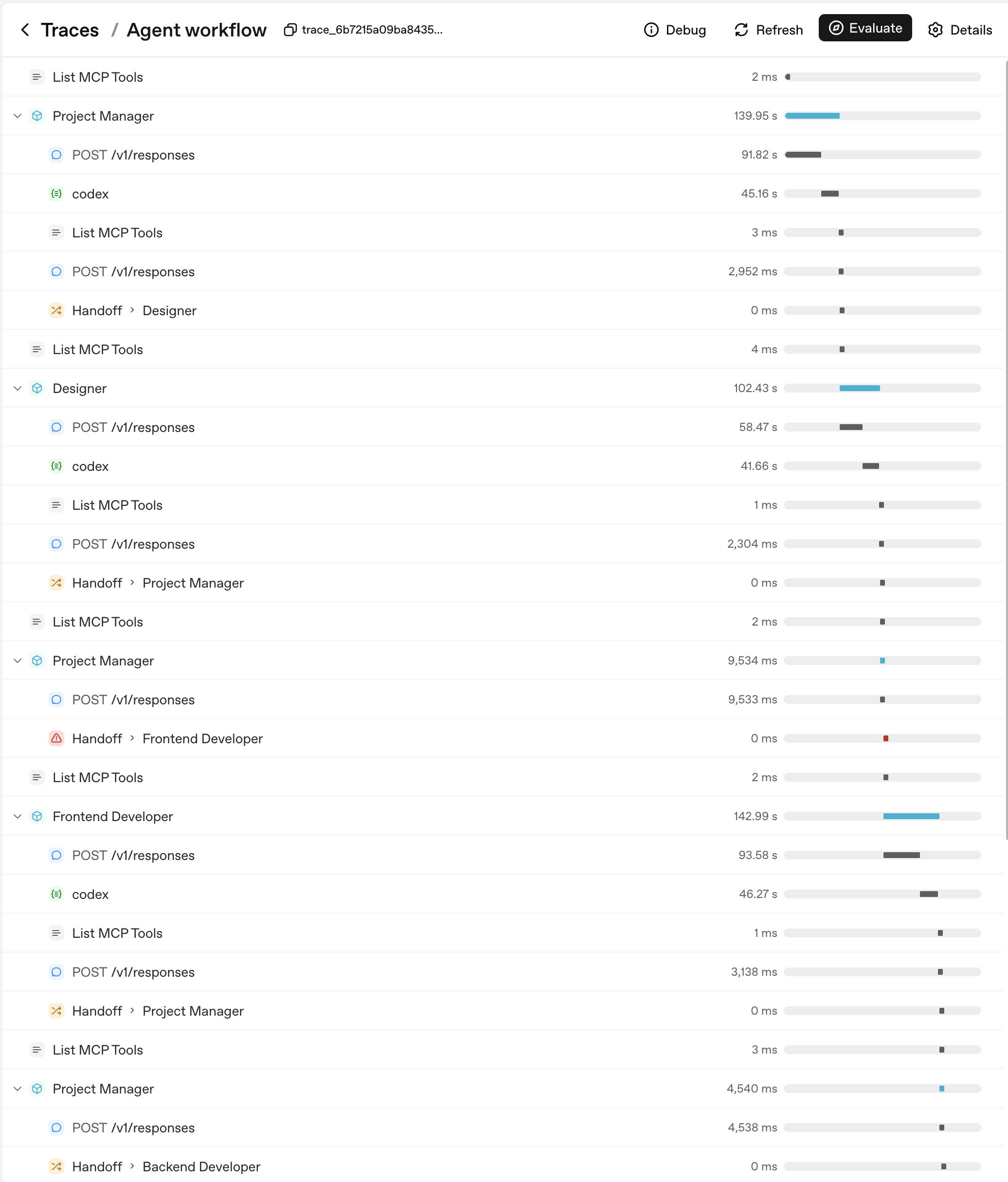
随着代理系统复杂度的增加,了解这些代理如何交互变得至关重要。我们可以通过 Traces 仪表板来实现这一点,它记录了:
- 提示词、工具调用以及代理之间的交接。
- MCP 服务器调用、Codex CLI 调用、执行时间和文件写入。
- 错误和警告。
让我们看看上面代理团队的代理追踪。
<div align="center">
 </div>
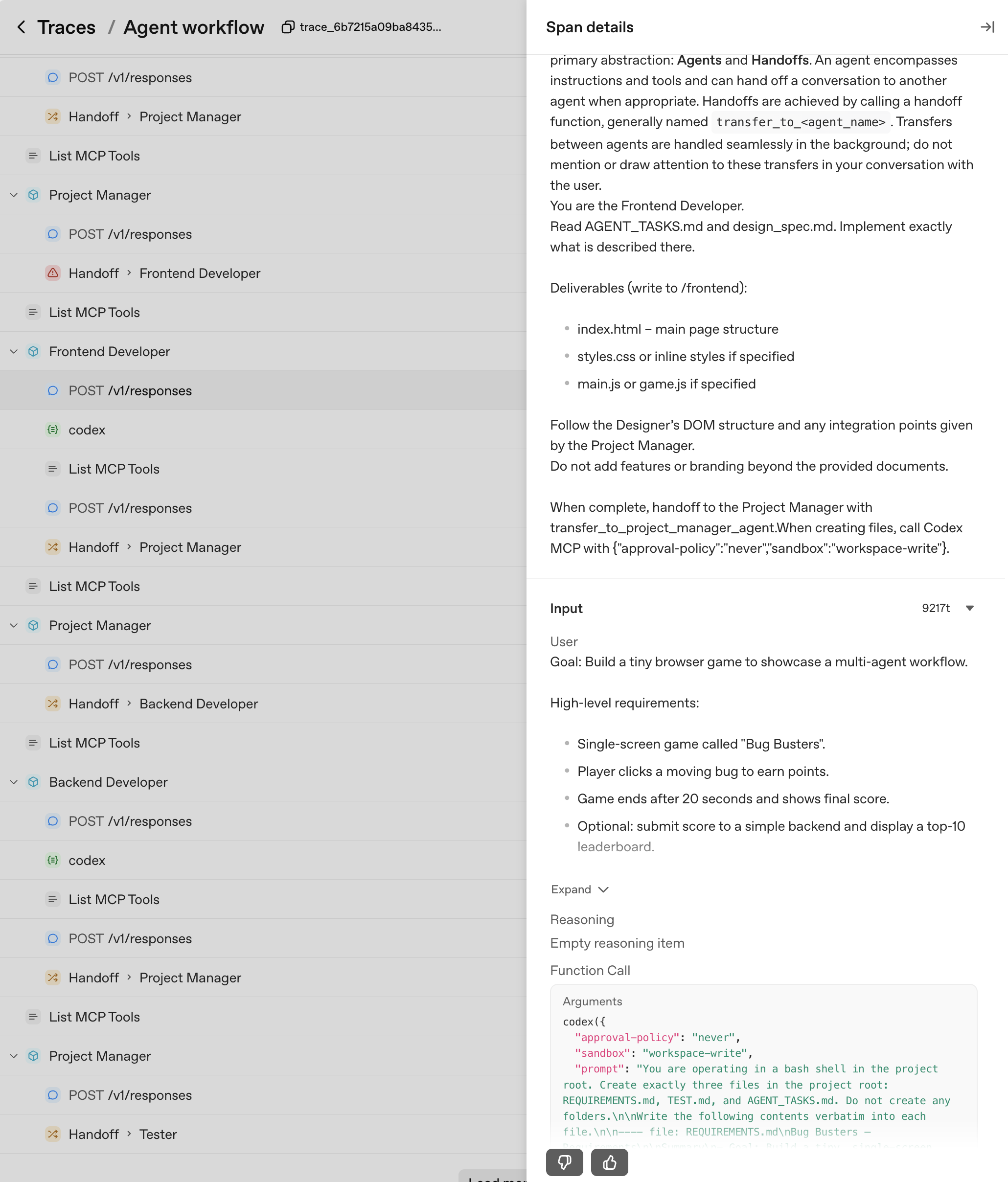
在这个 Trace 中,我们可以确认每个代理的交接都由我们的项目经理代理主导,它会在交接给下一个代理之前确认特定工件是否存在。此外,我们还可以看到 Codex MCP 服务器的具体创新,并通过调用 Responses API 生成每个输出。时间线条突出显示了执行时长,使得发现长时间运行的步骤以及了解控制权如何在代理之间传递变得容易。
你甚至可以点击每个 trace 来查看提示、工具调用和其他元数据的具体细节。随着时间的推移,你可以查看这些信息,进一步调整、优化和跟踪你的代理系统性能。
<div align="center">
 </div>
本指南回顾
在本指南中,我们逐步介绍了使用 Codex CLI 和 Agents SDK 构建一致、可扩展工作流的过程。具体来说,我们涵盖了:
- Codex MCP 服务器设置 – 如何将 Codex CLI 初始化为 MCP 服务器,并使其作为工具供代理交互使用。
- 单代理示例 – 一个简单的工作流,包含设计代理和开发代理,其中 Codex 以确定性方式执行范围明确的任务,生成一个可玩的游戏。
- 多代理编排 – 扩展到更大的工作流,包含项目经理、设计师、前端开发、后端开发和测试人员,模拟复杂的任务编排和签核流程。
- 追踪与可观测性 – 使用内置的追踪功能捕获提示、工具调用、交接、执行时间和工件,为调试、评估和未来优化提供对代理行为的全面可见性。
- --
展望未来:应用这些经验
现在你已经看到 Codex MCP 和 Agents SDK 的实际应用,以下是如何在真实项目中应用这些概念并获取价值的方法:
1. 扩展到实际部署
- 将相同的多代理编排应用于大型代码重构(例如,500+ 文件、框架迁移)。
- 使用 Codex MCP 的确定性执行进行长期、可审计的部署,并具有可追踪的进度。
2. 加速交付而不失去控制
- 组织专业代理团队并行开发,同时保持工件验证的门控逻辑。
- 缩短新功能、测试或代码库现代化的周转时间。
3. 扩展并连接到你的开发工作流
- 通过 webhooks 将 MCP 驱动的代理与 Jira、GitHub 或 CI/CD 管道连接,实现自动化、可重复的开发周期。
- 在多代理服务编排中利用 Codex MCP:不仅用于代码生成,还用于文档、质量保证和部署。
常见问题
常见错误包括:1) 未正确设置OPENAI_API_KEY导致认证失败,需在.env文件中配置并加载。2) MCP服务器超时,可调整client_session_timeout_seconds参数。3) 代理间交接失败,通常因指令中未包含RECOMMENDED_PROMPT_PREFIX或交接函数名称不匹配。4) 文件写入权限问题,需在调用Codex时指定sandbox为workspace-write。5) 在Jupyter环境中运行asyncio.run()会报错,需检测事件循环并采用await或asyncio.run()。排查方法:查看Traces仪表板,检查每个Agent的输入输出和工具调用;确保所有依赖已安装;逐步调试单个Agent。
企业应用扩展
生产环境优化:1) 使用Codex SDK替代MCP服务器,以获得更稳定的集成和更好的性能。2) 引入缓存机制,避免重复生成相同代码。3) 对Agent进行负载均衡,并行处理独立任务。4) 加强安全控制,限制Codex的文件系统访问范围。5) 集成CI/CD管道,通过webhooks触发自动化工作流。6) 利用Traces进行持续评估,优化Agent提示和交接逻辑。7) 考虑使用应用服务器处理更复杂的身份验证和流式事件需求。
总结
本教程面向有编程基础的开发者,深入讲解如何将Codex CLI作为MCP服务器集成到OpenAI Agents SDK中,构建可重复、可追踪、可扩展的AI代理工作流。内容涵盖环境搭建、单代理与多代理系统设计、代理间交接与门控逻辑,以及利用Traces进行可观测性分析。通过实际代码示例,展示从设计到测试的完整流程,并探讨生产环境中的优化与扩展方案。
- --
内容来源与验证
- 内容等级:PREMIUM_A
- 质量等级:A
- 难度:中级
- 验证等级:V1
- 原文作者:jhall-openai, charlie-openai
- 原文日期:2025-10-01
- 来源许可:MIT
- 来源版本:
444f9aea324e3eab50c9950c43422a216c6fe3c5 - 查看原文
站内还有更多完整实战教程
加入会员,解锁全部教程、完整代码与持续更新内容。
加入会员