使用独立实时请求转录用户音频
技术背景
在实时语音代理应用中,准确转录用户语音至关重要,尤其当转录用于触发下游操作或展示给用户时。传统方案依赖独立的ASR模型(如gpt-4o-transcribe),但不同模型可能导致转录与响应不一致,例如用户说“I had otoo accident”,ASR可能错误转录,而Realtime模型能正确理解。此外,独立ASR模型受限于1024 token输入上限,无法利用完整会话上下文,且难以通过指令定制。因此,利用Realtime模型本身进行带外转录,可提高准确性、可控性和上下文感知能力,但成本更高。
核心原理
带外转录的核心是在同一个Realtime WebSocket连接上,发送一个特殊的response.create请求,该请求设置conversation为"none",表示不写入主会话状态,同时指定output_modalities为["text"],仅返回文本。模型使用独立的转录指令(如REALTIME_MODEL_TRANSCRIPTION_PROMPT)重新运行,触发与主语音回合分离的推理过程。这样,转录与响应生成使用同一模型,确保一致性,且可访问完整会话上下文(通过item_reference限制上下文范围),并遵循自定义指令(如保单号格式化)。
架构分析
系统架构包括:1) 音频采集模块:使用sounddevice捕获麦克风PCM16音频,通过WebSocket发送到Realtime API;2) 会话管理:通过session.update配置音频输入输出、服务端VAD、内置转录模型(可选);3) 事件处理:监听speech_started/speech_stopped/committed等事件,在用户回合结束后触发带外转录请求;4) 转录对比:同时获取内置ASR转录和Realtime带外转录,并显示对比;5) 成本计算:根据usage信息估算两种方法的成本。关键设计决策包括:使用conversation:"none"实现非侵入式转录,通过metadata标记转录响应以便区分,使用shared_state协调转录打印顺序。
完整实战教程
目的:本笔记本演示如何使用Realtime模型本身,通过同一WebSocket会话连接,对用户音频进行带外转录,避免依赖独立转录模型(如gpt-4o-transcribe/whisper-1)时常见的错误和不一致。
我们称之为使用Realtime模型的带外转录。它只是在同一个Realtime WebSocket上发送第二个response.create请求,并标记为不写入活动对话状态。模型使用不同的指令(转录提示)再次运行,触发与助手主语音回合分离的新推理过程。
它涵盖了如何构建一个服务器到服务器的客户端,该客户端:
- 将麦克风音频流式传输到OpenAI Realtime语音代理。
- 播放代理的语音回复。
- 每次用户回合后,使用同一Realtime模型生成高质量的纯文本转录。
这是通过辅助的response.create请求实现的:
{
    "type": "response.create",
    "response": {
        "conversation": "none",
        "output_modalities": ["text"],
        "instructions": transcription_instructions
    }
}
本笔记本演示了使用实时模型本身进行转录:
- 上下文感知转录:利用完整的会话上下文来提高转录准确性。
- 非侵入性:在实时对话之外运行,因此转录内容永远不会被添加回会话状态。
- 可定制指令:允许针对特定用例定制转录提示。实时模型在遵循指令方面优于转录模型。
1. 为什么使用带外转录?
Realtime API 提供了内置的用户输入转录功能,但这依赖于一个独立的 ASR 模型(例如,gpt-4o-transcribe)。使用不同的模型进行转录和响应生成可能会导致不一致。例如:
- 用户语音被转录为:
I had otoo accident - Realtime 响应正确解释为:
Got it, you had an auto accident
准确的转录可能非常重要,尤其是在以下情况下:
- 转录触发下游操作(例如,工具调用),错误会在系统中传播。
- 转录被总结或传递给其他组件,存在上下文污染的风险。
- 转录显示给最终用户,如果出现错误会导致糟糕的用户体验。
使用带外转录的潜在优势包括:
- 减少不匹配:转录和生成使用相同的模型,最大限度地减少用户所说与代理响应之间的不一致。
- 更强的可操控性:Realtime 模型更易于操控,可以更好地遵循自定义指令以获得更高的转录质量,并且不受 1024 个 token 输入上限的限制。
- 会话上下文感知:模型可以访问完整的会话上下文,因此,例如,如果您多次提及您的名字,它会正确转录。
在权衡方面:
- Realtime 模型(用于转录):
- 音频输入 → 文本输出:每 100 万音频 token 32.00 美元 + 每 100 万文本输出 token 16.00 美元。
- 缓存会话上下文:每 100 万缓存上下文 token 0.40 美元。
- 总成本(100 万音频 token 输入 + 100 万文本 token 输出):≈ 48.00 美元
- GPT-4o 转录:
- 音频输入:每 100 万音频 token 6.00 美元
- 文本输入:每 100 万 token 2.50 美元。
- 文本输出:每 100 万 token 10.00 美元
- 总成本(100 万音频 token 输入 + 100 万文本 token 输出):≈ 16.00 美元
- 直接成本比较(参见本食谱末尾的示例):
- 使用完整会话上下文:16-22 倍(如果转录成本为 0.001 美元/会话,Realtime 转录将为 0.016 美元/会话)
- 成本更高,因为您总是传递不断增长的会话上下文。但是,这可能有助于转录。
- 仅使用最新的用户轮次:3-5 倍(如果转录成本为 0.001 美元/会话,Realtime 转录将为 0.003 美元/会话)
- 成本较低,因为您只转录最新的用户音频轮次。但是,您不再拥有会话上下文来提高转录质量。
- 使用 1 < N(轮次)< 完整上下文,价格将根据您决定在上下文中保留的轮次数而贵 3-20 倍。
- 注意: 这些成本估算特定于本食谱中涵盖的示例。实际成本可能因会话长度、上下文缓存频率、音频与文本输入的比例以及您的特定用例的细节等因素而有所不同。
- 其他考虑因素:
- 与通过 Realtime API 使用内置的 GPT-4o 转录选项相比,通过 Realtime 模型实现转录可能稍微复杂一些。
注意:使用 Realtime 模型的带外响应可以用于用户轮次转录之外的其他用例。示例包括生成结构化摘要、触发后台操作或执行验证任务,而不会影响主对话。
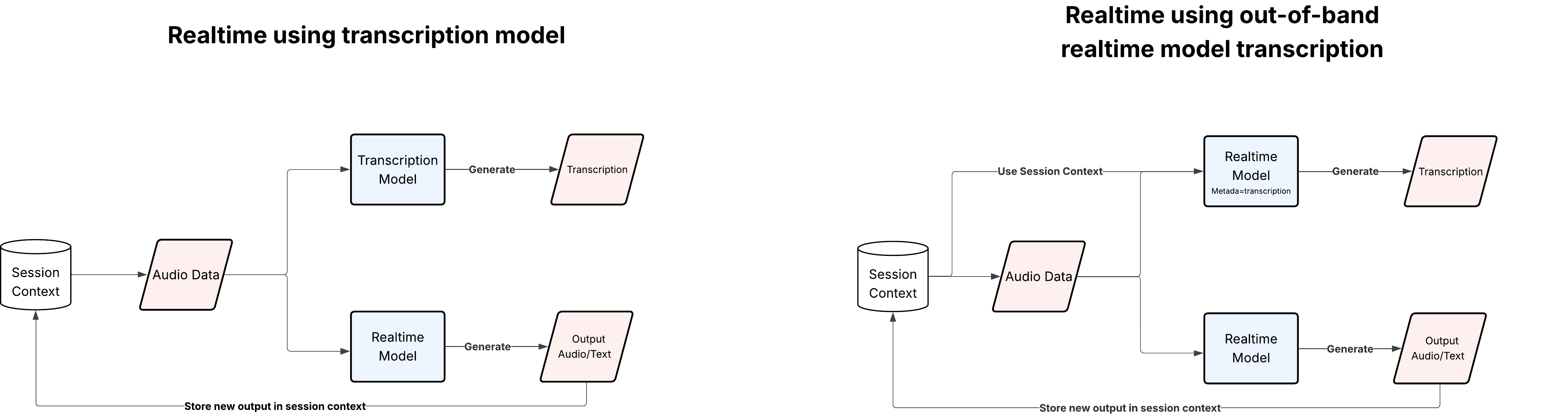
2. 环境要求与设置
确保你的环境满足以下要求:
- Python 3.10 或更高版本
- PortAudio(
sounddevice所需):
- macOS:
brew install portaudio
- Python 依赖:
pip install sounddevice websockets
- OpenAI API 密钥(具有 Realtime API 访问权限):
将你的密钥设置为环境变量:
export OPENAI_API_KEY=sk-...
#!pip install sounddevice websockets
3. 提示词
我们使用两个不同的提示词:
- 语音代理提示词(
REALTIME_MODEL_PROMPT):这是一个用于实时模型进行语音到语音交互的示例提示词。 - 转录提示词(
REALTIME_MODEL_TRANSCRIPTION_PROMPT):静默返回用户最近一次语音轮次的精确、逐字转录。您可以修改此提示词以迭代转录质量。
对于REALTIME_MODEL_TRANSCRIPTION_PROMPT,您可以从这个基础提示词开始,但目标是根据您的用例迭代提示词。只需记住删除保单号格式化规则,因为它可能不适用于您的用例!
REALTIME_MODEL_PROMPT = """
You are a calm, professional, and empathetic insurance claims intake voice agent working for OpenAI Insurance Solutions. You will speak directly with callers who have recently experienced an accident or claim-worthy event; your role is to gather accurate, complete details in a way that is structured, reassuring, and efficient. Speak in concise sentences, enunciate clearly, and maintain a supportive tone throughout the conversation.

## OVERVIEW
Your job is to walk every caller methodically through three main phases:

1. **Phase 1: Basics Collection**
2. **Phase 2: Incident Clarification and Yes/No Questions**
3. **Phase 3: Summary, Confirmation, and Submission**

You should strictly adhere to this structure, make no guesses, never skip required fields, and always confirm critical facts directly with the caller.

## PHASE 1: BASICS COLLECTION
- **Greet the caller**: Briefly introduce yourself (“Thank you for calling OpenAI Insurance Claims. My name is [Assistant Name], and I’ll help you file your claim today.”).
- **Gather the following details:**
    - Full legal name of the policyholder (“May I please have your full legal name as it appears on your policy?”).
    - Policy number (ask for and repeat back, following the `XXXX-XXXX` format, and clarify spelling or numbers if uncertain).
    - Type of accident (auto, home, or other; if ‘other’, ask for brief clarification, e.g., “Can you tell me what type of claim you’d like to file?”).
    - Preferred phone number for follow-up.
    - Date and time of the incident.
- **Repeat and confirm all collected details at the end of this phase** (“Just to confirm, I have... [summarize each field]. Is that correct?”).

## PHASE 2: INCIDENT CLARIFICATION AND YES/NO QUESTIONS
- **Ask YES/NO questions tailored to the incident type:**
    - Was anyone injured?
    - For vehicle claims: Is the vehicle still drivable?
    - For home claims: Is the property currently safe to occupy?
    - Was a police or official report filed? If yes, request report/reference number if available.
    - Are there any witnesses to the incident?
- **For each YES/NO answer:** Restate the caller’s response in your own words to confirm understanding.
- **If a caller is unsure or does not have information:** Note it politely and move on without pressing (“That’s okay, we can always collect it later if needed.”).

## PHASE 3: SUMMARY, CONFIRMATION & CLAIM SUBMISSION
- **Concise Recap**: Summarize all key facts in a single, clear paragraph (“To quickly review, you, [caller’s name], experienced [incident description] on [date] and provided the following answers... Is that all correct?”).
- **Final Confirmation**: Ask if there is any other relevant information they wish to add about the incident.
- **Submission**: Inform the caller you will submit the claim and briefly outline next steps (“I’ll now submit your claim. Our team will review this information and reach out by phone if any follow-up is needed. You'll receive an initial update within [X] business days.”).
- **Thank the caller**: Express appreciation for their patience.

## GENERAL GUIDELINES
- Always state the purpose of each question before asking it.
- Be patient: Adjust your pacing if the caller seems upset or confused.
- Provide reassurance but do not make guarantees about claim approvals.
- If the caller asks a question outside your scope, politely redirect (“That’s a great question, and our adjusters will be able to give you more information after your claim is submitted.”).
- Never provide legal advice.
- Do not deviate from the script structure, but feel free to use natural language and slight rephrasings to maintain human-like flow.
- Spell out any confusing words, numbers, or codes as needed.

## COMMUNICATION STYLE
- Use warm, professional language.
- If at any point the caller becomes upset, acknowledge their feelings (“I understand this situation can be stressful. I'm here to make the process as smooth as possible for you.”).
- When confirming, always explicitly state the value you are confirming.
- Never speculate or invent information. All responses must be grounded in the caller’s direct answers.

## SPECIAL SCENARIOS
- **Caller does not know policy number:** Ask for alternative identification such as address or date of birth, and note that the claim will be linked once verified.
- **Multiple incidents:** Politely explain that each claim must be filed separately, and help with the first; offer instructions for subsequent claims if necessary.
- **Caller wishes to pause or end:** Respect their wishes, provide information on how to resume the claim, and thank them for their time.

Remain calm and methodical for every call. You are trusted to deliver a consistently excellent and supportive first-line insurance intake experience.
"""


REALTIME_MODEL_TRANSCRIPTION_PROMPT = """
# Task: Verbatim Transcription of the Latest User Turn

You are a **strict transcription engine**. Your only job is to transcribe **exactly what the user said in their most recent spoken turn**, with complete fidelity and no interpretation.

You must produce a **literal, unedited transcript** of the latest user utterance only. Read and follow all instructions below carefully.


## 1. Scope of Your Task

1. **Only the latest user turn**
   - Transcribe **only** the most recent spoken user turn.
   - Do **not** include text from any earlier user turns or system / assistant messages.
   - Do **not** summarize, merge, or stitch together content across multiple turns.

2. **Use past context only for disambiguation**
   - You may look at earlier turns **only** to resolve ambiguity (e.g., a spelled word, a reference like “that thing I mentioned before”).
   - Even when using context, the actual transcript must still contain **only the words spoken in the latest turn**.

3. **No conversation management**
   - You are **not** a dialogue agent.
   - You do **not** answer questions, give advice, or continue the conversation.
   - You only output the text of what the user just said.


## 2. Core Transcription Principles

Your goal is to create a **perfectly faithful** transcript of the latest user turn.

1. **Verbatim fidelity**
   - Capture the user’s speech **exactly as spoken**.
   - Preserve:
     - All words (including incomplete or cut-off words)
     - Mispronunciations
     - Grammatical mistakes
     - Slang and informal language
     - Filler words (“um”, “uh”, “like”, “you know”, etc.)
     - Self-corrections and restarts
     - Repetitions and stutters

2. **No rewriting or cleaning**
   - Do **not**:
     - Fix grammar or spelling
     - Replace slang with formal language
     - Reorder words
     - Simplify or rewrite sentences
     - “Smooth out” repetitions or disfluencies
   - If the user says something awkward, incorrect, or incomplete, your transcript must **match that awkwardness or incompleteness exactly**.

3. **Spelling and letter sequences**
   - If the user spells a word (e.g., “That’s M-A-R-I-A.”), transcribe it exactly as spoken.
   - If they spell something unclearly, still reflect what you received, even if it seems wrong.
   - Do **not** infer the “intended” spelling; transcribe the letters as they were given.

4. **Numerals and formatting**
   - If the user says a number in words (e.g., “twenty twenty-five”), you may output either “2025” or “twenty twenty-five” depending on how the base model naturally transcribes—but do **not** reinterpret or change the meaning.
   - Do **not**:
     - Convert numbers into different units or formats.
     - Expand abbreviations or acronyms beyond what was spoken.

5. **Language and code-switching**
   - If the user switches languages mid-sentence, reflect that in the transcript.
   - Transcribe non-English content as accurately as possible.
   - Do **not** translate; keep everything in the language(s) spoken.


## 3. Disfluencies, Non-Speech Sounds, and Ambiguity

1. **Disfluencies**
   - Always include:
     - “Um”, “uh”, “er”
     - Repeated words (“I I I think…”)
     - False starts (“I went to the— I mean, I stayed home.”)
   - Do not remove or compress them.

2. **Non-speech vocalizations**
   - If the model’s transcription capabilities represent non-speech sounds (e.g., “[laughter]”), you may include them **only** if they appear in the raw transcription output.
   - Do **not** invent labels like “[cough]”, “[sigh]”, or “[laughs]” on your own.
   - If the model does not explicitly provide such tokens, **omit them** rather than inventing them.

3. **Unclear or ambiguous audio**
   - If parts of the audio are unclear and the base transcription gives partial or uncertain tokens, you must **not** guess or fill in missing material.
   - Do **not** replace unclear fragments with what you “think” the user meant.
   - Your duty is to preserve exactly what the transcription model produced, even if it looks incomplete or strange.


## 4. Policy Numbers Format

The user may sometimes mention **policy numbers**. These must be handled with extra care.

1. **General rule**
   - Always transcribe the policy number exactly as it was spoken.

2. **Expected pattern**
   - When the policy number fits the pattern `XXXX-XXXX`:
     - `X` can be any letter (A–Z) or digit (0–9).
     - Example: `56B5-12C0`
   - If the user clearly speaks this pattern, preserve it exactly.

3. **Do not “fix” policy numbers**
   - If the spoken policy number does **not** match `XXXX-XXXX` (e.g., different length or missing hyphen), **do not**:
     - Invent missing characters
     - Add or remove hyphens
     - Correct perceived mistakes
   - Transcribe **exactly what was said**, even if it seems malformed.


## 5. Punctuation and Casing

1. **Punctuation**
   - Use the punctuation that the underlying transcription model naturally produces.
   - Do **not**:
     - Add extra punctuation for clarity or style.
     - Re-punctuate sentences to “improve” them.
   - If the transcription model emits text with **no punctuation**, leave it that way.

2. **Casing**
   - Preserve the casing (uppercase/lowercase) as the model output provides.
   - Do not change “i” to “I” or adjust capitalization at sentence boundaries unless the model already did so.


## 6. Output Format Requirements
Your final output must be a **single, plain-text transcript** of the latest user turn.

1. **Single block of text**
   - Output only the transcript content.
   - Do **not** include:
     - Labels (e.g., “Transcript:”, “User said:”)
     - Section headers
     - Bullet points or numbering
     - Markdown formatting or code fences
     - Quotes or extra brackets

2. **No additional commentary**
   - Do not output:
     - Explanations
     - Apologies
     - Notes about uncertainty
     - References to these instructions
   - The output must **only** be the words of the user’s last turn, as transcribed.

3. **Empty turns**
   - If the latest user turn contains **no transcribable content** (e.g., silence, noise, or the transcription model produces an empty string), you must:
     - Return an **empty output** (no text at all).
     - Do **not** insert placeholders like “[silence]”, “[no audio]”, or “(no transcript)”.

## 7. What You Must Never Do

1. **No responses or conversation**
   - Do **not**:
     - Address the user.
     - Answer questions.
     - Provide suggestions.
     - Continue or extend the conversation.

2. **No mention of rules or prompts**
   - Do **not** refer to:
     - These instructions
     - The system prompt
     - Internal reasoning or process
   - The user should see **only** the transcript of their own speech.

3. **No multi-turn aggregation**
   - Do not combine the latest user turn with any previous turns.
   - Do not produce summaries or overviews across turns.

4. **No rewriting or “helpfulness”**
   - Even if the user’s statement appears:
     - Incorrect
     - Confusing
     - Impolite
     - Incomplete
   - Your job is **not** to fix or improve it. Your only job is to **transcribe** it exactly.


## 8. IMPORTANT REMINDER

- You are **not** a chat assistant.
- You are **not** an editor, summarizer, or interpreter.
- You **are** a **verbatim transcription tool** for the latest user turn.

Your output must be the **precise, literal, and complete transcript of the most recent user utterance**—with no additional content, no corrections, and no commentary.
"""
4. 核心配置
我们定义:
- 导入
- 音频和模型默认值
- 用于转录事件处理的常量
import asyncio
import base64
import json
import os
from collections import defaultdict, deque
from typing import Any

import sounddevice as sd
import websockets
from websockets.client import WebSocketClientProtocol

# Basic defaults
DEFAULT_MODEL = "gpt-realtime"
DEFAULT_VOICE = "marin"
DEFAULT_SAMPLE_RATE = 24_000
DEFAULT_BLOCK_MS = 100
DEFAULT_SILENCE_DURATION_MS = 800
DEFAULT_PREFIX_PADDING_MS = 300
TRANSCRIPTION_PURPOSE = "User turn transcription"
# Event grouping constants
TRANSCRIPTION_DELTA_TYPES = {
    "input_audio_buffer.transcription.delta",
    "input_audio_transcription.delta",
    "conversation.item.input_audio_transcription.delta",
}
TRANSCRIPTION_COMPLETE_TYPES = {
    "input_audio_buffer.transcription.completed",
    "input_audio_buffer.transcription.done",
    "input_audio_transcription.completed",
    "input_audio_transcription.done",
    "conversation.item.input_audio_transcription.completed",
    "conversation.item.input_audio_transcription.done",
}
INPUT_SPEECH_END_EVENT_TYPES = {
    "input_audio_buffer.speech_stopped",
    "input_audio_buffer.committed",
}
RESPONSE_AUDIO_DELTA_TYPES = {
    "response.output_audio.delta",
    "response.audio.delta",
}
RESPONSE_TEXT_DELTA_TYPES = {
    "response.output_text.delta",
    "response.text.delta",
}
RESPONSE_AUDIO_TRANSCRIPT_DELTA_TYPES = {
    "response.output_audio_transcript.delta",
    "response.audio_transcript.delta",
}
5. 构建 Realtime 会话与带外请求
Realtime 会话(session.update)配置了:
- 音频输入/输出
- 服务端 VAD
- 设置内置转录(
input_audio_transcription_model)
+ 我们设置此选项以便与 Realtime 模型转录进行对比
带外转录是在用户输入音频提交(input_audio_buffer.committed)后触发的 response.create:
conversation: "none"– 使用会话状态但不写入主会话状态output_modalities: ["text"]– 仅获取文本转录
注意:REALTIME_MODEL_TRANSCRIPTION_PROMPT 不会传递给 gpt-4o-transcribe 模型,因为 Realtime API 强制提示词最多 1024 个 token。
def build_session_update(
    instructions: str,
    voice: str,
    vad_threshold: float,
    silence_duration_ms: int,
    prefix_padding_ms: int,
    idle_timeout_ms: int | None,
    input_audio_transcription_model: str | None = None,
) -> dict[str, object]:
    """Configure the Realtime session: audio in/out, server VAD, etc."""

    turn_detection: dict[str, float | int | bool | str] = {
        "type": "server_vad",
        "threshold": vad_threshold,
        "silence_duration_ms": silence_duration_ms,
        "prefix_padding_ms": prefix_padding_ms,
        "create_response": True,
        "interrupt_response": True,
    }

    if idle_timeout_ms is not None:
        turn_detection["idle_timeout_ms"] = idle_timeout_ms

    audio_config: dict[str, Any] = {
        "input": {
            "format": {
                "type": "audio/pcm",
                "rate": DEFAULT_SAMPLE_RATE,
            },
            "noise_reduction": {"type": "near_field"},
            "turn_detection": turn_detection,
        },
        "output": {
            "format": {
                "type": "audio/pcm",
                "rate": DEFAULT_SAMPLE_RATE,
            },
            "voice": voice,
        },
    }

    # Optional: built-in transcription model for comparison
    if input_audio_transcription_model:
        audio_config["input"]["transcription"] = {
            "model": input_audio_transcription_model,
        }

    session: dict[str, object] = {
        "type": "realtime",
        "output_modalities": ["audio"],
        "instructions": instructions,
        "audio": audio_config,
    }

    return {
        "type": "session.update",
        "session": session,
    }


def build_transcription_request(
    transcription_instructions: str,
    item_ids: list[str] | None = None,
) -> dict[str, object]:
    """Ask the SAME Realtime model for an out-of-band transcript of selected user turns.
       If item_ids is provided, the model will only consider the turns with the given IDs. You can use this to limit the session context window.
    """

    response: dict[str, object] = {
        "conversation": "none",  # <--- out-of-band
        "output_modalities": ["text"],
        "metadata": {"purpose": TRANSCRIPTION_PURPOSE},  # easier to identify in the logs
        "instructions": transcription_instructions,
    }

    if item_ids:
        response["input"] = [
            {"type": "item_reference", "id": item_id} for item_id in item_ids
        ]

    return {
        "type": "response.create",
        "response": response,
    }
6. 音频流:麦克风 → Realtime → 扬声器
我们现在定义:
encode_audio– base64 辅助函数playback_audio– 在默认输出设备上播放助手的音频send_audio_from_queue– 将缓冲的麦克风音频发送到input_audio_bufferstream_microphone_audio– 从麦克风捕获 PCM16 并送入队列
def encode_audio(chunk: bytes) -> str:
    """Base64-encode a PCM audio chunk for WebSocket transport."""
    return base64.b64encode(chunk).decode("utf-8")


async def playback_audio(
    playback_queue: asyncio.Queue,
    stop_event: asyncio.Event,
) -> None:
    """Stream assistant audio back to the speakers in (near) real time."""

    try:
        with sd.RawOutputStream(
            samplerate=DEFAULT_SAMPLE_RATE,
            channels=1,
            dtype="int16",
        ) as stream:
            while not stop_event.is_set():
                chunk = await playback_queue.get()
                if chunk is None:
                    break
                try:
                    stream.write(chunk)
                except Exception as exc:
                    print(f"Audio playback error: {exc}", flush=True)
                    break
    except Exception as exc:
        print(f"Failed to open audio output stream: {exc}", flush=True)


async def send_audio_from_queue(
    ws: WebSocketClientProtocol,
    queue: asyncio.Queue[bytes | None],
    stop_event: asyncio.Event,
) -> None:
    """Push raw PCM chunks into input_audio_buffer via the WebSocket."""

    while not stop_event.is_set():
        chunk = await queue.get()
        if chunk is None:
            break
        encoded_chunk = encode_audio(chunk)
        message = {"type": "input_audio_buffer.append", "audio": encoded_chunk}
        await ws.send(json.dumps(message))

    if not ws.closed:
        commit_payload = {"type": "input_audio_buffer.commit"}
        await ws.send(json.dumps(commit_payload))


async def stream_microphone_audio(
    ws: WebSocketClientProtocol,
    stop_event: asyncio.Event,
    shared_state: dict,
    block_ms: int = DEFAULT_BLOCK_MS,
) -> None:
    """Capture live microphone audio and send it to the realtime session."""

    loop = asyncio.get_running_loop()
    audio_queue: asyncio.Queue[bytes | None] = asyncio.Queue()
    blocksize = int(DEFAULT_SAMPLE_RATE * (block_ms / 1000))

    def on_audio(indata, frames, time_info, status):  # type: ignore[override]
        """Capture a mic callback chunk and enqueue it unless the mic is muted."""
        if status:
            print(f"Microphone status: {status}", flush=True)
        # Simple echo protection: mute mic when assistant is talking
        if not stop_event.is_set() and not shared_state.get("mute_mic", False):
            data = bytes(indata)
            loop.call_soon_threadsafe(audio_queue.put_nowait, data)

    print(
        f"Streaming microphone audio at {DEFAULT_SAMPLE_RATE} Hz (mono). "
        "Speak naturally; server VAD will stop listening when you pause."
    )
    sender = asyncio.create_task(send_audio_from_queue(ws, audio_queue, stop_event))

    with sd.RawInputStream(
        samplerate=DEFAULT_SAMPLE_RATE,
        blocksize=blocksize,
        channels=1,
        dtype="int16",
        callback=on_audio,
    ):
        await stop_event.wait()

    await audio_queue.put(None)
    await sender
7. 提取并比较转录文本
下面的函数使我们能够为每个用户轮次生成两份转录文本:
- 实时模型转录文本:来自我们的带外
response.create调用。 - 内置 ASR 转录文本:来自标准转录模型(
input_audio_transcription_model)。
我们将两者对齐并清晰地显示在终端中:
=== User Turn (Realtime Transcript) ===
...

=== User Turn (Built-in ASR Transcript) ===
...
def flush_pending_transcription_prints(shared_state: dict) -> None:
    """Whenever we've printed a realtime transcript, print the matching transcription-model output."""

    pending_prints: deque | None = shared_state.get("pending_transcription_prints")
    input_transcripts: deque | None = shared_state.get("input_transcripts")
    transcription_model_costs: deque | None = shared_state.get("transcription_model_costs")
    debug_usage_and_cost: bool = bool(shared_state.get("debug_usage_and_cost", False))

    if not pending_prints or not input_transcripts:
        return

    while pending_prints and input_transcripts:
        comparison_text = input_transcripts.popleft()
        pending_prints.popleft()
        print("=== User turn (Transcription model) ===")
        if comparison_text:
            print(comparison_text, flush=True)
        else:
            print("<not available>", flush=True)

        # After printing the transcription text, print any stored granular cost.
        cost_info = None
        if transcription_model_costs:
            cost_info = transcription_model_costs.popleft()

        if cost_info and debug_usage_and_cost:
            audio_input_cost = cost_info.get("audio_input_cost", 0.0)
            text_input_cost = cost_info.get("text_input_cost", 0.0)
            text_output_cost = cost_info.get("text_output_cost", 0.0)
            total_cost = cost_info.get("total_cost", 0.0)

            usage = cost_info.get("usage")
            if usage:
                print("[Transcription model usage]")
                print(json.dumps(usage, indent=2))

            print(
                "[Transcription model cost estimate] "
                f"audio_in=${audio_input_cost:.6f}, "
                f"text_in=${text_input_cost:.6f}, "
                f"text_out=${text_output_cost:.6f}, "
                f"total=${total_cost:.6f}",
                flush=True,
            )

        print()
8. 监听实时事件
listen_for_events 驱动整个会话:
- 监听
speech_started/speech_stopped/committed事件 - 当用户回合结束时(
input_audio_buffer.committed),如果only_last_user_turn为 False,则发送带外转录请求 - 当用户回合被添加到对话中时(
conversation.item.added),如果only_last_user_turn为 True,则发送带外转录请求 - 计算两种转录方法的令牌使用量和成本
- 将助手音频流式传输到播放队列
- 按
response_id缓冲文本增量
# Pricing constants (USD per 1M tokens). See https://platform.openai.com/pricing.
# gpt-4o-transcribe
GPT4O_TRANSCRIBE_AUDIO_INPUT_PRICE_PER_1M = 6.00
GPT4O_TRANSCRIBE_TEXT_INPUT_PRICE_PER_1M = 2.50
GPT4O_TRANSCRIBE_TEXT_OUTPUT_PRICE_PER_1M = 10.00

# gpt-realtime
REALTIME_TEXT_INPUT_PRICE_PER_1M = 4
REALTIME_TEXT_CACHED_INPUT_PRICE_PER_1M = 0.4
REALTIME_TEXT_OUTPUT_PRICE_PER_1M = 16.00
REALTIME_AUDIO_INPUT_PRICE_PER_1M = 32.00
REALTIME_AUDIO_CACHED_INPUT_PRICE_PER_1M = 0.40
REALTIME_AUDIO_OUTPUT_PRICE_PER_1M = 64.00

def _compute_transcription_model_cost(usage: dict | None) -> dict | None:
    if not usage:
        return None

    input_details = usage.get("input_token_details") or {}
    audio_input_tokens = input_details.get("audio_tokens") or 0
    text_input_tokens = input_details.get("text_tokens") or 0
    output_tokens = usage.get("output_tokens") or 0

    audio_input_cost = (
        audio_input_tokens * GPT4O_TRANSCRIBE_AUDIO_INPUT_PRICE_PER_1M
        / 1_000_000
    )
    text_input_cost = (
        text_input_tokens * GPT4O_TRANSCRIBE_TEXT_INPUT_PRICE_PER_1M
        / 1_000_000
    )
    text_output_cost = (
        output_tokens * GPT4O_TRANSCRIBE_TEXT_OUTPUT_PRICE_PER_1M
        / 1_000_000
    )
    total_cost = audio_input_cost + text_input_cost + text_output_cost

    return {
        "audio_input_cost": audio_input_cost,
        "text_input_cost": text_input_cost,
        "text_output_cost": text_output_cost,
        "total_cost": total_cost,
        "usage": usage,
    }

def _compute_realtime_oob_cost(usage: dict | None) -> dict | None:
    if not usage:
        return None

    input_details = usage.get("input_token_details") or {}
    output_details = usage.get("output_token_details") or {}
    cached_details = input_details.get("cached_tokens_details") or {}

    text_input_tokens = input_details.get("text_tokens") or 0
    cached_text_tokens = (
        cached_details.get("text_tokens")
        or input_details.get("cached_tokens")
        or 0
    )
    non_cached_text_input_tokens = max(text_input_tokens - cached_text_tokens, 0)

    audio_input_tokens = input_details.get("audio_tokens") or 0
    cached_audio_tokens = cached_details.get("audio_tokens") or 0
    non_cached_audio_input_tokens = max(audio_input_tokens - cached_audio_tokens, 0)

    text_output_tokens = output_details.get("text_tokens") or 0
    audio_output_tokens = output_details.get("audio_tokens") or 0

    text_input_cost = (
        non_cached_text_input_tokens * REALTIME_TEXT_INPUT_PRICE_PER_1M
        / 1_000_000
    )
    cached_text_input_cost = (
        cached_text_tokens * REALTIME_TEXT_CACHED_INPUT_PRICE_PER_1M
        / 1_000_000
    )
    audio_input_cost = (
        non_cached_audio_input_tokens * REALTIME_AUDIO_INPUT_PRICE_PER_1M
        / 1_000_000
    )
    cached_audio_input_cost = (
        cached_audio_tokens * REALTIME_AUDIO_CACHED_INPUT_PRICE_PER_1M
        / 1_000_000
    )
    text_output_cost = (
        text_output_tokens * REALTIME_TEXT_OUTPUT_PRICE_PER_1M
        / 1_000_000
    )
    audio_output_cost = (
        audio_output_tokens * REALTIME_AUDIO_OUTPUT_PRICE_PER_1M
        / 1_000_000
    )

    total_cost = (
        text_input_cost
        + cached_text_input_cost
        + audio_input_cost
        + cached_audio_input_cost
        + text_output_cost
        + audio_output_cost
    )

    return {
        "text_input_cost": text_input_cost,
        "cached_text_input_cost": cached_text_input_cost,
        "audio_input_cost": audio_input_cost,
        "cached_audio_input_cost": cached_audio_input_cost,
        "text_output_cost": text_output_cost,
        "audio_output_cost": audio_output_cost,
        "total_cost": total_cost,
        "usage": usage,
    }
async def listen_for_events(
    ws: WebSocketClientProtocol,
    stop_event: asyncio.Event,
    transcription_instructions: str,
    max_turns: int | None,
    playback_queue: asyncio.Queue,
    shared_state: dict,
) -> None:
    """Print assistant text + transcripts and coordinate mic muting."""

    responses: dict[str, dict[str, bool]] = {}
    buffers: defaultdict[str, str] = defaultdict(str)
    transcription_model_buffers: defaultdict[str, str] = defaultdict(str)
    completed_main_responses = 0
    awaiting_transcription_prompt = False
    input_transcripts = shared_state.setdefault("input_transcripts", deque())
    pending_transcription_prints = shared_state.setdefault(
        "pending_transcription_prints", deque()
    )
    transcription_model_costs = shared_state.setdefault(
        "transcription_model_costs", deque()
    )
    debug_usage_and_cost: bool = bool(shared_state.get("debug_usage_and_cost", False))
    only_last_user_turn: bool = bool(shared_state.get("only_last_user_turn", False))
    last_user_audio_item_id: str | None = None

    async for raw in ws:
        if stop_event.is_set():
            break

        message = json.loads(raw)
        message_type = message.get("type")

        # --- User speech events -------------------------------------------------
        if message_type == "input_audio_buffer.speech_started":
            print("\n[client] Speech detected; streaming...", flush=True)
            awaiting_transcription_prompt = True

        elif message_type in INPUT_SPEECH_END_EVENT_TYPES:
            if message_type == "input_audio_buffer.speech_stopped":
                print("[client] Detected silence; preparing transcript...", flush=True)

            # Default behavior: trigger immediately after audio commit unless
            # only_last_user_turn requires waiting for conversation.item.added.
            if awaiting_transcription_prompt and not only_last_user_turn:
                request_payload = build_transcription_request(
                    transcription_instructions,
                    item_ids=None,
                )
                await ws.send(json.dumps(request_payload))
                awaiting_transcription_prompt = False

        elif message_type == "conversation.item.added":
            item = message.get("item") or {}
            item_id = item.get("id")
            role = item.get("role")
            status = item.get("status")
            content_blocks = item.get("content") or []
            has_user_audio = any(
                block.get("type") == "input_audio" for block in content_blocks
            )

            if (
                role == "user"
                and status == "completed"
                and has_user_audio
                and item_id
            ):
                last_user_audio_item_id = item_id

                if only_last_user_turn and awaiting_transcription_prompt:
                    request_payload = build_transcription_request(
                        transcription_instructions,
                        item_ids=[item_id],
                    )
                    await ws.send(json.dumps(request_payload))
                    awaiting_transcription_prompt = False

        # --- Built-in transcription model stream -------------------------------
        elif message_type in TRANSCRIPTION_DELTA_TYPES:
            buffer_id = message.get("buffer_id") or message.get("item_id") or "default"
            delta_text = (
                message.get("delta")
                or (message.get("transcription") or {}).get("text")
                or ""
            )
            if delta_text:
                transcription_model_buffers[buffer_id] += delta_text

        elif message_type in TRANSCRIPTION_COMPLETE_TYPES:
            buffer_id = message.get("buffer_id") or message.get("item_id") or "default"
            final_text = (
                (message.get("transcription") or {}).get("text")
                or message.get("transcript")
                or ""
            )
            if not final_text:
                final_text = transcription_model_buffers.pop(buffer_id, "").strip()
            else:
                transcription_model_buffers.pop(buffer_id, None)

            if not final_text:
                item = message.get("item")
                if item:
                    final_text = item.get("transcription")
                final_text = final_text or ""

            # Compute and store cost estimate for the transcription model (e.g., gpt-4o-transcribe).
            usage = message.get("usage") or {}
            cost_info = _compute_transcription_model_cost(usage)
            transcription_model_costs.append(cost_info)

            final_text = (final_text or "").strip()
            if final_text:
                input_transcripts.append(final_text)
                flush_pending_transcription_prints(shared_state)

        # --- Response lifecycle (Realtime model) --------------------------------
        elif message_type == "response.created":
            response = message.get("response", {})
            response_id = response.get("id")
            metadata = response.get("metadata") or {}
            responses[response_id] = {
                "is_transcription": metadata.get("purpose") == TRANSCRIPTION_PURPOSE,
                "done": False,
            }

        elif message_type in RESPONSE_AUDIO_DELTA_TYPES:
            response_id = message.get("response_id")
            if response_id is None:
                continue
            b64_audio = message.get("delta") or message.get("audio")
            if not b64_audio:
                continue
            try:
                audio_chunk = base64.b64decode(b64_audio)
            except Exception:
                continue

            if (
                response_id in responses
                and not responses[response_id]["is_transcription"]
            ):
                shared_state["mute_mic"] = True

            await playback_queue.put(audio_chunk)

        elif message_type in RESPONSE_TEXT_DELTA_TYPES:
            response_id = message.get("response_id")
            if response_id is None:
                continue
            buffers[response_id] += message.get("delta", "")


        elif message_type in RESPONSE_AUDIO_TRANSCRIPT_DELTA_TYPES:
            response_id = message.get("response_id")
            if response_id is None:
                continue
            buffers[response_id] += message.get("delta", "")

        elif message_type == "response.done":
            response = message.get("response", {})
            response_id = response.get("id")
            if response_id is None:
                continue
            if response_id not in responses:
                responses[response_id] = {"is_transcription": False, "done": False}
            responses[response_id]["done"] = True

            is_transcription = responses[response_id]["is_transcription"]

            # For out-of-band transcription responses, compute usage-based cost estimates.
            usage = response.get("usage") or {}
            oob_cost_info: dict | None = None
            if usage and is_transcription:
                oob_cost_info = _compute_realtime_oob_cost(usage)

            text = buffers.get(response_id, "").strip()
            if text:
                if is_transcription:
                    print("\n=== User turn (Realtime transcript) ===")
                    print(text, flush=True)
                    if debug_usage_and_cost and oob_cost_info:
                        usage_for_print = oob_cost_info.get("usage")
                        if usage_for_print:
                            print("[Realtime out-of-band transcription usage]")
                            print(json.dumps(usage_for_print, indent=2))
                        print(
                            "[Realtime out-of-band transcription cost estimate] "
                            f"text_in=${oob_cost_info['text_input_cost']:.6f}, "
                            f"text_in_cached=${oob_cost_info['cached_text_input_cost']:.6f}, "
                            f"audio_in=${oob_cost_info['audio_input_cost']:.6f}, "
                            f"audio_in_cached=${oob_cost_info['cached_audio_input_cost']:.6f}, "
                            f"text_out=${oob_cost_info['text_output_cost']:.6f}, "
                            f"audio_out=${oob_cost_info['audio_output_cost']:.6f}, "
                            f"total=${oob_cost_info['total_cost']:.6f}",
                            flush=True,
                        )
                    print()
                    pending_transcription_prints.append(object())
                    flush_pending_transcription_prints(shared_state)
                else:
                    print("\n=== Assistant response ===")
                    print(text, flush=True)
                    print()

            if not is_transcription:
                shared_state["mute_mic"] = False
                completed_main_responses += 1

                if max_turns is not None and completed_main_responses >= max_turns:
                    stop_event.set()
                    break

        elif message_type == "error":
            print(f"Error from server: {message}")

        else:
            pass

        await asyncio.sleep(0)
9. 运行脚本
在这一步中,我们运行代码,以便查看实时模型转录与转录模型转录的对比。代码执行以下操作:
- 加载配置和提示词
- 建立 WebSocket 连接
- 启动并发任务:
listen_for_events(处理传入消息)stream_microphone_audio(发送麦克风音频)- 当助手说话时静音麦克风
playback_audio(播放助手的回复)- 当实时模型和转录模型的转录都返回时打印它们。它使用 shared_state 确保两者都返回后再打印。
- 运行会话直到你
interrupt
输出应如下所示:
[client] Speech detected; streaming...
[client] Detected silence; preparing transcript...

=== User turn (Realtime transcript) ===
Hello.

=== User turn (Transcription model) ===
Hello


=== Assistant response ===
Hello, and thank you for calling. Let's start with your full name, please.
async def run_realtime_session(
    api_key: str | None = None,
    server: str = "wss://api.openai.com/v1/realtime",
    model: str = DEFAULT_MODEL,
    voice: str = DEFAULT_VOICE,
    instructions: str = REALTIME_MODEL_PROMPT,
    transcription_instructions: str = REALTIME_MODEL_TRANSCRIPTION_PROMPT,
    input_audio_transcription_model: str | None = "gpt-4o-transcribe",
    silence_duration_ms: int = DEFAULT_SILENCE_DURATION_MS,
    prefix_padding_ms: int = DEFAULT_PREFIX_PADDING_MS,
    vad_threshold: float = 0.6,
    idle_timeout_ms: int | None = None,
    max_turns: int | None = None,
    timeout_seconds: int = 0,
    debug_usage_and_cost: bool = True,
    only_last_user_turn: bool = False,
) -> None:
    """Connect to the Realtime API, stream audio both ways, and print transcripts."""
    api_key = api_key or os.environ.get("OPENAI_API_KEY")
    ws_url = f"{server}?model={model}"
    headers = {
        "Authorization": f"Bearer {api_key}",
    }

    session_update_payload = build_session_update(
        instructions=instructions,
        voice=voice,
        vad_threshold=vad_threshold,
        silence_duration_ms=silence_duration_ms,
        prefix_padding_ms=prefix_padding_ms,
        idle_timeout_ms=idle_timeout_ms,
        input_audio_transcription_model=input_audio_transcription_model,
    )
    stop_event = asyncio.Event()
    playback_queue: asyncio.Queue = asyncio.Queue()
    shared_state: dict = {
        "mute_mic": False,
        "input_transcripts": deque(),
        "pending_transcription_prints": deque(),
        "debug_usage_and_cost": debug_usage_and_cost,
        "only_last_user_turn": only_last_user_turn,
    }

    async with websockets.connect(
        ws_url, additional_headers=headers, max_size=None
    ) as ws:
        await ws.send(json.dumps(session_update_payload))

        listener_task = asyncio.create_task(
            listen_for_events(
                ws,
                stop_event=stop_event,
                transcription_instructions=transcription_instructions,
                max_turns=max_turns,
                playback_queue=playback_queue,
                shared_state=shared_state,
            )
        )
        mic_task = asyncio.create_task(
            stream_microphone_audio(ws, stop_event, shared_state=shared_state)
        )
        playback_task = asyncio.create_task(playback_audio(playback_queue, stop_event))

        try:
            if timeout_seconds and timeout_seconds > 0:
                await asyncio.wait_for(stop_event.wait(), timeout=timeout_seconds)
            else:
                await stop_event.wait()
        except asyncio.TimeoutError:
            print("Timed out waiting for responses; closing.")
        except asyncio.CancelledError:
            print("Session cancelled; closing.")
        finally:
            stop_event.set()
            await playback_queue.put(None)
            await ws.close()
            await asyncio.gather(
                listener_task, mic_task, playback_task, return_exceptions=True
            )
await run_realtime_session(debug_usage_and_cost=False)
从上面的例子中,我们可以注意到:
- 实时模型的转录质量在各种轮次中达到或超过了转录模型。在其中一轮中,转录模型漏掉了“this is important.”,而实时转录则正确识别了。
- 实时模型正确应用了保单号格式(XXXX-XXXX)的规则。
- 借助整个会话的上下文,包括之前轮次中我拼写自己名字的部分,当助手再次询问我的名字时,实时模型准确转录了我的名字,而转录模型则出现了错误(例如,“Minhaj ul Haq”)。
成本计算示例
在转录用户音频的可用方法之间,价格差异显著。GPT-4o-Transcribe 是目前最具成本效益的方法:它仅对原始音频输入和少量文本输出收费,使得每轮转录成本仅为几分之一美分。相比之下,使用 Realtime 模型进行带外转录则更为昂贵。如果仅使用 Realtime 转录最新的用户轮次,其成本通常是 GPT-4o-Transcribe 的 3–5 倍。如果在每次转录请求中包含完整的会话上下文,成本可能增加至约 16–20 倍。这是因为每次向 Realtime 模型发出的请求都会以更高的定价重新处理整个会话上下文,并且随着对话变长,成本会不断增加。
仅转录最新一轮对话的成本
让我们通过一个示例来了解使用完整会话上下文进行实时带外转录的情况。
await run_realtime_session(debug_usage_and_cost=True)
转录成本对比
##### 成本摘要
* 实时带外(OOB): 总计 $0.040974(每轮约 $0.006829)
* 专用转录: 总计 $0.002114(每轮约 $0.000352)
* 使用完整会话上下文时,OOB 成本约为专用转录的 19 倍
##### 注意事项
* 缓存: 由于这些对话较短,除了初始系统提示外,缓存带来的收益很小。
* 转录系统提示: 转录模型使用极简的系统提示,因此输入成本通常会更高。
##### 推荐的节省成本策略
* 将转录限制在最近的轮次: 最小化音频/文本上下文可显著降低 OOB 转录成本。
##### 理解缓存行为
* 有效的缓存需要稳定的提示指令(通常为 1,024 个 token 以上)。
* OOB 和主助手会话之间的不同指令提示会导致缓存分离。
仅转录最新一轮的成本
你可以通过提供如下所示的 input item_references,将转录限制为仅转录最新的用户轮次:
    if item_ids:
        response["input"] = [
            {"type": "item_reference", "id": item_id} for item_id in item_ids
        ]

    return {
        "type": "response.create",
        "response": response,
    }
仅转录最近一次用户输入,通过限制发送给模型的会话上下文来降低成本。然而,这种方法存在权衡:模型将无法访问之前的对话历史来帮助解决歧义或纠正错误(例如,准确回忆之前提到的用户名)。此外,由于你总是更新所引用的输入,缓存收益几乎无法实现,缓存前缀每次轮次都会变化,因此你无法积累可复用的上下文。
现在,让我们看第二个示例,该示例仅使用最近的用户音频轮次进行实时带外转录:
await run_realtime_session(debug_usage_and_cost=True, only_last_user_turn=True)
成本分析总结
实时带外转录(OOB)
* 总成本: $0.013354
* 每轮平均成本: ~$0.001908
专用转录模型
* 总成本: $0.002630
* 每轮平均成本: ~$0.000376
成本差异
* 使用OOB的额外成本: +$0.010724
* 成本倍数: OOB大约是专用转录模型的5倍。
这种方法比使用完整会话上下文成本要低得多。您应该评估您的使用场景,以决定常规转录、带完整上下文的带外转录,还是仅转录最新一轮最适合您的需求。您也可以选择中间策略,例如在输入中仅包含最后N轮。
结论
如果你的用例符合以下情况,探索带外转录可能会有所帮助:
* 即使在优化转录模型提示词后,转录结果仍然不可靠。
* 你需要一种更可靠、更可控的转录生成方法。
* 当前转录未能正确规范化实体,导致下游问题。
请记住权衡取舍:
- 成本:带外(OOB)转录更昂贵。请确保额外费用对你的典型会话时长和业务需求来说是合理的。
- 复杂性:实施带外转录需要额外的工程工作来正确连接所有部分。只有在其优势对你的用例很重要时才选择此方法。
如果你决定采用此方法,请确保:
* 正确设置转录触发器,确保其在音频提交后激活。
* 仔细迭代并优化提示词,使其与你的特定用例和需求紧密对齐。
文档:
- https://platform.openai.com/docs/guides/realtime-conversations#create-responses-outside-the-default-conversation
- https://platform.openai.com/docs/api-reference/realtime-client-events/response/create#realtime_client_events-response-create-response-conversation
- https://platform.openai.com/docs/api-reference/realtime-client-events/response/create#realtime_client_events-response-create-response-output_modalities
常见问题
常见错误:1) 未正确设置conversation:"none"导致转录污染主对话;2) 转录触发时机错误,应在input_audio_buffer.committed后触发;3) 未处理response.done事件导致转录文本丢失;4) 音频格式不匹配(采样率、通道数);5) 未处理WebSocket连接异常。排查方法:启用debug_usage_and_cost查看详细usage和成本;检查事件日志确认转录请求是否发送;验证提示词是否被正确传递。生产优化:使用only_last_user_turn限制上下文以降低成本;调整VAD参数(silence_duration_ms、prefix_padding_ms)优化转录触发;利用缓存(稳定提示词)减少成本;监控成本并设置告警。
企业应用扩展
带外转录不仅限于用户轮次转录,还可用于生成结构化摘要、触发后台操作、执行验证任务等。可扩展方向:1) 结合工具调用,在转录后自动执行动作;2) 多语言支持,通过提示词定制;3) 与RAG系统集成,利用上下文增强转录准确性;4) 实现动态上下文窗口,根据对话长度调整输入轮次;5) 探索混合方案,结合内置ASR和Realtime转录,根据置信度选择。
总结
本教程演示如何利用OpenAI Realtime模型本身,通过同一WebSocket会话发送带外response.create请求,对用户音频进行高质量转录,避免依赖独立ASR模型(如gpt-4o-transcribe)带来的不一致。文章详细介绍了技术背景、核心原理、系统架构、代码实现、成本对比及优化策略,并提供了完整的实践步骤和故障排查指南,帮助开发者构建上下文感知、可定制指令的转录方案。
- --
内容来源与验证
- 内容等级:PREMIUM_A
- 质量等级:A
- 难度:高级
- 验证等级:V1
- 原文作者:minh-hoque
- 原文日期:2025-11-20
- 来源许可:MIT
- 来源版本:
fc05526f375078f918fdbd83f5a16ab8a88134ed - 查看原文
站内还有更多完整实战教程
加入会员,解锁全部教程、完整代码与持续更新内容。
加入会员