使用RAG进行图像理解:OpenAI视觉与响应API实战指南
技术背景
多模态数据在医疗、客服等领域日益普遍,传统纯文本RAG无法处理图像信息。OpenAI的视觉与响应API支持图像理解与文件搜索,能构建更强大的RAG系统。本教程解决如何高效整合多模态数据、评估图像理解对RAG性能的影响,适用于需要分析混合文本与图像反馈的场景,如客户服务、医疗记录分析。主要限制包括API成本、图像处理延迟及对合成数据的依赖。
核心原理
系统核心原理:1) 使用Image API生成合成图像,Responses API生成文本评论;2) 通过base64编码图像,调用视觉模型分析情感;3) 将文本和图像分析结果合并为完整情感描述;4) 创建两个向量存储(纯文本 vs 文本+图像),上传文件并设置属性过滤器(如月份);5) 检索时使用file_search工具,结合自然语言查询和属性过滤;6) 利用Evaluation API对比两种RAG的准确率和token消耗。关键设计决策:分离向量存储以隔离变量,使用属性过滤器实现精准检索,通过评估API量化图像理解的价值。
架构分析
架构采用分层设计:数据层(合成数据生成与缓存)、处理层(图像编码与情感分析)、存储层(向量存储与文件属性)、检索层(文件搜索与过滤)、评估层(Evaluation API与本地分析)。组件关系:客户端调用OpenAI API生成数据,处理后的文本上传至向量存储,检索时通过Responses API触发file_search,返回结果包含注解用于图像展示。设计思想:模块化、可扩展,通过对比实验验证多模态增强效果,强调缓存和属性过滤以优化性能。
完整实战教程
使用OpenAI视觉与响应API的RAG图像理解
欢迎!本笔记本演示如何使用OpenAI的视觉和响应API构建检索增强生成(RAG)系统。它专注于多模态数据,结合图像和文本输入来分析客户体验。该系统利用GPT-5,并将图像理解与文件搜索集成,以提供上下文感知的响应。
多模态数据集越来越常见,特别是在医疗保健等领域,记录通常包含视觉数据(如放射扫描)和伴随文本(如临床笔记)。现实世界的数据集也往往存在噪声,信息不完整或缺失,因此同时分析多种模态至关重要。
本指南聚焦于客户服务用例:评估可能包含照片和文字评论的客户反馈。您将学习如何合成生成图像和文本输入,使用文件搜索进行上下文检索,并应用评估API来评估结合图像理解对整体性能的影响。
- --
概述
- --
目录
- 加载合成数据集
- 合并数据
- 上传数据以进行文件搜索
- 设置属性过滤器
- 测试检索性能
- 应用基于属性的过滤器
- 将预测与真实值比较
- 分析性能指标
设置与依赖
%pip install openai evals pandas numpy matplotlib tqdm ipython --upgrade --quiet
import base64
from io import BytesIO
import os
from pathlib import Path

import matplotlib.pyplot as plt
import numpy as np
import pandas as pd
from openai import OpenAI
from IPython.display import display, Image
from tqdm.notebook import tqdm

cache_dir = Path('.local_cache')
cache_dir.mkdir(parents=True, exist_ok=True)

client = OpenAI()
示例生成
为机器学习任务生成高质量的训练和评估数据可能既昂贵又耗时。合成数据提供了一种实用且可扩展的替代方案。在本笔记本中,使用 OpenAI Image API 生成合成图像,同时使用 Responses API 创建合成文本,从而能够跨多模态任务进行高效的原型设计和实验。
prompt = ("Gourmet pasta neatly plated with garnish and sides on a white ceramic plate, "
          "photographed from above on a restaurant table. Soft shadows and vibrant colors.")
cache_path = f".local_cache/{hash(prompt)}.png"

if not os.path.exists(cache_path):
    response = client.images.generate(
        model="gpt-image-1",
        prompt=prompt,
        size="1024x1024"
    )

    with open(cache_path, "wb") as f:
        f.write(base64.b64decode(response.data[0].b64_json))
    print(f"Generated and cached: {cache_path}")

else:
    print(f"Loading from cache: {cache_path}")

display(Image(filename=cache_path))
def generate_food_delivery_review(sentiment: str = 'positive') -> str:
    """
    Generate a synthetic food delivery review with the specified sentiment.

    Args:
        sentiment: An adjective such as 'positive' or 'negative'.

    Returns:
        Generated review text
    """
    prompt = "Write a very concise, realistic customer review for a recent food delivery."
    prompt += f" The review should reflect a {sentiment} experience."

    response = client.responses.create(
        model="gpt-5",
        reasoning={"effort": "minimal"},
        input=[{"role": "user", "content": prompt}]
    )
    return response.output_text


review = generate_food_delivery_review()
print(review)
数据处理
在本示例中,我们将使用一个预生成的合成客户反馈数据集,其中包含短文本片段、来自客户评论的图像,以及偶尔出现的组合多模态条目。你也可以使用上面提供的示例生成自己的合成数据集,以根据你的具体用例定制数据。
# Download the dataset
! mkdir -p .local_cache/images
! wget https://raw.githubusercontent.com/robtinn/image_understanding_rag_dataset/main/data/df.csv -O .local_cache/df.csv


! wget https://raw.githubusercontent.com/robtinn/image_understanding_rag_dataset/main/data/images/1.png -O .local_cache/images/1.png
! wget https://raw.githubusercontent.com/robtinn/image_understanding_rag_dataset/main/data/images/2.png -O .local_cache/images/2.png
! wget https://raw.githubusercontent.com/robtinn/image_understanding_rag_dataset/main/data/images/3.png -O .local_cache/images/3.png
! wget https://raw.githubusercontent.com/robtinn/image_understanding_rag_dataset/main/data/images/4.png -O .local_cache/images/4.png
! wget https://raw.githubusercontent.com/robtinn/image_understanding_rag_dataset/main/data/images/5.png -O .local_cache/images/5.png
! wget https://raw.githubusercontent.com/robtinn/image_understanding_rag_dataset/main/data/images/6.png -O .local_cache/images/6.png
! wget https://raw.githubusercontent.com/robtinn/image_understanding_rag_dataset/main/data/images/7.png -O .local_cache/images/7.png
def encode_image(image_path: str) -> str:
    """Encode image file to base64 string."""
    with open(image_path, "rb") as f:
        return base64.b64encode(f.read()).decode("utf-8")


def analyze_image_sentiment(image_path: str) -> str:
    """Analyze food delivery image and return sentiment analysis."""
    base64_image = encode_image(image_path)
    response = client.responses.create(
        model="gpt-5",
        reasoning={"effort": "minimal"},
        input=[{
            "role": "user",
            "content": [
                {
                    "type": "input_text",
                    "text": "Analyze this food delivery image. Respond with a brief description and sentiment (positive/negative) in one line."
                },
                {
                    "type": "input_image",
                    "image_url": f"data:image/jpeg;base64,{base64_image}",
                },
            ],
        }],
    )
    return response.output_text.strip()
df = pd.read_csv(".local_cache/df.csv")
cache_dir = Path(".local_cache")

for idx, row in df[~df['image_path'].isna()].iterrows():
    image_path = cache_dir / 'images' / row['image_path']
    sentiment = analyze_image_sentiment(str(image_path))
    df.at[idx, 'full_sentiment'] = f"{row['text']} {sentiment}" if pd.notna(row['text']) else sentiment
    print(f"Processed {row['image_path']}")

df['full_sentiment'] = df['full_sentiment'].fillna(df['text'])

output_path = cache_dir / "df_full_sentiment.csv"
df.to_csv(output_path, index=False)
print(f"\nSaved results to {output_path}")
pd.set_option('display.max_colwidth', 100)  # Increase from default (50) to view full sentiment
display(df.head())
填充向量存储
此示例使用 OpenAI 内置的向量存储和文件搜索功能来构建一个 RAG 系统,该系统可以从客户反馈中分析客户体验,这些反馈既可以是视觉的,也可以是基于文本的。我们创建两个向量存储以进行比较,一个具备图像理解能力,另一个则不具备。
text_vector_store = client.vector_stores.create(
    name="food_delivery_reviews_text",
    metadata={
        "purpose": "text_understanding",
        "created_by": "notebook",
        "version": "1.0"
    }
)
text_vector_store_id = text_vector_store.id

text_image_vector_store = client.vector_stores.create(
    name="food_delivery_reviews_text_image",
    metadata={
        "purpose": "text_image_understanding",
        "created_by": "notebook",
        "version": "1.0"
    }
)
text_image_vector_store_id = text_image_vector_store.id

print("Vector Store IDs:")
print(f"  Text:       {text_vector_store_id}")
print(f"  Text+Image: {text_image_vector_store_id}")
# upload files to vector database and set metadata

def upload_files_to_vector_store(vector_store_id, df, column_name="full_sentiment"):
    file_ids = []
    for i, row in tqdm(df.iterrows(), total=len(df), desc="Uploading context files"):
        if pd.isna(row[column_name]):
            file_stream = BytesIO('No information available.'.encode('utf-8'))
        else:
            file_stream = BytesIO(row[column_name].encode('utf-8'))
        file_stream.name = f"context_{row.get('id', i)}_{row.get('month', '')}.txt"

        file = client.vector_stores.files.upload(
            vector_store_id=vector_store_id,
            file=file_stream
        )
        file_ids.append(file.id)

    for i, row in tqdm(df.iterrows(), total=len(df), desc="Updating file attributes"):
        client.vector_stores.files.update(
            vector_store_id=vector_store_id,
            file_id=file_ids[i],
            attributes={"month": row["month"]}
        )
upload_files_to_vector_store(text_image_vector_store_id, df)
upload_files_to_vector_store(text_vector_store_id, df, column_name="text")
检索与过滤
借助文件搜索,我们可以通过自然语言查询来分析数据集。对于纯文本数据集,我们发现缺少可用于分析的信息。
七月唯一一条关于意大利面的正面评价包含视觉反馈,我们可以看到,仅使用基于文本上下文的 RAG 系统对正面细节并不确定。然而,在提供图像上下文后,第二个 RAG 系统能够给出更准确的回答。
# Query the vector store for spaghetti reviews in July
query = "Where there any comments about the 'spaghetti'?"
print(f"🔍 Query: {query}\n")

# Execute the search with filtering
response = client.responses.create(
    model="gpt-5",
    input=query,
    tools=[{
        "type": "file_search",
        "vector_store_ids": [text_vector_store_id],
        "filters": {
            "type": "eq",
            "key": "month",
            "value": "july"
        }
    }]
)

# Display the results
print("📝 Response:")
print("-" * 40)
print(response.output_text)
query = "Where there any comments about the 'spaghetti'?"
print(f"🔍 Query: {query}\n")

response = client.responses.create(
    model="gpt-5",
    input=query,
    tools=[{
        "type": "file_search",
        "vector_store_ids": [text_image_vector_store_id],
        "filters": {
            "type": "eq",
            "key": "month",
            "value": "july"
        }
    }]
)

print("📝 Response:")
print("-" * 40)
print(response.output_text)
我们可以通过检查检索到的图像来确认这是否正确。
IMAGE_ID_MAPPING = {
    f"context_{row['id']}_{row['month']}.txt": row["image_path"]
    for _, row in df[~df['image_path'].isna()].iterrows()
}

def display_retrieved_images(
    response,
    cache_dir: str = ".local_cache"
):
    """
    Display images from the retrieved search results.

    Args:
        response: The response object from the search query
        cache_dir: Directory where images are stored

    Returns:
        Dict mapping filenames to image paths for the displayed images
    """
    # Get the annotations from the response
    try:
        annotations = response.output[3].content[0].annotations
        retrieved_files = {result.filename for result in annotations}
    except (AttributeError, IndexError):
        print("No search results found in the response.")
        return {}


    # Display matching images
    displayed_images = {}
    for file in retrieved_files:
        if file in IMAGE_ID_MAPPING and IMAGE_ID_MAPPING[file]:
            image_path = Path(cache_dir) / 'images' / IMAGE_ID_MAPPING[file]
            print(f"Displaying image for {file}:")
            display(Image(str(image_path)))
            displayed_images[file] = str(image_path)

    return displayed_images

displayed = display_retrieved_images(response)
print(f"Displayed {len(displayed)} images")
同样,我们可以针对六月里任何关于烤焦披萨的负面评论来测试这一点。
query = "Were there any negative reviews for pizza, and if so, was the pizza burnt?"
print(f"🔍 Query: {query}\n")

response = client.responses.create(
    model="gpt-5",
    input=query,
    tools=[{
        "type": "file_search",
        "vector_store_ids": [text_image_vector_store_id],
        "filters": {
            "type": "eq",
            "key": "month",
            "value": "june"
        }
    }]
)

print("📝 Response:")
print("-" * 40)
print(response.output_text)
我们可以通过检查检索到的图像来确认这是否正确。
displayed = display_retrieved_images(response)
print(f"Displayed {len(displayed)} images")
评估与分析
由于我们的数据集可能会随时间演变,并且我们希望评估新模型,我们可以使用 OpenAI Evaluation API 来评估系统在情感分析方面的性能。在这个简单的示例中,使用 string_check 标准,我们检查输出是否为三个可能值之一:positive、negative 或 unclear。
def prepare_evaluation_data(
    df: pd.DataFrame,
    text_col: str = "full_sentiment",
    label_col: str = "label"
) -> list:
    """
    Prepare evaluation data items from a DataFrame.

    Args:
        df: Input pandas DataFrame.
        text_col: Column containing the input text.
        label_col: Column containing the ground truth label.

    Returns:
        List of dicts formatted for evaluation.
    """
    return [
        {"item": {"input": str(row[text_col]), "ground_truth": row[label_col]}}
        for _, row in df.iterrows()
    ]

def create_eval_run(evaluation_data: list, eval_id: str) -> str:
    """
    Create and launch an evaluation run.

    Args:
        evaluation_data: List of evaluation items.
        eval_id: The evaluation object ID.

    Returns:
        The run ID as a string.
    """
    eval_config = {
        "type": "completions",
        "model": "gpt-5",
        "input_messages": {
            "type": "template",
            "template": [
                {
                    "type": "message",
                    "role": "user",
                    "content": {
                        "type": "input_text",
                        "text": (
                            "Classify the sentiment of this food delivery review: {{ item.input }}. "
                            "Categorize the request into one of \"positive\", \"negative\" or \"unclear\". "
                            "Respond with only one of those words."
                        )
                    }
                }
            ]
        },
        "source": {
            "type": "file_content",
            "content": evaluation_data
        }
    }

    run = client.evals.runs.create(
        eval_id=eval_id,
        data_source=eval_config
    )
    print("✅ Evaluation run created successfully")
    print(f"Run ID: {run.id}")
    return run.id
eval_obj = client.evals.create(
    name="food-categorization-eval",
    data_source_config={
        "type": "custom",
        "item_schema": {
            "type": "object",
            "properties": {
                "input": {"type": "string"},
                "ground_truth": {"type": "string"}
            },
            "required": ["input", "ground_truth"]
        },
        "include_sample_schema": True
    },
    testing_criteria=[
        {
            "type": "string_check",
            "name": "Match output to human label",
            "input": "{{sample.output_text}}",
            "reference": "{{item.ground_truth}}",
            "operation": "eq"
        }
    ]
)
eval_id = eval_obj.id
eval_id
# create evaluation runs

evaluation_data = prepare_evaluation_data(df, text_col="text")
text_only_run_id = create_eval_run(evaluation_data, eval_id)

evaluation_data = prepare_evaluation_data(df)
text_image_run_id = create_eval_run(evaluation_data, eval_id)

# retrieve both run urls

text_only_run = client.evals.runs.retrieve(eval_id=eval_id, run_id=text_only_run_id)
print(text_only_run.to_dict()['report_url'])

text_image_run = client.evals.runs.retrieve(eval_id=eval_obj.id, run_id=text_image_run_id)
print(text_image_run.to_dict()['report_url'])
# you may need to wait a few seconds before running this cell for the eval runs to finish up

text_only_run_output_items = client.evals.runs.output_items.list(eval_id=eval_id, run_id=text_only_run_id)
text_image_run_output_items = client.evals.runs.output_items.list(eval_id=eval_id, run_id=text_image_run_id)
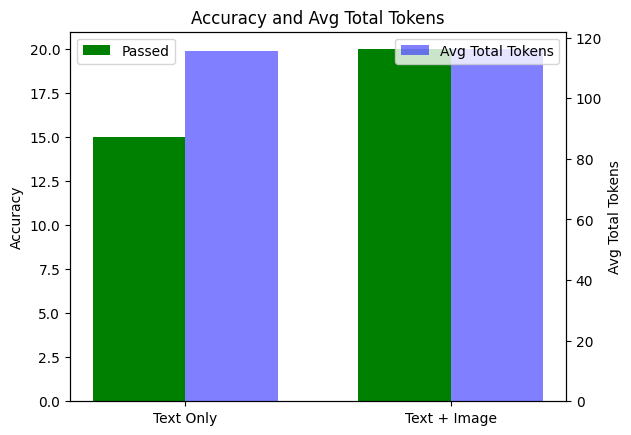
我们可以检索这些评估运行的结果并进行一些本地分析。在这种情况下,我们将比较纯文本和文本+图像运行的性能,并评估增加总 token 数量(通过添加图像上下文)如何影响模型的准确性。我们还可以通过分析失败示例的模型输入来进行一些基本的错误分析。
# Calculate passed and total for text_only_run
text_only_data = text_only_run_output_items.to_dict()['data']
text_only_passed = sum(1 for output_item in text_only_data if output_item['results'][0]['passed'])
text_only_total = len(text_only_data)

# Calculate passed and total for text_image_run
text_image_data = text_image_run_output_items.to_dict()['data']
text_image_passed = sum(1 for output_item in text_image_data if output_item['results'][0]['passed'])
text_image_total = len(text_image_data)

# Calculate average total_tokens for each run
def avg_total_tokens(data):
    tokens = [item['sample']['usage']['total_tokens'] for item in data if 'usage' in item['sample']]
    return sum(tokens) / len(tokens) if tokens else 0

text_only_avg_tokens = avg_total_tokens(text_only_data)
text_image_avg_tokens = avg_total_tokens(text_image_data)

# Plotting
labels = ['Text Only', 'Text + Image']
passed = [text_only_passed, text_image_passed]
avg_tokens = [text_only_avg_tokens, text_image_avg_tokens]

x = np.arange(len(labels))
width = 0.35

fig, ax1 = plt.subplots()

# Bar for passed only
bars1 = ax1.bar(x - width/2, passed, width, label='Passed', color='green')
ax1.set_ylabel('Accuracy')
ax1.set_xticks(x)
ax1.set_xticklabels(labels)
ax1.set_title('Accuracy and Avg Total Tokens')
ax1.legend(loc='upper left')

# Second y-axis for avg total tokens
ax2 = ax1.twinx()
bars2 = ax2.bar(x + width/2, avg_tokens, width, label='Avg Total Tokens', color='blue', alpha=0.5)
ax2.set_ylabel('Avg Total Tokens')
ax2.legend(loc='upper right')

plt.show()
failed_samples = [
    {
        "Input": sample['sample']['input'],
        "Model Output": sample['sample']['output']
    }
    for sample in text_only_run_output_items.to_dict()['data']
    if not sample['results'][0]['passed']
]

pd.set_option('display.max_colwidth', 150)  # Adjust as needed

failed_df = pd.DataFrame(failed_samples)
display(failed_df.style.set_properties(**{'text-align': 'left'}))
最后,让我们清理一些我们创建的资源。
# delete vector stores
deleted_vector_store = client.vector_stores.delete(
  vector_store_id=text_vector_store_id
)
print(deleted_vector_store)

deleted_vector_store = client.vector_stores.delete(
  vector_store_id=text_image_vector_store_id
)
print(deleted_vector_store)
常见问题
常见错误:1) API密钥未设置导致认证失败;2) 图像路径错误或文件缺失;3) 向量存储上传超时或文件格式不支持;4) 检索时过滤器键值不匹配;5) 评估运行未完成即获取结果。排查方法:检查环境变量、验证文件路径、查看API响应状态码、确认属性键存在、等待评估完成。生产优化:使用异步请求、批量上传、缓存频繁查询、监控token使用、设置重试机制、考虑成本与延迟平衡。
企业应用扩展
扩展方向:1) 支持更多模态(音频、视频);2) 集成自定义嵌入模型提升检索精度;3) 实现实时流式处理;4) 添加用户反馈循环优化评估;5) 部署为微服务,结合Kubernetes自动扩缩容;6) 探索多语言和多文化场景;7) 使用更细粒度的属性过滤器(如情感极性、产品类别);8) 结合LangChain等框架构建更复杂的工作流。
总结
本教程面向有编程基础的开发者,详细讲解如何利用OpenAI的视觉与响应API构建多模态RAG系统。通过合成图像与文本数据,结合文件搜索和评估API,实现客户反馈的上下文感知分析。内容涵盖环境配置、数据生成、向量存储填充、检索过滤、评估分析等完整流程,并对比纯文本与文本+图像RAG的性能差异,提供可落地的工程实践指导。
- --
内容来源与验证
- 内容等级:PREMIUM_A
- 质量等级:A
- 难度:中级
- 验证等级:V1
- 原文作者:robert-tinn
- 原文日期:2025-05-16
- 来源许可:MIT
- 来源版本:
70353ecd82bd6272e50fd599eb6c253516a551bd - 查看原文
站内还有更多完整实战教程
加入会员,解锁全部教程、完整代码与持续更新内容。
加入会员