检索增强生成(RAG)指南:构建与优化
技术背景
大语言模型虽具备通用能力,但对企业内部文档、客户支持知识库等专有领域问题往往无法准确回答,容易产生幻觉。RAG通过检索外部知识并注入提示词,让模型基于真实上下文作答,成为企业落地AI应用的主流范式。然而,朴素RAG在检索质量、上下文相关性、排序精度上存在明显瓶颈,需要工程化手段持续优化。本教程面向有编程基础的开发者,提供从基础实现到高级优化的完整工程路径,并强调用数据驱动的方式评估每一次改进。
核心原理
RAG的核心数据流为:文档切分→嵌入向量化→向量检索→上下文拼接→LLM生成。基础RAG按标题切分文档,用Voyage AI的voyage-2模型生成嵌入,通过点积计算余弦相似度并设置阈值过滤,取Top-K块拼接为上下文。摘要索引在嵌入阶段将标题、原文与Claude生成的2-3句摘要拼接后共同嵌入,使向量同时承载语义概要,提升召回质量。重排序阶段先以initial_k=20扩大召回,再用Claude对候选摘要按相关性排序,输出前k个索引,并赋予递减的relevance_score,从而在精度与召回之间取得更优平衡。评估体系将检索指标与端到端准确率解耦,检索指标基于正确块链接集合计算,端到端准确率由Claude 3.5 Sonnet作为LLM评判者,按XML格式输出is_correct判定。
架构分析
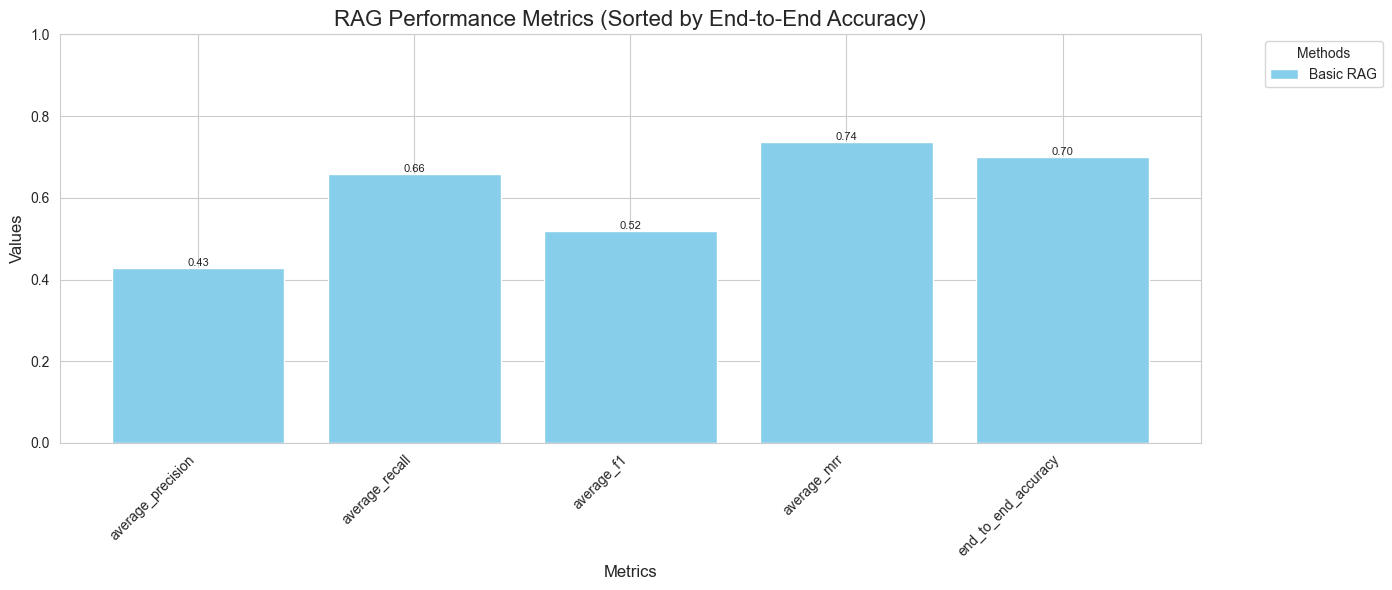
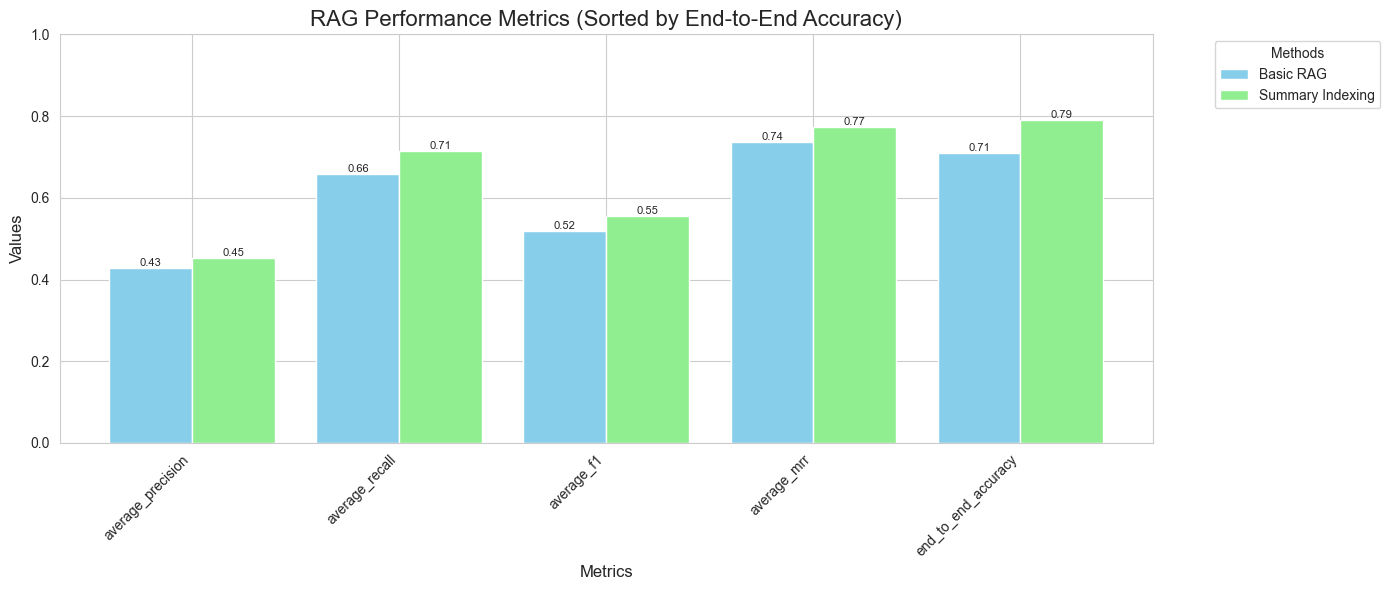
系统由四层组成:数据层负责加载anthropic_docs.json与评估数据集;向量存储层实现VectorDB与SummaryIndexedVectorDB两个类,封装嵌入、缓存、持久化(pickle)与相似度检索;检索层提供retrieve_base、retrieve_level_two、retrieve_advanced三种策略,分别对应基础、摘要索引与重排序;生成与评估层通过answer_query_*函数调用Claude生成答案,并由evaluate_retrieval与evaluate_end_to_end完成指标计算。关键设计决策包括:查询缓存避免重复嵌入、相似度阈值0.75过滤低质结果、批量嵌入batch_size=128控制API调用、重排序失败时回退到原始Top-K保证鲁棒性。评估结果通过plot_performance统一可视化,便于横向对比不同方法的精确率、召回率、F1、MRR与端到端准确率。
完整实战教程
Claude 擅长处理各种任务,但在涉及您独特业务场景的查询时可能力不从心。这正是检索增强生成(RAG)发挥关键作用的地方。RAG 使 Claude 能够利用您的内部知识库或客户支持文档,显著增强其回答特定领域问题的能力。企业越来越多地构建 RAG 应用,以改进客户支持、内部公司文档问答、金融与法律分析等工作流程。
在本指南中,我们将以 Claude 文档作为知识库,演示如何构建和优化 RAG 系统。我们将引导您完成:
1) 使用内存向量数据库和来自 Voyage AI 的嵌入建立基础 RAG 系统。
2) 构建稳健的评估套件。我们将超越基于“感觉”的评估,向您展示如何独立衡量检索管道和端到端性能。
3) 实施高级技术来改进 RAG,包括使用 Claude 进行摘要索引和重排序。
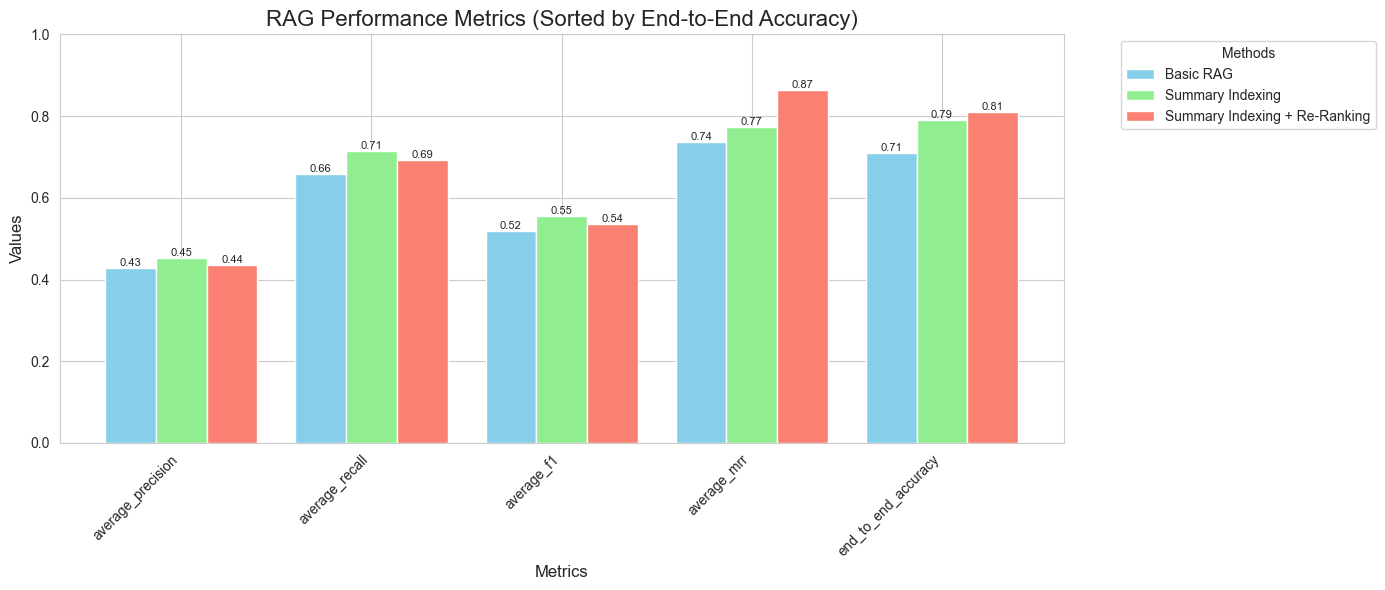
通过一系列有针对性的改进,与基础 RAG 管道相比,我们在以下指标上实现了显著的性能提升(稍后我们将解释所有这些指标的含义):
- 平均精度:0.43 --> 0.44
- 平均召回率:0.66 --> 0.69
- 平均 F1 分数:0.52 --> 0.54
- 平均倒数排名(MRR):0.74 --> 0.87
- 端到端准确率:71% --> 81%
注意:
本 cookbook 中的评估旨在模拟生产评估系统,请记住它们可能需要一段时间才能运行。另外请注意:如果您完整运行评估,可能会遇到速率限制,具体取决于您的使用层级。如果您想节省 token 用量,可以考虑跳过完整的端到端评估。
目录
1) 设置
2) 第 1 级 - 基础 RAG
3) 构建评估系统
4) 第 2 级 - 摘要索引
5) 第 3 级 - 摘要索引与重排序
设置
我们需要一些库,包括:
1) anthropic - 用于与 Claude 交互
2) voyageai - 用于生成高质量的嵌入
3) pandas、numpy、matplotlib 和 scikit-learn 用于数据处理和可视化
你还需要来自 Anthropic 和 Voyage AI 的 API 密钥
## setup
%pip install anthropic
%pip install voyageai
%pip install pandas
%pip install numpy
%pip install matplotlib
%pip install seaborn
%pip install -U scikit-learn
import os

os.environ["VOYAGE_API_KEY"] = "VOYAGE KEY HERE"
os.environ["ANTHROPIC_API_KEY"] = "ANTHROPIC KEY HERE"
import os

import anthropic

client = anthropic.Anthropic(
    # This is the default and can be omitted
    api_key=os.getenv("ANTHROPIC_API_KEY"),
)
初始化向量数据库类
在此示例中,我们使用的是内存中的向量数据库,但在生产应用中,您可能希望使用托管解决方案。
import json
import os
import pickle

import numpy as np
import voyageai


class VectorDB:
    def __init__(self, name, api_key=None):
        if api_key is None:
            api_key = os.getenv("VOYAGE_API_KEY")
        self.client = voyageai.Client(api_key=api_key)
        self.name = name
        self.embeddings = []
        self.metadata = []
        self.query_cache = {}
        self.db_path = f"./data/{name}/vector_db.pkl"

    def load_data(self, data):
        if self.embeddings and self.metadata:
            print("Vector database is already loaded. Skipping data loading.")
            return
        if os.path.exists(self.db_path):
            print("Loading vector database from disk.")
            self.load_db()
            return

        texts = [f"Heading: {item['chunk_heading']}\n\n Chunk Text:{item['text']}" for item in data]
        self._embed_and_store(texts, data)
        self.save_db()
        print("Vector database loaded and saved.")

    def _embed_and_store(self, texts, data):
        batch_size = 128
        result = [
            self.client.embed(texts[i : i + batch_size], model="voyage-2").embeddings
            for i in range(0, len(texts), batch_size)
        ]
        self.embeddings = [embedding for batch in result for embedding in batch]
        self.metadata = data

    def search(self, query, k=5, similarity_threshold=0.75):
        if query in self.query_cache:
            query_embedding = self.query_cache[query]
        else:
            query_embedding = self.client.embed([query], model="voyage-2").embeddings[0]
            self.query_cache[query] = query_embedding

        if not self.embeddings:
            raise ValueError("No data loaded in the vector database.")

        similarities = np.dot(self.embeddings, query_embedding)
        top_indices = np.argsort(similarities)[::-1]
        top_examples = []

        for idx in top_indices:
            if similarities[idx] >= similarity_threshold:
                example = {
                    "metadata": self.metadata[idx],
                    "similarity": similarities[idx],
                }
                top_examples.append(example)

                if len(top_examples) >= k:
                    break
        self.save_db()
        return top_examples

    def save_db(self):
        data = {
            "embeddings": self.embeddings,
            "metadata": self.metadata,
            "query_cache": json.dumps(self.query_cache),
        }
        os.makedirs(os.path.dirname(self.db_path), exist_ok=True)
        with open(self.db_path, "wb") as file:
            pickle.dump(data, file)

    def load_db(self):
        if not os.path.exists(self.db_path):
            raise ValueError(
                "Vector database file not found. Use load_data to create a new database."
            )
        with open(self.db_path, "rb") as file:
            data = pickle.load(file)
        self.embeddings = data["embeddings"]
        self.metadata = data["metadata"]
        self.query_cache = json.loads(data["query_cache"])
第 1 级 - 基础 RAG
首先,我们将使用最基础的方法搭建一个基本的 RAG 流程。业界许多人有时将其称为“朴素 RAG”。一个基础的 RAG 流程包含以下 3 个步骤:
1) 按标题切分文档——仅包含每个子标题下的内容
2) 对每个文档进行嵌入
3) 使用余弦相似度检索文档以回答查询
import json
import logging
import xml.etree.ElementTree as ET  # noqa: S314
from collections.abc import Callable
from typing import Any

import matplotlib.pyplot as plt
from tqdm import tqdm

# Load the evaluation dataset
with open("evaluation/docs_evaluation_dataset.json") as f:
    eval_data = json.load(f)

# Load the Claude Documentation
with open("data/anthropic_docs.json") as f:
    anthropic_docs = json.load(f)

# Initialize the VectorDB
db = VectorDB("anthropic_docs")
db.load_data(anthropic_docs)


def retrieve_base(query, db):
    results = db.search(query, k=3)
    context = ""
    for result in results:
        chunk = result["metadata"]
        context += f"\n{chunk['text']}\n"
    return results, context


def answer_query_base(query, db):
    documents, context = retrieve_base(query, db)
    prompt = f"""
    You have been tasked with helping us to answer the following query:
    <query>
    {query}
    </query>
    You have access to the following documents which are meant to provide context as you answer the query:
    <documents>
    {context}
    </documents>
    Please remain faithful to the underlying context, and only deviate from it if you are 100% sure that you know the answer already.
    Answer the question now, and avoid providing preamble such as 'Here is the answer', etc
    """
    response = client.messages.create(
        model="claude-haiku-4-5",
        max_tokens=2500,
        messages=[{"role": "user", "content": prompt}],
        temperature=0,
    )
    return response.content[0].text
评估设置
在评估 RAG 应用时,分别评估检索系统和端到端系统的性能至关重要。
我们合成生成了一个包含 100 个样本的评估数据集,其中包括以下内容:
- 一个问题
- 来自我们文档中与该问题相关的块。这是我们期望检索系统在提问时检索到的内容
- 问题的正确答案。
这是一个相对具有挑战性的数据集。我们的一些问题需要综合多个块才能正确回答,因此我们的系统能够一次加载多个块非常重要。您可以通过打开 evaluation/docs_evaluation_dataset.json 来检查数据集
运行下一个单元格以查看数据集的预览
# previewing our eval dataset
import json


def preview_json(file_path, num_items=3):
    try:
        with open(file_path) as file:
            data = json.load(file)

        if isinstance(data, list):
            preview_data = data[:num_items]
        elif isinstance(data, dict):
            preview_data = dict(list(data.items())[:num_items])
        else:
            print(f"Unexpected data type: {type(data)}. Cannot preview.")
            return

        print(f"Preview of the first {num_items} items from {file_path}:")
        print(json.dumps(preview_data, indent=2))
        print(f"\nTotal number of items: {len(data)}")

    except FileNotFoundError:
        print(f"File not found: {file_path}")
    except json.JSONDecodeError:
        print(f"Invalid JSON in file: {file_path}")
    except Exception as e:
        print(f"An error occurred: {str(e)}")


preview_json("evaluation/docs_evaluation_dataset.json")
指标定义
我们将基于5个关键指标来评估系统:精确率、召回率、F1分数、平均倒数排名(MRR)和端到端准确率。
检索指标:
精确率
精确率表示检索到的块中实际相关的比例。它回答了这个问题:“在我们检索到的块中,有多少是正确的?”
关键点:
- 高精确率表明系统高效,假阳性少。
- 低精确率表明检索到了许多不相关的块。
- 我们的系统每次查询至少检索3个块,这可能会影响精确率分数。
公式:
$$
\text{Precision} = \frac{\text{True Positives}}{\text{Total Retrieved}} = \frac{|\text{Retrieved} \cap \text{Correct}|}{|\text{Retrieved}|}
$$
召回率
召回率衡量我们检索系统的完整性。它回答了这个问题:“在所有存在的正确块中,我们成功检索到了多少?”
关键点:
- 高召回率表明对必要信息的全面覆盖。
- 低召回率表明遗漏了重要的块。
- 召回率对于确保LLM能够访问所有所需信息至关重要。
公式:
$$
\text{Recall} = \frac{\text{True Positives}}{\text{Total Correct}} = \frac{|\text{Retrieved} \cap \text{Correct}|}{|\text{Correct}|}
$$
F1分数
F1分数提供了精确率和召回率之间的平衡度量。当您需要一个单一指标来评估系统性能时,它特别有用,尤其是在类别分布不均匀的情况下。
关键点:
- F1分数范围从0到1,1表示完美的精确率和召回率。
- 它是精确率和召回率的调和平均值,倾向于两者中较低的值。
- 在假阳性和假阴性都很重要的情况下很有用。
公式:
$$
\text{F1 Score} = 2 \times \frac{\text{Precision} \times \text{Recall}}{\text{Precision} + \text{Recall}}
$$
解释F1分数:
- F1分数为1.0表示完美的精确率和召回率。
- F1分数为0.0表示最差性能。
- 通常,F1分数越高,整体性能越好。
平衡精确率、召回率和F1分数:
- 精确率和召回率之间通常存在权衡。
- 我们系统的最小块检索偏向召回率而非精确率。
- 最佳平衡取决于具体用例。
- 在许多RAG系统中,通常优先考虑高召回率,因为LLM可以在生成过程中过滤掉不太相关的信息。
平均倒数排名(MRR)@k
MRR衡量我们的系统对相关信息进行排名的效果。它帮助我们了解如果用户从检索结果的顶部开始,他们找到所需信息的速度有多快。
关键点:
- MRR范围从0到1,其中1表示完美(正确答案总是排在第一位)。
- 它只考虑每个查询的第一个正确结果的排名。
- 更高的MRR表示相关信息的排名更好。
公式:
$$
\text{MRR} = \frac{1}{|Q|} \sum_{i=1}^{|Q|} \frac{1}{\text{rank}_i}
$$
其中:
- |Q|是查询的总数
- rank_i是第i个查询的第一个相关项的位置
端到端指标:
端到端准确率
我们使用LLM作为评判者(Claude 3.5 Sonnet)来评估生成的答案基于问题和真实答案是否正确。
公式:
$$
\text{End to End Accuracy} = \frac{\text{Number of Correct Answers}}{\text{Total Number of Questions}}
$$
该指标评估整个流程,从检索到答案生成。
定义我们的指标计算函数
def calculate_mrr(retrieved_links: list[str], correct_links: set[str]) -> float:
    for i, link in enumerate(retrieved_links, 1):
        if link in correct_links:
            return 1 / i
    return 0


def evaluate_retrieval(
    retrieval_function: Callable, evaluation_data: list[dict[str, Any]], db: Any
) -> tuple[float, float, float, float, list[float], list[float], list[float]]:
    precisions = []
    recalls = []
    mrrs = []

    for i, item in enumerate(tqdm(evaluation_data, desc="Evaluating Retrieval")):
        try:
            retrieved_chunks, _ = retrieval_function(item["question"], db)
            retrieved_links = [
                chunk["metadata"].get("chunk_link", chunk["metadata"].get("url", ""))
                for chunk in retrieved_chunks
            ]
        except Exception as e:
            logging.error(f"Error in retrieval function: {e}")
            continue

        correct_links = set(item["correct_chunks"])

        true_positives = len(set(retrieved_links) & correct_links)
        precision = true_positives / len(retrieved_links) if retrieved_links else 0
        recall = true_positives / len(correct_links) if correct_links else 0
        mrr = calculate_mrr(retrieved_links, correct_links)

        precisions.append(precision)
        recalls.append(recall)
        mrrs.append(mrr)

        if (i + 1) % 10 == 0:
            print(
                f"Processed {i + 1}/{len(evaluation_data)} items. Current Avg Precision: {sum(precisions) / len(precisions):.4f}, Avg Recall: {sum(recalls) / len(recalls):.4f}, Avg MRR: {sum(mrrs) / len(mrrs):.4f}"
            )

    avg_precision = sum(precisions) / len(precisions) if precisions else 0
    avg_recall = sum(recalls) / len(recalls) if recalls else 0
    avg_mrr = sum(mrrs) / len(mrrs) if mrrs else 0
    f1 = (
        2 * (avg_precision * avg_recall) / (avg_precision + avg_recall)
        if (avg_precision + avg_recall) > 0
        else 0
    )

    return avg_precision, avg_recall, avg_mrr, f1, precisions, recalls, mrrs


def evaluate_end_to_end(answer_query_function, db, eval_data):
    correct_answers = 0
    results = []
    total_questions = len(eval_data)

    for i, item in enumerate(tqdm(eval_data, desc="Evaluating End-to-End")):
        query = item["question"]
        correct_answer = item["correct_answer"]
        generated_answer = answer_query_function(query, db)

        prompt = f"""
        You are an AI assistant tasked with evaluating the correctness of answers to questions about Anthropic's documentation.

        Question: {query}

        Correct Answer: {correct_answer}

        Generated Answer: {generated_answer}

        Is the Generated Answer correct based on the Correct Answer? You should pay attention to the substance of the answer, and ignore minute details that may differ.

        Small differences or changes in wording don't matter. If the generated answer and correct answer are saying essentially the same thing then that generated answer should be marked correct.

        However, if there is any critical piece of information which is missing from the generated answer in comparison to the correct answer, then we should mark this as incorrect.

        Finally, if there are any direct contradictions between the correect answer and generated answer, we should deem the generated answer to be incorrect.

        Respond in the following XML format:
        <evaluation>
        <content>
        <explanation>Your explanation here</explanation>
        <is_correct>true/false</is_correct>
        </content>
        </evaluation>
        """

        try:
            response = client.messages.create(
                model="claude-sonnet-4-6",
                max_tokens=1500,
                messages=[
                    {"role": "user", "content": prompt},
                    {"role": "assistant", "content": "<evaluation>"},
                ],
                temperature=0,
                stop_sequences=["</evaluation>"],
            )

            response_text = response.content[0].text
            print(response_text)
            # Parse XML from trusted LLM response
            evaluation = ET.fromstring(response_text)  # noqa: S314
            is_correct = evaluation.find("is_correct").text.lower() == "true"

            if is_correct:
                correct_answers += 1
            results.append(is_correct)

            logging.info(f"Question {i + 1}/{total_questions}: {query}")
            logging.info(f"Correct: {is_correct}")
            logging.info("---")

        except ET.ParseError as e:
            logging.error(f"XML parsing error: {e}")
            is_correct = "true" in response_text.lower()
            results.append(is_correct)
        except Exception as e:
            logging.error(f"Unexpected error: {e}")
            results.append(False)

        if (i + 1) % 10 == 0:
            current_accuracy = correct_answers / (i + 1)
            print(
                f"Processed {i + 1}/{total_questions} questions. Current Accuracy: {current_accuracy:.4f}"
            )
        # time.sleep(2)
    accuracy = correct_answers / total_questions
    return accuracy, results
绘制性能的辅助函数
import json
import os

import matplotlib.pyplot as plt
import seaborn as sns


def plot_performance(results_folder="evaluation/json_results", include_methods=None, colors=None):
    # Set default colors
    default_colors = ["skyblue", "lightgreen", "salmon"]
    if colors is None:
        colors = default_colors

    # Load JSON files
    results = []
    for filename in os.listdir(results_folder):
        if filename.endswith(".json"):
            file_path = os.path.join(results_folder, filename)
            with open(file_path) as f:
                try:
                    data = json.load(f)
                    if "name" not in data:
                        print(f"Warning: {filename} does not contain a 'name' field. Skipping.")
                        continue
                    if include_methods is None or data["name"] in include_methods:
                        results.append(data)
                except json.JSONDecodeError:
                    print(f"Warning: {filename} is not a valid JSON file. Skipping.")

    if not results:
        print("No JSON files found with matching 'name' fields.")
        return

    # Validate data
    required_metrics = [
        "average_precision",
        "average_recall",
        "average_f1",
        "average_mrr",
        "end_to_end_accuracy",
    ]
    for result in results.copy():
        if not all(metric in result for metric in required_metrics):
            print(f"Warning: {result['name']} is missing some required metrics. Skipping.")
            results.remove(result)

    if not results:
        print("No valid results remaining after validation.")
        return

    # Sort results based on end-to-end accuracy
    results.sort(key=lambda x: x["end_to_end_accuracy"])

    # Prepare data for plotting
    methods = [result["name"] for result in results]
    metrics = required_metrics

    # Set up the plot
    plt.figure(figsize=(14, 6))
    sns.set_style("whitegrid")

    x = range(len(metrics))
    width = 0.8 / len(results)

    # Create color palette
    num_methods = len(methods)
    color_palette = colors[:num_methods] + sns.color_palette("husl", num_methods - len(colors))

    # Plot bars for each method
    for i, (result, color) in enumerate(zip(results, color_palette, strict=False)):
        values = [result[metric] for metric in metrics]
        offset = (i - len(results) / 2 + 0.5) * width
        bars = plt.bar([xi + offset for xi in x], values, width, label=result["name"], color=color)

        # Add value labels on the bars
        for bar in bars:
            height = bar.get_height()
            plt.text(
                bar.get_x() + bar.get_width() / 2.0,
                height,
                f"{height:.2f}",
                ha="center",
                va="bottom",
                fontsize=8,
            )

    # Customize the plot
    plt.xlabel("Metrics", fontsize=12)
    plt.ylabel("Values", fontsize=12)
    plt.title("RAG Performance Metrics (Sorted by End-to-End Accuracy)", fontsize=16)
    plt.xticks(x, metrics, rotation=45, ha="right")
    plt.legend(title="Methods", bbox_to_anchor=(1.05, 1), loc="upper left")
    plt.ylim(0, 1)

    plt.tight_layout()
    plt.show()
评估我们的基准情况
import pandas as pd

avg_precision, avg_recall, avg_mrr, f1, precisions, recalls, mrrs = evaluate_retrieval(
    retrieve_base, eval_data, db
)
e2e_accuracy, e2e_results = evaluate_end_to_end(answer_query_base, db, eval_data)

# Create a DataFrame
df = pd.DataFrame(
    {
        "question": [item["question"] for item in eval_data],
        "retrieval_precision": precisions,
        "retrieval_recall": recalls,
        "retrieval_mrr": mrrs,
        "e2e_correct": e2e_results,
    }
)

# Save to CSV
df.to_csv("evaluation/csvs/evaluation_results_detailed.csv", index=False)
print("Detailed results saved to evaluation/csvs/evaluation_results_one.csv")

# Print the results
print(f"Average Precision: {avg_precision:.4f}")
print(f"Average Recall: {avg_recall:.4f}")
print(f"Average MRR: {avg_mrr:.4f}")
print(f"Average F1: {f1:.4f}")
print(f"End-to-End Accuracy: {e2e_accuracy:.4f}")

# Save the results to a file
with open("evaluation/json_results/evaluation_results_one.json", "w") as f:
    json.dump(
        {
            "name": "Basic RAG",
            "average_precision": avg_precision,
            "average_recall": avg_recall,
            "average_f1": f1,
            "average_mrr": avg_mrr,
            "end_to_end_accuracy": e2e_accuracy,
        },
        f,
        indent=2,
    )

print(
    "Evaluation complete. Results saved to evaluation_results_one.json, evaluation_results_one.csv"
)
# let's visualize our performance
plot_performance("evaluation/json_results", ["Basic RAG"], colors=["skyblue"])
第2级:用于增强检索的文档摘要
在本节中,我们将通过整合文档摘要来实施一种改进的检索系统方法。我们不再直接嵌入文档中的块,而是为每个块创建一个简洁的摘要,并在嵌入过程中使用这个摘要以及原始内容。
这种方法旨在更有效地捕捉每个文档块的精髓,从而可能提高检索性能。
此过程的关键步骤:
- 我们加载原始文档块。
- 对于每个块,我们使用Claude生成一个2-3句话的摘要。
- 我们将每个块的原始内容和摘要都存储在一个新的json文件:
data/anthropic_summary_indexed_docs.json中。
这种摘要增强方法旨在在嵌入和检索阶段提供更多上下文,可能提高系统理解和匹配最相关文档与用户查询的能力。
生成摘要并存储它们
import json

from tqdm import tqdm


def generate_summaries(input_file, output_file):
    # Load the original documents
    with open(input_file) as f:
        docs = json.load(f)

    # Prepare the context about the overall knowledge base
    knowledge_base_context = "This is documentation for Anthropic's, a frontier AI lab building Claude, an LLM that excels at a variety of general purpose tasks. These docs contain model details and documentation on Anthropic's APIs."

    summarized_docs = []

    for doc in tqdm(docs, desc="Generating summaries"):
        prompt = f"""
        You are tasked with creating a short summary of the following content from Anthropic's documentation.

        Context about the knowledge base:
        {knowledge_base_context}

        Content to summarize:
        Heading: {doc["chunk_heading"]}
        {doc["text"]}

        Please provide a brief summary of the above content in 2-3 sentences. The summary should capture the key points and be concise. We will be using it as a key part of our search pipeline when answering user queries about this content.

        Avoid using any preamble whatsoever in your response. Statements such as 'here is the summary' or 'the summary is as follows' are prohibited. You should get straight into the summary itself and be concise. Every word matters.
        """

        response = client.messages.create(
            model="claude-haiku-4-5",
            max_tokens=150,
            messages=[{"role": "user", "content": prompt}],
            temperature=0,
        )

        summary = response.content[0].text.strip()

        summarized_doc = {
            "chunk_link": doc["chunk_link"],
            "chunk_heading": doc["chunk_heading"],
            "text": doc["text"],
            "summary": summary,
        }
        summarized_docs.append(summarized_doc)

    # Save the summarized documents to a new JSON file
    with open(output_file, "w") as f:
        json.dump(summarized_docs, f, indent=2)

    print(f"Summaries generated and saved to {output_file}")


# generate_summaries('data/anthropic_docs.json', 'data/anthropic_summary_indexed_docs.json')
摘要索引向量数据库创建
在这里,我们正在创建一个新的向量数据库,其中整合了摘要增强的文档块。这种方法将原始文本、块标题和新生成的摘要合并为单个文本进行嵌入。
此过程的关键特性:
- 我们使用 Voyage AI API 为组合文本(标题 + 摘要 + 原始内容)创建嵌入。
- 嵌入和完整元数据(包括摘要)存储在我们的向量数据库中。
- 我们实现缓存机制以提高重复查询的效率。
- 数据库保存到磁盘以实现持久化,并在未来会话中快速加载。
这种摘要索引方法旨在创建更具信息性的嵌入,从而可能实现更准确且上下文相关的文档检索。
import json
import os
import pickle

import numpy as np
import voyageai


class SummaryIndexedVectorDB:
    def __init__(self, name, api_key=None):
        if api_key is None:
            api_key = os.getenv("VOYAGE_API_KEY")
        self.client = voyageai.Client(api_key=api_key)
        self.name = name
        self.embeddings = []
        self.metadata = []
        self.query_cache = {}
        self.db_path = f"./data/{name}/summary_indexed_vector_db.pkl"

    def load_data(self, data_file):
        # Check if the vector database is already loaded
        if self.embeddings and self.metadata:
            print("Vector database is already loaded. Skipping data loading.")
            return
        # Check if vector_db.pkl exists
        if os.path.exists(self.db_path):
            print("Loading vector database from disk.")
            self.load_db()
            return

        with open(data_file) as f:
            data = json.load(f)

        texts = [
            f"{item['chunk_heading']}\n\n{item['text']}\n\n{item['summary']}" for item in data
        ]  # Embed Chunk Heading + Text + Summary Together
        # Embed more than 128 documents with a for loop
        batch_size = 128
        result = [
            self.client.embed(texts[i : i + batch_size], model="voyage-2").embeddings
            for i in range(0, len(texts), batch_size)
        ]

        # Flatten the embeddings
        self.embeddings = [embedding for batch in result for embedding in batch]
        self.metadata = data  # Store the entire item as metadata
        self.save_db()
        # Save the vector database to disk
        print("Vector database loaded and saved.")

    def search(self, query, k=3, similarity_threshold=0.75):
        query_embedding = None
        if query in self.query_cache:
            query_embedding = self.query_cache[query]
        else:
            query_embedding = self.client.embed([query], model="voyage-2").embeddings[0]
            self.query_cache[query] = query_embedding

        if not self.embeddings:
            raise ValueError("No data loaded in the vector database.")

        similarities = np.dot(self.embeddings, query_embedding)
        top_indices = np.argsort(similarities)[::-1]
        top_examples = []

        for idx in top_indices:
            if similarities[idx] >= similarity_threshold:
                example = {
                    "metadata": self.metadata[idx],
                    "similarity": similarities[idx],
                }
                top_examples.append(example)

                if len(top_examples) >= k:
                    break
        self.save_db()
        return top_examples

    def save_db(self):
        data = {
            "embeddings": self.embeddings,
            "metadata": self.metadata,
            "query_cache": json.dumps(self.query_cache),
        }

        # Ensure the directory exists
        os.makedirs(os.path.dirname(self.db_path), exist_ok=True)

        with open(self.db_path, "wb") as file:
            pickle.dump(data, file)

    def load_db(self):
        if not os.path.exists(self.db_path):
            raise ValueError(
                "Vector database file not found. Use load_data to create a new database."
            )

        with open(self.db_path, "rb") as file:
            data = pickle.load(file)

        self.embeddings = data["embeddings"]
        self.metadata = data["metadata"]
        self.query_cache = json.loads(data["query_cache"])
使用摘要索引嵌入增强检索
在本节中,我们使用新的摘要索引向量数据库实现检索过程。这种方法利用了我们创建的增强嵌入,这些嵌入将文档摘要与原始内容结合在一起。
此更新检索过程的关键方面:
- 我们使用查询嵌入搜索向量数据库,检索出最相似的前 k 个文档。
- 对于每个检索到的文档,我们在提供给 LLM 的上下文中包含块标题、摘要和全文。
- 然后使用这个丰富的上下文来生成对用户查询的答案。
通过在嵌入和检索阶段都包含摘要,我们旨在为 LLM 提供更全面和聚焦的上下文。这可能会带来更准确和相关的答案,因为 LLM 可以访问每个相关文档块的简明概述(摘要)和详细信息(全文)。
def retrieve_level_two(query, db):
    results = db.search(query, k=3)
    context = ""
    for result in results:
        chunk = result["metadata"]
        context += f"\n <document> \n {chunk['chunk_heading']}\n\nText\n {chunk['text']} \n\nSummary: \n {chunk['summary']} \n </document> \n"  # show model all 3 items
    return results, context


def answer_query_level_two(query, db):
    documents, context = retrieve_base(query, db)
    prompt = f"""
    You have been tasked with helping us to answer the following query:
    <query>
    {query}
    </query>
    You have access to the following documents which are meant to provide context as you answer the query:
    <documents>
    {context}
    </documents>
    Please remain faithful to the underlying context, and only deviate from it if you are 100% sure that you know the answer already.
    Answer the question now, and avoid providing preamble such as 'Here is the answer', etc
    """
    response = client.messages.create(
        model="claude-haiku-4-5",
        max_tokens=2500,
        messages=[{"role": "user", "content": prompt}],
        temperature=0,
    )
    return response.content[0].text
# Initialize the SummaryIndexedVectorDB
level_two_db = SummaryIndexedVectorDB("anthropic_docs_v2")
level_two_db.load_data("data/anthropic_summary_indexed_docs.json")

import pandas as pd

# Run the evaluations
avg_precision, avg_recall, avg_mrr, f1, precisions, recalls, mrrs = evaluate_retrieval(
    retrieve_level_two, eval_data, level_two_db
)
e2e_accuracy, e2e_results = evaluate_end_to_end(answer_query_level_two, level_two_db, eval_data)

# Create a DataFrame
df = pd.DataFrame(
    {
        "question": [item["question"] for item in eval_data],
        "retrieval_precision": precisions,
        "retrieval_recall": recalls,
        "retrieval_mrr": mrrs,
        "e2e_correct": e2e_results,
    }
)

# Save to CSV
df.to_csv("evaluation/csvs/evaluation_results_detailed_level_two.csv", index=False)
print("Detailed results saved to evaluation_results_detailed.csv")

# Print the results
print(f"Average Precision: {avg_precision:.4f}")
print(f"Average Recall: {avg_recall:.4f}")
print(f"Average MRR: {avg_mrr:.4f}")
print(f"Average F1: {f1:.4f}")
print(f"End-to-End Accuracy: {e2e_accuracy:.4f}")

# Save the results to a file
with open("evaluation/json_results/evaluation_results_level_two.json", "w") as f:
    json.dump(
        {
            "name": "Summary Indexing",
            "average_precision": avg_precision,
            "average_recall": avg_recall,
            "average_f1": f1,
            "average_mrr": avg_mrr,
            "end_to_end_accuracy": e2e_accuracy,
        },
        f,
        indent=2,
    )

print(
    "Evaluation complete. Results saved to evaluation_results_level_two.json, evaluation_results_detailed_level_two.csv"
)
将此方法与基础 RAG 进行评估对比
# visualizing our performance
plot_performance("evaluation/json_results", ["Basic RAG", "Summary Indexing"])
第 3 级 - 使用 Claude 进行重排序
在我们检索系统的最后一项增强中,我们引入了一个重排序步骤,以进一步提高检索文档的相关性。这种方法利用 Claude 的能力,更好地理解查询和检索文档的上下文和细微差别。
rerank_results 函数使用 Claude 重新评估并重新排序最初检索到的文档:
- 它将查询和所有检索到的文档摘要呈现给 Claude。
- 要求 Claude 选择并排序最相关的文档。
- 该函数解析 Claude 的响应以获取重新排序后的文档索引。
- 它包含错误或结果不足时的回退机制。
- 最后,它为重新排序后的结果分配递减的相关性分数。
retrieve_advanced 函数实现了新的检索流程:
- 我们最初从向量数据库中检索比所需更多的文档(默认为 20,可通过
initial_k配置)。 - 然后我们使用
rerank_results函数将这个更大的集合精炼为最相关的文档(默认为 3,可通过k配置)。 - 最后,它从这些重新排序的文档中生成一个新的上下文字符串。
这个过程最初撒下更大的网,然后使用 AI 聚焦于最相关的信息。通过结合基于向量的检索和 LLM 重排序,这种方法旨在为用户查询提供更准确且上下文更合适的响应。
我们的评估显示出显著的改进:
- 准确率从之前系统的 78% 提高到 85%。
- 通过使用我们的重排序器减少展示给 LLM 的文档数量,精度得到了提高。
- 通过要求 Claude 按顺序对每个文档的相关性进行排序,MRR(平均倒数排名)可能得到了改善。
这些改进证明了在我们的检索过程中引入 AI 驱动的重排序的有效性。
def rerank_results(query: str, results: list[dict], k: int = 5) -> list[dict]:
    # Prepare the summaries with their indices
    summaries = []
    print(len(results))

    for i, result in enumerate(results):
        summary = f"[{i}] Document Summary: {result['metadata']['summary']}"
        summaries.append(summary)
    joined_summaries = "\n\n".join(summaries)

    prompt = f"""
    Query: {query}
    You are about to be given a group of documents, each preceded by its index number in square brackets. Your task is to select the only {k} most relevant documents from the list to help us answer the query.

    <documents>
    {joined_summaries}
    </documents>

    Output only the indices of {k} most relevant documents in order of relevance, separated by commas, enclosed in XML tags here:
    <relevant_indices>put the numbers of your indices here, seeparted by commas</relevant_indices>
    """
    try:
        response = client.messages.create(
            model="claude-haiku-4-5",
            max_tokens=50,
            messages=[
                {"role": "user", "content": prompt},
                {"role": "assistant", "content": "<relevant_indices>"},
            ],
            temperature=0,
            stop_sequences=["</relevant_indices>"],
        )

        # Extract the indices from the response
        response_text = response.content[0].text.strip()
        indices_str = response_text
        relevant_indices = []
        for idx in indices_str.split(","):
            try:
                relevant_indices.append(int(idx.strip()))
            except ValueError:
                continue  # Skip invalid indices
        print(indices_str)
        print(relevant_indices)
        # If we didn't get enough valid indices, fall back to the top k by original order
        if len(relevant_indices) == 0:
            relevant_indices = list(range(min(k, len(results))))

        # Ensure we don't have out-of-range indices
        relevant_indices = [idx for idx in relevant_indices if idx < len(results)]

        # Return the reranked results
        reranked_results = [results[idx] for idx in relevant_indices[:k]]
        # Assign descending relevance scores
        for i, result in enumerate(reranked_results):
            result["relevance_score"] = (
                100 - i
            )  # Highest score is 100, decreasing by 1 for each rank

        return reranked_results

    except Exception as e:
        print(f"An error occurred during reranking: {str(e)}")
        # Fall back to returning the top k results without reranking
        return results[:k]


def retrieve_advanced(
    query: str, db: SummaryIndexedVectorDB, k: int = 3, initial_k: int = 20
) -> tuple[list[dict], str]:
    # Step 1: Get initial results
    initial_results = db.search(query, k=initial_k)

    # Step 2: Re-rank results
    reranked_results = rerank_results(query, initial_results, k=k)

    # Step 3: Generate new context string from re-ranked results
    new_context = ""
    for result in reranked_results:
        chunk = result["metadata"]
        new_context += (
            f"\n <document> \n {chunk['chunk_heading']}\n\n{chunk['text']} \n </document> \n"
        )

    return reranked_results, new_context


# The answer_query_advanced function remains unchanged
def answer_query_advanced(query: str, db: SummaryIndexedVectorDB):
    documents, context = retrieve_advanced(query, db)
    prompt = f"""
    You have been tasked with helping us to answer the following query:
    <query>
    {query}
    </query>
    You have access to the following documents which are meant to provide context as you answer the query:
    <documents>
    {context}
    </documents>
    Please remain faithful to the underlying context, and only deviate from it if you are 100% sure that you know the answer already.
    Answer the question now, and avoid providing preamble such as 'Here is the answer', etc
    """
    response = client.messages.create(
        model="claude-haiku-4-5",
        max_tokens=2500,
        messages=[{"role": "user", "content": prompt}],
        temperature=0,
    )
    return response.content[0].text
评估
# Initialize the SummaryIndexedVectorDB
level_three_db = SummaryIndexedVectorDB("anthropic_docs_v3")
level_three_db.load_data("data/anthropic_summary_indexed_docs.json")

import pandas as pd

# Run the evaluations
avg_precision, avg_recall, avg_mrr, f1, precisions, recalls, mrrs = evaluate_retrieval(
    retrieve_advanced, eval_data, level_three_db
)
e2e_accuracy, e2e_results = evaluate_end_to_end(answer_query_advanced, level_two_db, eval_data)

# Create a DataFrame
df = pd.DataFrame(
    {
        "question": [item["question"] for item in eval_data],
        "retrieval_precision": precisions,
        "retrieval_recall": recalls,
        "retrieval_mrr": mrrs,
        "e2e_correct": e2e_results,
    }
)

# Save to CSV
df.to_csv("evaluation/csvs/evaluation_results_detailed_level_three.csv", index=False)
print("Detailed results saved to evaluation_results_detailed_level_three.csv")

# Plot the results
# Print the results
print(f"Average Precision: {avg_precision:.4f}")
print(f"Average Recall: {avg_recall:.4f}")
print(f"Average F1: {f1:.4f}")
print(f"Average Mean Reciprocal Rank: {avg_mrr:4f}")
print(f"End-to-End Accuracy: {e2e_accuracy:.4f}")

# Save the results to a file
with open("evaluation/json_results/evaluation_results_level_three.json", "w") as f:
    json.dump(
        {
            "name": "Summary Indexing + Re-Ranking",
            "average_precision": avg_precision,
            "average_recall": avg_recall,
            "average_f1": f1,
            "average_mrr": avg_mrr,
            "end_to_end_accuracy": e2e_accuracy,
        },
        f,
        indent=2,
    )

print(
    "Evaluation complete. Results saved to evaluation_results_level_three.json, evaluation_results_detailed_level_three.csv, and evaluation_results_level_three.png"
)
# visualizing our performance
plot_performance(
    "evaluation/json_results",
    ["Basic RAG", "Summary Indexing", "Summary Indexing + Re-Ranking"],
    colors=["skyblue", "lightgreen", "salmon"],
)
评估 - 使用 Promptfoo 深入探索
本指南已经说明了在提示工程中通过实证方式衡量提示性能的重要性。你可以在此处阅读更多关于我们提示工程实证方法论的内容。使用 Jupyter Notebook 是开始提示工程的好方法,但随着你的数据集变得更大、提示数量变得更多,利用能够随你一起扩展的工具就变得非常重要。
在本指南的这一部分,我们将探讨如何使用 Promptfoo,这是一个开源的 LLM 评估工具包。要开始使用,请前往 ./evaluation 目录并查看 ./evaluation/README.md。
Promptfoo 让构建自动化测试套件变得非常容易,这些测试套件可以相互比较不同的模型、超参数选择和提示。
例如,你可以运行下面的单元格,查看 Haiku 与 3.5 Sonnet 在我们所有测试用例上的平均表现。
import json

import numpy as np
import pandas as pd

# Load the JSON file
with open("data/end_to_end_results.json") as f:
    data = json.load(f)

# Extract the results
results = data["results"]["results"]

# Create a DataFrame
df = pd.DataFrame(results)

# Extract provider, prompt, and score information
df["provider"] = df["provider"].apply(lambda x: x["label"] if isinstance(x, dict) else x)
df["prompt"] = df["prompt"].apply(lambda x: x["label"] if isinstance(x, dict) else x)


# Function to safely extract scores
def extract_score(x):
    if isinstance(x, dict) and "score" in x:
        return x["score"] * 100  # Convert to percentage
    return np.nan


df["score"] = df["gradingResult"].apply(extract_score)

# Group by provider and prompt, then calculate mean scores
result = df.groupby(["provider", "prompt"])["score"].mean().unstack()

# Fill NaN values with 0
result = result.fillna(0)

# Calculate the average score across all prompts for each provider
result["Average"] = result.mean(axis=1)

# Sort the result by the average score
result = result.sort_values(by="Average", ascending=False)

# Round the results to 2 decimal places
result = result.round(2)
# Calculate overall statistics
overall_average = result["Average"].mean()
overall_std = result["Average"].std()
best_provider = result["Average"].idxmax()
worst_provider = result["Average"].idxmin()

print("\nOverall Statistics:")
print(f"Best Performing Provider: {best_provider} ({result.loc[best_provider, 'Average']:.2f}%)")
print(f"Worst Performing Provider: {worst_provider} ({result.loc[worst_provider, 'Average']:.2f}%)")
常见问题
常见错误包括:未设置VOYAGE_API_KEY或ANTHROPIC_API_KEY导致客户端初始化失败;向量数据库文件路径不存在时load_db抛出ValueError,需先调用load_data;嵌入维度不一致或未加载数据时search报错;LLM评判返回的XML解析失败,代码已用ET.ParseError捕获并回退为字符串匹配;重排序返回的索引越界或数量不足,代码会过滤越界索引并在为空时回退到原始顺序。生产环境需注意API速率限制,可降低评估样本量或增加重试与退避;内存向量库不适合大规模数据,应替换为托管向量数据库;嵌入模型与查询模型需保持一致,避免语义空间错位。
企业应用扩展
可进一步优化的方向包括:引入混合检索(BM25+向量)提升关键词匹配能力;使用更细粒度的分块策略与重叠窗口;对重排序结果做多样性去重,避免上下文冗余;将评估流程接入Promptfoo实现自动化回归测试与多模型对比;用托管向量数据库(如Pinecone、Weaviate)替换内存实现以支撑生产规模;增加查询改写与多轮检索,提升复杂问题的召回率;对LLM评判者进行校准,减少评估偏差。
总结
本文以Claude官方文档为知识库,系统演示如何从零构建并迭代优化RAG系统。教程分为三个层级:基础RAG(按标题切分、Voyage AI嵌入、余弦相似度检索)、摘要索引(用Claude为每个块生成摘要并联合嵌入)、以及摘要索引加重排序(先召回20个候选,再由Claude按相关性重排取前3)。文章同时构建了完整的评估体系,独立衡量检索指标(精确率、召回率、F1、MRR)与端到端准确率,并给出可复现的代码、指标公式与性能对比结果。
- --
内容来源与验证
- 内容等级:PREMIUM_A
- 质量等级:S_CANDIDATE
- 难度:中级
- 验证等级:V1
- 原文作者:Anthropic
- 原文日期:2024-07-02
- 来源许可:MIT
- 来源版本:
e9c793eb067a609a01fd3f087a476332708b666b - 查看原文
站内还有更多完整实战教程
加入会员,解锁全部教程、完整代码与持续更新内容。
加入会员